

HomeLink®
- 33.00
- 3.2
- Installs
- 50.00K
- Price
- Free

Screenshots
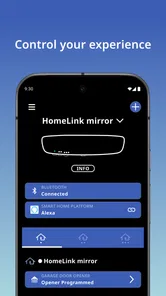
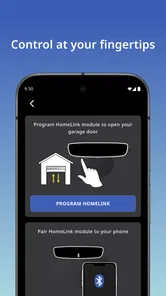
Analysis by Reviewed
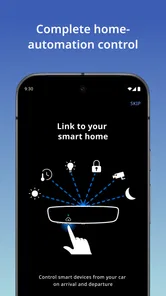
HomeLink® is the kind of app that makes sense only after you connect it with the right vehicle and compatible home equipment. I approached it as a first-time user would: install it, understand what it is meant to control, and look for one useful action that could save a small amount of effort during an ordinary drive. Developed by Gentex Corporation, this free Auto & Vehicles app focuses on in-vehicle home automation rather than trying to become a general smart-home dashboard.
That distinction matters. You should not expect a broad control center for every connected device in your home. The appeal is more focused: when your vehicle supports the HomeLink system, the app can be part of a routine that links driving with selected home functions. For someone who regularly operates a compatible garage door, gate, or similar setup, that can be more convenient than reaching for a separate remote or phone at the right moment.
I also think it is important to set expectations before installing it. The app is not automatically useful for every driver, and a download alone does not turn an ordinary car into a smart vehicle. Its value depends on compatibility between the vehicle, the HomeLink setup, and the equipment you want to operate. If those pieces line up, the experience can feel pleasantly direct. If they do not, the app may seem limited even though it is working as intended.
What the first-time experience is really like
The first thing I would tell a friend is to think of HomeLink® as one part of a larger in-vehicle system, not as a standalone remote-control replacement for everyone. The app’s store summary describes in-vehicle home automation, and that is a good way to understand its role. It is designed around the moment when you are arriving at or leaving a property and want the vehicle to participate in that routine.
That makes it especially relevant to homeowners who already have a compatible HomeLink-equipped vehicle. It can also suit households where several people use the same entrance and want a more integrated approach than keeping a small remote in each car. The useful question is not simply “Can I install it?” but “Does my vehicle and home equipment support the workflow this app is built for?”
The app is free, which removes the usual trial-cost concern. It is rated for Everyone, so its presentation is not aimed at a narrow age group. Its current version is 4.2.0, and the minimum operating-system requirement is 10. On Android, that means checking that your device meets the operating-system requirement before troubleshooting anything else. A compatible phone is only one part of the picture, but it is the easiest part to verify.
Public interest appears modest rather than overwhelming: the app has passed fifty thousand installs, with an average rating of 3.2 from roughly seventy-five ratings and thirty-three written reviews. I would read that as a reason to approach it practically rather than emotionally. It is not a universally loved, one-size-fits-all utility, but neither is a middling rating enough to dismiss it when your vehicle and home setup are a good match.
More From Our News Desk

 Gmail
GmailGmail in a Busy Inbox: Who Benefits Most?
From first account to crowded workday, Gmail earns its place through dependable search and flexible sorting—but its best fit depends on how much inbox maintenance you can tolerate.

 Prime Video
Switching to Prime Video: What Changes in Your Viewing Routine
Prime Video can make a compelling second home for streaming, but switching means learning a different catalog, rental layer, and route from browsing to playback.

 Universal TV Remote Control
Universal TV Remote Control Works Best as a Reliable Backup
A phone remote earns its place through quick setup and reliable habits. Here is how to get more from Universal TV Remote Control—and where its limits show.

 Weather - By Xiaomi
Weather by Xiaomi Review: Clear at a Glance, Less Clear Up Close
Xiaomi’s weather app makes everyday forecasts quick to scan, but its calm surface can leave useful details and recovery paths harder to find than they should be.

 X
XX Under Pressure: Can It Recover When Posting Goes Wrong?
A resilience-focused review of X, examining setup, mistaken posts, interruptions, weak connections, and the gaps that matter when recovery needs to be dependable.

 Clash of Clans
Clash of Clans Is Won Between the Battles
Its raids are quick; its community is a long-term project of coordination, teaching, rivalry, and shared responsibility—with all the friction that entails.
Latest News



One useful way to judge it is by the number of handoffs it removes from your routine. Without an integrated setup, you might use a visor remote, search for a button, open a separate phone app, or wait for a smart-home service to load. HomeLink’s appeal is strongest when it shortens that chain. It is less compelling if you already have a dependable method that is faster and easier for you.
Before installing: identify the real compatibility question
Before spending time inside the app, inspect the controls and documentation associated with your vehicle. Look for HomeLink branding or controls that indicate the car is equipped for this kind of integration. Then identify the home device you want to operate and consider whether it uses a setup process that requires pairing or learning from an existing remote. The exact steps can vary by vehicle and equipment, so forcing a generic sequence is more likely to create confusion than progress.
This is one of the less obvious trade-offs: the app may be simple once the system is prepared, but preparation can involve more than downloading software. A first-time user who skips that check may conclude that the app is broken when the real issue is an unsupported vehicle or home device. I would treat compatibility as the first setup step, not as an afterthought.
It is also worth deciding which action you actually want first. Do not begin by trying to organize every possible home control. Pick one meaningful routine, such as opening an entrance when arriving home. A narrow goal gives you a clear test and makes it easier to tell whether the system is useful in daily life.
Getting from installation to the first successful action
I’d make the first setup session about proving one complete routine, not exploring every control. Start with the vehicle parked and choose an entrance you can watch clearly, so you can tell whether the command and the equipment’s response line up. That gives you a useful baseline before moving on to the points that tend to trip up new users.
Start with one controlled setup
After installation, I recommend keeping the first session deliberately simple. Have the vehicle parked safely, keep the relevant home remote or device information nearby, and avoid testing while you are already approaching a busy entrance. The first successful action should happen in a calm setting where you can observe what the vehicle and the home equipment are doing.
HomeLink is most reassuring when you treat setup as a sequence rather than a single tap. First confirm that the vehicle recognizes the HomeLink controls. Next work through the pairing or learning process appropriate to your equipment. Then test the command while stationary and close enough to see the result. This order helps separate three different problems: the app or vehicle interface, the connection between vehicle and equipment, and the equipment’s own response.
A practical tip is to test the command twice in a row, with a pause between attempts, rather than repeatedly pressing it quickly. If the first action succeeds, the second test tells you whether the behavior is repeatable. If it fails, repeated taps can make it difficult to know whether the system ignored the first command or is still processing it. A calm, observable test is more valuable than a fast one.
For a realistic everyday scenario, imagine returning home with groceries in the trunk. The useful moment is not merely opening the entrance; it is doing so without putting the car in park, searching for a remote, or balancing bags while trying to use a phone. Once the setup is reliable, the benefit is small but tangible: fewer objects to handle and one less step between arriving and unloading.
Make the first success meaningful, not merely technical
A successful setup is not just seeing a button respond. It is completing a routine you will genuinely repeat. I would choose the entrance you use most often and test it at a quiet time of day. Watch for the full result: the command is sent, the equipment reacts, and the vehicle interface leaves you confident about what happened.
This is where HomeLink can feel different from a conventional smart-home app. A general home-control application may offer more device categories and remote access, but it can also require unlocking a phone, opening an app, selecting a device, and waiting for the interface. HomeLink’s strength is the vehicle-centered context. If your main need begins and ends at the driveway, a narrower system can be more natural than a larger dashboard.
The trade-off is flexibility. A broad smart-home platform may be better if you want scenes, notifications, cameras, lighting, locks, or control while away from the vehicle. HomeLink should not be judged as a replacement for every one of those functions. Its value comes from doing a specific driving-related job with less friction.
Use a repeatable test instead of guessing
When the first action does not work, change only one thing at a time. Confirm that the intended control was selected, check that the vehicle is positioned in a sensible place for testing, and verify that the home equipment is ready to receive the command. Then try again. Changing several variables at once makes troubleshooting feel random.
Another useful habit is to keep the first configured action easy to identify. If several controls look similar, you may press the wrong one and blame the system. A single clearly understood control provides a baseline. Once that works consistently, expanding the setup becomes much less intimidating.
I would also avoid treating a successful test as proof that every future situation will behave identically. Physical surroundings, the vehicle’s position, and the equipment itself can affect the experience. That does not make the app unreliable by definition; it means an in-vehicle control system still operates in the real world, where conditions are not perfectly controlled.
Where new users usually get confused
The confusing part is often working out which piece of the setup is responsible when an action fails: the selected control, the vehicle’s HomeLink capability, the learning process, or the home equipment. I find it helps to change only one thing between tests and keep a familiar fallback available, which makes it easier to separate a setup snag from a genuine compatibility mismatch.
The app is not the same as universal smart-home control
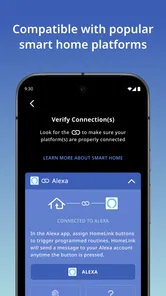
The most common misunderstanding is expecting HomeLink to discover and manage any home device automatically. Its purpose is tied to compatible in-vehicle automation, so the app is not a universal catalog of every connected product in your house. If your goal is to manage a wide collection of brands and device types from one place, a dedicated smart-home platform may suit you better.
That limitation is also part of its clarity. A focused tool can be easier to understand when your need is focused. I would not install it expecting a replacement for a full home-automation hub. I would install it because I want a vehicle-related routine to be more convenient and my equipment appears to support that arrangement.
Pairing is not the same as ordinary phone control
Another source of frustration is assuming that the phone alone is the important component. In practice, the vehicle and the home equipment are central to the experience. If the vehicle does not have the required HomeLink capability, or if the equipment cannot participate in the expected setup, the app cannot solve that mismatch through persistence.
This is why I recommend checking the car first. Many users begin with the app because that is the visible download, but the decisive question is often built into the vehicle. The app can be a helpful companion to the system, yet it cannot substitute for hardware compatibility.
A failed command does not always identify the cause
If nothing happens, there are several possible points of failure: the selected control, the learning process, the vehicle’s HomeLink equipment, or the home device itself. The app may not make that distinction obvious to a first-time user. My advice is to return to the simple baseline test rather than immediately adding more controls or changing the whole setup.
Keep the test visible and safe. Do not experiment while driving, and do not depend on a command you have not tested before entering a situation where you need it. This is especially important for gates and garage doors, where a delayed or misunderstood action can create an awkward or unsafe moment.
Ratings should be read in context
The 3.2 average rating may make some readers hesitate, and that is reasonable. Still, a utility like this is unusually dependent on the vehicle and home equipment around it. A disappointing experience for one driver may reflect a compatibility or setup issue that another driver never encounters. I would use the rating as a prompt to test carefully, not as a final verdict.
The written reviews can be useful for spotting recurring friction, but I would compare them with your own situation. A complaint from someone using a different vehicle or home device may not predict your experience. Conversely, if your setup already has a known limitation, a positive review from a perfectly matched configuration should not make you ignore it.
How it compares with the usual alternatives
The most obvious alternative is a traditional remote kept in the car. That option is often hard to beat for simplicity: it does not require opening an app, and many drivers already know exactly where its button is. If your remote works reliably and you rarely need anything beyond one entrance, HomeLink may offer convenience rather than a dramatic improvement.
The integrated approach becomes more attractive when you dislike carrying a separate remote, share vehicles, or want the control to feel like part of the car instead of an accessory attached to the visor. The benefit is strongest in repeated routines, not occasional experiments. A tool you use every day can justify a little setup effort; a tool you use twice a year probably cannot.
A general smart-home app is the better alternative for people who want a wider view of their home. It may centralize more types of equipment and support routines beyond arrival and departure. However, that broader scope can introduce more menus and more dependence on the phone. HomeLink’s narrower focus may win when the car is already the place where the action should happen.
Voice assistants are another possible route, but they are not always ideal at the driveway. Speaking a command can be convenient, yet it depends on the assistant, the phone or vehicle interface, and the surrounding conditions. HomeLink is appealing when you prefer a direct physical control associated with the vehicle. On the other hand, if voice control already handles your home reliably and you want hands-free operation across many devices, another ecosystem may be more suitable.
For remote access while you are away from home, a dedicated connected-home service may be the stronger choice. HomeLink is most naturally evaluated for the in-vehicle moment. If you want to check or operate equipment from work, while traveling, or from another location, look for a solution designed around remote home access rather than assuming this app covers that broader need.
Who should use it, and who should move on
I would recommend trying HomeLink if you own a compatible vehicle, have a compatible home entrance or automation setup, and repeat the same arrival or departure routine often. It is also worth considering if you want to reduce the number of remotes in the car or prefer vehicle-based control over opening a general smart-home app every time.
It is less suitable for someone whose car does not support HomeLink, whose home equipment is incompatible, or who wants a complete smart-home command center. It may also be unnecessary if a traditional remote already provides instant, dependable control and you have no interest in integrating the vehicle into that routine.
Families should think about consistency. If several drivers use the same entrance, agree on one simple test and one understood control before relying on the system. The benefit of integration disappears if people are unsure which button to use or whether the command worked. A short shared routine is more valuable than a complicated setup that only one person understands.
For first-time users, my strongest advice is to measure success by confidence. Can you identify the right control, activate it while safely parked, and recognize the result without second-guessing? If yes, the app is doing something useful for you. If every attempt requires searching, guessing, or switching between several systems, the traditional remote or a different home-automation solution may be the better everyday choice.
The next step after the first working routine
Once one action works, resist the temptation to configure everything immediately. Use the first routine for several normal arrivals and departures. Notice whether it saves effort, whether the control is easy to find, and whether the result is clear from the driver’s seat. This real-world trial tells you more than a long setup session.
If the first routine proves valuable, add another only when it solves a specific problem. For example, a second entrance may be worthwhile if you use it regularly, while a rarely used control may add clutter without adding convenience. This is an advanced but practical insight: the best in-vehicle automation setup is not necessarily the one with the most configured actions; it is the one that makes the common actions unmistakable.
Keep your fallback method available while you are still learning. A remote or another established control can prevent a minor setup issue from becoming a stressful arrival. Once HomeLink has demonstrated consistent behavior in your own environment, you can decide whether it deserves to become your default.
My overall view is cautiously positive for the right audience. HomeLink® is not a universal smart-home solution, and its usefulness depends heavily on compatibility and a sensible setup. But when your vehicle and home equipment fit the intended workflow, it offers a focused way to connect driving with a familiar household task. I would install it for that specific convenience, test one meaningful action carefully, and keep it only if it makes the routine genuinely easier.
HomeLink® Frequently Asked Questions
Is HomeLink® available for my phone, and what should I check before downloading?
HomeLink® is a free Auto & Vehicles app from Gentex Corporation, with a current version of 4.2.0 and a minimum operating-system requirement of 10. Before downloading, check that your phone meets that requirement and that your vehicle and home equipment support the HomeLink® features you want to use. The app is intended for in-vehicle home automation, so compatibility with your setup matters as much as phone compatibility.
What is HomeLink® and what can I use it for?
HomeLink® is a connected-home system designed to let compatible vehicles communicate with automatic garage doors, gates, lighting systems, and other supported devices. After installation and setup, you can use the vehicle’s built-in buttons or controls instead of carrying separate remotes. Its exact features depend on your car, the HomeLink® version, and whether your device requires an additional compatibility accessory.
Is HomeLink® compatible with my vehicle and garage door opener?
Compatibility is not universal, so you should check your vehicle model, production year, region, and the garage-door or gate opener before downloading or setting up the app. Many systems work with common fixed-code and rolling-code openers, but some require a compatibility bridge or repeater. The official compatibility information is the safest way to confirm support for your equipment.
Does HomeLink® require an internet connection or a subscription?
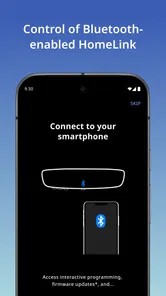
Basic HomeLink® operation generally works through the vehicle and the programmed device, meaning you can often open or close a compatible garage door without an active internet connection. However, connected features, remote status checks, smart-home integrations, or manufacturer-specific services may require a paired smartphone, internet access, an account, or a paid subscription. Requirements can vary by vehicle and region.
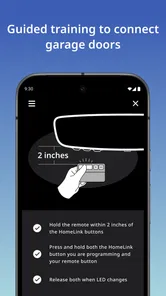
How do I program HomeLink® with my garage door or gate?
Setup usually involves placing the vehicle near the garage door or gate, selecting a HomeLink® button, and copying the signal from the original remote control. Rolling-code systems commonly require an additional learn or training step on the opener motor. Because button locations and instructions differ between vehicles, follow the in-car manual and keep the original remote nearby during programming.
Pros
- Remote access makes it easy to monitor and control connected devices away from home.
- Supports convenient automation routines for lights
- locks
- thermostats
- and other equipment.
- Push notifications can alert you to activity or changes in your smart home.
- A centralized dashboard reduces the need to manage every device separately.
- Useful for households that want shared access to connected-home controls.
Cons
- Compatibility depends on having supported HomeLink®-enabled devices and equipment.
- Some features may require an active internet connection to work reliably.
- Initial setup can be time-consuming when pairing multiple devices or vehicles.
- Remote controls may respond slowly during network outages or weak connections.
- Privacy and security depend on keeping accounts
- devices
- and access permissions protected.











