

Holman Insights
- 132.00
- 4.4
- Installs
- 50.00K
- Price
- Free

Screenshots
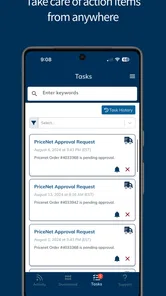
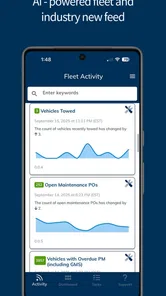
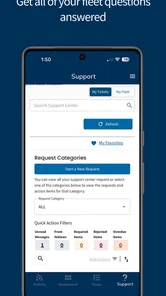
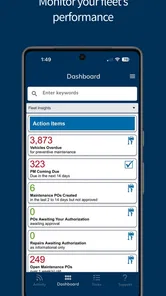
Analysis by Reviewed
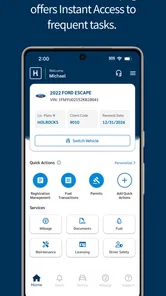
Managing a vehicle usually becomes difficult for a very ordinary reason: the information is scattered. Mileage may be written down somewhere, maintenance reminders arrive through another channel, fuel details live in a separate habit, and licensing paperwork is easy to forget until it becomes urgent. Holman Insights is designed to bring those vehicle-related details into one place for Holman customers. After spending time with it, I see it as a practical ownership companion rather than a full driving or navigation tool.
The app sits in the Auto & Vehicles category and is developed by Holman. It is free to use, carries an Everyone age rating, and has built a respectable audience with an average rating of 4.4 from around 1.8 thousand ratings. That combination tells me it has found a clear purpose: helping people keep track of the administrative and maintenance side of a vehicle without building their own spreadsheet.
How I use Holman Insights in a normal week
My preferred starting point is simple. I open the app when I need to check the current mileage, review maintenance information, look at licensing details, inspect fuel records, or follow an order. I do not treat it like an app that needs constant attention. Its value comes from short, repeatable visits at the right moments.
For example, after filling the tank, I can make the fuel-related update part of the same routine as saving the receipt. When a service appointment is completed, checking the maintenance area immediately is more reliable than promising myself I will remember it later. Before a longer trip, reviewing mileage and outstanding vehicle information gives me a quick administrative checkpoint without searching through messages or paper documents.
This is the first important habit with Holman Insights: use it as a record-checking tool, not as a place to browse aimlessly. The app covers mileage, maintenance, licensing, fuel, and orders, so each visit works best when it is connected to a real ownership task. That makes the experience feel focused, especially for someone who wants fewer separate places to monitor.
The baseline workflow is also useful for people who manage more than one responsibility around a vehicle. A driver may care mostly about mileage and fuel, while a household member may be more concerned with licensing or service progress. Instead of relying on one person’s memory, both can use the same central source when the relevant information is available through the account.
There is a trade-off here. Holman Insights is most useful when your vehicle relationship is connected to Holman. It is not a universal maintenance journal where I can freely build a detailed history for any car from any provider. If I simply want a blank logbook for an older privately owned vehicle, a general maintenance tracker may offer more flexibility. Holman Insights makes more sense when its connection to your Holman vehicle is the main reason you installed it.
More From Our News Desk

 Gmail
GmailGmail in a Busy Inbox: Who Benefits Most?
From first account to crowded workday, Gmail earns its place through dependable search and flexible sorting—but its best fit depends on how much inbox maintenance you can tolerate.

 Prime Video
Switching to Prime Video: What Changes in Your Viewing Routine
Prime Video can make a compelling second home for streaming, but switching means learning a different catalog, rental layer, and route from browsing to playback.

 Universal TV Remote Control
Universal TV Remote Control Works Best as a Reliable Backup
A phone remote earns its place through quick setup and reliable habits. Here is how to get more from Universal TV Remote Control—and where its limits show.

 Weather - By Xiaomi
Weather by Xiaomi Review: Clear at a Glance, Less Clear Up Close
Xiaomi’s weather app makes everyday forecasts quick to scan, but its calm surface can leave useful details and recovery paths harder to find than they should be.

 X
XX Under Pressure: Can It Recover When Posting Goes Wrong?
A resilience-focused review of X, examining setup, mistaken posts, interruptions, weak connections, and the gaps that matter when recovery needs to be dependable.

 Clash of Clans
Clash of Clans Is Won Between the Battles
Its raids are quick; its community is a long-term project of coordination, teaching, rivalry, and shared responsibility—with all the friction that entails.
Latest News



What to check before relying on it
On first use, I would take a few minutes to confirm that the vehicle information shown in the account matches the vehicle I expect to manage. This is a small step, but it prevents a common mistake: assuming every displayed detail is current without checking the context. Mileage, licensing, maintenance, fuel, and orders are useful precisely because they influence real decisions, so I prefer to verify the starting picture before turning the app into part of my routine.
I would also look through each available area once, even if I only expect to use one or two of them. The maintenance section may be the immediate reason for downloading the app, but licensing and order information can become more valuable at specific moments. Familiarity matters because an app is less helpful when I only discover an important section while already dealing with a deadline.
The settings and account options deserve a similar inspection. I avoid changing anything just for the sake of customization, but I do check how the app presents vehicle details and whether the information is arranged in a way that makes sense to me. The best setup is the one that reduces hesitation: I should know where to go when I need mileage, where to look for service information, and where to check an order without wandering through unrelated screens.
Because the current version is 9.0.7 and the app requires Android 8.0 or later, compatibility is straightforward for many Android users, but it is still worth checking the operating system before planning around it. I would not assume that an older phone will provide the same experience as a supported device. Keeping the app updated is also a sensible habit for an account-based vehicle tool, particularly when the app is being used for current records rather than historical curiosity.
One practical tip is to decide what “up to date” means for your own routine. For fuel, that might mean checking after every refill. For mileage, it could mean reviewing it before a scheduled service. For licensing, it may be a periodic check rather than a daily action. Holman Insights becomes easier to live with when each section has a clear trigger instead of competing for attention.
Faster patterns for everyday vehicle management
Experienced use is less about tapping quickly and more about removing unnecessary decisions. I would keep three repeatable moments in mind: after a refuel, after maintenance, and before a trip or administrative deadline. These moments naturally map to the information the app handles, so they are easier to remember than an arbitrary instruction to “check the app regularly.”
After refueling, I would review the fuel area while the receipt or transaction is still fresh. This creates a cleaner record than trying to reconstruct several stops later. It also gives mileage context to the fuel habit, which can make unusual changes easier to notice. I would not treat the app as a precision diagnostic instrument, but as a place to maintain a useful ownership record.
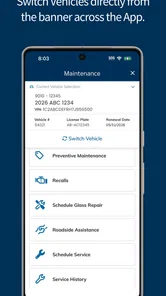
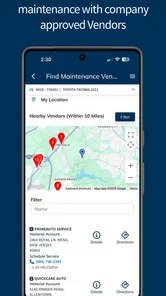
After servicing, I would check the maintenance information before filing away the paperwork. This is a valuable workflow because the service event is already in my mind. If I wait until the next reminder or problem, I may remember the work but forget the details that help me understand what has already been handled.
Before a trip, I would make one short pass through mileage, maintenance, licensing, and any relevant order information. The point is not to turn a journey into an administrative project. It is to catch the kind of small uncertainty that becomes inconvenient when I am already away from home. This pre-trip check is particularly useful when a vehicle has recently been serviced or when an order is still being followed.
Another efficient pattern is to separate “record checking” from “problem solving.” If I notice something that needs attention, I first use Holman Insights to understand the available vehicle information, then decide what action is appropriate. I would not expect the app alone to replace a mechanic, roadside assistance, or official licensing procedures. Its strength is helping me see the relevant information before I make that next call or appointment.
For people who share vehicle responsibilities, a consistent handoff can help. One person can check the app after a service visit, while another reviews the information before a longer journey. The advantage is not a special collaboration system; it is simply that both people can refer to the same vehicle-focused resource instead of passing around incomplete notes. That is a modest improvement, but it can prevent duplicated questions and missed updates.
Where the app is strong, and where it stops
The strongest part of Holman Insights is its focus. Mileage, maintenance, licensing, fuel, and orders are not random features placed beside one another; they represent the practical information people repeatedly need when managing a vehicle. I appreciate that the app is aimed at ownership administration rather than trying to become a social driving platform, a map replacement, or an entertainment product.
Its other strength is convenience. A dedicated vehicle app is easier to return to than a collection of notes, email searches, receipts, and calendar reminders. The benefit is especially clear when I want a quick status check rather than a long explanation. The app gives the vehicle relationship a defined home, which reduces the mental effort of remembering where each detail belongs.
Still, the focused design creates limits. Someone looking for route planning, live traffic, parking discovery, fuel-price comparison, or a broad database of repair instructions should choose a different app for those jobs. Holman Insights is not the right replacement for navigation software or a detailed mechanical diagnostic tool. It also may feel unnecessary to a driver who already has a well-maintained manual log and rarely needs Holman-specific information.
I would also avoid assuming that a digital record removes the need for personal judgment. A mileage entry does not tell me whether a vehicle feels unsafe. A maintenance record does not replace inspection. Licensing information should be treated as something to review carefully when a deadline matters, rather than as an excuse to ignore official documents or communications. The app supports better organization; it does not take responsibility for every vehicle decision.
This distinction is important when comparing it with general alternatives. A spreadsheet offers more freedom and can track any vehicle, but it requires manual structure and discipline. A generic maintenance app may provide broader customization, especially for users who want to record repairs from independent garages. Email and paper records can contain more detail, yet they are slower to search and easier to overlook. Holman Insights wins when the priority is a connected, vehicle-specific view through Holman, not unlimited customization.
Privacy and account awareness are also part of sensible use. Since the app centers on vehicle and order information, I would use it deliberately on shared devices and make sure I understand which account is active before reviewing details. I do not need to overcomplicate the experience, but I do want the same basic care I would apply to any app that displays personal ownership information.
Who will get the most from Holman Insights?
I would recommend it first to Holman vehicle users who want a single place to check essential records. It is a good fit for drivers who dislike spreadsheets, people who regularly forget service details, and households where more than one person needs visibility into the vehicle. It can also suit users who prefer short, practical app sessions instead of managing a large collection of automotive tools.
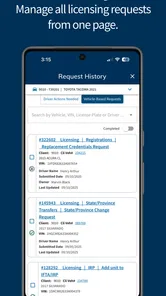
It is especially helpful for someone taking on responsibility for a vehicle for the first time. The categories provide a useful mental map: mileage for usage, maintenance for care, licensing for administration, fuel for running costs, and orders for ongoing requests. That structure can make vehicle ownership feel less vague, even if the user is not naturally organized.
I would be more cautious about recommending it to a driver with several unrelated vehicles, a collector who needs extensive service notes, or a hands-on owner who wants to enter every part, labor detail, and repair measurement manually. Those users may prefer a flexible logbook built around custom fields. Likewise, anyone searching mainly for navigation, roadside tools, or fuel-price intelligence will probably be happier with a specialized alternative.
The app’s accessibility is helped by being free and rated for Everyone. Its reach is already visible in more than fifty thousand installs, which is a healthy sign that the concept is useful beyond a tiny group. I would still judge it by the fit with my vehicle situation rather than by popularity alone. A focused app can be excellent for the right owner and irrelevant to someone outside its intended workflow.
My verdict after building a repeatable routine
Holman Insights works best when I give it a job in my routine. I check the relevant section after a real event, use the information to prepare for the next action, and avoid expecting it to perform tasks outside vehicle administration. That approach makes the app feel calmer and more useful than opening it randomly and hoping it will tell me what to do.
My favorite practical habit is the three-point check: fuel after refueling, maintenance after service, and a broader review before a trip or important deadline. It is simple enough to maintain, but specific enough to prevent the app from becoming another forgotten icon. Combining that habit with a quick look through the account and vehicle details gives me a dependable baseline without turning ownership into paperwork.
The main reason to choose Holman Insights is the connected view of your Holman vehicle, not a long list of extras. I find that focus reassuring. It keeps the app relevant to mileage, care, licensing, fuel, and orders while leaving navigation, diagnostics, and highly customized record keeping to tools built for those purposes.
With its 4.4 average and free entry point, it is an easy app to try if you manage a Holman vehicle and want fewer scattered records. The release history reaches back to January 2017, while the current build shows that the product remains actively presented as a modern vehicle-management companion. I would install it for organization, use it through repeatable moments, and keep another specialist tool nearby only when my needs go beyond its focused scope.
In the end, I see Holman Insights as a sensible recommendation for the driver who values clarity over complexity. It will not replace every automotive app, and it should not replace professional judgment, but it can make the everyday business of owning or managing a vehicle easier to follow. For the right Holman user, that is a worthwhile improvement.
Holman Insights Frequently Asked Questions
Can I use Holman Insights to keep track of my vehicle’s mileage and maintenance?
Yes. Holman Insights is intended to give users access to information about a Holman vehicle, including mileage and maintenance, along with licensing, fuel, and orders. This can make it easier to check key vehicle details from a mobile device. What you can view will depend on your account access and how the service is set up for you.
What is Holman Insights used for?
Holman Insights is designed to provide users with access to business, operational, or performance-related information through a centralized mobile interface. For vehicle-related use, the app can provide access to mileage, maintenance, licensing, fuel, and order information. It is primarily intended for authorized users who need convenient access to current information while working away from a desktop computer.
Who can use Holman Insights, and do I need an account?
The application is generally intended for approved users connected with the Holman organization or one of its supported services. You will normally need valid login credentials, and access may depend on your role, company permissions, or account configuration. It is not typically an open app for anonymous browsing, so downloading it alone may not provide access unless your organization has already activated your account.
What information and features are available in Holman Insights?
The information available can vary according to your account permissions and the version of the application. Users may be able to review mileage, maintenance, licensing, fuel, and order details, as well as other organization-specific information. Some features may support filtering, viewing trends, or checking updates quickly. The exact dashboard and tools you see will depend on how Holman Insights has been configured for your workplace.
Is Holman Insights free to download and use?
Holman Insights is free to download, but that does not necessarily mean every user can use it independently. Access is usually connected to an organization, service agreement, or managed account. Before installing, check with your employer or administrator about eligibility, possible subscription arrangements, mobile data usage, and whether any additional software or permissions are required.
Pros
- Clear visual summaries make irrigation data easier to understand.
- Helps identify watering trends across connected Holman devices.
- Useful for checking system performance away from home.
- Can support more informed adjustments to watering schedules.
- A practical companion for users managing larger garden systems.
Cons
- Requires compatible Holman hardware to provide meaningful data.
- Some insights may depend on a stable internet connection.
- Initial setup can take time if several zones are connected.
- Advanced information may feel excessive for small gardens.
- App usefulness is limited when sensors or controllers go offline.











