

Highway Radar
- 159.00
- 4.2
- Installs
- 100.00K
- Price
- Free

Screenshots
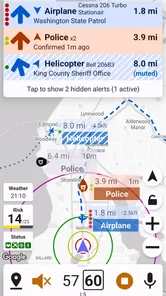
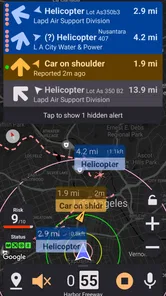
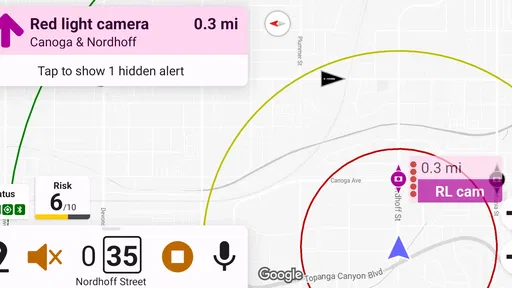
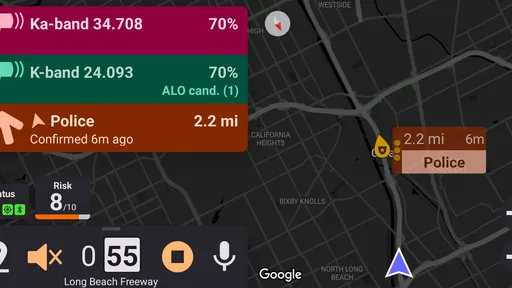
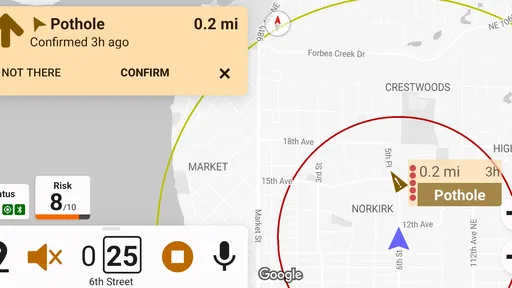
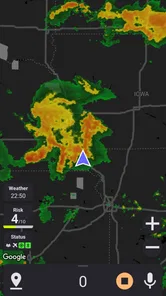
Analysis by Reviewed
Driving is full of moments when a little extra awareness can make a tiring journey feel more manageable. Highway Radar is an Auto & Vehicles app from Highway Radar built around that idea: it helps drivers notice possible speed traps and road hazards earlier, rather than relying only on what becomes visible at the last second. I found its appeal less in flashy presentation and more in the way it can add another layer of attention during a long trip.
It is free, rated for Everyone, and available on devices running Android 7.0 or newer. The app has passed the point of being an obscure experiment, with over 100 thousand installs, a 4.2 average from around 443 ratings, and 159 written reviews. Those figures suggest a useful level of interest, although they should not be confused with a guarantee that every alert will be accurate or relevant to every route.
How Highway Radar fits into a real drive
The most sensible way to think about this app is as a driving companion, not as permission to relax your attention. Its purpose is to give you earlier awareness of situations that may deserve caution. That can be helpful on unfamiliar highways, during long-distance travel, or when traffic conditions make it difficult to process everything around you at once.
For example, imagine leaving work for a weekend trip on a route you rarely use. You are following navigation instructions, checking traffic, and trying to keep a steady pace while approaching an unfamiliar stretch of road. An additional warning about a possible speed trap or hazard may prompt you to look farther ahead, check your speed, and prepare for a changing situation. The value is in the reminder, not in treating the alert as an instruction to brake suddenly or drive differently without checking the road.
That distinction matters. A warning application cannot replace visible signs, road markings, weather awareness, or responsible driving. It also cannot make every hazard predictable. If the app becomes a reason to stare at the phone, it defeats its own purpose. I would set it up before moving, keep the phone mounted safely, and treat every notification as a prompt to pay attention rather than as a definitive statement about what is happening ahead.
Highway Radar is particularly suitable for drivers who spend time on major roads and want a focused tool for awareness. It may also appeal to someone who dislikes cluttered navigation suites and wants an app with a narrower purpose. On the other hand, drivers who already use a trusted navigation service with the exact warnings they need may find a second app unnecessary. Adding another source of alerts can create distraction or uncertainty if both tools report the same situation differently.
What I noticed about the app’s identity and maturity
The developer is named Highway Radar, which makes the product easy to understand at a glance: this is a dedicated road-awareness app rather than a general map, fuel, parking, or vehicle-maintenance tool. Its current version is 3.2 update 7, and the release history reaches back to June 2, 2019. That combination gives the app a more established feel than a newly published utility, while still leaving room for users to judge whether its current behavior suits their phone and driving habits.
More From Our News Desk

 Gmail
GmailGmail in a Busy Inbox: Who Benefits Most?
From first account to crowded workday, Gmail earns its place through dependable search and flexible sorting—but its best fit depends on how much inbox maintenance you can tolerate.

 Prime Video
Switching to Prime Video: What Changes in Your Viewing Routine
Prime Video can make a compelling second home for streaming, but switching means learning a different catalog, rental layer, and route from browsing to playback.

 Universal TV Remote Control
Universal TV Remote Control Works Best as a Reliable Backup
A phone remote earns its place through quick setup and reliable habits. Here is how to get more from Universal TV Remote Control—and where its limits show.

 Weather - By Xiaomi
Weather by Xiaomi Review: Clear at a Glance, Less Clear Up Close
Xiaomi’s weather app makes everyday forecasts quick to scan, but its calm surface can leave useful details and recovery paths harder to find than they should be.

 X
XX Under Pressure: Can It Recover When Posting Goes Wrong?
A resilience-focused review of X, examining setup, mistaken posts, interruptions, weak connections, and the gaps that matter when recovery needs to be dependable.

 Clash of Clans
Clash of Clans Is Won Between the Battles
Its raids are quick; its community is a long-term project of coordination, teaching, rivalry, and shared responsibility—with all the friction that entails.
Latest News



The store short description is simply “Highway Radar,” while the longer summary explains its focus on spotting speed traps and road hazards early. In practice, that narrow positioning is useful. I would not install it expecting turn-by-turn navigation, trip planning, vehicle diagnostics, or a broad collection of automotive services. Its job is more specific, and the best experience comes from evaluating it on that basis.
The public rating is encouraging but not overwhelming. A 4.2 average from around 443 ratings indicates that many users find value in it, yet it also leaves enough room for mixed experiences. Road-alert apps are unusually dependent on location, timing, road changes, and the quality of information available for a particular area. A positive score can tell me that the concept works for a meaningful group of drivers; it cannot prove that every alert will arrive at the ideal moment on my route.
Trust begins with visible choices
When I use a driving app, trust is not only about whether the warnings seem useful. I also want to understand what I am choosing when I install it, what the app asks me to allow, and whether I can use it without surrendering more control than necessary. Highway Radar is free, which removes a purchase decision, but “free” should not automatically mean “risk-free” from a privacy or attention standpoint.
I would review the permission prompts carefully during setup instead of accepting everything automatically. In a road-awareness app, location access can be closely connected to the central purpose, but that does not mean every permission request deserves the same treatment. If a prompt appears unrelated to receiving road information, I would pause and decide whether the app still works without it. Android’s system controls make it possible to revisit permissions later, so the initial setup does not have to be a permanent, unquestioned choice.
I also recommend checking the app’s page in the Android settings after installation. That gives you a practical view of the permissions currently granted and lets you remove access you no longer consider appropriate. This is a more useful trust check than assuming a familiar-looking interface tells you everything about data handling. I would make the same review after an update, because app behavior and permission needs can change over time.
There is another important control: notifications. Alerts are the reason to install Highway Radar, but too many sounds or visual interruptions can become a driving problem. I would configure the phone so that warnings are noticeable without encouraging repeated screen checks. If the app allows different alert behaviors on your device, I would favor audio or brief, glanceable signals over anything that requires reading while the car is moving.
Handling sensitive moments on the road
Location is naturally sensitive in any app connected to driving. Even without making assumptions about how Highway Radar handles information, I would treat the route itself as personal data in practical terms. A sequence of locations can reveal where someone lives, works, shops, or spends time. That is why I would avoid granting broader access than the app needs and would review the phone’s location controls when I finish a trip.
There is a difference between using an app for a particular journey and leaving it active constantly. If I only need warnings on occasional highway trips, I would open it for those journeys and close it afterward rather than making it part of every short drive. This approach reduces unnecessary background activity and makes it easier to remember which apps are currently involved in tracking or notifying me.
Public roads also change quickly. Construction, temporary lane closures, emergency incidents, and altered speed limits can make an old or incomplete warning less useful than a direct view of the road. I would therefore compare any alert with current signs and traffic behavior. If the app warns about something that is not visible, I would not make an abrupt maneuver simply to follow the warning. A calm response gives the tool its proper role: supporting awareness, not overriding judgment.
Weather creates a similar limitation. Rain, fog, glare, snow, and darkness can make a known hazard more difficult to handle, while a clear road can still contain an unexpected obstruction. Highway Radar may help draw attention to a situation, but it cannot measure my stopping distance or compensate for poor visibility. The safest workflow is to reduce speed according to conditions and use the warning as one input among several.
A practical setup for everyday use
My preferred workflow would begin while parked. I would install the app, inspect the permission requests, adjust notifications, and make sure the phone is positioned where it can be heard or glanced at safely. I would then test the basic behavior on a familiar route, not because a familiar road needs warnings, but because it lets me learn the app’s timing and alert style without the added pressure of an unfamiliar journey.
That test drive can answer questions that a store page cannot. Are the alerts easy to understand? Do they arrive early enough to be useful? Are they too frequent in a busy area? Does the app compete with audio from navigation or music? Do I feel tempted to look down at the screen? These are personal, practical questions, and they matter more than a polished description when deciding whether the app belongs in a daily driving routine.
For a longer trip, I would prepare the phone before leaving, confirm that the battery is sufficient, and avoid changing settings while moving. If another person is in the car, that passenger can handle any needed interaction. If I am alone and something requires more attention than a quick glance, I would wait until I am parked. This seems obvious, but alert-based apps can encourage users to interact at exactly the wrong time if their setup is not settled in advance.
A useful advanced habit is to compare Highway Radar with the road itself over several drives rather than judging it after one unusual alert. An isolated warning may be early, late, duplicated, or simply difficult to interpret. Repeated use on familiar and unfamiliar roads helps reveal whether the app’s alert style fits your expectations. It also shows whether the extra information reduces stress or merely adds another stream of interruptions.
Where it differs from usual alternatives
The most common alternative is a navigation app that already includes some form of traffic or road warning. That option is convenient because directions, route changes, and alerts appear in one place. If you want a single screen and minimal setup, your existing navigation tool may be the better choice. Highway Radar becomes more interesting when you want a dedicated layer of attention rather than a full navigation replacement.
A second alternative is relying on roadside signs and personal observation alone. That costs nothing and remains essential, but it offers no additional advance notice beyond what the driver can see and process. Highway Radar can complement that approach, especially on long, repetitive stretches where fatigue makes it easy to miss a sign. The trade-off is that an app introduces its own possible inaccuracies and distractions, so the benefit depends on disciplined use.
There is also a difference between a focused warning tool and a community-driven driving platform. A community platform may offer more social reporting, route features, or broader incident information, while a focused app can feel less overwhelming. I would choose based on what I actually need: if I want navigation and a large set of travel services, a broader platform may be more efficient; if I mainly want early awareness of speed traps and hazards, Highway Radar’s narrower purpose may be easier to live with.
Drivers who want vehicle maintenance records, fuel-price comparisons, parking discovery, or diagnostic information should look elsewhere. Those are not reasons I would choose this app. Its usefulness is tied to the moment before and during a drive, not to managing the vehicle as an ownership project.
Who should use it, and who should skip it
I think Highway Radar is a reasonable fit for frequent highway drivers, people who regularly cross unfamiliar areas, and anyone who wants a dedicated supplement to ordinary road awareness. It is also a sensible experiment for drivers who are dissatisfied with the warning experience in their current navigation app but do not want to replace that app entirely.
I would be more cautious about recommending it to new drivers who are still building basic scanning habits. Learning to read signs, watch traffic, maintain a safe following distance, and anticipate changes should come first. An alert tool can support those skills, but it should not become a substitute for them. The same applies to anyone who finds notifications stressful or who is likely to interact with a phone while driving.
It may also be the wrong choice for someone who expects complete certainty. No alert system can turn a changing road into a perfectly predictable environment. If an occasional false, outdated, or poorly timed warning would make you distrust the app immediately, a simpler setup based on navigation and direct observation may suit you better.
My cautious verdict
After looking at Highway Radar as both a driving utility and a product that deserves careful user control, I see a focused free app with a clear practical role. Its strongest quality is that it concentrates on early awareness of speed traps and road hazards instead of trying to become an all-purpose automotive platform. The rating of 4.2 and its audience of over 100 thousand installs show that the idea has found a real user base, while the mixed nature of public ratings is a reminder to test it on your own routes.
The best reason to use it is not to drive faster or depend less on your eyes; it is to create one more prompt to look ahead and make a calm decision. Set it up while parked, inspect permissions, keep notifications under control, and compare warnings with signs and traffic. If it improves awareness without increasing distraction, it can earn a place beside your usual navigation app. If it makes you watch the screen, question every alert, or feel overloaded, uninstalling it is the responsible choice.
For me, that makes Highway Radar worth trying for the right driver, especially because it is free and supports older Android devices from Android 7.0 onward. I would recommend it as a cautious companion for highway travel, not as an authority on the road. Its value depends less on the promise of catching every hazard and more on whether its alerts fit your habits, your routes, and your willingness to keep final responsibility where it belongs: with the driver.
Highway Radar Frequently Asked Questions
Is Highway Radar free, and what devices can install it?
Highway Radar is a free Auto & Vehicles app for Android, with a minimum operating system requirement of Android 7.0. Its age rating is Everyone, so it is suitable for a broad audience. Before downloading, check that your device meets the Android requirement and has the location settings and connectivity you want to use for driving alerts.
What is Highway Radar and what does it do?
Highway Radar is a driving-assistance app designed to help motorists stay more aware of potential hazards on the road. Depending on the device and available features, it can use your phone’s camera, GPS, and other sensors to identify or report situations such as speed traps, traffic enforcement areas, stopped vehicles, and nearby road dangers. It is intended as an awareness tool, not a replacement for careful driving or local traffic knowledge.
Does Highway Radar work without an internet connection?
Highway Radar may provide limited functionality when your connection is unavailable, but many of its most useful features depend on current map data, community reports, traffic information, or cloud-based processing. GPS positioning can often continue offline, although accuracy and available alerts may be reduced. For the best experience, users should normally allow location access and maintain a reliable mobile data connection while driving.
Does Highway Radar detect police, speed cameras, or traffic enforcement reliably?
The app can provide alerts related to reported enforcement locations or possible roadside hazards, but no detection system is perfectly accurate. Information may be outdated, incomplete, incorrectly reported, or affected by GPS limitations. Highway Radar should never be treated as a guarantee that police, cameras, or other enforcement activity will be identified. Always follow posted speed limits and obey the laws in the area where you are driving.
What permissions does Highway Radar require?
Highway Radar may request access to location services, notifications, mobile data, and possibly the camera or microphone, depending on the features you enable and the platform you use. Location access is generally important for navigation and proximity alerts, while camera-related permissions may support visual driving assistance. Before installing, review the app’s current privacy policy and permission explanations, and disable optional access that you do not feel is necessary.
Pros
- Real-time alerts help identify hazards
- stopped vehicles
- and unusual road activity.
- Customizable sensitivity lets drivers reduce unnecessary warnings on familiar routes.
- Works with navigation apps
- making it easier to monitor traffic while following directions.
- Trip history provides useful details about routes
- alerts
- and driving conditions.
- Voice notifications can keep drivers informed without constantly checking the screen.
Cons
- Some advanced features may require a subscription or in-app purchase.
- Accurate alerts depend heavily on location access and a reliable internet connection.
- Frequent notifications can become distracting in busy areas or during rush hour.
- Background location use may increase battery consumption on longer journeys.
- Availability and accuracy of alerts can vary significantly by region and road coverage.











