Hairstyle Try On: AI Haircut
- 3.00
- 4.2
- Installs
- 10.00K
- Price
- Free
Screenshots

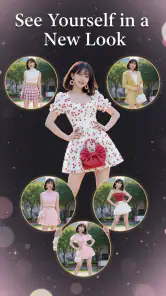
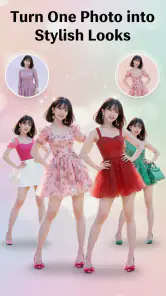

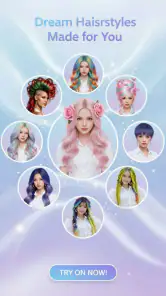
Analysis by Reviewed
When I am unsure about changing my hair, the hard part is often picturing the result on my own face rather than finding another inspiration photo. Hairstyle Try On: AI Haircut gives me a way to explore that question using a personal portrait. I find it most useful as a visual aid for sorting out preferences—not as a guarantee that a salon result will match the screen.
A personal preview still calls for care
Any beauty app that uses a portrait raises a practical question: what choices can I see, what permissions does it request, and what happens to an image I select? I would read the permission prompts and any privacy information shown in the app before choosing a photo. I would start with an ordinary portrait I am comfortable using, rather than a sensitive image, and avoid guessing about storage or deletion if the app’s own explanations do not make those points clear.
That caution need not make the experience difficult. It simply means treating photo access as a decision rather than tapping through automatically. If the app offers a way to select one picture instead of granting broader access, I would choose the narrower option. If I cannot tell what an option means, I would pause and look for an explanation before continuing.
Useful for exploring a change, not guaranteeing one
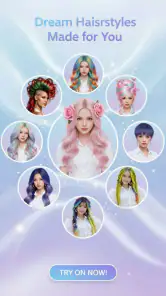
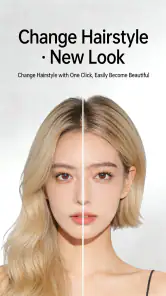
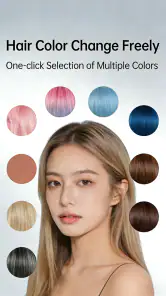
This is a beauty app from SuLan, and its focus is narrower than that of a general photo editor. Instead of asking me to retouch a portrait, it lets me consider haircuts, fringe, braids, curls, wedding looks, and colour variations against my own image. That makes the experience particularly relevant when I have a specific question—such as whether bangs suit my face—rather than when I simply want to make a picture look polished.
The app has a 4.2 average from around 215 ratings, with over 10,000 installs. Those figures suggest that people are using it, but they are not a substitute for checking whether a particular preview looks convincing on my face and hair. I would judge it by how helpful it is for narrowing down ideas, not by treating popularity as proof that every style will fit every person.
Start with a photo that makes comparison fair
The quality of a try-on depends heavily on the starting picture. For a useful comparison, I would choose a clear, front-facing portrait with the hairline visible and the face evenly lit. A busy background, strong shadows, hair covering one side of the face, or an extreme camera angle can make it harder to judge the result. This is not a guarantee that every preview will align perfectly; it is a way to reduce avoidable distractions when comparing options.
I would also take a moment to decide what I want to learn before browsing. If I am curious about a fringe, I would compare a few fringe shapes while keeping the rest of the look as similar as possible. If I am weighing a colour change, I would focus on colour options rather than switching cut, texture, and colour all at once. Changing one visual element at a time makes it easier to tell which difference is actually influencing my opinion.
More From Our News Desk

Weather by Xiaomi Review: Clear at a Glance, Less Clear Up Close

X Under Pressure: Can It Recover When Posting Goes Wrong?

Clash of Clans Is Won Between the Battles

Android Auto Makes the Case for Quieter Car Software

MobiOffice: Transforming Mobile Productivity with Seamless Integration

EA SPORTS FC™ Mobile Soccer: Redefining Mobile Sports Gaming
That workflow matters because a dramatic preview can be exciting without being practical. A style that looks appealing in a still image may need a different length, texture, or amount of daily styling in real life. I would keep the most useful direction as a reference for a stylist and explain what I like about it, rather than asking someone to reproduce an image pixel for pixel.
Where the previews can help—and where they can mislead
The range of looks is useful for early decisions. A person planning a wedding might use the wedding-style options to compare an updo-like direction with curls before choosing accessories or discussing the look with a stylist. Someone considering braids can use the preview as a way to communicate the general silhouette they have in mind. For a more everyday change, fringe and haircut experiments can help answer whether to bring a reference photo to an appointment.
The important limitation is that a photo preview cannot fully represent movement, texture, maintenance, or how a cut behaves after washing. Hair density, natural curl pattern, growth direction, and styling habits all affect the result in real life. I would be especially cautious about using a simulated colour as a dependable prediction: lighting in the photo and the starting hair colour can change how a shade appears. The app can help me explore a direction, but a stylist is better placed to assess what is achievable with my hair.
A useful non-obvious approach is to compare a conservative option with a more adventurous one, rather than browsing only the boldest transformations. Seeing both can help separate “I like the idea of a change” from “I want this exact change.” I would also look at the overall balance of the face in the image, not just whether the hairstyle itself looks attractive. That makes the preview more useful as a decision aid and less like a collection of novelty edits.
Keep control of the image and the decision
Because the central activity involves trying styles on a personal image, I would treat photo selection as a user choice worth making deliberately. A casual portrait that I am comfortable using is a sensible starting point; a private or highly identifying image is not necessary for basic experimentation. Before granting access, I would read the permission prompt and choose the narrowest option offered that still lets me select the picture I want. If an option or explanation is unclear, I would pause rather than infer what it means.
I would apply the same care to any sharing or saving decision the app presents. A hairstyle preview can be personal even when it is only a playful experiment, and there is no need to distribute it just to decide whether I like a cut. If I want a second opinion, I can choose intentionally which image to show and to whom. For a salon consultation, a screenshot or saved reference may be useful if the app provides that choice, but I would check the visible controls rather than assume how saving works.
These habits are not a claim about the app’s data practices. They are a practical way to keep control over a portrait while using any photo-based beauty tool. I would look for clear explanations inside the app and make my decision based on what is actually shown, not on guesses about storage, account settings, or deletion options.
A realistic way to use it before an appointment
Imagine I have a haircut booked after work and keep changing my mind about whether to add bangs. I would take a well-lit portrait at home, try several fringe directions while leaving other variables alone, and compare them with the haircut I already have in mind. If one version catches my eye, I would note what appeals to me—perhaps the shape around the face—rather than treating the whole preview as a fixed instruction. At the appointment, that gives me a clearer way to explain the idea while leaving room for the stylist to adapt it to my hair.
This is also a useful way to avoid a common trap: choosing a look because it is striking in an edited image, then discovering that the real commitment is more involved than expected. A fringe, for example, is not just a visual change; it may affect how I style my hair each morning. The preview can prompt that practical question before I sit in the chair, but it cannot answer it for my routine. I would use the image to start a conversation about upkeep, not to settle it.
Pricing, access, and whether it fits your routine
The app is free to download, while in-app purchases range from $4.99 to $38.99 per item. I would explore the available experience before paying and check what an individual purchase covers at the point where it is offered. That range is broad enough that I would not treat “free” as meaning every option is included. If I only want to test a couple of ideas for an upcoming haircut, I would be cautious about spending until I know the purchase matches that limited need.
Its content rating is Everyone, and it is listed for devices running Android 8.0 or later. The current version is 1.6.7.4, and the app was released on November 22, 2025. Those details help establish basic compatibility, but my recommendation still depends on the phone’s actual performance and the results I see with my own photo. I would not choose a style or make a purchase solely because the app is available on my device.
For someone deciding whether to pay, I would first identify the exact decision at hand: one fringe comparison, a colour idea, or several wedding-style directions. Then I would check which options are available before buying and whether that set is enough for the task. A one-off change may not justify paying for choices I will not use; someone who expects to explore several looks may value the extra range differently. The important point is to judge the purchase against a real need, not the excitement of seeing a dramatic preview.
How it differs from galleries and salon advice
Compared with ordinary hairstyle galleries, the main advantage here is personal context: I can consider a look against my own face instead of trying to imagine it from a model’s photo. Compared with a professional consultation, though, it cannot replace advice about hair condition, technique, upkeep, or what a stylist can realistically achieve. A gallery may be enough if I already know what I want; a salon conversation is better if the decision involves a major change or a complicated colour process.
There is a middle ground too: I can use a gallery to collect real examples of hair texture and finish, then use this app to explore how a broad silhouette might sit on my face. Those references answer different questions. A simulated look can make proportions easier to discuss, while real photographs are more useful for showing how a style behaves on actual hair. I would bring both only if each helps explain something specific, rather than gathering a pile of images that all point in different directions.
Who is likely to get the most from it?
I would recommend Hairstyle Try On: AI Haircut to someone who is undecided between a few broad directions and wants a more personal visual reference before booking an appointment. It is also a reasonable fit for someone planning a special occasion who wants to compare the general feel of different wedding hairstyles. The best results come from treating it as a way to prepare better questions, not as an authority on what will suit or work technically.
I would skip it if I needed an exact salon-ready simulation, if I did not want to use a personal portrait, or if I was looking for detailed professional guidance on hair health and colour. In those cases, a stylist’s assessment or a collection of real reference photos is likely more useful. I would also avoid making a large purchase just to satisfy a passing curiosity; first establish whether the choices available match the specific decision I am trying to make.
It may also be the wrong choice when the main concern is technical feasibility rather than appearance. If I am considering a major colour change, trying to work around damaged hair, or unsure how a cut will behave with my natural texture, a preview cannot inspect those factors. A stylist can ask about my routine, examine my hair, and suggest adjustments. I would use the app to clarify the look I am drawn to, then rely on that real-world conversation for the parts a portrait cannot show.
My cautious verdict
My cautious verdict is that this beauty app can make the early stage of choosing a look more concrete, particularly for fringe, cuts, curls, braids, and occasion styles. Its value depends on sensible photo selection, realistic expectations, and checking the choices presented around access and purchases. If I were using it before a haircut, I would compare a few controlled options, keep only the most informative reference, and let a real stylist make the final call. That is where the app is most helpful: it gives me a starting point without pretending that a preview can settle the whole decision.
Hairstyle Try On: AI Haircut Frequently Asked Questions
What is Hairstyle Try On: AI Haircut?
Hairstyle Try On: AI Haircut is a virtual hairstyle app that lets you preview different looks using a photo. Depending on the features available in your version, you may be able to explore haircuts, lengths, colors, and styles before deciding what to ask for at a salon. It is best treated as a visual guide rather than a guarantee of exactly how a style will look in real life.
How do I get the best results from a hairstyle preview?
Choose a clear, well-lit, front-facing photo where your face and hairline are visible, and avoid filters, hats, or objects covering your hair. A neutral expression and uncluttered background can also help the app place a style more convincingly. Results may vary with image quality, pose, and hair texture, so try more than one photo if the first preview looks inaccurate.
Can I use the app to decide which haircut or color suits me?
The previews can help you compare ideas and communicate your preferences, but they should not replace advice from a professional stylist. A simulated look may not account for your natural hair texture, current cut, maintenance needs, or how a color will take on your hair. Save or show a preview to your stylist, then discuss what is realistically achievable and suitable.
Is Hairstyle Try On: AI Haircut free to download and use?
Availability and pricing can differ by platform, region, and app version. The app may offer some features at no cost while reserving additional styles, tools, or usage behind in-app purchases or a subscription. Check the store listing and the purchase screen before starting a trial or paying, including its renewal terms and cancellation instructions, so you know what access costs.
What should I know about photo privacy before using the app?
A hairstyle preview may require access to a photo you select or permission to use your camera. Before uploading an image, review the app’s privacy policy and your device’s permission settings to understand how photos and related data are handled, including whether processing occurs online. Avoid submitting images you do not have permission to use, and revoke camera or photo access when you no longer need it.
Pros
- Lets you preview different hairstyles before visiting a salon.
- AI suggestions can help you explore styles you might not normally choose.
- Useful for comparing haircut ideas against your own photo.
- A virtual makeover can make sharing preferences with a stylist easier.
- Good for casual experimentation without changing your real hair.
Cons
- Results may look unrealistic if the photo has poor lighting or an awkward angle.
- Hair color and texture in previews may not match real-world results.
- Some styles may fit the face imperfectly or appear misaligned.
- The app’s suggestions are for inspiration
- not professional styling advice.
- Photo access may be required
- so review privacy settings before uploading images.
- Category
- Beauty
- Version
- 1.6.7.4











