Hacker News
- 2.00
- 4.0
- Installs
- 10.00K
- Price
- Free

Screenshots
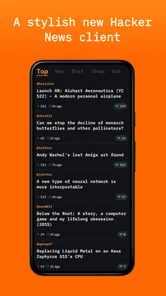
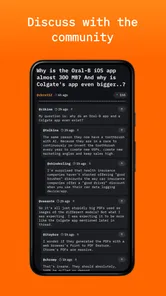
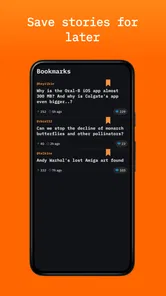
Analysis by Reviewed
I spent time with Hacker News as a focused way to read the Hacker News community on a phone, and my first impression was straightforward: this is for people who want a quieter, more direct news-reading experience rather than a general magazine app. It comes from Emerge Tools, is free to use, and sits in the News & Magazines category. The appeal is not a huge collection of unrelated publications; it is the ability to open the app with a specific technical reading habit in mind.
That narrow purpose is also the key to deciding whether it belongs on your device. If you already check Hacker News several times a day, a dedicated reader can feel more natural than opening a browser, searching for the site, and working through browser tabs. If you want breaking news from many subjects, personalized recommendations, newsletters, or a broad newspaper replacement, I would look elsewhere. My experience with this app is best understood as a comparison between a focused community reader and the wider world of news apps.
How I would decide whether it fits my reading routine
The first question I would ask is not whether the app is attractive, but what I expect from a news reader. Hacker News is built around a particular source and audience, so the decision depends on whether that concentration feels useful or restrictive. I found it most suitable for short reading sessions: checking what the technology community is discussing, opening an interesting story, and moving on without turning the phone into a full-time news feed.
The app is open source, which matters to me because it gives the project a different character from a large commercial news platform. I do not install it expecting a polished ecosystem of subscriptions, editorial sections, video channels, and recommendation engines. I install it because I want a simple front end for this specific reading destination. That distinction helps set expectations before switching from a browser or another news application.
It is also worth considering how you usually discover stories. A broad news app is better when I want a mixture of politics, business, culture, local reporting, and world events in one place. A browser is better when I need to search widely or follow several sources at once. This reader makes more sense when the Hacker News conversation itself is part of the value: the story matters, but so does seeing which links attract attention and discussion.
For me, the strongest decision criterion is friction. A dedicated app earns its place when it makes a repeated task easier. If I already have a habit of visiting Hacker News, launching a purpose-built reader can remove the extra steps of opening a browser, finding the right page, and managing unrelated tabs. That benefit is modest in a single session, but it becomes meaningful when the same action happens during a commute, a coffee break, or a quick pause between tasks.
I would also think about attention. Hacker News can lead me from one technical article to another, and a dedicated reader may make that rabbit hole more convenient. That is useful when I want to learn, but it can also make a supposedly brief check last much longer. I recommend deciding in advance whether the app is for a quick scan or for deliberate reading; the right choice depends less on the interface than on how disciplined I am with the habit.
More From Our News Desk

Weather by Xiaomi Review: Clear at a Glance, Less Clear Up Close

X Under Pressure: Can It Recover When Posting Goes Wrong?

Clash of Clans Is Won Between the Battles

Android Auto Makes the Case for Quieter Car Software

MobiOffice: Transforming Mobile Productivity with Seamless Integration

EA SPORTS FC™ Mobile Soccer: Redefining Mobile Sports Gaming
What the first few sessions reveal
During an ordinary session, I would use the app in three stages. First, I scan the available stories and look for subjects connected to my current interests. Next, I open only the links that seem worth the time. Finally, I decide whether the discussion is useful enough to continue reading or whether I should return to the list. That workflow sounds simple, but it is exactly why a focused reader can be more comfortable than a general news feed.
One practical tip is to treat the story list as a filter rather than a reading assignment. I do not try to open everything. I use the headline and the surrounding context to choose one or two items, then leave the rest for another visit. This keeps the app from becoming an endless queue and makes it easier to use during short breaks.
Another useful habit is separating discovery from deep reading. I can use the app to notice a topic, then decide whether I have enough time to follow the linked article. That prevents the common mistake of opening a technically dense story when I only have a minute. In that situation, the reader still serves a purpose: it helps me save the idea mentally for a later, more suitable session, even if I do not continue immediately.
Where this reader wins over a browser
The clearest advantage is focus. A browser is flexible, but that flexibility comes with distractions: open tabs, unrelated bookmarks, social feeds, and other sites competing for attention. Hacker News gives me a single-purpose starting point. When I want that specific reading experience, I do not need to navigate through the broader web first.
The open-source identity is another meaningful strength. It does not automatically make every interaction better, but it signals that the app is designed around a focused project rather than a large content business. For readers who value transparent, community-oriented software, that can be a reason to try it alongside the practical convenience.
I also like the idea of keeping this activity separate from a general news application. Combining everything into one feed can blur the difference between carefully chosen technical links and fast-moving headlines. A dedicated reader gives the Hacker News habit its own place. That separation helps me choose the right tool for the mood: broad news when I need awareness, this app when I want a concentrated technology-oriented reading session.
The app’s position is reflected in the response it has received so far. It carries a 4.0 average from around 33 ratings and has passed 10K installs. I read those figures as signs of a small but real audience rather than proof that it will suit everyone. The rating is encouraging, while the relatively focused scale suggests that I should judge it by my own workflow instead of treating popularity as a guarantee.
Small workflows that make it more useful
A good workflow is to open the reader at a fixed point in the day, such as before starting work or after finishing the main tasks. I would scan for ideas related to software development, product design, research, or the wider technology industry, then choose one article to read properly. This turns the app into a deliberate learning tool instead of another source of constant notifications in my attention.
I would also use it as a conversation starter. If a story raises a question about programming practice, company culture, security, or the future of technology, I can read the linked piece and the surrounding discussion before forming an opinion. That is more valuable than judging a headline alone. The trade-off is that the quality of the experience depends on my willingness to evaluate the discussion rather than accept the most confident comment as the final word.
A less obvious benefit is topic continuity. General news apps often jump rapidly between subjects because variety keeps the feed moving. A focused Hacker News reader lets me stay within a recognizable technical context. When I am researching a theme over several days, that continuity can help me notice different angles and related links without rebuilding the same search from scratch every time.
When another kind of news app is the better choice
I would not replace a broad news app with this reader if my main goal were a complete daily briefing. Someone who wants local events, sports, weather, international reporting, or a balanced mix of publishers will probably find the scope too narrow. The app’s strength is concentration, and concentration necessarily means giving up breadth.
A browser may still be the better option for research-heavy users. Browsers make it easier to compare several websites, search for older material, keep multiple pages open, and move between unrelated sources. If I am following a developing story across different publications, I would rather have that flexibility than stay inside a specialized reader.
Newsletter readers and RSS tools may also fit better for people who already maintain a carefully selected list of writers and publications. Those tools are designed around personal source management. Hacker News offers a different discovery model, one shaped by the community’s current interests rather than by a private list I have assembled. Neither approach is universally superior; they answer different questions about how I want information to reach me.
There is a similar trade-off with recommendation-driven news platforms. They can save time by adapting to my interests, but they may also encourage passive scrolling and repeated exposure to familiar subjects. This reader gives me less of that broad personalization and more intentional choice. I prefer that when I want to decide what deserves my attention, but I would miss automated variety if I were trying to discover news outside technology.
The age classification is Everyone 10+, which makes the app approachable for a wide audience, but that should not be confused with a promise that every linked article will match every reader’s interests or maturity level. The app points toward outside reading and community discussion, so I would still use ordinary judgment about which links to open, especially when handing the device to a younger family member.
What switching feels like in practice
Moving from a browser is relatively easy because the underlying reading destination is familiar. The real adjustment is behavioral: I have to accept that this is a dedicated doorway rather than a general-purpose web tool. I would keep the browser available for searches and deeper research, then use the app for routine checking. That combination avoids forcing one tool to do everything.
Switching from a broad news feed requires more adjustment. I would lose the convenience of seeing many categories together, and I would need to make a conscious choice to open the Hacker News reader when I want technology-focused discovery. In return, I would gain a cleaner boundary around that activity. Whether the exchange is worthwhile depends on whether I am tired of broad feeds or still rely on them for most of my daily awareness.
There is little reason to treat the switch as permanent. Because the app is free, I can test it alongside my current reader without committing money to the experiment. I would use it for several normal days rather than judging it from one installation: a quick morning scan, a longer evening session, and at least one moment when I need to find something specific. That reveals whether it changes my routine or merely duplicates a browser shortcut.
The current release is version 1.0.6, and the app was released on August 28, 2024. I see it as a relatively young project, which makes trying it a little different from adopting a mature, feature-heavy news platform. I would be comfortable exploring it for its focused purpose, but I would keep my expectations realistic about choosing a small reader over an established all-in-one service.
Who should install it and who should skip it
I would recommend trying it if you regularly read Hacker News, prefer a dedicated mobile experience, and want to keep technical discovery separate from the rest of your news consumption. It is especially appealing to developers, students, founders, researchers, and curious readers who enjoy following ideas through both stories and community conversation.
I would skip it if I rarely visit Hacker News or if I need one app to cover every major news category. It is also not my first choice when I need advanced research across many sources, a personal RSS library, or a carefully managed publication list. In those cases, a browser, RSS reader, newsletter tool, or general news app may be a better match.
My clearest recommendation is to use Hacker News as a companion rather than automatically treating it as a replacement. Keep the broad tool for broad coverage, and use this one when you want a focused technology reading session. That approach takes advantage of its strongest quality without asking it to solve a problem it was not designed to solve.
Overall, I found the app worthwhile because it understands its role. It is not trying to be an entire media center. It gives me a direct, free way to build a repeatable Hacker News habit, with the simplicity and focus that come from staying close to one community. The limitations are the same qualities that make it appealing: the subject range is narrow, and the experience depends on wanting this particular source.
My final advice is simple: install it if focused Hacker News reading is already part of your day, and test it alongside your usual tools rather than expecting a universal news replacement. For that audience, the small commitment and free price make experimentation easy. For everyone else, the app is more likely to be a specialized extra than the main news reader on the phone.
Hacker News Frequently Asked Questions
What devices and operating systems can I use Hacker News on?
The Hacker News app is listed for devices running iOS 11 or later, so check your device’s operating-system version before downloading. It is a mobile reader for Hacker News rather than a general-purpose news app. If you use a different platform, the Hacker News website remains an option through a browser, while this app is intended for compatible Apple devices.
Is this Hacker News app open source?
Yes. Hacker News is described as an open source reader, which may appeal to users who value software whose source code can be examined. The app is developed by Emerge Tools and is a reader for Hacker News, rather than the platform itself. Open-source status does not by itself establish how every feature handles data, so review the app’s permissions and privacy information before installing if those details matter to you.
What is Hacker News, and what can I use it for?
Hacker News is a technology-focused news and discussion platform operated by Y Combinator. It features links and original posts about programming, startups, artificial intelligence, cybersecurity, science, and related topics. After reviewing it, I found the service especially useful for discovering technical articles and following thoughtful community discussions, although it is less suitable if you mainly want general news or entertainment content.
Is Hacker News available as an official Android or iOS app?
Hacker News is primarily a web-based service, accessible through its official website in a mobile browser. There is no universally recognized official Hacker News application published by Y Combinator for Android or iOS, although several third-party apps and mobile clients may be available. Before downloading one, check the developer, permissions, privacy policy, update history, and user reviews to avoid confusing unofficial software with the original service.
Do I need an account to read Hacker News?
No account is required to browse the front page, open submitted links, read comments, or search through many public discussions. However, creating an account is necessary if you want to submit stories, comment, vote, save favorites, or customize certain aspects of your experience. In my review, the basic reading experience was quick and accessible, while participation benefited from having a registered account.
Pros
- Clean
- distraction-free interface focused on technology news
- Comments often provide valuable technical context and alternative viewpoints
- Fast loading makes it practical on slower connections
- No account is required to browse stories and discussions
- Simple layout works well on both phones and tablets
Cons
- Discussion quality can vary significantly between individual threads
- The minimalist design may feel too plain for some users
- Older stories can quickly disappear from the front page
- Limited personalization compared with larger news platforms
- Some linked articles require subscriptions or may be unavailable











