

GOODCAR - VIN & Plate Lookups
- 46.00
- 4.4
- Installs
- 10.00K
- Price
- Free

Screenshots
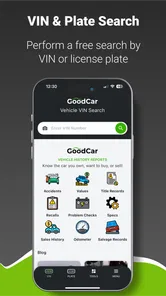
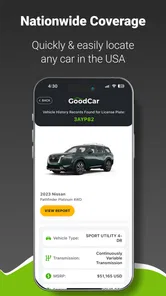
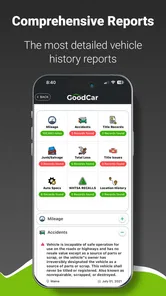
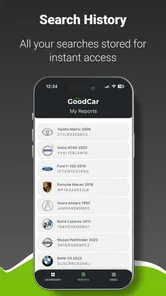
Analysis by Reviewed
Buying a used vehicle usually begins with a question that photos and a friendly seller cannot answer: what has happened to this car before it reached me? GOODCAR - VIN & Plate Lookups is built around that moment of doubt. I found it most useful as a quick research companion for checking a vehicle before spending time on a viewing, arranging a test drive, or making an offer. It does not replace a mechanic or a careful inspection, but it can make the first stage of vehicle research more organized and less dependent on guesswork.
My overall view is positive, with one important qualification: this is a focused lookup tool rather than a complete car-buying service. Its value depends on the quality and usefulness of the report available for the vehicle you check, and that means I would treat the results as evidence to investigate, not as a final verdict. For shoppers who want a convenient way to start checking a used car, it is a sensible free app to keep available. For someone expecting a guaranteed mechanical diagnosis or a full replacement for professional inspection, it is the wrong tool.
What the app is really useful for when researching a vehicle
GOODCAR comes from Infopay Inc. and sits in the Auto & Vehicles category. The central idea is straightforward: use a vehicle identification number or a plate lookup to gather information before making a decision. That approach is more practical than relying on a seller’s description alone, because it gives the buyer a separate starting point for questions and verification.
I like the fact that the workflow is aimed at the early research stage. When I am comparing several listings, I do not necessarily want to call a dealership, book an inspection, or spend an hour with each candidate. A lookup can help me decide which cars deserve that extra effort. In that role, the app works as a filter: it can help move one vehicle higher on the list and another lower before the process becomes expensive or time-consuming.
The app is free to install, although it includes purchases priced from $9.95 to $24.99 per item. That distinction matters. A person can try the experience without committing immediately, but should still pay attention to what is included before ordering a report. I would not assume that every lookup has the same depth or that the free part alone answers every question. The sensible approach is to use the initial experience to decide whether a paid report is worthwhile for a particular vehicle.
Its audience rating is Everyone, and the app supports Android devices running version 7.0 or later. The current version is 2.2.8, which makes compatibility fairly approachable for people using older Android hardware. The app reached the store on April 10, 2024, so it is relatively recent rather than a long-established automotive platform. That does not determine quality by itself, but it is useful context when deciding whether to make it part of a long-term research routine.
A practical workflow for a used-car search
The strongest way to use the app is not to open it only after you have already decided to buy. I would use it earlier, while building a shortlist. Save the listing details separately, enter the available vehicle information carefully, and compare what the lookup shows with the seller’s wording. If the result raises a question, contact the seller before arranging a viewing instead of treating the report as a reason to panic.
More From Our News Desk

 Gmail
GmailGmail in a Busy Inbox: Who Benefits Most?
From first account to crowded workday, Gmail earns its place through dependable search and flexible sorting—but its best fit depends on how much inbox maintenance you can tolerate.

 Prime Video
Switching to Prime Video: What Changes in Your Viewing Routine
Prime Video can make a compelling second home for streaming, but switching means learning a different catalog, rental layer, and route from browsing to playback.

 Universal TV Remote Control
Universal TV Remote Control Works Best as a Reliable Backup
A phone remote earns its place through quick setup and reliable habits. Here is how to get more from Universal TV Remote Control—and where its limits show.

 Weather - By Xiaomi
Weather by Xiaomi Review: Clear at a Glance, Less Clear Up Close
Xiaomi’s weather app makes everyday forecasts quick to scan, but its calm surface can leave useful details and recovery paths harder to find than they should be.

 X
XX Under Pressure: Can It Recover When Posting Goes Wrong?
A resilience-focused review of X, examining setup, mistaken posts, interruptions, weak connections, and the gaps that matter when recovery needs to be dependable.

 Clash of Clans
Clash of Clans Is Won Between the Battles
Its raids are quick; its community is a long-term project of coordination, teaching, rivalry, and shared responsibility—with all the friction that entails.
Latest News



For example, imagine I find a reasonably priced hatchback online that appears clean and has a convincing description. Before driving across town, I can run the available lookup and note anything that changes the conversation: an inconsistency in the vehicle identity, a history detail that deserves clarification, or simply a reason to ask for more paperwork. If the seller cannot explain an important discrepancy, I have saved myself a wasted trip. If the information looks consistent, I still arrange an inspection, but I arrive with better questions.
That is a less obvious strength of this kind of app. Its best result is not always a dramatic warning. Sometimes it simply improves the quality of the questions I ask. A buyer who knows what needs checking is less likely to be distracted by a polished interior, a low monthly payment, or a rushed sales pitch.
I also see a useful role for private sellers. If you are selling a vehicle, checking the information you plan to share can help you prepare for questions from buyers. It may reveal that an old record needs an explanation or that the identification details should be double-checked. Used-car transactions often become tense when one side appears to know more than the other. Independent research can make the conversation more transparent, even when the result is not perfect.
Why a lookup is not the same as an inspection
This is where I would keep expectations under control. A lookup can support research, but it cannot tell me everything about the car sitting in front of me. It cannot substitute for checking the engine, transmission, tires, brakes, fluids, warning lights, rust, leaks, alignment, or signs of poor repairs. It also cannot replace a road test or an independent mechanic’s opinion.
That limitation is not a flaw unique to GOODCAR; it is a boundary of the entire lookup category. A record-based result and a physical inspection answer different questions. The first concerns available information about the vehicle’s identity or history. The second concerns its current condition. A car can have a clean-looking background and still need expensive work, while a vehicle with an old issue may now be well repaired. I would never use a favorable result as permission to skip an inspection.
The same caution applies to incomplete records. If an event does not appear in a report, I would not interpret that as proof that it never happened. Records can depend on what was reported, recorded, or made available. The right habit is to combine the lookup with service invoices, ownership documents, a visual inspection, and a professional assessment when the purchase is significant.
Where the experience can become frustrating
The main friction comes from uncertainty about the value of a paid lookup before seeing the complete result. The in-app purchase range makes the app accessible for occasional use, but it also means I would read the report options carefully. A buyer comparing multiple cars could spend more than expected if every candidate requires a separate purchase. That makes the app better suited to narrowing a shortlist first than checking every vehicle indiscriminately.
There is also a practical difference between having a VIN and having a plate number. Sellers do not always provide complete information in a listing, and a plate-based search may not answer every question a buyer has. If I were serious about a particular car, I would ask the seller directly for the VIN and compare it with the vehicle itself, the paperwork, and the dashboard. A mismatch would be a reason to pause, not a minor administrative detail.
Another weakness is that a report can create false confidence when presented without context. A buyer may see a clean result and stop asking questions, or see one unfamiliar entry and reject a vehicle without understanding it. I would like users to approach every result as a prompt for investigation. The app is most valuable when it improves judgment; it is less valuable when it becomes a single yes-or-no button.
Because the app has a 4.4 average from around 294 ratings and 46 written reviews, it appears to have earned a generally favorable response from its early audience. It has also passed 10K+ installs, suggesting that people are using it beyond a purely experimental download. I take those figures as encouraging signs of usability, not as proof that every report will fit every buyer’s needs. Reviews can describe the experience of using the app, while the usefulness of an individual lookup still depends on the vehicle and the information available for it.
Three habits that make the app more useful
First, I would run a lookup before negotiating rather than after agreeing on a price. Information found early gives me room to decide whether to continue, ask for documents, or adjust my offer. Running it after emotionally committing to the car makes it easier to excuse warning signs because I already want the purchase.
Second, I would keep a simple comparison note for each candidate. Record the vehicle details, the seller’s claims, the result of the lookup, and the questions still unanswered. This prevents several similar cars from blending together and helps reveal which listing has the strongest overall evidence. The app becomes more useful when it is part of a repeatable process instead of a one-time curiosity.
Third, I would verify the physical identity of the car before trusting the result. Compare the VIN shown on the vehicle with the number supplied in the listing or paperwork. This is an easy step to overlook, especially when a seller sends information by message. A report about the wrong vehicle can look convincing while being completely irrelevant to the car being offered.
A fourth habit is to use the result to plan an inspection. Rather than handing the report to a mechanic and asking for a vague opinion, point out the areas that deserve attention and ask the mechanic to check them alongside the normal inspection. That makes the paid lookup more valuable because it guides the next action instead of ending the research process.
How it compares with the usual alternatives
The usual alternative is to rely on the seller, search manually across several websites, or go straight to a mechanic. Each option has a place, but none is identical to this app. Asking the seller is quick and sometimes sufficient for basic details, yet it is not independent verification. Manual web research can provide useful context, but it is slower and easier to organize poorly. A mechanic offers the best assessment of present condition, but usually after I have already chosen to spend time and money on the vehicle.
GOODCAR fits between those stages. It is more structured than casual searching and less expensive or involved than an inspection, especially when I am still deciding which cars deserve attention. That position is its clearest reason to exist. It does not need to beat a mechanic at mechanical diagnosis; it needs to help me decide when a mechanic’s time is justified.
For a dealer or experienced buyer who already has access to established reporting systems and a professional inspection workflow, the app may feel unnecessary. The benefit is greater for a private buyer who wants a simple starting point and does not yet have a reliable process. Someone shopping for a very inexpensive vehicle should also think about the economics. If a lookup costs a meaningful portion of the car’s price, it may be wiser to prioritize an inspection and basic documentation checks, depending on the situation.
Who should use it, and who should skip it
I would recommend the app to first-time used-car buyers, people comparing online listings, and anyone who wants an independent checkpoint before contacting a seller. It is particularly useful when several candidates look similar and I need a way to decide which one deserves a viewing. It can also help family members or friends who are assisting with a purchase and want to discuss the same vehicle information rather than relying on screenshots and sales descriptions.
I would be more cautious recommending it to someone who expects a complete guarantee. If your decision depends on current mechanical condition, arrange a professional inspection. If you need a detailed valuation, financing, insurance quote, or repair estimate, use the specialist service designed for that task. This app is not a universal answer to every automotive question, and forcing it into that role would lead to disappointment.
I would also skip unnecessary paid checks on vehicles that have not passed basic screening. Confirm the seller, approximate budget, location, and visible condition first. Then use the app on the strongest candidates. That small change can prevent spending money on reports for cars you would have rejected anyway because of price, distance, obvious damage, or missing paperwork.
My final assessment
After using GOODCAR as a research step rather than a magic answer, I see a clear and useful product. Its real strength is helping a buyer move from vague suspicion to specific questions before committing time or money. The VIN and plate lookup approach is easy to understand, the free installation lowers the barrier to trying it, and the app makes sense in the gap between browsing listings and booking an inspection.
The trade-off is just as clear. Paid reports require deliberate choices, and no lookup can reveal every mechanical or ownership problem. I would compare the report with the car, the paperwork, the seller’s explanation, and an independent inspection whenever the purchase matters. Used-car research rewards several small checks working together, not one impressive-looking result.
For that reason, I would recommend GOODCAR - VIN & Plate Lookups to anyone who wants a practical first filter while shopping for a used vehicle. I would not recommend using it alone or treating a favorable result as a guarantee. Used with a shortlist, careful VIN verification, written questions, and a mechanic’s inspection, it becomes a genuinely useful part of the buying process. That balanced role is where the app works best, and it is enough to make it worth keeping on an Android device for the next serious vehicle search.
GOODCAR - VIN & Plate Lookups Frequently Asked Questions
Which devices can run GOODCAR - VIN & Plate Lookups?
GOODCAR is a vehicle-research app for Android and iOS. Its Android compatibility starts at version 7.0, so it should suit many older Android phones as well as newer ones that meet that requirement. Before downloading, check that your device’s operating system is compatible and that you have enough space for an app. The app is free to download, with some purchases available inside it.
Who makes GOODCAR, and what kind of app is it?
GOODCAR is developed by Infopay Inc. and focuses on vehicle research, including VIN and license-plate lookups. It is intended for people who want to gather information while considering a vehicle purchase, sale, or maintenance decision. The app is in the Auto & Vehicles category, and its content rating is Everyone, making it broadly suitable for general audiences.
What is GOODCAR - VIN & Plate Lookups used for?
GOODCAR is designed to help users research vehicles before buying, selling, or maintaining them. By entering a vehicle identification number (VIN) or, where supported, a license plate, you can review available details such as vehicle specifications, reported history, recalls, title information, and other records. The amount of information depends on the vehicle, location, and data sources available to the service.
Does GOODCAR provide a complete and guaranteed vehicle history report?
No vehicle-history app can guarantee that every accident, repair, theft, title event, or ownership detail will appear in a report. GOODCAR gathers information from available databases, but records may be delayed, incomplete, duplicated, or unavailable for some vehicles. Treat the results as a useful research tool rather than a substitute for an independent inspection, a mechanic’s evaluation, or official documentation.
Is it safe to enter a VIN or license plate in GOODCAR?
A VIN is generally intended to identify a vehicle and is commonly shared during sales, insurance, and maintenance processes. License-plate searches can involve more sensitive regional and legal considerations, so users should review GOODCAR’s privacy policy and the permissions requested by the app before using that feature. Avoid entering personal information that is not necessary for the lookup.
Pros
- Quick VIN and license plate searches from a simple mobile interface.
- Useful vehicle history details for checking a used car before purchase.
- Helps identify recalls
- title issues
- and possible accident records.
- Saves lookup results for easier comparison between multiple vehicles.
- Convenient alternative to searching several vehicle databases manually.
Cons
- Report availability and accuracy can vary by vehicle and region.
- Some detailed records may require a paid lookup or subscription.
- License plate searches may be limited by local privacy regulations.
- Older vehicles can have incomplete or sparse history information.
- Results may take time to appear when third-party data sources are slow.











