Good Morning Wishes
- 798.00
- 4.7
- Installs
- 1.00M
- Price
- Free

Screenshots
Analysis by Reviewed
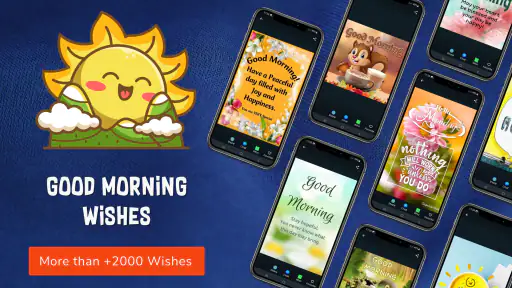
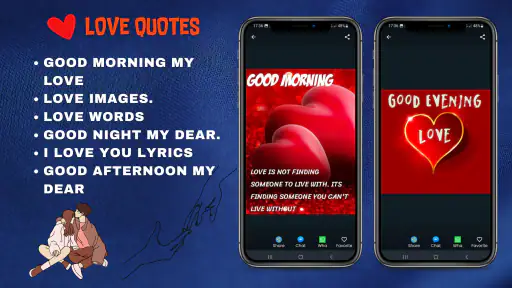
I like the idea of a small, cheerful message that takes only a moment to send, especially when a friend or relative is far away. Good Morning Wishes is built around that simple habit: choosing a greeting with a picture and sharing it with people through social media. I see it as a lightweight source of ready-made inspiration, rather than a replacement for a personal conversation.
That distinction matters when choosing a communication app. This one is for a small, specific gesture, not for managing conversations or keeping track of family plans. I’d consider it when I want a visual greeting quickly, but I wouldn’t expect it to organize who has checked in, save a shared family history, or replace the messaging service where a real conversation happens.
Making a morning greeting feel personal
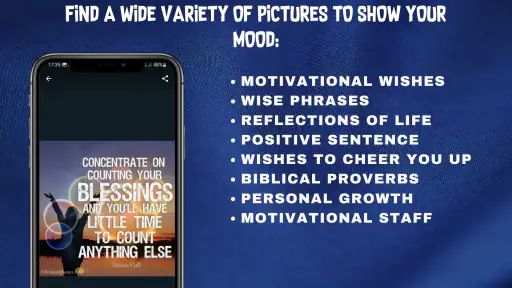
So, you wake up, and before you dive into the hustle and bustle of daily life, you open up the Good Morning Wishes app. It's like opening a window to a world of positivity. The app is packed with a plethora of cheerful and inspiring messages that you can send to your friends and family. Whether it’s a motivational quote or a sweet morning greeting, you’ll find something for every mood.
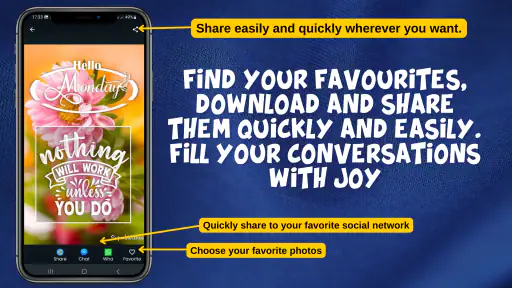
One of the things I really dig about this app is its simplicity. You don’t have to be a tech guru to navigate through it. With just a few taps, you can select the perfect message, customize it if you like, and send it off to brighten someone’s day. It’s a straightforward, no-frills experience, which is exactly what you need in the morning when you’re still shaking off the sleepiness.
A personal touch without overthinking it
Now, let’s talk customization. The app gives you the option to personalize your messages. You can tweak the text to add your own flair or even pair it with a cute image or GIF. This feature really adds a personal touch, making your morning greetings feel more genuine and heartfelt.
Moreover, the app updates its message library regularly, so you’re never short of fresh content. It’s like having a never-ending supply of morning cheer at your fingertips. And let’s be honest, who wouldn’t want that?
A useful way to avoid sending something that feels copied and pasted is to treat a suggested greeting as a starting point. I’d add a recipient’s name or one specific sentence that refers to their day, then check the wording before sharing. That small edit helps the picture and greeting feel like a note from me, not just a forwarded image.
You May Like

Clash of Clans Is Won Between the Battles

Android Auto Makes the Case for Quieter Car Software

MobiOffice: Transforming Mobile Productivity with Seamless Integration

EA SPORTS FC™ Mobile Soccer: Redefining Mobile Sports Gaming

How Microsoft OneDrive Became a Mobile Productivity Giant

How Google Translate Breaks Language Barriers Effortlessly
I’d also choose the image with the recipient in mind rather than selecting the first cheerful option. A motivational line might suit someone starting a new job, while a simple warm greeting can be less intrusive for a friend who is busy or not especially fond of inspirational quotes. If the text doesn’t sound like something I would say, I’d rewrite it or skip that card; a quick message should still feel like it came from me.
Sharing across a household
What I absolutely love is how easy it is to share these messages across different platforms. Whether your friends are on WhatsApp, Facebook, or even good ol’ SMS, you can spread the morning cheer effortlessly. Plus, the app doesn't bombard you with ads, so your experience remains smooth and uninterrupted. It's like the developers thought of everything!
That sharing-first approach can work well in a household where people use different services. One person might prefer a social app while another is more comfortable with a text message; the greeting can be chosen first, then sent through a familiar channel. For a realistic routine, I’d pick one image while making coffee, personalize it for a relative who has an early appointment, and send it before the morning gets busy. The value is in making that small check-in easier, not in expecting a picture to stand in for a longer catch-up.
On a shared phone or tablet, I’d keep the boundary simple: each person should decide which greeting they want to send and to whom, and check the chosen destination before tapping share. The app is a source of messages, not a household messaging plan, so it makes sense to use the receiving service’s own account and conversation. That reduces the chance of sending from the wrong person’s account or dropping a family greeting into a group chat by mistake.
One practical household habit is to pause at the share step and confirm both the recipient and the account shown in the service that opens. That small check is useful when several people use one device, especially if a greeting is intended for a grandparent rather than a family group. I wouldn’t treat a shared device as a shared identity: the person sending the image should be clear about whose message it is and should avoid leaving a conversation open for the next user.
For coordination, it helps to agree on a light routine rather than turning greetings into an obligation. For example, one person might send a picture when they genuinely think of someone, while another prefers a direct text on busy mornings. This app can help with the first kind of check-in, but it isn’t a calendar or reminder system. If the household needs to plan appointments, divide chores, or make sure a time-sensitive message is seen, a calendar or group chat is the more dependable choice.
Who it suits, and where another option may fit better
I’d recommend this to someone who already enjoys sending morning greetings but sometimes runs out of ideas. It can also suit a family member who wants an easy way to keep in touch with relatives without composing a new message from scratch every day. Compared with searching the web for a picture or making a graphic in a general design app, a dedicated wishes app keeps the task focused on choosing and sharing a greeting. The trade-off is that ready-made messages can feel familiar or generic; if you want a highly personal note, a direct text or a custom image will usually be better.
The choice between this and a plain messaging app comes down to whether the image is the point. If I already know what I want to say, opening the conversation and typing it directly is faster and feels more natural. If I want a visual prompt because I’m short on words or want to send a small cheerful gesture, a greeting library gives me a quicker starting place. A general design app makes more sense when I want to control the layout or make a bespoke card, but that extra freedom also means more effort before I can send anything.
It is less suited to anyone who dislikes inspirational sayings, prefers quiet mornings without social messages, or wants a full-featured card editor. I would also avoid sending the same greeting to a large group simply because it is convenient: different recipients may appreciate different tones, and a quick personal edit can make the gesture warmer. If you are deciding whether to install it, the key question is whether a library of shareable morning images fits a habit you already have.
There’s another trade-off in sending an image instead of a short text: pictures can make a greeting feel more expressive, but they can also be unnecessary when the recipient is trying to keep notifications or data use low. I’d save image greetings for people who enjoy receiving them and use a plain message when speed, discretion, or accessibility matters more. That flexibility is part of a sensible routine; the app doesn’t need to be the answer for every person or every morning.
Age, trust, and practical expectations
The app is free to download and is listed for Teen audiences, with optional in-app purchases priced at $4.99 per item. It is published by The Master Appr and has a 4.7 average from around 79,000 ratings, with over 1 million installs. Its current version is 42.1.0, and it supports Android 6.0 and later. Those details make it easy to judge the basic fit, but I’d still treat the messages as material to review before sharing, especially when a young person uses a shared device. A family can agree on which account to use and what kinds of greetings are appropriate without assuming the app provides parental or household controls.
For a teen using a family device, I’d focus on the same everyday boundaries I’d use with any shareable content: read the text, check the image, and know which social account or conversation will receive it. The Teen age context is a useful reminder that younger users may be part of the audience, but it doesn’t remove the value of an adult’s judgment about what is suitable for their household. A parent who wants explicit controls or monitoring should look for a tool designed for that purpose rather than expecting a greeting app to provide them.
It’s also reasonable to ask whether someone needs to create an account just to send a greeting, or whether every image will suit every recipient. I would not make a household decision on assumptions: check the current setup on the device, and review each item before sharing it. The most reliable expectation is modest—this is a place to find and personalize greetings, while the destination app remains responsible for the actual conversation and its account settings.
Because its purpose is straightforward, the most useful questions are practical: can I change a message before sending it, and can I share it where my contacts already are? The app offers text personalization and sharing through social platforms, so it can support that quick workflow. If you want to keep a greeting for later, send it on a schedule, or coordinate a family calendar, this is not the tool I’d choose; a notes app, messaging app, or calendar is a better match for those jobs. I’d also glance at any optional purchase prompt before proceeding, even when I only intend to use the free experience.
For someone who only wants to send an occasional greeting, the most useful test is whether the first few choices feel easy to adapt rather than merely easy to forward. I’d try changing a line, compare it with the way I normally speak, and send it to one person who welcomes this kind of message. If I find myself repeatedly editing the card heavily, writing a direct note may be simpler; if a small edit is enough, the app is doing its job.
A small ritual, not a substitute for a conversation
In a world where we’re constantly bombarded with negativity, having a tool like this can be a breath of fresh air. It’s a simple yet effective way to spread positivity and start the day on a high note. Its strongest use is modest: a bright image and a few words can remind someone that you thought of them, while a call or a personal message remains the better choice when the conversation needs more care.
That modest role is why I’d see it as a useful addition for a particular kind of person, not an essential communication app for everyone. It suits someone who likes visual greetings, wants a prompt when their own wording runs dry, and is comfortable choosing a recipient each time. Someone who rarely sends picture messages, wants a private one-to-one conversation, or needs dependable reminders should stick with the tools they already use for those needs.
All in all, if you’re someone who appreciates the little joys in life and loves spreading smiles, this app is worth considering. It’s like having a pocketful of sunshine that you can share with the world. So, go ahead, download it, and start making mornings better, one message at a time.
Remember, a good morning sets the tone for a good day. Let the app help you make every day a little brighter, while keeping the greeting personal enough to sound like you.
Good Morning Wishes Frequently Asked Questions
Is Good Morning Wishes free to download, and are there optional purchases?
Good Morning Wishes is free to download, so you can try its greeting-focused features without paying an upfront price. The app also offers optional in-app purchases for $4.99 per item. If you prefer not to spend money, review any purchase prompts carefully and choose only the features or content you actually want.
What kind of content can I share with Good Morning Wishes?
The app focuses on good morning wishes and pictures that you can share with friends through social media. It may suit you if you often send a cheerful greeting to start someone’s day or want an image to accompany a message. Its central appeal is sharing morning-themed content rather than serving as a general-purpose messaging app.
Who developed Good Morning Wishes, and what is its age rating?
Good Morning Wishes is developed by The Master Appr and has a Teen content rating. That rating is worth considering when deciding whether the app is suitable for someone in your household. The app is centered on greeting pictures and social sharing, so review its content and intended use before installing it for a younger user.
What devices can run Good Morning Wishes?
Good Morning Wishes is an app for Android, with a minimum operating-system requirement of Android 6.0. It is listed in the Communication category and is suitable for users rated Teen and older. Before downloading, check that your device meets the system requirement and that you are choosing the correct app from The Master Appr.
What is the primary purpose of the Good Morning Wishes app?
The Good Morning Wishes app is designed to help users start their day on a positive note by providing a wide array of good morning messages, images, and quotes. Whether you want to send a heartfelt message to a loved one or need some inspiration to kickstart your day, this app offers a variety of options to suit your needs.
Pros
- Wide variety of morning greetings
- Easy to share messages on social media
- User-friendly interface
- Regular updates with new content
- High-quality images for each wish
Cons
- Contains ads that may be intrusive
- Limited customization options
- Requires internet for full functionality
- No option for scheduling messages
- Some greetings may be culturally specific

- Category
- Communication
- Version
- 42.1.0











