FOREO For You
- 591.00
- 4.6
- Installs
- 1.00M
- Price
- Free

Screenshots
Analysis by Reviewed
I would treat FOREO For You as a companion to compatible FOREO beauty devices, rather than a complete skincare guide on its own. Its value is in linking device use with routines and guidance; if you already enjoy a simple routine with no connected device, it may add more setup than benefit. I found that distinction useful when deciding whether an app belongs in an everyday bathroom routine.
Where setup can feel less obvious
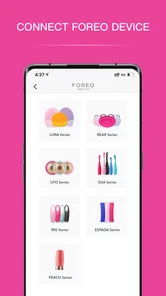
The first hurdle is having a compatible FOREO device and getting the connection process to behave. Before troubleshooting, check that the device is ready to pair and follow the in-app setup steps in order. If it does not appear right away, closing and reopening the app and trying again is a sensible first move; repeated tapping usually adds frustration rather than clarity. Device setup is the point where this experience differs most from a regular beauty or habit-tracking app.
It also helps to decide what you want the app to do before personalizing anything. If your main aim is to follow a device routine, focus on that workflow first instead of trying to build a perfect record of every product you use. I would keep expectations grounded: personalized prompts can help structure a routine, but they are not a substitute for noticing how your skin reacts or seeking professional advice for persistent concerns.
Setup checks that save time
If pairing is the snag, I would resist changing several things at once. First make sure the device is charged or otherwise ready for use, then keep the phone and device close while following the app’s own prompts. If the connection still fails, close and reopen the app before attempting the sequence again. These are simple checks rather than a guarantee, but they help isolate whether the issue is a temporary app hiccup or a step that was missed.
It is also worth checking that the phone’s operating system is supported: the Android version listed for the app is 7.0 or later. That does not mean every older phone will feel equally smooth, but it gives Android users a useful baseline before spending time on setup. I would also make sure the app itself is current; its current release is 4.2.1. Keeping the app updated is sensible maintenance, though an update cannot make an incompatible device compatible.
One practical choice is to do initial setup when you have a few quiet minutes, rather than immediately before bed or while rushing out. Device registration, routine choices, and connection checks are easier to handle when you are not watching the clock. Once the device is linked, the everyday interaction can be much shorter. This is a small distinction, but it prevents a first-use snag from making the whole idea feel more complicated than it is.
A routine that fits a real day
For someone who already uses a FOREO device, the app can make a rushed evening easier to organize. I can picture opening it after washing my face, checking the guided steps, and following them without having to remember the sequence. That is most helpful when I am tired or learning a device, not when I want to spend extra time exploring menus. A practical tip is to settle on a routine you can repeat consistently before changing several choices at once; otherwise, it becomes harder to tell which change actually suits you.
More From Our News Desk
 Instagram
’s Power Comes From Its Place in Your Phone
A close look at how Instagram turns Meta’s reach, recommendation systems and everyday camera habits into durable platform power—and what that costs users.

 Gmail
Gmail in a Busy Inbox: Who Benefits Most?
From first account to crowded workday, Gmail earns its place through dependable search and flexible sorting—but its best fit depends on how much inbox maintenance you can tolerate.

 Prime Video
Switching to Prime Video: What Changes in Your Viewing Routine
Prime Video can make a compelling second home for streaming, but switching means learning a different catalog, rental layer, and route from browsing to playback.
 Universal TV Remote Control
 Works Best as a Reliable Backup
A phone remote earns its place through quick setup and reliable habits. Here is how to get more from Universal TV Remote Control—and where its limits show.

 Weather - By Xiaomi
Weather by Xiaomi Review: Clear at a Glance, Less Clear Up Close
Xiaomi’s weather app makes everyday forecasts quick to scan, but its calm surface can leave useful details and recovery paths harder to find than they should be.

 X
X Under Pressure: Can It Recover When Posting Goes Wrong?
A resilience-focused review of X, examining setup, mistaken posts, interruptions, weak connections, and the gaps that matter when recovery needs to be dependable.
Latest News



A morning routine offers a different use case: I would use the app to keep a device step from being forgotten, but would avoid making it the first thing I need to navigate when I am already in a hurry. The more dependable approach is to learn the basic sequence during an unhurried session, then return to the app for a reminder or guidance when needed. In that sense, the app works best as a reference and routine companion, not as a requirement for every ordinary face wash.
Compared with a paper skincare diary, an app-based log is easier to revisit, while a notebook can be quicker and does not depend on a phone. Compared with general beauty apps, FOREO For You is more useful when device guidance is the priority; if you only want reminders or a record of products, a basic notes or habit app may be simpler. That trade-off is central: its strongest case is connected device use, not replacing every other part of skincare planning.
A Skincare Companion
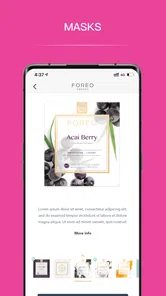
The FOREO For You app is designed to sync with your FOREO devices, making it a breeze to unlock a personalized skincare experience. Right from the start, the app greets you with a user-friendly interface that’s enjoyable to navigate. With this app, setting up your device and tailoring your skincare routines to your unique needs is as easy as pie!
Personalized Routines
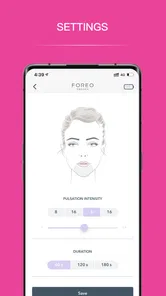
One of the coolest features has to be the personalized skincare routines. You can literally create a routine that suits your skin type and specific concerns. Whether it's moisturizing, cleansing, or anti-aging, the app guides you with step-by-step instructions tailored just for you. And the best part? The app provides real-time feedback, so you know your skin is getting the best care possible.
I would use that guidance as a way to make the device steps clearer, rather than as a promise that a routine will suit everyone equally. Skin can be sensitive, and preferences change with weather, schedule, and the products already in use. A sensible workflow is to start with a routine you can follow comfortably, observe how your skin feels, and only then adjust. If something causes persistent irritation, pause and seek appropriate advice instead of trying to solve it by cycling through app settings.
There is a useful trade-off in personalization: more tailoring can make a device routine feel relevant, but it also asks you to make choices and pay attention to them. If you prefer skincare to be deliberately minimal, that extra layer may feel like work. I would not treat every prompt as an instruction to add another step. The better test is whether the guidance makes an existing routine easier to follow without making the routine longer or harder to maintain.
Tracking Your Progress
Keeping track of your skincare progress has never been this interactive. The app allows you to log your skincare activities and see how your skin improves over time. It’s like having a skincare journal, but without the hassle of pen and paper. Plus, seeing your progress graphically displayed is super motivating!
A log is most useful when I keep it steady: noting a routine at roughly the same point in the day gives me a more meaningful comparison than recording only occasional “good skin” days. I would avoid changing several parts of my routine at once, since an app can organize observations but cannot tell me which product caused a reaction. That is a useful limit to remember when reading any progress view: it can support reflection, not diagnose skin or prove cause and effect.
For a practical record, I would keep entries focused on what I can actually compare: whether I followed the routine and how my skin seemed afterward. A long inventory of every detail can turn tracking into a chore, and skipped entries do not make the app useless. Even a modest, consistent record can help me notice patterns in my own habits, such as whether I tend to miss a step on busy evenings. That is different from claiming the app can measure skin health on my behalf.
Easy Device Management
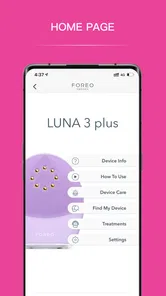
Managing your FOREO devices through the app is a piece of cake. From registering your device to firmware updates, the app handles it all seamlessly. It's perfect for those of us who aren’t exactly tech-savvy but want to maintain our devices effortlessly. And if you ever run into an issue, the app provides excellent customer support options.
If a routine stalls, I would separate an app problem from a device or connection problem before starting over. Reopen the app, check that the device is available to connect, and retry the relevant step; if the device itself is not responding, repeatedly changing app settings is unlikely to help. For persistent trouble, use the support options in the app rather than guessing at a fix. Keeping the device and app workflow simple also makes it easier to identify where the snag is.
That distinction matters because a connected app cannot resolve every physical-device issue. If the device does not respond when used outside the app, I would stop treating the phone as the likely cause and consult the relevant device guidance or support. If the device works but the app cannot complete a step, then revisiting the connection and setup sequence makes more sense. This avoids a frustrating loop of reinstalling or changing settings without knowing what problem those actions are meant to solve.
For anyone wondering whether the app is worth installing before buying or using a device, I would decide based on the role you want it to play. It makes the strongest case for someone who already has a compatible FOREO device and wants guidance or device management in one place. Someone who only wants to track products, build a simple reminder, or keep occasional notes may be better served by tools they already use, with no pairing step to maintain.
FOREO For You is a free beauty app from FOREO, with an Everyone content rating. It has a 4.8 average from around 11,000 ratings and more than a million installs. The current version is 4.2.1, and it runs on Android 7.0 or later. Those figures suggest a well-established audience, but they do not guarantee that every device setup will feel effortless; your experience still depends on whether its connected routine fits your habits.
Its audience size is reassuring as a sign that the app is not an obscure experiment, but popularity is not the same as personal fit. I would weigh the connected-device benefit more heavily than the rating if I were deciding to keep it. If I found myself opening it only during setup and never using the routines afterward, a simpler approach would make more sense. If the prompts help me use a device consistently and the management tools are useful, then the extra app has a clear job.
One realistic way to judge that fit is to try a week of ordinary use without adding new products or changing several habits. Use the device as you normally would, open the app when guidance is genuinely helpful, and notice whether it reduces uncertainty or adds steps. This is not a skin-treatment test; it is a test of whether the app fits your day. If the connection is dependable and the routine feels manageable, it earns a place. If it repeatedly interrupts a routine you already understand, there is little reason to force it.
So, if you're looking for an app that brings a touch of high-tech to your skincare routine, FOREO For You might just be what you need. It's not just about skincare; it's about making the process enjoyable and tailored to you. Give it a go, and let your skin thank you later!
FOREO For You Frequently Asked Questions
What devices and operating systems can I use FOREO For You on?
FOREO For You is a beauty app developed by FOREO, and it requires Android 7.0 or later on Android devices. Before downloading, check that your phone or tablet meets that requirement and that your FOREO device is compatible with app connectivity. The app is free to download, so you can install it and explore its features without paying for the app itself.
What is the FOREO For You app and how does it work?
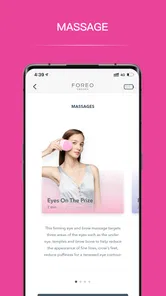
The FOREO For You app is a specialized application designed to enhance your skincare routine by connecting with FOREO beauty devices. Once paired with your FOREO device, the app provides personalized skincare routines, tracks your skin's progress, and offers various treatment options. The app's user-friendly interface allows you to easily navigate through its features, ensuring you get the most out of your beauty device.
Is the FOREO For You app compatible with all FOREO devices?
Not all FOREO devices are compatible with the FOREO For You app. While many of the newer models are designed to work seamlessly with the app, some older devices may not offer this connectivity. It's important to check the compatibility of your specific model before downloading the app to ensure you can take full advantage of its features.
What are the benefits of using the FOREO For You app with my FOREO device?
Using the FOREO For You app with your device provides numerous benefits such as personalized skincare routines tailored to your specific needs, progress tracking, and access to exclusive treatments. The app also offers educational content and tips to maximize your skincare experience, making it a valuable tool for anyone looking to improve their skincare regimen.
Are there any costs associated with using the FOREO For You app?
The FOREO For You app is free to download and use, offering a range of features at no additional cost. However, to fully utilize the app, you will need a compatible FOREO device, which must be purchased separately. There are no in-app purchases or subscription fees, ensuring an accessible experience for all users.
Pros
- User-friendly interface enhances accessibility
- Offers personalized skincare routines
- Integrates seamlessly with FOREO devices
- Regular updates with new features
- Detailed skin analysis for better skincare
Cons
- Limited features without FOREO device
- Requires stable internet connection
- Occasional sync issues with devices
- Initial setup can be time-consuming
- Subscription needed for premium features