Flipster - Digital Magazines
- 154.00
- 2.5
- Installs
- 100.00K
- Price
- Free

Screenshots
Analysis by Reviewed
I approached Flipster - Digital Magazines as a practical reading tool rather than a replacement for every news app on my phone. It is a library-connected magazine service from EBSCO Information Services, and that relationship explains both its biggest strength and its main limitation: access depends on what your library makes available. When the right titles are included, it can turn a library membership into a convenient digital reading shelf. When your preferred magazines are missing, the app has little to offer beyond its basic browsing experience.
That distinction matters before you install it. Flipster is free, aimed at Everyone, and belongs to the News & Magazines category, but “free” here describes the app and its library-based access rather than an unlimited independent magazine subscription. I found it most useful for readers who already use a participating library and want to read selected magazines without carrying paper copies. It is less suitable for someone who expects a broad, universal magazine catalog or wants a conventional subscription app with complete control over every title.
How the everyday reading workflow feels
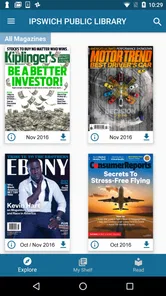
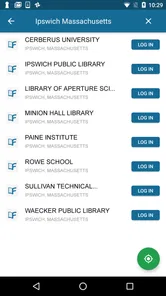
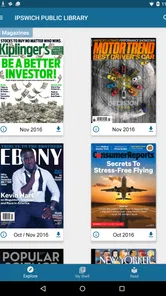
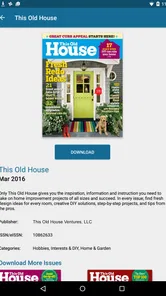
The normal routine is straightforward. I would open the app, identify the library access route, browse the available magazine collection, choose a title, and then settle into an issue. That simple flow is the heart of Flipster. It does not ask me to build a complicated news feed or learn a new publishing system. Instead, it presents magazines in a library context, which makes the experience feel closer to borrowing than purchasing.
The first useful habit is to treat the library connection as the starting point, not as an annoying setup step to rush through. Your available titles determine whether Flipster is valuable, so checking the collection early saves time. If you are considering the app for a particular hobby, profession, or household interest, look at the magazines your library provides before changing your reading routine around it. The service is strongest when its catalog matches a real need.
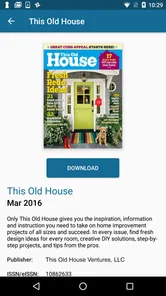
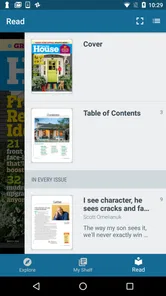
Once inside an issue, I prefer reading in short, intentional sessions. A magazine is not organized like a stream of brief posts, and trying to skim it exactly as I would a social feed can make the experience feel slower than it needs to be. I get more from Flipster when I choose an issue, scan its cover and contents, and then decide whether I want a quick article, a longer feature, or a few pages of visual browsing.
A realistic use case is a quiet ten-minute break when I want something more substantial than headline scrolling. I can open a magazine connected to my library, read one feature, and stop without committing to a full issue. Another good scenario is travel: a digital issue is easier to carry than several paper magazines, provided I have already arranged access and the reading experience suits me on that device.
The app also works well for households that use a library regularly. One person might browse lifestyle content, another might check technology or current-interest titles, and both can approach the same service from their own reading habits. That shared-library angle is more important than flashy presentation. Flipster’s value comes from making an existing public or academic resource easier to reach.
More From Our News Desk

Weather by Xiaomi Review: Clear at a Glance, Less Clear Up Close

X Under Pressure: Can It Recover When Posting Goes Wrong?

Clash of Clans Is Won Between the Battles

Android Auto Makes the Case for Quieter Car Software

MobiOffice: Transforming Mobile Productivity with Seamless Integration

EA SPORTS FC™ Mobile Soccer: Redefining Mobile Sports Gaming
Still, I would not confuse digital availability with perfect convenience. Magazine reading depends on screen comfort, navigation, and the way each issue has been prepared for the service. Some readers will enjoy the page-based feeling, while others will find a phone too cramped for layouts designed for print. A tablet is generally the more natural environment for extended reading, while a phone is better for checking a short piece or browsing between activities.
What I would check before relying on it
Before making Flipster part of my weekly routine, I would answer three practical questions. Does my library participate? Are the titles I actually want included? And is my usual reading device comfortable for magazine pages? These questions are more useful than judging the app from its icon or general category because the service is only as good as the combination of library access, catalog selection, and screen experience.
I would also decide whether I need current magazine issues or simply occasional reading material. If I follow one publication closely and need every issue immediately, a publisher’s own app or a direct subscription may be a better fit. Flipster makes more sense when I value variety through a library and do not want to pay separately for each title.
The app has a 2.5 average from around 395 ratings, with roughly 154 written reviews. I read that as a reason to keep expectations measured rather than as a complete verdict on the service. A library-dependent app can feel excellent to one reader with a strong local collection and disappointing to another whose preferred titles are unavailable. Reviews may also reflect access and device frustrations as much as the reading content itself.
Settings and habits that make the service easier
Experienced use begins with checking the parts of the app that affect reading friction. I would look through the available account or library options first, confirm that the correct library is being used, and pay attention to any reading preferences the app exposes. Even small adjustments can matter when magazine pages contain dense text, wide layouts, or detailed images.
I would not change every option immediately. A better approach is to read one complete article and notice what slows me down. If page movement feels awkward, I would test the available navigation style. If text is difficult to inspect, I would look for a more readable viewing method where the issue supports it. If I mainly browse covers and contents, I would prioritize quick page movement over a setting designed for long-form reading.
One useful trade-off is choosing between the visual design of the original page and a more comfortable reading view, when both are available for an issue. The original layout preserves the magazine’s intended design and is often best for photography, charts, and product pages. A text-focused view can be more practical for an article, especially on a smaller screen. I would switch according to the content instead of forcing one mode for everything.
Another habit is to keep the app’s role clearly defined. Flipster is not necessarily the place where I discover every breaking story. I use it for curated magazine reading, background, specialist interests, and slower coverage. For urgent headlines, a dedicated news app is usually faster. For deep magazine reading without library dependence, a publisher or subscription platform may offer a more predictable catalog.
Because access is courtesy of a library, I would also avoid assuming that the same collection follows me everywhere. Library authentication can shape the experience, and a change in account, institution, or access method may require attention. I would confirm access before a long trip rather than waiting until I am offline or away from my normal library routine. That is a small but important planning step for anyone treating digital issues as travel reading.
Flipster is free to download and use within its intended library arrangement. That makes it attractive for budget-conscious readers, students, families, and anyone who already pays attention to library resources. The financial advantage is clearest when it replaces several occasional purchases. It is less decisive if the library collection is narrow or if you already maintain paid subscriptions to all the magazines you read.
Faster patterns for repeat readers
The quickest way to use Flipster is to create a repeatable sequence rather than browse randomly every time. I would start with a short check of the collection, open the issue that matches my current interest, scan its contents, and save my attention for one or two articles. This prevents the familiar problem of spending the entire reading session deciding what to read.
I also find it helpful to separate “browse” sessions from “read” sessions. During a browse session, I look at covers, headlines, and topics without expecting to finish anything. During a read session, I open one issue with a specific goal. That distinction reduces the temptation to jump between titles and makes a library-sized collection feel manageable.
For regular users, a weekly rhythm can work better than constant checking. I might choose one day to see what is available and then return to selected issues during the week. This is especially useful for people who want magazine reading to replace aimless scrolling. The app becomes a small appointment with longer-form content rather than another notification-driven feed.
A second advanced habit is matching the device to the task. I would use a larger screen for visual magazines, recipes, diagrams, and spreads where the page design carries information. I would reserve the phone for short reading, quick reference, or checking whether an issue deserves more time later. This is not a glamorous trick, but it avoids judging the whole service based on an uncomfortable phone session.
I would also keep notes outside the app if I am reading for study, work, or a project. Magazine services are convenient for access, but they are not automatically a full research workspace. When an article contains an idea I need later, I would record the title and subject in my own note system while the context is fresh. That workflow makes Flipster useful for discovery and background without pretending it replaces a dedicated reference tool.
One non-obvious benefit of the library model is permission to sample. With a direct subscription, I may feel pressure to justify the purchase by reading one publication repeatedly. With Flipster, I can explore a title for a particular issue or topic and then move on. That makes it a good fit for curiosity-driven reading, especially when my interests change from week to week.
Where the experience reaches its limits
The main limitation is catalog dependence. EBSCO Information Services provides the service, but the practical selection a reader sees is tied to library availability. I cannot treat Flipster as a universal kiosk for every magazine. If a specific title is central to my routine, I would verify access first and keep a publisher subscription in mind as the more dependable alternative.
There is also a difference between having an issue available and having the ideal reading experience. Magazine pages often combine text, advertising, photography, sidebars, and unusual layouts. A digital viewer may preserve that design, but preserving it can make small text harder to read on a phone. Conversely, a simplified reading view may improve comfort while losing some of the original page relationship. Readers who care deeply about print-style presentation should test their preferred device before committing.
I would not choose Flipster as my only source for fast-moving news. Its magazine structure encourages depth and presentation, not instant updates. Someone who wants alerts, rapidly changing headlines, live coverage, or a tightly personalized stream will probably be happier with a mainstream news application. Flipster serves a different rhythm: selected publications, longer articles, and library-supported access.
The age rating is Everyone, which fits a general magazine service, but that does not mean every article will suit every personal preference. Magazine collections cover different subjects and editorial styles. Parents or shared-device users should still choose titles thoughtfully, just as they would in a physical library.
The app was released on November 20, 2014, and its current version is 3.5.4. It supports devices running Android 8.0 or later. Those details are useful when deciding whether an older phone can run it, but they do not guarantee that every device will feel equally comfortable for reading. A supported phone can still have a small display, limited battery, or awkward ergonomics for long magazine sessions.
Its install base is over 100,000, which suggests that the service has reached a meaningful audience without making it a universal reading standard. I see that as consistent with its specialized purpose: Flipster is most relevant to people whose libraries participate and whose reading habits fit digital magazines.
Who should use it, and who should skip it
I would recommend trying Flipster if you already have library access, enjoy browsing more than one magazine subject, and want to avoid separate purchases. It is particularly appealing to students, curious readers, families, and occasional magazine readers who prefer sampling to committing. It can also be useful for someone who wants a calmer alternative to headline feeds during short breaks.
I would be more cautious if you need a guaranteed title, a complete back catalog, or a highly polished subscription experience independent of a library. Professional readers who depend on one publication should compare the app with that publisher’s own service. Readers who dislike page-based digital magazines may prefer a text-first news reader. And anyone using an older device should check compatibility before building a routine around it.
My strongest practical advice is to judge Flipster after trying a real article, not just after browsing the collection. Open the kind of content you normally read, use your usual device, and see whether the page navigation and text size feel natural. Then try the same process with a visually rich issue. That two-part test reveals much more than a quick glance at the home screen.
My verdict after building a repeatable routine
After using it as a library magazine shelf, I see Flipster as a useful specialist app rather than an all-purpose news destination. Its best quality is access: it can make library-provided magazines available in a form that fits modern reading habits. Its weakest point is also access, because the experience depends heavily on the participating library’s selection and on how comfortable each issue is on your device.
I like the service most when I approach it with a plan: confirm the library, browse with a purpose, choose the right screen, and read one article instead of endlessly hopping between covers. Those habits make the app feel more capable than its simple premise suggests. They also prevent the common disappointment of expecting it to behave like a paid, universal magazine subscription.
The modest average rating of 2.5 should encourage realistic expectations, especially if your library access or device setup is unusual. Still, ratings alone do not erase the practical value of free library-supported reading. For the right reader, the ability to sample magazines without buying each one can outweigh interface friction and catalog limitations.
My final recommendation is conditional but positive: install Flipster if your library offers the titles you want and you enjoy deliberate magazine reading. Give it a real trial on the device where you will use it most, then build a simple browse-and-read routine. If you need guaranteed publications, breaking news, or a fully independent subscription catalog, choose a different option. For everyone in between, this app is worth exploring because its strongest feature is not a flashy tool; it is the practical bridge between a library collection and your everyday reading time.
Flipster - Digital Magazines Frequently Asked Questions
Do I need a library card or account before downloading Flipster?
Usually, yes: although you can download Flipster for free, reading its magazine collection generally requires access through a participating library, school, university, or other organization. You may need to select your organization and sign in with its account details or a library card. Checking that your organization offers Flipster before installing can help you avoid downloading an app you cannot use.
What kinds of magazines can I find in Flipster?
The magazines available in Flipster depend on the collection chosen by the library or organization that provides your access. Once signed in, you can browse the titles available to your account and open current or back issues where offered. The selection is not necessarily the same for every reader, so it is worth checking your library’s magazine collection if you have particular publications in mind.
What is Flipster - Digital Magazines?
Flipster is a digital magazine reading app that lets users access participating magazines through a smartphone or tablet. It is commonly provided through libraries, schools, universities, or other organizations that subscribe to the service. After signing in with an eligible account, you can browse available titles, open current or back issues, and read them in a page-by-page digital format rather than using printed copies.
Is Flipster - Digital Magazines free to use?
The app itself can generally be downloaded without paying, but access to its magazine collection depends on the organization providing the subscription. Many users receive access through a public library membership, while others may use a school or institutional account. Before downloading, check whether your library or organization supports Flipster and whether a valid membership, login, or library card is required.
Can I read magazines offline with Flipster?
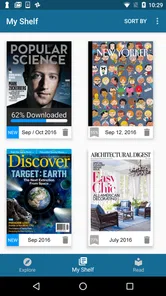
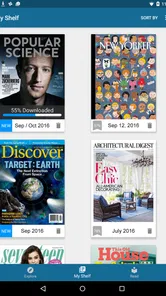
In many cases, Flipster allows users to download magazine issues for offline reading after signing in and opening the desired title. This is useful when traveling or when an internet connection is unavailable. Availability and download behavior can vary by publication and account settings, so it is wise to download issues while connected to Wi-Fi and confirm that they appear in your saved or downloaded section.
Pros
- Large selection of popular magazines in one subscription.
- Clean reader interface makes articles comfortable to browse.
- Offline downloads let you read without an internet connection.
- New issues are added regularly across multiple categories.
- Useful search tools help find titles and topics quickly.
Cons
- Some magazines may have limited back issues available.
- Subscription pricing can vary by region and platform.
- Downloaded issues may use considerable storage space.
- Certain interactive features may not work offline.
- The app may feel less useful if your favorite titles are missing.











