

Five ELD Driver
- 61.00
- 4.5
- Installs
- 50.00K
- Price
- Free

Screenshots
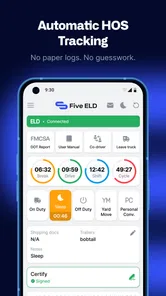
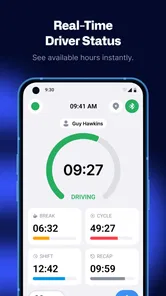
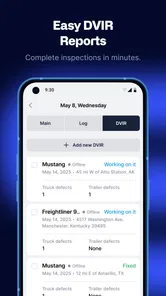

Analysis by Reviewed
When I look at a fleet app, I do not begin with the promise on its store page. I begin with the moment a driver is already busy: the vehicle is ready, a route needs attention, paperwork is waiting, and someone in the office needs a clear update. That is where Five ELD Driver makes the most sense. It is a free Auto & Vehicles app from Five ELD, built around the driver side of fleet management rather than casual personal driving.
My impression is that this is best understood as a working tool for commercial drivers and the people coordinating them. It is not trying to be a navigation app, a fuel-price finder, or a general car-maintenance companion. Its purpose is to bring several parts of a driver’s daily routine into one place, so information can move from the cab to the fleet operation without relying entirely on phone calls, paper notes, or disconnected apps.
The app has been available since November 14, 2020, and its current version is 4.17.0. It is rated for Everyone, which makes the age classification uncomplicated, although the actual audience is clearly professional. With a 4.5 average from around 444 ratings and more than 50 thousand installs, it has attracted enough use to feel like an established tool rather than an experiment. Still, those figures should not replace a practical question: does its workflow fit the way your company already works?
From a parked truck to a completed workday
I find it useful to think of the shift as a sequence of handoffs, starting before the vehicle moves and ending when the office has a clear picture of the day. Preparing the driver’s routine while parked can prevent small setup questions from turning into distractions later. From there, the next section looks at how to keep that routine workable when several demands compete for attention.
The starting condition matters more than the feature list
Imagine a driver beginning a shift in a vehicle that is part of a larger fleet. The driver needs to work within the company’s operating process, while the office needs dependable visibility into what is happening on the road. In that situation, the first challenge is not finding one spectacular feature. It is keeping ordinary events organized: the start of work, changes during the trip, status information, and the handoff back to the people managing the operation.
This is where the driver-focused design is useful. Instead of treating the driver as someone who only receives instructions, the app places the driver inside the information loop. The phone becomes a working point for recording and communicating activity, while the wider fleet process can use that information to make decisions. I find that approach more practical than asking drivers to juggle a general navigation app, messages, paper records, and separate fleet tools at the same time.
That said, this is not automatically the right choice for every motorist. If you drive your own car occasionally, you will probably find the app too specialized. Its value appears when a driver is connected to a fleet workflow and needs a consistent way to pass information along. A private driver looking for directions or reminders should choose a simpler app designed for those tasks.
More From Our News Desk

 Gmail
GmailGmail in a Busy Inbox: Who Benefits Most?
From first account to crowded workday, Gmail earns its place through dependable search and flexible sorting—but its best fit depends on how much inbox maintenance you can tolerate.

 Prime Video
Switching to Prime Video: What Changes in Your Viewing Routine
Prime Video can make a compelling second home for streaming, but switching means learning a different catalog, rental layer, and route from browsing to playback.

 Universal TV Remote Control
Universal TV Remote Control Works Best as a Reliable Backup
A phone remote earns its place through quick setup and reliable habits. Here is how to get more from Universal TV Remote Control—and where its limits show.

 Weather - By Xiaomi
Weather by Xiaomi Review: Clear at a Glance, Less Clear Up Close
Xiaomi’s weather app makes everyday forecasts quick to scan, but its calm surface can leave useful details and recovery paths harder to find than they should be.

 X
XX Under Pressure: Can It Recover When Posting Goes Wrong?
A resilience-focused review of X, examining setup, mistaken posts, interruptions, weak connections, and the gaps that matter when recovery needs to be dependable.

 Clash of Clans
Clash of Clans Is Won Between the Battles
Its raids are quick; its community is a long-term project of coordination, teaching, rivalry, and shared responsibility—with all the friction that entails.
Latest News



Step one: setting up the driver’s side of the operation
The first useful habit is to treat setup as part of the workday, not as an afterthought. A driver should open the app before moving into the active part of the shift, check that the correct working context is available, and make sure the phone is ready to remain useful during the route. Doing this while parked reduces the risk of trying to solve an account or workflow problem at the worst possible moment.
I would also establish a simple company rule around who checks what. The driver should be responsible for entering or confirming information that only the driver can know from the cab. The dispatcher or fleet manager should be responsible for reviewing the incoming information and resolving exceptions. That division prevents a common mistake: expecting the driver to compensate for an office-side problem while driving.
A less obvious benefit of this arrangement is consistency. When every driver begins from the same app and follows the same sequence, the office receives information in a more predictable form. That can be more valuable than a long feature list because predictable handoffs make unusual situations easier to spot. The app cannot fix an unclear company process, but it can give that process one shared place to operate.
Step two: recording the day as it happens
During the route, the driver’s job is not to narrate every second. The useful approach is to update the app at meaningful points: when the work status changes, when an event affects the plan, or when the office needs a current picture of the trip. Entering information at those natural breaks is safer and more realistic than trying to interact with the phone while the vehicle is moving.
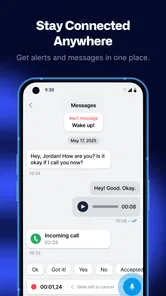
This is one of the areas where a fleet-specific tool can be more helpful than ordinary messaging. A text message may contain context, but it can also be incomplete, buried in a conversation, or written differently by every driver. A structured driver workflow encourages the same type of information to be passed along each time. For a manager comparing several vehicles, that shared structure can make the difference between a quick decision and a chain of follow-up calls.
My practical tip is to avoid treating the app as a diary. Use it for operationally relevant updates, and agree in advance which events require attention. That keeps the driver’s workload reasonable and makes the information more meaningful to the office. If a company asks for constant manual interaction, the problem is not simply the app; the workflow itself needs to be simplified.
Step three: turning driver input into a fleet decision
The real test begins after the driver submits information. A driver app only earns its place when the next person can understand what happened and act without repeatedly asking the same questions. In a good handoff, the driver provides the current situation, the office interprets it against the wider fleet picture, and the next instruction comes back clearly.
For example, a driver may encounter a delay that changes the expected sequence of the day. The useful outcome is not merely that the driver has recorded the delay. The fleet side must be able to recognize its effect, decide whether another task needs to move, and communicate the revised plan. Five ELD Driver is most valuable in this kind of loop, where the phone is one part of a larger operational chain.
This also explains why I would not judge it only by how polished the driver interface feels. Fleet software succeeds through cooperation between the cab and the office. A driver may use the app correctly, yet still experience frustration if dispatchers do not review updates promptly or if company procedures are vague. Before adopting it across a fleet, I would test the complete handoff with a real driver and a real coordinator, not just install the app on one phone.
The everyday scenario where it earns its place
Consider a small carrier with several drivers leaving at different times. One driver starts early, another has a later pickup, and the office needs to keep track of changing conditions without calling everyone repeatedly. The early driver uses the app as the working point for the shift, sends the relevant update when the situation changes, and continues the route. The office can then use that information when coordinating the next vehicle instead of waiting for a separate message.
The important result is not dramatic automation. It is a reduction in scattered communication. The driver has one recognized channel for the fleet process, and the coordinator has a clearer place to look. That can help especially when the company is large enough for informal phone calls to become unreliable but small enough that replacing the whole operational system would be excessive.
I would be careful, however, not to promise that the app alone will create this result. The company still needs clear responsibilities, trained users, and a response habit on the office side. If nobody acts on driver updates, the app becomes another box to tick. Its strongest use case is a team willing to make the information flow part of its normal routine.
Handoffs are where the design is really judged
There are several handoffs in a driver’s day, and each one can introduce friction. The first is between the driver and the phone: the information has to be entered at a sensible time and in a way that reflects what actually happened. The second is between the phone and the fleet team: the update has to reach the people who can use it. The third is between the current plan and the revised plan: somebody must decide what changes next.
Five ELD Driver is a better fit for teams that acknowledge all three handoffs. I would not install it and simply tell drivers to “use it when needed.” Instead, I would define a short operating sequence, demonstrate it while parked, and make sure the office knows what a complete update looks like. This is a non-obvious but important trade-off: the app may simplify communication only after the company invests effort in standardizing communication.
Another practical point is device handling. A driver who is switching between several apps, notifications, and conversations can lose focus quickly. The safest workflow is to prepare before departure and use the app only during lawful, safe stops. That is not a criticism unique to this product; it is a basic condition for any phone-based fleet tool. If a company’s process expects live interaction while driving, no interface can make that acceptable.
What the result looks like after the update loop
At the end of a successful cycle, the fleet team has a more coherent account of the driver’s work, and the driver spends less time explaining the same event through different channels. The office can work from a shared operational record rather than depending entirely on memory, paper, or a scattered message history. For a manager, that means fewer avoidable gaps between what happened on the road and what the business believes happened.
For the driver, the benefit is more modest but still meaningful: a clearer routine. Instead of deciding from scratch how to report every change, the driver follows the company’s established path. That can reduce uncertainty, particularly for newer drivers who need to know not only what to do on the road but also how to communicate it afterward.
I would describe the outcome as coordination rather than convenience. This is not the sort of app I would recommend because it makes a personal errand more enjoyable. I would recommend it when a fleet needs a driver-facing layer that supports accountability and shared awareness. The value grows with the number of people who depend on the same information.
Where the workflow can break
The first weak point is adoption. Drivers may resist any additional step if they already feel overloaded, especially when the company has not explained why the information matters. A tool that is technically capable can still fail if entering updates feels like duplicate work. Managers should therefore remove unnecessary parallel reporting wherever possible instead of asking drivers to use the app and continue every old method unchanged.
The second weak point is unclear ownership. If a driver submits an update but nobody is assigned to review it, the handoff ends in a dead end. Conversely, if several people respond without coordination, the driver may receive conflicting instructions. The app can support a process, but it cannot decide which person in a company has authority to act.
The third is the difference between a driver tool and a complete fleet platform. Some businesses may need a broader system with extensive planning, accounting, maintenance, or analytics capabilities. I would compare Five ELD Driver with the company’s existing tools before assuming it replaces them. It may be the right driver-facing component while another system remains necessary for office work.
There is also a learning curve for teams that have relied on informal communication for years. The interface may be straightforward once the routine is understood, but the change in habits can be harder than the installation. A short trial with one vehicle or one shift pattern would give a manager a better answer than a rushed fleet-wide rollout.
How it compares with familiar alternatives
The usual alternative is a mixture of phone calls, text messages, paper notes, and whatever navigation or vehicle apps drivers already use. That mixture can feel flexible, but it creates inconsistent records and makes it difficult to know which message is current. Five ELD Driver has an advantage when the priority is a shared driver-to-fleet workflow rather than personal convenience.
A general navigation app is still better for many route-finding tasks because it is designed around maps and directions. A messaging app may be faster for a one-off conversation. A spreadsheet may be more comfortable for a manager who wants to review information manually. The reason to choose this app is not that it wins every individual task; it is that a fleet-specific driver tool can connect recurring operational steps more cleanly than those separate alternatives.
On the other hand, a company with a mature fleet platform already in place should check for overlap. Adding another driver app can create duplicate entry, confusion about the official record, and extra training. In that situation, the better option may be the existing platform if it already gives drivers and coordinators a reliable shared workflow. Five ELD Driver makes more sense when the current process is fragmented or when the organization specifically needs its driver-side suite.
Who should use it, and who should skip it?
I see it as a strong candidate for commercial drivers, small and growing carriers, dispatch teams, and fleet managers who want the cab and office to work from the same operational routine. It is especially suitable for teams that are ready to define when drivers report information and who responds to it. The free price also makes it easier to evaluate without turning the first trial into a major purchasing decision.
I would skip it for casual car owners, people looking only for navigation, and drivers who do not belong to a coordinated fleet process. I would also hesitate if the company cannot provide training or does not have anyone responsible for reviewing updates. In those cases, a simpler personal app or an existing company system may produce less friction.
My recommendation after following the full workflow
Five ELD Driver is not compelling because it sounds broad; it is compelling when its broad set of driver and fleet tasks is narrowed into a clear daily sequence. Start parked, establish the driver’s context, record meaningful changes rather than constant noise, pass the information to the right office contact, and close the loop with a clear next step. That is the workflow I would test before making a decision.
The app’s 4.5 average, its 50K-plus install reach, and its continued development through version 4.17.0 suggest that many users see practical value in it. I would still treat those signals as a reason to try it, not as proof that it will suit every carrier. The decisive factor is whether your existing process has a communication gap that a driver-focused tool can genuinely close.
My honest recommendation is to give it a controlled trial if you manage a fleet and want to replace scattered driver reporting with a more consistent handoff. Train one group, define the response responsibilities, and observe where information still gets lost. If the trial reduces duplicate calls and makes the next action clearer, the app is doing useful work. If it merely adds another screen without changing the outcome, your company probably needs a process redesign or a different, more comprehensive fleet platform.
For the right audience, the strongest phrase I can use is a practical bridge between the cab and the fleet office. It is free, available to an Everyone-rated audience, and developed by Five ELD, but its real value depends on disciplined use. I would recommend it to a coordinated professional fleet, while reminding casual drivers that a specialized tool is only helpful when there is a real fleet workflow for it to support.
Five ELD Driver Frequently Asked Questions
Is Five ELD Driver free to download, and who publishes it?
Five ELD Driver is a free Auto & Vehicles app published by Five ELD. It is listed for Everyone, so its stated age rating is broad, but the app is aimed at commercial drivers working with a fleet’s electronic logging setup. Before downloading, it is worth checking with your carrier that it uses Five ELD and can provide the account access needed to use the app.
What is the current version, and is the app established?
The current version is 4.17.0, and Five ELD Driver was released on Nov 14, 2020. It has 50K+ installs, a 4.5 average rating from 444 ratings, and 61 reviews. Those figures suggest it has an active base of users, but they do not replace checking that the app works with your specific carrier account, device, and ELD setup.
What is Five ELD Driver and who is it designed for?
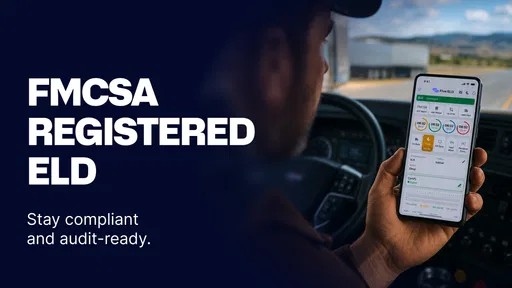
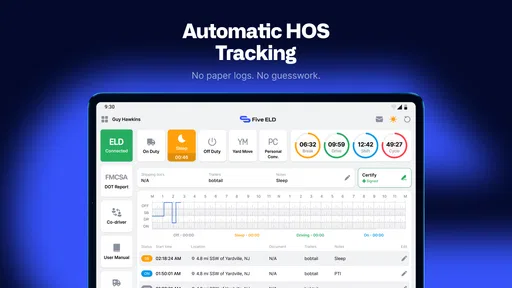
Five ELD Driver is a mobile application intended for commercial drivers who need to manage electronic logging device records and comply with hours-of-service requirements. After signing in through a supported fleet account, drivers can review duty status, inspect driving activity, add required remarks, and communicate relevant information to dispatch. Its usefulness depends on whether the driver’s carrier has activated the service and connected the required ELD hardware or platform.
Does Five ELD Driver work without an ELD device or fleet account?
In most cases, Five ELD Driver is not a completely standalone logbook app. Drivers generally need valid credentials from their carrier and an active connection to the company’s supported ELD system. Without that setup, some features may be unavailable, including automatic driving detection, vehicle information, synchronization, and compliance reports. Before downloading, confirm with your fleet administrator that your account and truck are supported.
What can drivers do with Five ELD Driver?
The app typically gives drivers access to essential electronic logging functions from a smartphone or tablet. Depending on the carrier configuration, you may be able to view and change duty statuses, inspect daily logs, certify records, add annotations, review violations, complete vehicle inspections, and send logs to authorized personnel. Available tools can vary by fleet, user permissions, device compatibility, and the ELD hardware connected to the account.
Pros
- Simple interface makes daily driving logs easy to review.
- Supports quick status updates while keeping records organized.
- Useful for monitoring hours-of-service compliance on the road.
- Clear trip information can help reduce paperwork mistakes.
- Designed for drivers who want essential ELD tools in one app.
Cons
- Requires compatible hardware or service access to work properly.
- Some features may depend on an active account or subscription.
- Limited usefulness for drivers outside supported ELD regulations.
- Bluetooth or network issues can interrupt data synchronization.
- New users may need time to understand compliance-related settings.











