

EvGateway
- 114.00
- 4.1
- Installs
- 10.00K
- Price
- Free

Screenshots
Analysis by Reviewed
Charging an electric vehicle sounds simple until the app, charger, account, and car all have to cooperate at the same time. That is where EvGateway fits in. I reviewed it as a free Auto & Vehicles app for EV drivers, and my impression is that it is most useful as a practical charging companion rather than something you open for entertainment or extensive trip planning.
The app is developed by EvGateway and has been available since March 27, 2018. Its current version is 5.9.9, and it runs on Android 7.0 or later. It is rated for Everyone, which matches the straightforward purpose: helping drivers interact with electric vehicle charging services. The app has a 4.1 average from around 572 ratings, with more than 10K installs, so it has a modest but established presence.
My main advice is to judge it by the job you need done. If you want a dedicated way to manage charging through the EvGateway ecosystem, it can be a useful tool. If you expect a universal replacement for every charging-network app, a complete route planner, or a live technical diagnostic system for your car, you may find its role narrower than expected.
Where charging-app users usually get stuck
The first difficulty is often not the app itself. EV charging involves several separate points of failure: the vehicle may not be ready, the connector may not be seated correctly, the charging station may be occupied or unavailable, or the account may not be recognized. When an app appears to do nothing, it is tempting to blame the software immediately, but the real problem can be anywhere along that chain.
With EvGateway, I would begin by treating the application as one part of the charging process. Before trying repeated taps, I would check whether the phone is connected to the internet, whether the vehicle is parked correctly, and whether the charging cable is fully inserted. A small physical issue can make an app action appear unsuccessful because the station has not reached the state needed to accept it.
Another common sticking point is expecting instant visual confirmation. Charging systems can take a moment to update after a plug is inserted or a session is started. If I moved rapidly between screens or repeated an action, I could make the situation harder to read. My better habit would be to perform one action, pause, and then check whether the vehicle or charger has responded before trying again.
It is also worth remembering that a charging app is not necessarily the same thing as the car’s own dashboard or the station’s physical controls. The vehicle may show that it is connected while the charging session has not actually begun. Conversely, a station may be preparing a session while the phone has not refreshed yet. Comparing the app’s state with the car’s indicator and the charger’s visible status is more reliable than trusting one screen alone.
More From Our News Desk

 Gmail
GmailGmail in a Busy Inbox: Who Benefits Most?
From first account to crowded workday, Gmail earns its place through dependable search and flexible sorting—but its best fit depends on how much inbox maintenance you can tolerate.

 Prime Video
Switching to Prime Video: What Changes in Your Viewing Routine
Prime Video can make a compelling second home for streaming, but switching means learning a different catalog, rental layer, and route from browsing to playback.

 Universal TV Remote Control
Universal TV Remote Control Works Best as a Reliable Backup
A phone remote earns its place through quick setup and reliable habits. Here is how to get more from Universal TV Remote Control—and where its limits show.

 Weather - By Xiaomi
Weather by Xiaomi Review: Clear at a Glance, Less Clear Up Close
Xiaomi’s weather app makes everyday forecasts quick to scan, but its calm surface can leave useful details and recovery paths harder to find than they should be.

 X
XX Under Pressure: Can It Recover When Posting Goes Wrong?
A resilience-focused review of X, examining setup, mistaken posts, interruptions, weak connections, and the gaps that matter when recovery needs to be dependable.

 Clash of Clans
Clash of Clans Is Won Between the Battles
Its raids are quick; its community is a long-term project of coordination, teaching, rivalry, and shared responsibility—with all the friction that entails.
Latest News



For a new user, the most important mental model is this: EvGateway can help with the digital side of charging, but it cannot correct a disconnected cable, a vehicle setting, a faulty outlet, or an unavailable station. That distinction prevents a lot of wasted troubleshooting.
Why the first charging attempt deserves extra care
On the first visit, I would avoid testing the app when the battery is nearly empty and I am already in a hurry. A calmer first session makes it easier to learn the sequence: open the app, identify the charging location or service, connect the vehicle as appropriate, and confirm that the session has really started. Once that routine is familiar, a later stop becomes much less stressful.
I would also keep the phone available until charging is visibly underway. Walking away immediately after initiating a session is risky because it removes the easiest opportunity to notice an account prompt, an unsuccessful start, or a connection problem. This is a small habit, but it matters more than repeatedly reinstalling an app.
Setup checks that save time
Installing a charging app is only the beginning. Before relying on EvGateway for an important trip, I would make sure the phone meets the Android requirement and that the application opens normally. Since the minimum supported operating system is Android 7.0, older devices should be checked before a journey rather than at the charger.
I would then sign in or complete any required account steps while I still have a stable connection. The practical reason is simple: a station is a poor place to discover that an account detail needs attention. I would also verify that the account I am using is the one intended for charging, especially if more than one person shares the vehicle or phone.
A useful preparation trick is to open the app before leaving home and look through the screens without starting anything. This helps me recognize the normal layout and makes it easier to distinguish a genuine error from a screen that simply needs time to update. It also avoids learning the interface with a queue of cars behind me.
Because charging availability can change, I would not treat any location shown in a charging app as a guarantee that a connector will be free when I arrive. EvGateway may be useful for the charging workflow, but I would still allow extra time on a busy route. For long journeys, I would keep a backup plan involving another suitable charging option or enough battery reserve to reach one.
One non-obvious benefit of this approach is that it separates preparation from emergency use. If the app opens, the account is ready, and I understand the basic controls before the battery is low, I can focus on the actual station instead of troubleshooting the phone under pressure.
What I would check before leaving
Confirm that the phone uses Android 7.0 or a later version.
Open EvGateway while the phone has a dependable connection.
Make sure the correct account is ready for the intended charging session.
Inspect the charging cable and connector before arriving at the station.
Plan a fallback charging option for a long or time-sensitive drive.
I would not overcomplicate this preparation with assumptions about advanced car integration. The safest expectation is that the app supports the charging-related workflow available through its service, while the vehicle and station remain separate systems that must also be ready.
Recovering a charging workflow without making it worse
When a session does not start, I prefer a controlled recovery sequence. First, I would stop tapping and read the current state. Is the cable connected? Does the vehicle indicate that it recognizes the connection? Is the station showing an error or simply waiting? These observations tell me whether to focus on the app, the physical connection, or the station.
Next, I would check the simplest causes: phone connectivity, cable seating, and whether the vehicle is in the correct parked state. If the app seems frozen, I would close and reopen it once rather than repeatedly forcing actions. A single restart can clear a temporary interface problem; repeated commands can create uncertainty about whether a session was actually requested.
If the application opens but information looks outdated, I would give it a moment and compare it with the charger and vehicle indicators. Refreshing can be useful, but refreshes are not a substitute for checking the physical equipment. In my experience, the most valuable recovery step is often confirming what the car is doing rather than staring at the phone.
If the session has apparently started, I would verify it in two places before leaving: the vehicle’s charging indicator and the station’s own status. This is one of the most practical habits for avoiding a silent failure. An app screen alone may not tell the whole story, particularly during the few moments when systems are synchronizing.
If the session will not begin after those checks, I would move to the next available support or station procedure rather than repeatedly reinstalling EvGateway. Reinstallation is a last resort because it can introduce new setup work without fixing a problem in the charger or account. I would also avoid deleting account information during a stressful charging stop unless I already know exactly how it will be restored.
A realistic everyday example
Imagine arriving home after work with enough battery for the evening but not enough confidence for the next morning. I would connect the car, open EvGateway, and wait for the charging state to become clear. If the car shows no charging activity, I would first reseat the connector and check the vehicle’s status. If the car begins charging but the app looks delayed, I would avoid disconnecting everything immediately; I would give the systems time to catch up and compare the indicators again.
If the app still does not reflect the session, I would treat the car’s confirmed charging state as the immediate priority and investigate the app afterward. That distinction is important: a display problem is less urgent than a charging failure, and a charging failure is less likely to be solved by random screen taps than by checking the cable, vehicle settings, and station response.
This workflow also shows where the app is most valuable. It gives me a digital point of interaction and a way to keep the charging task organized, but it does not remove the need for basic awareness at the vehicle. EV charging remains partly physical, and the best app experience cannot change that.
When the app is not the cause
Some problems sit outside EvGateway. A vehicle can refuse to charge because of its own scheduled-charging settings, a connector can be damaged, or a station can be temporarily unavailable. In those cases, changing app settings will not solve the underlying issue. I would check the car’s charging schedule and dashboard messages before deciding that the application is broken.
Network conditions are another source of confusion. If the phone has weak connectivity, the app may not update promptly even though the station is functioning. I would move to a location with a better signal when possible and avoid assuming that an old status means the charger is still in exactly the same condition.
Account-related friction can also look like a station failure. If the app repeatedly returns to a sign-in screen or does not recognize the intended service, I would carefully confirm the account details rather than creating several new accounts. Multiple accounts can make it harder to understand which one is connected to the charging activity.
There is a useful boundary here. EvGateway is a sensible choice for someone who wants an app centered on EV charging, but it is not the right single tool for every driving need. Drivers who regularly compare many unrelated charging networks may prefer a broader charging directory or route-planning service alongside it. Drivers who mainly need vehicle diagnostics may be better served by the manufacturer’s application or a dedicated diagnostic tool.
I would also skip it if I rarely charge an electric vehicle and do not use the service it supports. Installing a charging app without a real charging workflow in mind adds little value. Likewise, someone expecting a highly detailed travel planner, extensive car controls, or a universal wallet for every possible provider should compare alternatives before making it their only app.
How it compares with the usual alternatives
The most common alternative is the vehicle manufacturer’s app. That option may be more natural for checking the car itself, viewing vehicle-specific information, or managing functions tied directly to the model. EvGateway makes more sense when the immediate task is the charging service rather than a complete digital companion for the vehicle.
Another alternative is using a station’s own physical interface or a separate network application. Physical controls can be useful when the phone has poor connectivity, while a network-specific app may offer a more direct relationship with that provider. The trade-off is that switching between several apps can become inconvenient, especially during a trip with multiple charging stops.
A general route-planning app may be better for drivers who need to calculate charging stops across a long journey. Its strength is trip context, not necessarily the hands-on charging workflow. I see EvGateway as complementary in that situation: one tool can help decide where to stop, while the charging-focused app can handle the relevant session when supported.
The choice therefore depends on the driver’s priority. If I want one familiar place for a particular charging routine, EvGateway is easier to justify. If I want broad network discovery, car controls, route planning, and charging history all in one place, I would look beyond it or use it together with other tools.
My practical verdict after using it
I find EvGateway most convincing as a focused, free utility for EV drivers who need a straightforward charging companion. Its age rating of Everyone makes sense, and the app’s established release history suggests that it is not a brand-new experiment. The 4.1 average is a reasonable sign that many users find it useful, although an average score cannot predict how well it will fit every vehicle, station, or charging routine.
The strongest reason to try it is practical: it can become part of a repeatable charging habit. Prepare the account before a trip, open the app before connecting, confirm the physical connection, and verify that charging has really begun. That workflow is more important than any individual button because it reduces the chance of leaving a station with an assumed but inactive session.
My main reservation is that users may expect the app to solve problems belonging to the car, charger, account, or mobile network. It cannot replace those systems. The best experience comes from treating EvGateway as one layer in the process and using the vehicle and station indicators as equally important evidence.
For an EV owner who wants a dedicated charging app and is comfortable with a little hands-on checking, I would recommend giving it a try. For someone seeking a universal travel planner or a complete vehicle-control center, I would choose a broader solution instead. The key is to use EvGateway as a charging workflow tool, not as a cure for every problem that can happen at a charger.
Overall, I would keep it installed if my regular charging routine matched its service. It is free, accessible to a wide age group, and focused enough to be useful without demanding much from the user. Just test it before an urgent journey, learn how its status compares with the car’s own indicators, and keep a backup plan for the occasions when the real fault is at the station or vehicle rather than in the app.
EvGateway Frequently Asked Questions
What devices can run EvGateway?
EvGateway is an Auto & Vehicles app for electric vehicle drivers. It requires Android 7.0 or later, so check your device’s operating system before installing. The app is free and rated for Everyone. If your phone meets the minimum requirement, you can download it and explore the charging services available in your area.
Who develops EvGateway, and is it an established app?
EvGateway is developed by EvGateway and has been available since March 27, 2018. It has more than 10,000 installs and an average rating of 4.1 from 572 ratings, with 114 written reviews. Those figures offer a sense of its reach and user feedback, though your experience will depend on local charging coverage and the services you use.
What is EvGateway and what can I use it for?
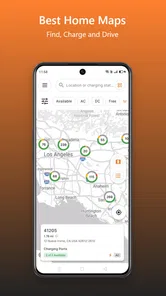
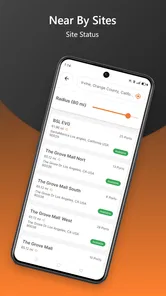
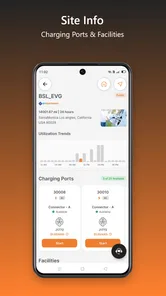
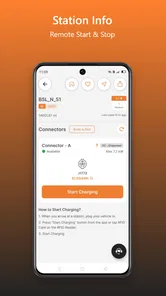
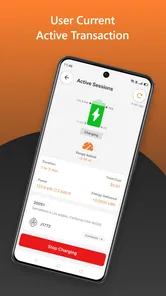
EvGateway is designed to help electric vehicle drivers interact with compatible charging services through a mobile device. Depending on the supported network and region, the app may let you locate charging stations, review charger details, check availability, start or stop a charging session, and monitor charging progress. Its usefulness depends on local coverage, participating operators, and the vehicle or charger compatibility available in your area.
Is EvGateway compatible with my electric vehicle and charging station?
Compatibility should be checked before downloading or relying on EvGateway for a trip. The app generally works with charging infrastructure connected to its supported network rather than with every EV or public charger automatically. Review the station information shown in the app and confirm that your vehicle’s connector, charging standard, account requirements, and location are supported. Compatibility can vary by country, operator, and charger model.
Does EvGateway require an account or payment information?
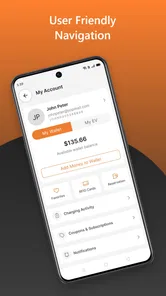
Many charging platforms require users to create an account before they can activate a charger or access billing features. EvGateway may request personal details, vehicle information, and a payment method, depending on the operator and the services enabled in your region. Before starting a session, check the displayed pricing, possible connection fees, taxes, and authorization requirements so you understand how the charge will be billed.
Pros
- Centralizes electric vehicle charging access in one app.
- Helps locate compatible charging stations while traveling.
- May simplify payment and session management at supported chargers.
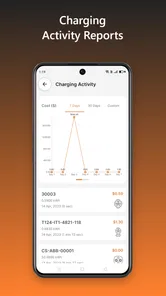
- Useful for monitoring charging activity and station availability.
- Can reduce the need to use multiple charging-network apps.
Cons
- Coverage and station features may vary by country or charging provider.
- Some stations may show outdated availability information.
- Requires an account and internet connection for many functions.
- Pricing details can differ between networks and may not be immediately clear.
- The app is less useful in areas with limited participating chargers.











