Enigma: What’s that in the Sky
- 182.00
- 3.5
- Installs
- 100.00K
- Price
- Free

Screenshots
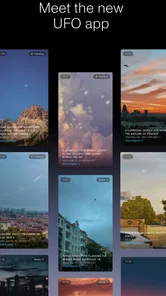
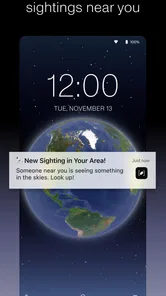
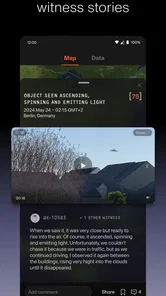
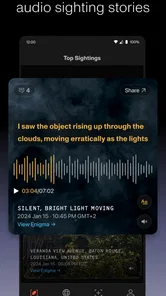
Analysis by Reviewed
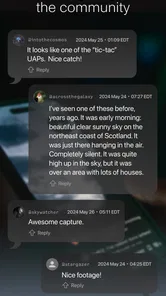
I approached Enigma: What’s that in the Sky as a news and observation app rather than as a game or a simple UFO gallery. Its main purpose is to let people report drone and UFO sightings, and that focus changes the way I use it. I am not opening it only to scroll through unusual images; I am checking it when something in the sky catches my attention, when I want to understand a nearby report, or when I want to add a careful account of my own.
The app is free, which makes it easy to try without making a financial commitment. It comes from Enigma Labs, LLC, and its audience is broad enough for curious newcomers, aviation watchers, local observers, and people who want a more organized way to document something they saw. At the same time, I would not treat it as a replacement for a conventional breaking-news app or an authoritative aviation alert service. Its value is in collecting and exploring reports, not in turning every unexplained sighting into a confirmed event.
How the connected experience shapes each report
When I use a connected sighting app, the report is only one part of the experience: what I notice, what I record, and how I later compare it all affect its usefulness. This section looks at those handoffs and why a careful personal account can become more informative when it is considered alongside other observations. Keeping observation separate from interpretation is the habit I would carry through each step.
Why the network matters when something is happening now
The most important part of using this app is timing. If I notice a strange light while walking home, the experience depends on being able to reach the reporting flow and move through it while the details are still fresh. That makes Enigma more useful in the moment than a notes app that leaves the information isolated on my phone. A report can become part of a wider record instead of remaining a private reminder that I may forget to revisit.
That same connected approach is useful when I am investigating a sighting rather than submitting one. Looking at reports around a location can provide context that I would not get from a single photograph or a conversation with a friend. A nearby report does not automatically prove that two people saw the same object, but matching time, direction, weather impressions, and movement can help me ask better questions. I find that more valuable than simply browsing dramatic descriptions without any local context.
There is also a social dimension to the app’s news-and-magazine character. Reports are not just personal diary entries; they are part of a stream that encourages comparison. That can be engaging when several people are paying attention to the same area. It can also make the quality of each contribution more important, because a vague report adds less value than one written with restraint and useful detail.
What I record before pressing submit
My best habit with an app like this is to pause before reporting. I first note the approximate time, where I was standing, the direction I was facing, how long I watched, and whether the object changed speed, brightness, or direction. I also separate what I directly observed from what I guessed. Calling something a drone, aircraft, satellite, balloon, or unidentified object too early can distort the report before anyone else has a chance to assess it.
More From Our News Desk

Weather by Xiaomi Review: Clear at a Glance, Less Clear Up Close

X Under Pressure: Can It Recover When Posting Goes Wrong?

Clash of Clans Is Won Between the Battles

Android Auto Makes the Case for Quieter Car Software

MobiOffice: Transforming Mobile Productivity with Seamless Integration

EA SPORTS FC™ Mobile Soccer: Redefining Mobile Sports Gaming
This is one of the less obvious strengths of a dedicated sighting service: it encourages me to preserve observation details that a casual social post usually loses. A short post saying “strange light tonight” may attract attention, but it is difficult to compare later. A more disciplined account is less exciting to write and much more useful to read.
I would also avoid treating a phone camera as proof. Night footage can exaggerate movement because of hand shake, autofocus changes, digital zoom, and exposure adjustments. I use the app to document what I saw, not to promise that a blurry recording explains itself. That distinction matters if the goal is responsible reporting rather than instant speculation.
Using it in ordinary mobile situations
Enigma fits naturally into mobile moments because sightings rarely happen at a desk. I can imagine opening it from a park, a balcony, a roadside stop, or a backyard. The phone is already the device I would use to check the time, capture a photo, or write down a direction, so keeping the reporting process on the same device feels sensible.
Still, I would not try to complete a detailed report while walking through traffic, standing in poor weather, or watching an object that may disappear in seconds. The safest workflow is to observe first and write afterward. If I have a few seconds, I might make a quick private note with the essential facts, then complete the report when I am stationary. This reduces the chance of missing the event because I was looking down at the screen.
That workflow also helps with battery and attention. A person who constantly keeps a camera open, increases screen brightness, or repeatedly refreshes a feed is asking more from a phone than someone who records one short observation and closes the app. Enigma is most practical when it supports the observation instead of becoming the main event.
For travelers, the location aspect can be especially useful, but it deserves care. A report connected to the wrong place is misleading, and a rushed submission may be less helpful than one completed later with the correct context. I would check the location details before sending anything, particularly if I am near a city boundary, on a moving vehicle, or using a phone whose location estimate is uncertain.
When connectivity breaks the flow
The weakest moment for any connected reporting app is the moment the network becomes unreliable. If I am in a rural area, inside a building with poor reception, or moving between coverage zones, I would not assume that every screen or submission will behave smoothly. The practical response is to preserve the observation separately until the connection is stable, then enter it carefully rather than repeatedly tapping through a failing form.
This is also where expectations matter. I see Enigma as a service that benefits from connectivity, not as a guaranteed substitute for a local notebook or the phone’s basic camera and notes tools. If an event matters to me, I keep the raw details outside the app until I know the report has gone through. That small precaution protects against losing the time, location, or description during an interrupted session.
Recovery is easier when I avoid rewriting the story from memory. I would save the original photo or video, retain the rough time, and write a short timeline immediately. Later, when the app is usable again, I can transfer those details without embellishing them. This is a better process than trying to reconstruct a sighting after an evening of unrelated activity.
The same principle applies when browsing. A feed that loads slowly can tempt me to refresh repeatedly, which adds frustration without improving the quality of the information. I prefer to step away and return later, especially if I am only exploring reports rather than responding to an urgent event. The app is more enjoyable when I treat it as a record to investigate, not a live emergency channel.
Making the app less demanding on mobile data
Because the experience revolves around reports and may involve visual material, I use it more carefully on a limited mobile plan. I avoid opening every image or replaying every clip simply because it is available. Instead, I start with the report’s basic context and inspect the most relevant material. This makes the app more manageable during travel and keeps casual curiosity from turning into unnecessary data use.
Uploading is where I would be most deliberate. A full-resolution video can be much larger than the information needed for an initial account, while excessive compression can make an important detail impossible to see. I would keep the original file, choose a sensible copy for sharing when possible, and add a clear description of what the media shows. The goal is not to create a dramatic upload; it is to provide material that other people can interpret.
I also think about privacy before sending anything. A photo taken from home may reveal a window view, a street sign, a building layout, or other clues about where I live. A report should describe the sighting accurately without exposing more personal information than necessary. That is a general mobile habit, but it becomes particularly relevant when location and visual evidence are central to the service.
For a person who mainly wants headlines, a traditional news app may use data more predictably and provide clearer editorial filtering. Enigma is different because the user’s attention is directed toward observations and reports. I would choose which material to open rather than letting curiosity lead me through an endless sequence of media files.
How it compares with familiar alternatives
The closest alternative is probably a general social network. Social platforms are faster for sharing a surprising clip with friends, and they can produce immediate reactions. Their weakness is that posts often lose precise context, disappear into a fast-moving feed, or become dominated by guesses. Enigma’s dedicated purpose gives a sighting a more appropriate home, especially when I care about location, timing, and comparison rather than instant popularity.
A notes app is better for private, offline-first capture. It gives me control and works well when I am outside coverage, but it does not offer the same sense of contributing to a shared collection. I use notes as a safety net and Enigma as the place for a report I am ready to share. That combination is more reliable than forcing one tool to handle every stage.
A conventional news app remains the better choice for verified world events, official announcements, and broad reporting. Enigma occupies a narrower space: it helps people document and explore unusual observations. I would not open it expecting the same editorial certainty as a newspaper, nor would I use a conventional news feed when my main goal is to record something I personally witnessed.
There is also a difference between this app and specialist aviation or astronomy resources. Those tools may be better when I want to identify a known aircraft, satellite, planet, or weather phenomenon through technical reference material. Enigma is more useful when I want to preserve the observation and see whether other people have reported something comparable. Choosing between them depends on whether my first question is “what was it?” or “has anyone else seen this?”
Who will get the most from it
I think the app suits people who enjoy careful observation and are willing to describe uncertainty honestly. It is a good fit for someone who notices unusual activity during a commute, follows local sky reports, or wants a dedicated place for documenting drone sightings. It can also help amateur investigators organize their attention, provided they resist the urge to treat every unexplained object as extraordinary.
A realistic example would be an evening walk during which I notice a light moving irregularly above the rooftops. Rather than posting a rushed claim, I would note the time, stop somewhere safe, record a short clip if possible, check my direction, and later submit a measured account. I could then review nearby reports and compare the timing. Even if the object turns out to be ordinary, the process has produced a more useful record than a vague message to a group chat.
The app is less suitable for someone who wants authoritative answers immediately, a polished stream of mainstream headlines, or guaranteed access in every location. It may also disappoint users who expect spectacular evidence on demand. Reports can be ambiguous, and the act of collecting them does not remove that ambiguity. In my view, the right mindset is curiosity with discipline.
What the current release tells me
The app launched on February 27, 2025, and the current release is version 2.3.2. It supports Android 7.0 and later, which keeps the compatibility range fairly welcoming for people using older Android phones. I would still keep the app updated when possible, particularly for a service whose usefulness depends on smooth access to current reports and reliable submission behavior.
Its audience has reached over 100 thousand installs, while the average rating sits at 3.6 from around 472 ratings. I read that as a sign of genuine interest mixed with uneven experiences, rather than as a reason to dismiss the app or accept it without question. The age classification is Everyone 10+, which matches the general subject matter, although individual reports or images may still be more unsettling for younger users than the label suggests.
Since it is free, the main cost is attention, storage for any media I choose to keep, and mobile data when I browse or upload away from Wi-Fi. That makes experimentation easy, but it also means I need to bring my own standards. A free reporting tool is only as useful as the care people take with location, timing, descriptions, and evidence.
My connectivity verdict
After using Enigma as a reporting and exploration tool, I see its strongest quality in the connection between a personal observation and a wider record. It gives a sighting more structure than a casual post and more public purpose than a private note. The experience is best when I have enough time and reception to describe what happened accurately, then compare it with other reports without rushing to a conclusion.
Its limitations are closely tied to that same design. A weak signal can interrupt the process, media can make browsing or uploading more demanding, and the information itself requires judgment. I would keep a basic note or original recording until a submission is safely completed, use mobile data selectively, and avoid confusing community reporting with confirmed news.
My recommendation is simple: try it if you want to document and investigate sightings, not if you need instant certainty. For a curious Android user with a reliable connection and a patient approach, this free News & Magazines app offers a focused way to turn “what was that?” into a clearer, shareable account. For people who prefer verified headlines, technical identification tools, or completely private offline notes, another option will probably feel more natural.
Enigma: What’s that in the Sky Frequently Asked Questions
What kind of app is Enigma: What’s that in the Sky?
Enigma: What’s that in the Sky is a News & Magazines app from Enigma Labs, LLC, focused on reporting drones and UFO sightings. It offers a place for people interested in unusual activity in the sky to engage with that subject. The app is free and is rated for Everyone 10+, so its topic and content are intended for a broad audience.
What is Enigma: What’s that in the Sky?
Enigma: What’s that in the Sky is a mystery-focused game built around investigating unusual events and discovering what is happening above you. It encourages observation, exploration, and careful interpretation rather than relying only on fast action. As you progress, clues gradually help form the bigger picture, making it a good choice for players who enjoy atmospheric stories, puzzles, and curiosity-driven gameplay.
How does the gameplay work in Enigma: What’s that in the Sky?
The game centers on examining your surroundings, noticing strange details, and connecting information to solve the central mystery. Progress may require exploring different areas, interacting with objects, and paying attention to visual or narrative clues. The experience is generally better suited to thoughtful players who enjoy taking their time, since rushing through scenes can make it easier to overlook important details.
Is Enigma: What’s that in the Sky suitable for children?
Whether it is suitable for children depends on their age and tolerance for mysterious or slightly unsettling themes. The game is not primarily designed as a competitive action title, but its atmosphere and unknown events may feel tense to younger players. Parents should review the store rating, content descriptions, and any available screenshots before downloading, especially if their child prefers lighthearted games.
Does Enigma: What’s that in the Sky require an internet connection?
The internet requirements can depend on the version and platform you install. Many story-driven experiences can be played offline after installation, but updates, advertisements, cloud features, analytics, or certain online functions may still require a connection. Before starting, check the official Google Play or App Store listing and test the game in airplane mode if offline access is important to you.
Pros
- Relaxing gameplay with a gentle pace suitable for short sessions.
- Beautiful sky-themed visuals create a calm and atmospheric experience.
- Puzzles encourage observation and attention to small visual details.
- Simple controls make it accessible for casual players of all ages.
- Works well as a quiet
- distraction-free game for unwinding.
Cons
- Some puzzles may feel too easy for experienced players.
- The slow pace may not appeal to users seeking action or challenge.
- Progression can become repetitive after extended play sessions.
- Limited replay value once the main mysteries have been solved.
- Certain visual details may be difficult to notice on smaller screens.











