

Elephant Insurance Mobile
- 51.00
- 3.8
- Installs
- 10.00K
- Price
- Free

Screenshots
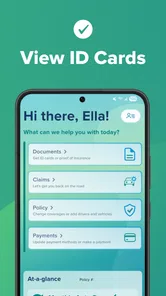
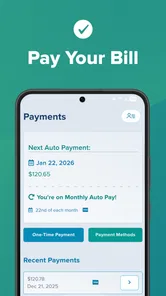
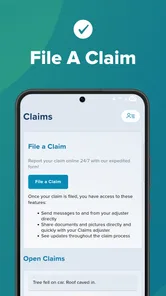

Analysis by Reviewed
Managing car insurance from a phone sounds simple until you need a policy detail while standing beside your vehicle, dealing with a renewal question, or trying to remember which document contains the answer. Elephant Insurance Mobile is built for that narrow but useful purpose: giving Elephant customers a direct way to reach their auto policy from a mobile device. I found its appeal less about entertainment or clever extras and more about reducing the number of steps between a driver and important insurance information.
That focus matters. This is an Auto & Vehicles app from Elephant Insurance, offered free of charge and rated for Everyone. It is not trying to replace every insurance conversation or become a general driving assistant. Instead, it works as a mobile doorway into an existing policy relationship. If you already use Elephant for your car insurance, that can be genuinely convenient. If you are looking for quotes from several providers, roadside tools, fuel prices, navigation, or vehicle maintenance tracking, you will need a different kind of app.
How Elephant Insurance Mobile fits into everyday driving
I find this app easiest to judge as one step in a larger driving routine: prepare your account before a trip, reach for it when a policy question comes up, and switch to another channel if the issue needs a person’s help. That perspective keeps the convenience in proportion and makes the next section’s everyday examples more useful. A little setup beforehand can save a rushed search later.
A useful shortcut when the network is available
The central experience is shaped by connectivity. Accessing an online auto policy normally means reaching the insurer’s systems, so the app is most useful when your phone has a dependable mobile or Wi-Fi connection. In a calm setting, that is rarely a problem. At home, in a parking lot with a strong signal, or before leaving for a trip, the app can save you from opening a browser, searching for the insurer, and working through a separate sign-in route.
The more interesting test is the inconvenient moment. Imagine that you are in a supermarket car park and another driver asks for insurance details after a minor bump. You are stressed, your attention is divided, and you do not want to search through old email messages. A dedicated mobile policy app gives you a more natural place to start. The benefit is not that it removes the need for careful communication; it is that it puts your insurance account closer at hand.
That same network dependency creates a practical habit I recommend: open the app before you actually need it. Check that you can sign in, make sure your account details are familiar, and understand where your policy information appears. Doing this while relaxed is much better than learning the workflow on the roadside. The app is most valuable when it turns preparation into a quick routine rather than an emergency search.
Connectivity can also affect how confident you feel using it. A page that loads quickly on home broadband may feel less convenient in a concrete garage, a rural lay-by, or a crowded event where many phones are competing for bandwidth. That is not unique to Elephant Insurance Mobile, but it is important because insurance information is often needed at precisely the least comfortable times. I would treat the app as a connected access point, not as a replacement for keeping essential details available through sensible backup arrangements.
More From Our News Desk

 Gmail
GmailGmail in a Busy Inbox: Who Benefits Most?
From first account to crowded workday, Gmail earns its place through dependable search and flexible sorting—but its best fit depends on how much inbox maintenance you can tolerate.

 Prime Video
Switching to Prime Video: What Changes in Your Viewing Routine
Prime Video can make a compelling second home for streaming, but switching means learning a different catalog, rental layer, and route from browsing to playback.

 Universal TV Remote Control
Universal TV Remote Control Works Best as a Reliable Backup
A phone remote earns its place through quick setup and reliable habits. Here is how to get more from Universal TV Remote Control—and where its limits show.

 Weather - By Xiaomi
Weather by Xiaomi Review: Clear at a Glance, Less Clear Up Close
Xiaomi’s weather app makes everyday forecasts quick to scan, but its calm surface can leave useful details and recovery paths harder to find than they should be.

 X
XX Under Pressure: Can It Recover When Posting Goes Wrong?
A resilience-focused review of X, examining setup, mistaken posts, interruptions, weak connections, and the gaps that matter when recovery needs to be dependable.

 Clash of Clans
Clash of Clans Is Won Between the Battles
Its raids are quick; its community is a long-term project of coordination, teaching, rivalry, and shared responsibility—with all the friction that entails.
Latest News



Mobile situations where it earns its place
I see the strongest fit for drivers who dislike carrying paperwork and prefer handling routine account checks from a phone. A mobile policy view is particularly practical before a long drive, when changing vehicles, or when someone in the household needs to confirm which insurance account to use. The value comes from reducing friction, not from adding a large collection of unrelated tools.
There is also a useful difference between checking information at home and checking it while moving through daily life. At home, a desktop browser may offer a larger screen and more room for comparing documents. On a phone, the advantage is immediacy. You can reach for the device in a driveway, outside a repair shop, or beside a borrowed car. That makes the app a better companion for short, focused tasks than for extended account administration.
I would not use it while driving, and I would not encourage anyone to handle an insurance issue from the driver’s seat. The sensible workflow is to pull over safely, connect to a stable network if possible, and then use the app. This sounds obvious, but insurance tasks can arrive alongside distraction, noise, and pressure. The app helps only when the surrounding situation is handled responsibly.
For a family with more than one driver, the phone-based format can also make policy conversations easier, provided everyone understands whose account they are accessing and what information they are allowed to use. It is worth agreeing in advance who will handle account changes or questions. A convenient app does not remove the need to protect login details or distinguish between viewing information and making a formal request.
What happens when the connection is weak
The biggest limitation of a connected insurance app is not necessarily the interface; it is the uncertainty that begins when the network becomes unreliable. If a screen is waiting for account information, a weak signal can make the experience feel stalled. In a time-sensitive situation, that can be frustrating even when the app itself is functioning normally.
My advice is to separate urgent preparation from urgent action. Before travelling, open the account while you have reliable service and make a mental note of where the important information is located. If you expect to be somewhere with poor reception, do not assume that opening the app for the first time there will be smooth. The safer approach is to prepare earlier and keep a second, lawful way to identify your policy available.
This is also where the app should be compared with ordinary alternatives. A browser may work just as well for someone who already has a bookmarked account page and remembers the sign-in process. A paper document may be slower to update but does not depend on a phone battery or signal at the moment you need it. An insurer’s phone support can be better when the question is complicated, but it takes more time and requires a conversation. Elephant Insurance Mobile sits between those choices: faster than starting from scratch, but dependent on the same connected account access.
That trade-off does not make the app a poor choice. It simply defines what it is. I would use it for quick access and routine checks, while treating more complicated claims, disputes, or policy decisions as situations that may require direct contact with Elephant Insurance. A mobile screen is excellent for finding information; it is not automatically the best place to resolve every insurance problem.
Recovering from sign-in and session friction
One of the first things I would test after installing any policy app is the recovery path. A forgotten password, an expired session, or a changed phone can matter more than the normal sign-in because these problems tend to appear when the user is already under pressure. Elephant Insurance Mobile is worth setting up ahead of time for that reason. Do not wait until a collision, a rental-car desk, or a travel departure to discover that your account needs additional attention.
A sensible setup routine is short. Install the current release, open the app on a reliable connection, sign in carefully, and confirm that you know how to return to the account later. The app’s current version is 1.6.5, and it runs on Android 8.0 or later, so older devices should be checked against that requirement before installation. Keeping the operating system and app reasonably current is also a practical way to reduce avoidable compatibility trouble.
If access fails, I would first distinguish between an account problem and a connection problem. Try a more reliable network, check that the credentials are being entered correctly, and avoid repeatedly guessing passwords. If the issue continues, the appropriate next step is Elephant’s official account or support route rather than repeatedly reinstalling the app. Reinstallation can clear local friction, but it cannot fix an account detail that needs correction on the insurer’s side.
There is a human factor here that many app reviews overlook. In a stressful incident, people often remember the app but not the email address or password connected to it. I recommend storing those credentials through the phone’s secure password manager rather than in an unprotected note. That makes recovery less dependent on memory while keeping the insurance account treated with the same care as banking or other sensitive services.
Using mobile data without making the app inconvenient
For ordinary policy access, I would not expect the app to be a heavy data consumer compared with video or social media, but connected use still benefits from sensible habits. Avoid repeatedly refreshing the same screen when the signal is slow. If you are on a limited mobile plan, use home Wi-Fi for initial setup, account review, and any longer document-related task. Then reserve mobile data for the brief checks that make the app useful away from home.
Battery planning matters just as much as data planning. A phone with very little charge is a poor place to keep your only route to insurance information, especially before a long journey. Charging the device before travel and carrying a power bank are simple precautions. They are not special Elephant features; they are part of using any connected policy service responsibly.
Privacy is another reason to be deliberate. Do not hand an unlocked phone to a stranger after an incident simply because you want to show insurance information. Show only what is necessary, keep the device in your control, and avoid using public networks for sensitive account actions when a safer connection is available. The convenience of a mobile policy should not encourage careless sharing.
For people who frequently travel through areas with patchy reception, the best workflow is a hybrid one. Use the app before departure to review what you need, keep essential policy references in an appropriate backup format, and rely on the app for connected access when service returns. This approach avoids expecting a mobile account tool to behave like a fully independent document wallet.
Who should choose it and who should look elsewhere
I would recommend Elephant Insurance Mobile first to existing Elephant customers who want a simpler route to their auto policy from Android. It is also a good fit for drivers who are comfortable doing routine account checks themselves and who value having insurer access in a phone-sized format. The free price removes a financial barrier, and the Everyone content rating makes it suitable as a general household utility rather than an age-restricted product.
The app has a modest but meaningful public footprint, with more than ten thousand installs and an average rating of 3.8 from around one hundred twenty ratings. I read that as evidence of a useful but not universally frictionless experience. The rating is respectable without suggesting that every user will find the process perfect, so I would install it with realistic expectations rather than treating it as a flawless replacement for every insurance channel.
I would skip it if you are not an Elephant policyholder, if you mainly want to compare insurance prices, or if your preferred insurer already provides a broader toolset that you use regularly. I would also hesitate if your phone cannot run Android 8.0 or later, since the app requires that minimum operating system. A browser, a different insurer’s application, or direct support may be a better fit depending on the task.
Compared with a general browser, the dedicated app should feel more purpose-built for a customer who returns to the same insurance account. Compared with paper documents, it is more convenient to carry but more dependent on battery, network access, and successful sign-in. Compared with calling the insurer, it is quicker for straightforward information but less suitable when you need explanation, judgement, or a human response. That comparison is the key to using it well: choose the app for access, not because every insurance need should be handled through a screen.
My practical setup routine
If I were recommending this to a friend, I would suggest a small setup routine rather than simply saying “install it.” Use a reliable connection for the first login, confirm that the account opens normally, and explore the policy area before you need it. Then decide what information you would want during a roadside incident and make sure you know how to reach it without rushing.
Next, test your personal recovery plan. Make sure your phone can be charged during travel, keep account credentials protected, and know which official support route to use if the app cannot resolve a problem. If another household driver may need access, discuss the arrangement in advance instead of sharing passwords casually.
Finally, keep your expectations narrow and useful. This is not an all-purpose driving companion, and its value is not measured by how many unrelated features it contains. Its job is to make an Elephant auto policy easier to reach from a mobile device. When the network is good and the account is already set up, that can be exactly enough.
Final thoughts on a connected policy experience
Elephant Insurance Mobile is a focused insurance utility rather than a feature-packed automotive app. I like the basic idea because policy access is one of those tasks that benefits from being close at hand, especially when paperwork is elsewhere or a browser search feels unnecessarily slow. The developer, Elephant Insurance, has kept the purpose clear: help customers reach their auto policy through a phone.
Its main weakness is equally clear. A connected account tool cannot guarantee convenience in a garage with no signal, on a phone with a dying battery, or during a stressful sign-in failure. That is why I would pair it with preparation instead of relying on it blindly. Open it before travel, understand the account path, protect your credentials, and keep a sensible backup for urgent situations.
My verdict is positive for the right audience. If you insure your car with Elephant and use Android, the free app is worth trying because it can remove small but recurring obstacles from policy access. I would not choose it as a substitute for direct support or as a general motoring toolkit. For connected, everyday policy checks, it is a practical shortcut; for exceptional situations, it works best as one part of a broader plan.
That balance is what makes the app useful in real life. It does not need to do everything. It needs to help an Elephant customer reach the right insurance information at the right moment, while making clear through its connected nature that preparation still matters. Used with that understanding, Elephant Insurance Mobile is a sensible addition to the phone of a current policyholder.
Elephant Insurance Mobile Frequently Asked Questions
Who can use Elephant Insurance Mobile?
Elephant Insurance Mobile is intended for people who have an Elephant auto insurance policy and want to access it from a phone. You will need to sign in to use account services, and the options shown can depend on your policy and your role on the account. The app is free to download, is rated for Everyone, and requires Android 8.0 or later on Android devices.
What is Elephant Insurance Mobile used for?
Elephant Insurance Mobile is designed to help policyholders manage their car insurance from a smartphone. After signing in, you can typically view policy details, check documents, review payment information, contact support, and access services related to your cover. The exact features available may depend on your policy, location, and whether you are the policyholder or an additional driver. Its focus is quick access to your auto policy, rather than a general-purpose finance tool.
Can I make an insurance claim through Elephant Insurance Mobile?
The app may provide access to claims support or guide you toward the correct claims process, but availability can vary depending on the type of incident and your policy. Before downloading, remember that an accident should be reported as soon as possible and emergency situations require the appropriate emergency services first. Keep photographs, incident details, and other relevant information available when contacting Elephant. The app can be a convenient starting point, but it should not delay urgent help or notification.
Does Elephant Insurance Mobile include telematics or driving-tracking features?
Elephant offers insurance products that may use telematics or driving information, but not every customer will have the same tracking features. If your policy includes a connected device or a smartphone-based driving service, the app may request permissions such as location, Bluetooth, motion, or background activity. Review the policy terms and privacy information carefully before enabling these permissions. If you do not use a tracking-related service, check permissions and settings before granting access that is not needed for your account.
Is Elephant Insurance Mobile free to download and use?
The Elephant Insurance Mobile app is free to download, although normal mobile data charges may apply. Using the app does not replace your insurance premium, policy excess, or any other charges connected with your cover. You will also need a compatible Android or iOS device, an internet connection, and valid account credentials to access most services. The app is categorized under Auto & Vehicles and is published by Elephant Insurance.
Pros
- Quick access to policy details
- documents
- and coverage information
- Mobile claims support can simplify reporting an accident
- Digital insurance cards are convenient to keep on your phone
- Useful tools help manage payments and policy-related tasks
- Roadside assistance details are easy to find when needed
Cons
- Some features may require an active Elephant Insurance policy
- App usefulness depends on available services in your location
- Claims updates may not appear instantly after submitting information
- Users may still need customer support for complex policy changes
- Performance and login experience can vary after app updates











