

eBay Motors: Parts, Cars, more
- 1.94K
- 4.0
- Installs
- 1.00M
- Price
- Free

Screenshots

Analysis by Reviewed
My first impression of eBay Motors: Parts, Cars, more is that it suits people who already have a specific automotive hunt in mind. Browsing can be enjoyable, but the real value is being able to compare a range of listings for a vehicle, component, or accessory without treating every search as a separate trip to a specialist shop. I’d use it as a place to research and narrow choices, while still checking the details carefully before committing to a purchase.
Where a search can go off track
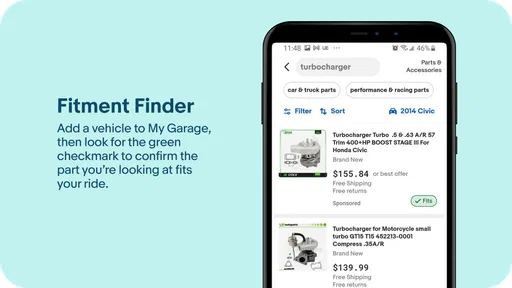
Parts searches are where a little patience pays off. A familiar part name may be listed under different wording, and a broad search can mix items that only look similar. I’d start with the vehicle details and the exact part description I know, then refine the results rather than assuming the first match will fit. When compatibility information is available, I’d treat it as a useful cross-check, not a substitute for comparing the listing details with the part I need.
That matters most when a wrong purchase means delays or extra work. Before choosing, I’d compare photos, condition, included components, and the seller’s description. If an important detail is unclear, asking the seller before buying is more sensible than relying on a thumbnail or a short title. This is a marketplace, so the quality of a result depends on the individual listing as much as on the app’s search.
Setup checks before shopping
The app is free, and it comes from eBay Mobile. It sits in the Auto & Vehicles category, is rated Teen, and its current version is 4.33.0. It has a 4.0 average from around 6,300 ratings, with over 1 million installs. Those figures suggest an established audience, though they don’t tell me whether a particular seller or item will be a good fit.
If the app seems awkward at first, I’d begin with simple checks: make sure the search terms are specific, review any filters that may be narrowing the results, and confirm that the vehicle information I’m using is accurate. The app was released on December 9, 2019, and requires iOS 8.1 or later. Keeping the app and device software compatible is a sensible first step if something behaves unexpectedly.
Recovering a useful shopping workflow
When a search produces little or nothing useful, I wouldn’t immediately assume the item is unavailable. I’d remove one restrictive filter, try a common alternate name for the part, and compare the results again. For an older or uncommon vehicle, searching by a broader component description may reveal listings that an exact phrase misses. Once I find a promising result, I’d keep the comparison focused: fit, condition, seller information, and the terms shown on that listing.
A practical example: if I’m planning a weekend repair, I’d search before the job is urgent, check whether the listing actually includes the small pieces I need, and leave time to resolve questions with the seller. That extra pause is less exciting than adding an item to a cart, but it can prevent a mismatch from becoming a stalled repair. For a vehicle purchase, I’d use the app to compare candidates and identify questions, then make sure I’m comfortable with the full listing and transaction before proceeding.
More From Our News Desk

 Gmail
GmailGmail in a Busy Inbox: Who Benefits Most?
From first account to crowded workday, Gmail earns its place through dependable search and flexible sorting—but its best fit depends on how much inbox maintenance you can tolerate.

 Prime Video
Switching to Prime Video: What Changes in Your Viewing Routine
Prime Video can make a compelling second home for streaming, but switching means learning a different catalog, rental layer, and route from browsing to playback.

 Universal TV Remote Control
Universal TV Remote Control Works Best as a Reliable Backup
A phone remote earns its place through quick setup and reliable habits. Here is how to get more from Universal TV Remote Control—and where its limits show.

 Weather - By Xiaomi
Weather by Xiaomi Review: Clear at a Glance, Less Clear Up Close
Xiaomi’s weather app makes everyday forecasts quick to scan, but its calm surface can leave useful details and recovery paths harder to find than they should be.

 X
XX Under Pressure: Can It Recover When Posting Goes Wrong?
A resilience-focused review of X, examining setup, mistaken posts, interruptions, weak connections, and the gaps that matter when recovery needs to be dependable.

 Clash of Clans
Clash of Clans Is Won Between the Battles
Its raids are quick; its community is a long-term project of coordination, teaching, rivalry, and shared responsibility—with all the friction that entails.
Latest News



Revving Up with eBay Motors
First off, let’s talk about the app’s interface. The moment you open it up, you're greeted with a slick and intuitive design that makes navigation a breeze. No one likes getting lost in an app, especially when you’re on the hunt for that elusive car part. With eBay Motors, finding what you need is as smooth as a perfectly tuned engine. The search function is robust and precise, offering filters galore to help you zero in on exactly what you’re looking for, whether it’s a rare car part or your next project car.
Finding Your Dream Ride
Now, if you’re in the market for a new set of wheels, this app has got you covered. From classic cars to the latest models, the listings are as diverse as they are plentiful. Each listing provides detailed information about the vehicle, complete with high-quality images and seller ratings, ensuring you know exactly what you’re getting into. It’s like having a car show in the palm of your hand! Plus, the secure transaction options give you peace of mind when making those big purchases.
For a first-time buyer, I’d use those listings to build a shortlist, not to make a snap decision. Save time by noting what each seller says about the vehicle and what still needs checking; then compare candidates on the same points. The app can make browsing easier, but it can’t replace an in-person inspection or careful follow-up on a major purchase. If you’re only looking for a nearby car you can inspect immediately, a local classifieds service may be a more direct starting point.
Parts Heaven for DIY Enthusiasts
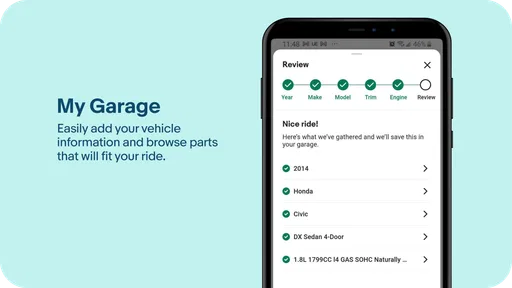
If you're more of a DIY mechanic, the parts section is where the eBay Motors app truly shines. The variety is staggering – from engine components to accessories, it’s a treasure trove for anyone looking to tinker with their ride. The app ensures you can check compatibility with your vehicle, which is a lifesaver. No more buying parts that just don’t fit!
I’d still compare a proposed replacement against the old part’s identifying details and the seller’s description, especially for components where a small variation matters. If you’re unsure about fitment, a parts counter or specialist who can verify the match may be a better next step than guessing from a listing. The trade-off is straightforward: a broad marketplace can help with hard-to-find options, while a dedicated supplier may make a narrow, urgent purchase easier to confirm.
Moreover, the community aspect of the app shouldn’t be overlooked. Engaging with other motorheads, sharing tips, and even reviewing sellers creates a vibrant and trustworthy environment. It’s like having a pit crew at your fingertips!
I find seller feedback most useful as context rather than a guarantee. I’d read the details of the listing and any available feedback together, then decide whether the seller has answered the questions that matter to me. For someone who prefers one shop, one warranty process, and a straightforward return to a counter, a specialist retailer may feel more reassuring. For someone willing to compare individual listings, this app offers a wider browsing experience.
Gears and Gadgets – All in One Place
Beyond cars and parts, the app also offers a range of automotive accessories. Whether you’re looking for the latest tech gadgets to pimp your ride or just some basic maintenance tools, you’ll find it all neatly categorized. It’s a one-stop shop for all things automotive, making it incredibly convenient for car lovers like us.
That breadth is handy when I’m already researching a repair and want to look at related equipment, but it can also make browsing less focused. I’d decide what I need before opening a wide category, then compare only the listings that suit that purpose. If I need a part immediately or want hands-on help identifying it, a nearby parts store is likely the better option; if I’m exploring choices or searching for something uncommon, browsing a larger marketplace makes more sense.
When the problem may be elsewhere
If results look wrong or a listing won’t answer the question I have, I’d separate an app issue from a shopping issue. Recheck the search phrase and filters first; if the item details themselves remain ambiguous, that’s a reason to ask the seller or consult someone familiar with the vehicle, not to assume the app can resolve the uncertainty. For a general loading or navigation hiccup, closing and reopening the app and checking the device’s connection are reasonable first steps. I wouldn’t repeat a purchase action just because a screen seemed slow; I’d first check whether the action already went through.
Overall, the app is most useful for enthusiasts, DIY owners, and patient shoppers who value choice and are comfortable comparing listings. It is less suited to anyone who needs guaranteed fitment without checking, immediate local help, or a single retailer’s tightly managed selection. My practical advice is to use it to discover and compare, verify the details that matter, and choose another route when urgency or certainty matters more than range.
In conclusion, the eBay Motors: Parts, Cars, more app is more than just a marketplace; it’s a community and a resource for anyone passionate about cars. Whether you’re a seasoned collector or just starting your car journey, this app offers something for everyone. So why not give it a spin and see what treasures you can find? Happy motoring!
A calmer way to compare listings
One useful habit is to decide what would make a listing a definite no before browsing. For a used component, that might be a visibly damaged connector, an unclear condition description, or missing hardware you need for installation. For a car, it might be a detail that conflicts with your budget or intended use. Having those limits in mind makes a large selection easier to manage and keeps an attractive photo from doing too much of the persuading.
I’d also keep a short comparison note outside the search itself: the exact item or vehicle, the questions still open, and what each seller has actually stated. That simple record is especially helpful if I’m returning to several listings later or discussing options with a mechanic. It reduces the chance of mixing up similar parts and makes follow-up questions more precise. The app is strongest as a discovery and comparison tool when I bring a clear checklist to it.
Who gets the most from it
This is a good fit for someone who enjoys researching cars, maintaining a vehicle, or tracking down a less common part and has enough time to assess individual offers. It can also help a hobbyist explore accessories alongside a repair project, without limiting the search to whatever happens to be stocked locally. If I’m shopping for a non-urgent item and can verify its details, the breadth is a genuine advantage.
I’d be more cautious recommending it to someone who wants a guaranteed, immediate answer to “which exact part fits?” or needs a repair completed today. A local parts specialist can look at the old component with you, and a mechanic can confirm what the job calls for. Likewise, a major vehicle purchase deserves inspection and direct due diligence; a polished listing is a starting point, not proof of condition. The app won’t remove the buyer’s responsibility to check.
Questions worth settling before you buy
If I’m unsure whether a part is the right one, I’d compare its identifying details with the item being replaced and ask the seller a specific question about the point that remains unclear. A broad message such as “Will this fit?” may not resolve a mismatch if the listing lacks the details needed to answer. When uncertainty remains, I’d pause and get confirmation from a knowledgeable parts supplier or mechanic rather than treating an apparent match as certain.
For a car, I’d use the listing to decide what to investigate next: clarify anything in the description that affects my decision, compare the vehicle with other candidates, and arrange an appropriate inspection before committing. If I’m wondering whether the app itself is responsible for an odd search, I’d first remove restrictive filters and try a different wording. If the search works but the listing is vague, the issue is the information available in that offer, not something a search adjustment can fix.
My verdict is that eBay Motors works best when I approach it as a broad automotive marketplace rather than a substitute for a parts expert, mechanic, or vehicle inspection. Its range can save time during research and uncover options I might not find in a nearby shop, but that benefit comes with the work of comparing sellers and checking details. If you’re patient, specific about what you need, and willing to verify before buying, I think it’s a useful app to keep in your shopping routine. If speed, hands-on confirmation, or a single accountable retailer matters more, I’d start elsewhere.
eBay Motors: Parts, Cars, more Frequently Asked Questions
Is eBay Motors free to download, and what devices can run it?
eBay Motors is free to download, so you can explore its automotive marketplace without paying for the app itself. It is listed for devices running version 8.1 or later, and its content rating is Teen. Before downloading, check that your device meets the operating-system requirement and that the app is available for your device through its app store.
Who makes eBay Motors, and what is the app focused on?
The app is developed by eBay Mobile and is built around the eBay Motors marketplace. Its store summary, “By enthusiasts, for enthusiasts,” captures its focus on automotive shoppers and sellers. The app falls into the Auto & Vehicles category, making it a specialized option for people interested in cars, vehicle parts, and related accessories rather than a general-purpose shopping experience.
What is eBay Motors and how does it work?
eBay Motors is a dedicated platform within the eBay marketplace that focuses on the buying and selling of vehicles, parts, and accessories. It offers a wide range of options, from cars and motorcycles to automotive parts and tools. Users can browse listings, compare prices, and make purchases directly through the app, benefiting from eBay's secure transaction processes.
Is eBay Motors safe for purchasing vehicles and parts?
Yes, eBay Motors is generally considered safe for purchasing vehicles and parts. The platform offers buyer protection policies, including eBay's Vehicle Purchase Protection, which covers certain eligible transactions up to a specified amount. It's important for buyers to read listings carefully, verify seller information, and communicate directly with sellers to ensure a smooth transaction.
How can I list my vehicle or parts for sale on eBay Motors?
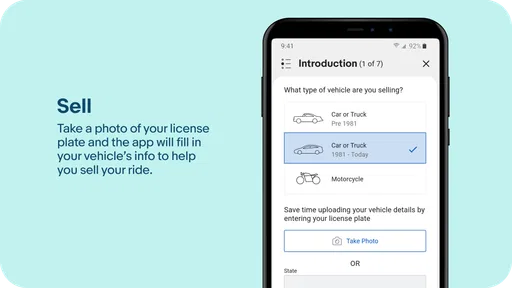
Listing a vehicle or parts for sale on eBay Motors is straightforward. Users need to create a detailed listing with photos, descriptions, and pricing. The app provides tools to help sellers create attractive listings and reach a broad audience. Sellers should ensure that all information is accurate and complete to attract potential buyers and facilitate an efficient sale.
Pros
- Wide selection of parts and vehicles.
- User-friendly interface for navigation.
- Frequent deals and discounts available.
- Trusted seller ratings and reviews.
- Secure payment options.
Cons
- High shipping costs for some items.
- Occasional counterfeit listings.
- Limited customer support hours.
- Varied seller responsiveness.
- No in-app customer service chat.












