

Dr. Prius / Dr. Hybrid
- 253.00
- 3.0
- Installs
- 100.00K
- Price
- Free

Screenshots
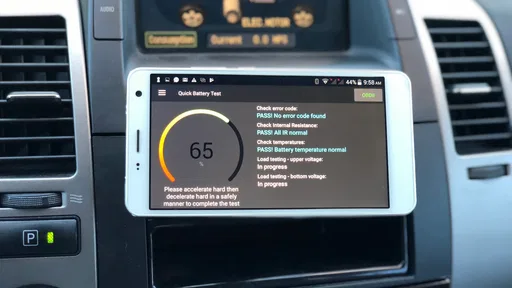
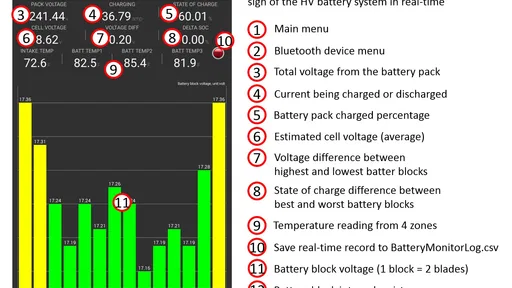
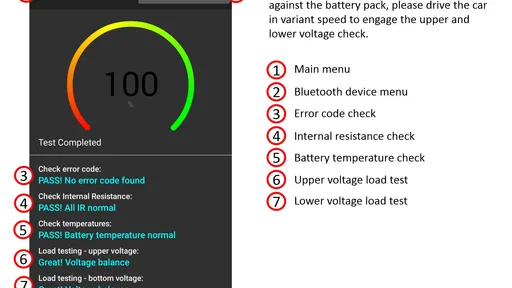
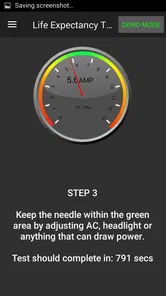
Analysis by Reviewed
Buying a used Toyota or Lexus hybrid can feel like a sensible way to save fuel, but the battery is the part that makes many buyers hesitate. A dashboard warning light may tell you that something is wrong, yet it rarely gives a simple answer to the question that matters most: is the high-voltage battery still healthy enough to justify the car? Dr. Prius / Dr. Hybrid is built around that decision. It is an Auto & Vehicles app from Pika Tech LLC that turns a compatible phone-and-adapter setup into a battery-monitoring and testing tool.
I see it as a practical specialist app rather than a general car companion. It is free to download, aimed at Everyone, and available for Android devices running at least version 5.0. The current version is 7.03. Its store presence is substantial, with over 100 thousand installs, but the average rating sits at 3.0 from around 1.4 thousand ratings, so I would not approach it as a universally effortless experience. It can be useful, but the value depends heavily on your vehicle, your adapter, and your willingness to interpret automotive information carefully.
What I would check before relying on the battery result
The first decision is not whether the app looks interesting. It is whether your vehicle and connection setup make the app relevant. Dr. Prius / Dr. Hybrid is designed for Toyota and Lexus hybrid battery monitoring and testing, so it makes most sense when you own one of those vehicles, are considering buying one, or are helping someone investigate a battery concern. If you drive a conventional petrol car, a different hybrid brand, or a vehicle with a problem unrelated to the high-voltage battery, this is probably the wrong starting point.
The second decision is how much certainty you need. An app-based test can be a useful screening step, especially before spending money on a repair or walking away from a used car. It should not automatically become the final word on a complicated electrical fault. A battery-health result is most useful when combined with the car’s symptoms, warning lights, service history, age, mileage, and a proper inspection. I would use the app to ask better questions, not to pretend that a phone has replaced a trained technician.
The third decision is whether you are comfortable with a little setup friction. This is not the kind of app I would open casually while sitting on the sofa. You need a compatible vehicle connection and enough patience to make sure the phone is receiving sensible information. A poor adapter, an interrupted connection, or a test performed under unsuitable conditions can make the experience confusing. Before drawing conclusions, I would make sure the car is safely parked, the connection is stable, and the battery is being assessed in a consistent situation.
The most important habit is to treat the first reading as a baseline, not a verdict. If you are checking a car you already own, record the circumstances around the reading: whether the vehicle was cold or warm, whether the battery had just been heavily used, and whether any warning appeared on the dashboard. Repeating a check under similar conditions can be more informative than reacting to one isolated result.
A realistic used-car scenario
Imagine that I am viewing a used Lexus hybrid. The seller says the car drives normally, but the vehicle is old enough that a replacement battery would affect my budget. Rather than relying only on a short test drive, I would connect the app, observe the battery information, and compare what I see with the seller’s claims and the car’s behavior. If the result looks concerning, I would not immediately declare the vehicle unusable. I would use that result to request a professional inspection, negotiate with a clearer understanding of the risk, or leave if the numbers and the seller’s answers do not line up.
More From Our News Desk

 Gmail
GmailGmail in a Busy Inbox: Who Benefits Most?
From first account to crowded workday, Gmail earns its place through dependable search and flexible sorting—but its best fit depends on how much inbox maintenance you can tolerate.

 Prime Video
Switching to Prime Video: What Changes in Your Viewing Routine
Prime Video can make a compelling second home for streaming, but switching means learning a different catalog, rental layer, and route from browsing to playback.

 Universal TV Remote Control
Universal TV Remote Control Works Best as a Reliable Backup
A phone remote earns its place through quick setup and reliable habits. Here is how to get more from Universal TV Remote Control—and where its limits show.

 Weather - By Xiaomi
Weather by Xiaomi Review: Clear at a Glance, Less Clear Up Close
Xiaomi’s weather app makes everyday forecasts quick to scan, but its calm surface can leave useful details and recovery paths harder to find than they should be.

 X
XX Under Pressure: Can It Recover When Posting Goes Wrong?
A resilience-focused review of X, examining setup, mistaken posts, interruptions, weak connections, and the gaps that matter when recovery needs to be dependable.

 Clash of Clans
Clash of Clans Is Won Between the Battles
Its raids are quick; its community is a long-term project of coordination, teaching, rivalry, and shared responsibility—with all the friction that entails.
Latest News



That workflow is where the app becomes more than a novelty. It can help turn a vague fear into a specific conversation. It may also prevent the opposite mistake: rejecting a car simply because the battery feels like an expensive unknown when a closer look suggests that the concern deserves further investigation rather than an automatic “no.”
What makes the app useful in practice
The strongest part of this product is its focus. It is not trying to be a navigation app, fuel log, maintenance reminder, or generic Bluetooth dashboard. Its purpose is narrower: help you monitor and test the remaining life of a Toyota or Lexus high-voltage battery. That narrow scope is valuable when the battery is the exact issue you need to understand.
I also like the way this kind of tool can support a conversation with a mechanic. Even if I still want a professional diagnosis, I can arrive with a clearer description of what happened and when. Instead of saying, “The hybrid battery seems bad,” I can explain that I noticed unusual behavior during a particular check and ask the technician to investigate that area. The app does not eliminate expert judgment, but it can make the first appointment less vague.
Another useful workflow is post-repair observation. If a battery-related repair has been completed, I would use the app to watch for consistent behavior over time rather than assuming that the absence of an immediate warning proves everything is perfect. This is not a substitute for the repairer’s warranty or diagnostic process. It is simply a way to remain attentive to the car after the work, especially if the original symptom was intermittent.
For owners who like to understand their vehicles, the app can also reduce dependence on guesswork. Hybrid systems often behave differently from conventional engines, and a driver may misread normal cycling as failure or miss a pattern that deserves attention. A focused monitoring tool gives more context than the dashboard alone, provided the user takes time to learn what the readings mean.
Where the experience can become frustrating
The average rating of 3.0 suggests that the experience is not consistently smooth for everyone. I would interpret that as a warning to manage expectations, not as proof that the app is unusable. Specialist automotive apps often expose problems that are invisible in ordinary consumer software: adapter compatibility, vehicle-specific behavior, connection stability, and readings that require technical interpretation.
The biggest weakness for a beginner is the gap between seeing information and understanding it. A screen full of battery-related values can feel authoritative even when the user has not established the right testing conditions. If you are hoping for a single green-or-red answer with no learning curve, this may feel more demanding than expected. I would rather spend time understanding the result than use a dramatic number to make an expensive decision.
There is also a safety issue that is easy to overlook. High-voltage hybrid systems are not ordinary car electronics. Connecting an approved diagnostic setup is one thing; opening battery components, probing wiring, or attempting a repair without training is another. I would keep the app’s role limited to monitoring and information gathering. It should not encourage anyone to handle dangerous components casually.
How it compares with the usual alternatives
The closest alternative is a visit to a hybrid specialist or dealership. That option is better when you need a formal diagnosis, a repair plan, or someone who can connect the readings to the entire vehicle. A professional can inspect more than the battery and may notice mechanical, cooling, wiring, or control-system issues that an app-centered check cannot settle. The trade-off is convenience and cost: an appointment takes more effort than checking a car yourself.
A generic OBD app is another alternative. Those apps may be more appealing if you want broad information across several vehicle systems or brands. However, broad coverage is not the same as focused battery testing. If your only question is the condition of a Toyota or Lexus hybrid battery, a general dashboard may leave you with a large amount of information but less confidence about the specific issue.
A basic code reader can also be useful, particularly when a warning light is already on. Its strength is fault-code access and general troubleshooting. Its weakness is that a code alone may not answer the longer-term question of remaining battery life. Dr. Prius / Dr. Hybrid is more attractive when you are evaluating battery condition rather than merely asking why a light appeared.
Finally, there is the option of doing nothing until the vehicle shows an obvious problem. That costs nothing and requires no setup, but it offers the least planning value. It may be reasonable for an owner who is not considering a purchase and simply wants to keep driving until a professional warning appears. It is a poor strategy for someone about to buy an older hybrid, where understanding a possible battery expense before signing a contract can matter greatly.
My decision rule is simple: choose this app when the battery question is specific, the vehicle is within its Toyota or Lexus focus, and you are comfortable treating the result as evidence rather than a final diagnosis. Choose a professional inspection when the decision involves a large repair bill, a serious warning, unclear symptoms, or a vehicle that does not fit the app’s intended range.
Understanding the cost before switching from curiosity to regular use
The free price makes it easy to try the basic experience before committing money. That is important because compatibility and interpretation matter more here than they do in a casual app. I would not pay for additional access until I had confirmed that the phone, adapter, and vehicle communicate properly and that the information is useful for my actual question.
There are in-app purchases ranging from $14.99 to $38.99 per item. That changes the decision for occasional users. If I only want to inspect one used car, I would compare the purchase cost with the price of a professional pre-purchase inspection and with the financial risk of making the wrong decision. The app may be a sensible first filter, but paying for an advanced function does not automatically make the result professionally certified.
For an owner who expects to monitor a vehicle over time, the calculation is different. Repeated checks may make the app more valuable than a one-off visit, especially for someone who enjoys maintaining their own records and communicating clearly with a mechanic. Even then, I would avoid turning every unusual reading into an emergency. Consistency, context, and confirmation matter more than compulsive checking.
The real switching cost is not just money. It is the time needed to learn the connection process, understand the displays, and develop a repeatable testing routine. Someone who wants a completely guided experience may find a paid professional service easier. Someone who already enjoys vehicle diagnostics may consider that learning time worthwhile because it gives them more control over when and how they investigate the car.
Questions I would answer before installing it
Will it tell me whether I should buy a used hybrid? It can contribute useful evidence, but I would not let it make the decision alone. I would combine the result with a test drive, service records, warning lights, the seller’s answers, and an independent inspection when the purchase is financially important.
Is it suitable for every car with a hybrid badge? I would only choose it when the vehicle fits its Toyota and Lexus focus. A different brand may require another diagnostic solution, and a conventional vehicle does not match the app’s main purpose. Checking compatibility before buying any in-app feature is a sensible step.
Do I need technical knowledge? You do not need to be a professional technician to begin, but you do need patience and caution. The more expensive the decision, the less comfortable I would be relying on an unexplained result. If the readings seem contradictory or alarming, I would stop experimenting and ask a qualified hybrid specialist.
Can it replace a mechanic? No. I see it as a monitoring and screening tool. A mechanic remains the better choice for confirming a fault, inspecting the wider vehicle, handling high-voltage components, and recommending a repair.
Is the free version enough? It is the right place to start because it lets you judge compatibility and usefulness before considering purchases. Whether you need an in-app purchase depends on your vehicle, your intended test, and how often you plan to use the tool. I would make that decision only after the basic setup works reliably.
Who should use it, and who should skip it
I would recommend Dr. Prius / Dr. Hybrid to Toyota and Lexus hybrid owners who want more insight than the dashboard provides, buyers assessing an older used hybrid, and technically curious drivers who are willing to learn what the readings mean. It is especially useful as a structured first check before a mechanic visit or as a way to compare observations over time.
I would skip it if you expect a universal car scanner, own a vehicle outside its intended focus, dislike connecting diagnostic hardware, or want a guaranteed diagnosis without interpretation. I would also skip self-directed testing if you are tempted to open high-voltage components. In that situation, the safer and smarter choice is a qualified professional.
After using it as a decision aid, my view is balanced. The app has a clear reason to exist, and its specialist focus can be genuinely helpful when a Toyota or Lexus hybrid battery is the question. The free entry point lowers the risk of trying it, while the optional purchases mean regular or advanced use should be considered carefully. At the same time, the middling average rating reflects the possibility of setup and usability friction, and the app cannot turn a complex vehicle diagnosis into a perfectly simple answer.
My recommendation is to try it as a screening tool, not as a substitute for expertise. Start with the free experience, confirm that your vehicle and connection work, repeat important checks under sensible conditions, and keep the results in context. If you are buying a hybrid or facing a costly repair, use what you learn to ask sharper questions and arrange proper confirmation. For the right Toyota or Lexus owner, that makes Dr. Prius / Dr. Hybrid a useful piece of the decision process; for everyone else, a broader scanner or a professional inspection will likely be the better fit.
Dr. Prius / Dr. Hybrid Frequently Asked Questions
Is Dr. Prius / Dr. Hybrid free to download, and are there in-app purchases?
Dr. Prius / Dr. Hybrid is free to download, with in-app purchases available for users who want access to paid items. The app is developed by Pika Tech LLC and is listed for everyone. Before installing, consider whether the free version covers what you need and review any purchase details shown in the app so you can decide whether an optional upgrade is worthwhile.
What should I check before relying on a battery test result?
For the most useful result, make sure the OBD2 adapter is compatible, properly connected, and communicating reliably with both the vehicle and phone. Battery readings can vary with temperature and driving conditions, so one test is not necessarily a complete picture. Treat the app’s findings as a practical starting point, and seek a qualified hybrid technician’s assessment before committing to a costly repair.
What is Dr. Prius / Dr. Hybrid used for?
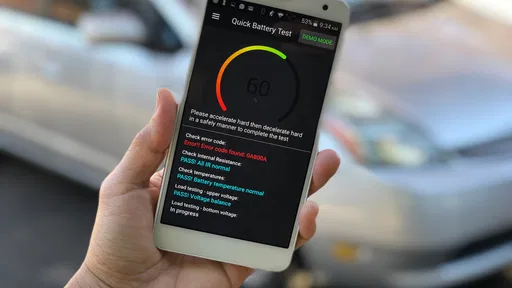
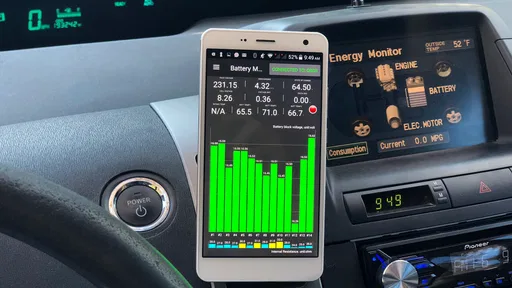
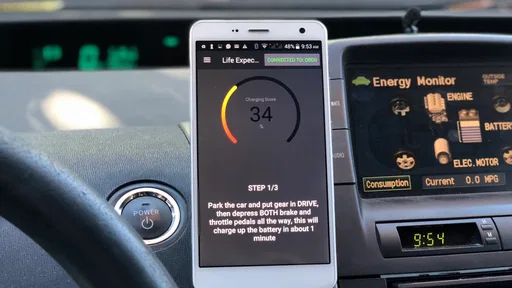
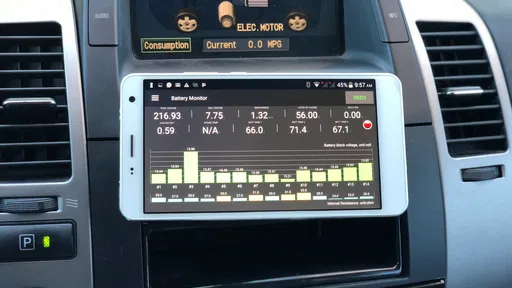
Dr. Prius / Dr. Hybrid is a diagnostic app designed for owners of Toyota and Lexus hybrid vehicles. After connecting a compatible OBD2 adapter, it can display information about the hybrid battery, monitor battery block voltages and temperatures, read certain diagnostic data, and help estimate battery condition. It is mainly intended as an informational and testing tool, not as a replacement for a professional workshop diagnosis.
Which vehicles and devices are compatible with the app?
Compatibility depends on the specific Toyota or Lexus hybrid model, model year, operating system, and OBD2 adapter being used. The app supports many popular hybrid vehicles, including several Prius models, but not every function is available on every car. Before downloading, check the developer’s current compatibility list and confirm that your Android or iPhone supports the required Bluetooth or Wi-Fi connection.
Do I need an OBD2 adapter to use Dr. Prius / Dr. Hybrid?
Yes, most of the app’s important diagnostic features require a compatible OBD2 adapter connected to the vehicle’s diagnostic port. The adapter acts as a bridge between the car and the phone, allowing the app to read hybrid-system data. A low-quality, unsupported, or incorrectly configured adapter may cause connection failures, inaccurate readings, or limited access to available functions.
Pros
- Provides detailed hybrid battery health and diagnostic readings.
- Works with several Toyota and Lexus hybrid models.
- Offers practical battery-life and performance estimates.
- Can help identify weak battery blocks before major failures.
- Supports Bluetooth OBD2 adapters for convenient wireless testing.
Cons
- Full diagnostic features may require an in-app purchase.
- Compatibility depends on the vehicle model and OBD2 adapter used.
- Some readings require driving tests
- not just a parked scan.
- Results can be difficult for non-technical users to interpret.
- Incorrect adapter settings may lead to incomplete or unreliable data.











