

Dash Cam: Dashcam Viewer
- 87.00
- 4.2
- Installs
- 100.00K
- Price
- Free

Screenshots
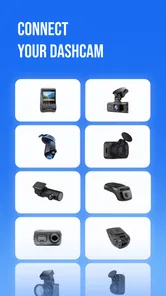
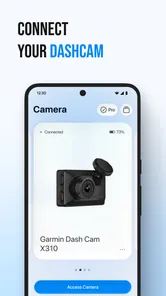
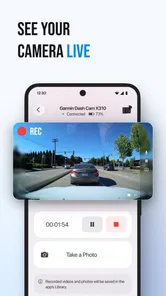
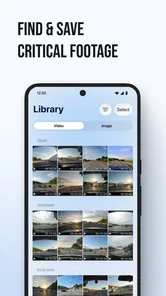
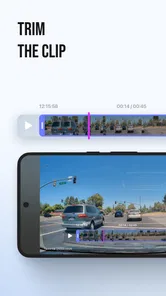
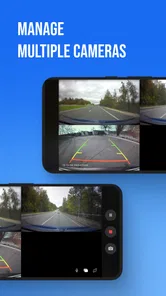
Analysis by Reviewed
I judge a dash-cam app by a simple question: does it make footage easier to find and use when I actually need it? Dash Cam: Dashcam Viewer is aimed at that practical job, with support for cameras from brands such as Redtiger, Viofo, and Rexing. It is an Auto & Vehicles app from Driving Theory Test LLC, rather than a driving recorder or a general video editor. That distinction matters: its appeal is strongest for people who already have a compatible dash cam and want a phone-based way to watch or download recordings.
Check the price against your actual need
The app is free to install, so you can try its basic appeal without paying upfront. There are also in-app purchases, with listed items ranging from $1.99 to $59.99. Those figures describe the available purchase range, not a promise that every user needs to buy something or that a particular feature costs a particular amount. I’d treat the free access as a chance to check whether the app works well with your camera and routine before considering any optional spending.
That’s a sensible way to approach a dash-cam companion app. Compatibility and the everyday transfer experience are more important than a long feature list: if you can’t get to the clips you want, a premium option won’t solve the main problem. Before spending, I would connect the camera, locate a routine recording, and check whether watching and downloading it feels straightforward. Then I’d decide whether the paid options offer something I personally need. Don’t pay simply because an upgrade is available; first establish that the free experience fits your camera and workflow.
The app is rated Everyone and is free to download, but purchases mean it isn’t accurate to call every possible use entirely cost-free. Its average rating is 4.2, drawn from around 7,700 ratings, and it has more than 100,000 installs. Those figures suggest there is an established audience, though they can’t tell me whether it will work smoothly with one specific camera model. The developer is Driving Theory Test LLC, and the current version is 1.1.1.
What it can add to a dash-cam routine
The most useful value here is convenience. Dash-cam footage often sits on the camera until a driver has a reason to review it. A companion app that lets you watch and download recordings can shorten the path from “I should check that clip” to having it available on your phone. That can be handy after a confusing road incident, when you want to review what happened while the details are still fresh, or when you’d rather not handle a card and search through files on a computer.
For example, imagine a driver returning to a parked car and noticing a scrape. Instead of waiting until they are home and able to inspect the camera’s storage, they can use a compatible setup to look for a relevant recording and save it. That doesn’t guarantee the footage will resolve the issue, and the app can’t make a camera record something it never captured. But a quicker review can help the driver decide whether a useful clip exists and what to do next.
There’s also a less dramatic but very practical use: checking a memorable drive. A short scenic stretch, an unusual road event, or a moment a passenger wants to revisit can be easier to share or keep if the recording is downloaded rather than left on the dash cam. I’d still be selective. Dash-cam files can include private conversations, license plates, or other people, so saving footage to a phone is worth doing deliberately rather than treating every recording as something to keep.
More From Our News Desk

 Gmail
GmailGmail in a Busy Inbox: Who Benefits Most?
From first account to crowded workday, Gmail earns its place through dependable search and flexible sorting—but its best fit depends on how much inbox maintenance you can tolerate.

 Prime Video
Switching to Prime Video: What Changes in Your Viewing Routine
Prime Video can make a compelling second home for streaming, but switching means learning a different catalog, rental layer, and route from browsing to playback.

 Universal TV Remote Control
Universal TV Remote Control Works Best as a Reliable Backup
A phone remote earns its place through quick setup and reliable habits. Here is how to get more from Universal TV Remote Control—and where its limits show.

 Weather - By Xiaomi
Weather by Xiaomi Review: Clear at a Glance, Less Clear Up Close
Xiaomi’s weather app makes everyday forecasts quick to scan, but its calm surface can leave useful details and recovery paths harder to find than they should be.

 X
XX Under Pressure: Can It Recover When Posting Goes Wrong?
A resilience-focused review of X, examining setup, mistaken posts, interruptions, weak connections, and the gaps that matter when recovery needs to be dependable.

 Clash of Clans
Clash of Clans Is Won Between the Battles
Its raids are quick; its community is a long-term project of coordination, teaching, rivalry, and shared responsibility—with all the friction that entails.
Latest News



A useful workflow is to think in terms of a specific moment, not a broad archive. If you’re looking for a clip, note roughly when it happened, review the relevant section, and download only what you need. That keeps the task focused and can help avoid filling your phone with routine footage. It also makes the app more useful as a quick-access companion than as a replacement for an organized long-term video library.
One trade-off is that the experience depends on the camera and its connection as well as on the app. Support for Redtiger, Viofo, Rexing, and more gives people with several popular brands a reason to investigate it, but a brand name alone doesn’t establish that every model or setup behaves identically. If a connection is unreliable, the frustrating part may be the camera-to-phone handoff rather than browsing the app itself. I’d test that handoff with a nonessential clip before relying on it during an urgent situation.
Make the phone workflow work for you
A practical detail worth planning for is where a downloaded clip goes next. If I need to revisit footage later, I’d give the file a clear name or move it into a folder I can find, rather than relying on memory to identify it among other videos. That small step matters most when several drives or incidents are involved: the app can help bring a recording to the phone, but a deliberate filing habit is what makes it easy to retrieve afterward.
There’s also a useful distinction between a quick review and keeping evidence. For a brief check, viewing the clip may be enough; if the recording could matter later, I’d preserve the original and verify the downloaded copy before clearing or reusing camera storage. That cautious sequence avoids making the phone transfer the only copy before I know it contains the right footage. It is a sensible safeguard for any dash-cam workflow, not a claim that the app itself manages backups.
How it compares with handling footage the usual way
The common alternative is to use the camera’s own screen and controls, or to move its storage to another device and browse the files there. Those methods can be perfectly adequate if you rarely review recordings and don’t mind a more hands-on process. This app makes more sense when reaching for a phone feels easier than dealing with the camera directly. It isn’t automatically better for everyone: a driver who already has a reliable, quick camera workflow may gain little from adding another app.
It also isn’t the right choice if what you really want is to record trips using your phone as the dash cam. Its stated purpose is viewing and downloading dash-cam videos, not turning a phone into a replacement camera. Likewise, someone who needs detailed editing, a carefully managed evidence archive, or a specific sharing workflow should compare those needs with the app’s actual options before assuming it will cover them. I wouldn’t choose it on the basis of features that aren’t established simply because the general idea sounds convenient.
For people already using a supported camera, the most important question is therefore not “Does it have every tool?” but “Does it reduce friction in the part I do often?” If you review footage after trips, want clips on your phone, or need a less awkward way to check a recording, the app’s focus is relevant. If you only look at footage once in a while and can manage it easily with the camera or a computer, the extra app may not change much.
Small habits that make the app more useful
I’d start by testing it at home or while parked, not when I’m already stressed about an incident. Confirm that the camera can be reached, open a harmless recording, and try a download. That simple rehearsal helps separate a genuine connection problem from the pressure of trying to find footage in a hurry. It also gives you a realistic sense of whether using the phone is faster than your existing method.
For an important clip, I’d avoid treating a successful download as the end of the job. Check that the saved video is the section you meant to keep, and make a second copy elsewhere if the recording matters. This is ordinary file-care advice, not a special guarantee about the app: any single device or storage location can become unavailable. Keeping the original on the camera until you’ve checked the copy is a cautious approach, especially if the footage may be useful later.
I’d also be mindful of when and where I use the phone. Looking for a clip while driving is a distraction, so any review or download should wait until the vehicle is safely parked. And if a recording contains someone else, consider privacy before sharing it. The convenience of phone access is most valuable when it makes review calmer and more deliberate, not when it encourages drivers to interact with a screen on the road.
Where phone access is most helpful
One everyday case is a commute with an awkward junction where a near miss happens but no one stops. Once safely parked, I’d use the app to check the relevant recording while the approximate time is still easy to remember. If I find the moment, I can save that section to review calmly later; if not, I haven’t spent time transferring an entire card just to discover the camera didn’t capture what I expected. This is where a phone-based viewer can be more convenient than waiting until I’m home with another device.
For a household sharing a car, the benefit can be less about speed and more about reducing handoffs. A driver who wasn’t present for an event may be able to look at the clip on a phone rather than needing the camera physically passed around. That only helps if the camera and phone connect as expected, and it still calls for care with private footage. I’d treat access as a practical option, not a reason to distribute every recording automatically.
Who is likely to get the most from it
This is a reasonable option for owners of Redtiger, Viofo, Rexing, or another compatible dash cam who want a more direct way to watch and save clips on a phone. It is especially relevant if you have previously postponed checking footage because the camera’s own controls or a computer-based transfer felt inconvenient. Drivers who value quick access more than elaborate video tools are the clearest audience.
I’d be more cautious if your camera isn’t confirmed as compatible, if you expect a phone to act as the recorder, or if your main requirement is professional video organization. A high rating and a sizable user base are reassuring context, not a substitute for checking your own setup. The app’s age rating is Everyone, so the classification is broad, but the practical fit still depends on the camera and on what you want to do with its recordings.
The release date is May 7, 2026, and the minimum operating-system requirement is version 9. Those details are useful to check before installing, particularly if you’re using an older device. I’d make sure the phone meets that requirement and that the camera is among the supported options before building a routine around the app. A quick compatibility check is more valuable than assuming that support for a brand covers every product it makes.
Questions to settle before relying on it
Will it work with a particular camera? I’d check the exact model rather than relying on the brand name alone, then test a recording before depending on the connection. Is the download process worth using? The answer depends on whether it is easier in your own setup than viewing on the camera or transferring files by another route. Does installing it mean paying? No upfront payment is required to try the app, but optional purchases are available, so I’d assess the basic workflow first and decide about spending only if there is a clear benefit for my use.
Can it replace a dash cam or a full video-editing tool? I wouldn’t treat it as either: its role is to access footage from a compatible camera, and anyone needing phone-based recording or more involved editing should look for a tool designed around that job. Is it useful for occasional drivers? It can be, especially when a clip is easier to review on a phone, but someone who almost never checks recordings may find that the camera’s existing controls are enough.
My buy-or-skip verdict
I’d try Dash Cam: Dashcam Viewer if I already owned a compatible camera and regularly wanted footage on my phone. Free installation makes it relatively easy to evaluate, while the range of in-app purchases means I’d judge optional spending only after testing the workflow I care about. The app’s value is practical rather than universal: it can make footage easier to reach, but it won’t improve what the camera recorded or replace a dedicated recording setup.
I’d skip it if I rarely review dash-cam videos, prefer handling files directly, or need a phone-recording or advanced editing tool. For everyone else, my advice is straightforward: test a routine clip, try a download while parked, and see whether the process genuinely saves effort. If it does, this focused companion app may earn a place in your driving toolkit; if it doesn’t, there’s little reason to pay for options before your basic use case works.
Dash Cam: Dashcam Viewer Frequently Asked Questions
What is Dash Cam: Dashcam Viewer used for?
Dash Cam: Dashcam Viewer is intended to help you browse and play video recordings made by a dash camera. Depending on the camera and connection method, you may be able to review clips on your phone, find footage from a particular drive, and share or save recordings. Its features can vary by device, so check that your dash camera and video format are supported before relying on it.
How do I connect my dash camera to the app?
The connection process depends on the dash camera model. Some cameras transfer footage over Wi-Fi, while others require a memory card, cable, or another supported method. Follow the camera manufacturer's instructions and enable any requested phone permissions, such as access to local files or nearby devices. If the app cannot find your camera, confirm that both devices are compatible and connected as directed.
Can I use Dash Cam: Dashcam Viewer with any dash camera?
Not necessarily. Dash cameras can use different wireless connections, file systems, and video formats, and an app may not recognize every model or recording type. Before downloading, check the app listing and your camera's documentation for compatibility details. If support is unclear, test playback with a short, nonessential recording first rather than assuming the app can access all footage.
Does Dash Cam: Dashcam Viewer work without an internet connection?
You may be able to view footage stored on your phone or access a dash camera over a local connection without mobile data, but behavior depends on the camera and the app's features. Internet access may still be needed for downloads, updates, account services, or sharing clips. Check the app's requirements and test its offline functions before a trip if you expect to use it without connectivity.
Is it safe to rely on the app as my only copy of important footage?
No. A viewer app is useful for checking recordings, but it should not be treated as a backup or guaranteed evidence archive. Clips can be overwritten by the dash camera, removed from a memory card, or lost if a phone or camera fails. For important footage, preserve the original file promptly and make a separate backup; also follow local rules when recording or sharing video.
Pros
- Automatically records driving footage
- so you don’t have to start each trip manually.
- Loop recording helps manage storage by replacing older clips when space runs low.
- Useful for reviewing incidents and sharing relevant footage when needed.
- A practical option for drivers who want dashcam features on a phone they already own.
- Recorded clips can provide a visual record of routes
- road conditions
- and unexpected events.
Cons
- Video recording can quickly consume storage
- especially at higher quality settings.
- Long recording sessions may drain the battery and cause the phone to heat up.
- A phone mount is needed for a stable view and safe placement while driving.
- Notifications or incoming calls may interrupt recording or distract the driver.
- A phone-based setup may be less reliable than a dedicated dashcam for continuous use.











