DailyWire+
- 5.75K
- 4.3
- Installs
- 1.00M
- Price
- Free

Screenshots



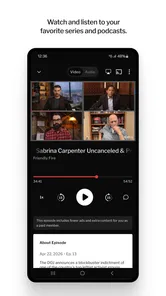


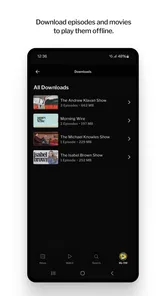

Analysis by Reviewed
My main impression of DailyWire+ is that it makes the most sense as a destination for a particular editorial perspective, not as a neutral window onto every side of the news. If you enjoy commentary alongside reporting and want video and audio in the same place, that focus can be a real draw. If you mainly want a broad, multi-outlet briefing, I’d pair it with other sources rather than make it your only news habit.
Who will get the most from it
The app is published by The Daily Wire and sits in the news and magazines category, but it reaches beyond a conventional headline feed. Its mix of articles, podcasts, and video is useful when you want to follow a topic in different formats: read an explanation when you have a quiet moment, then listen to a discussion while doing chores. That flexibility is more valuable than trying to consume every item in the app.
For example, I’d use it during a commute or lunch break to catch up on a developing issue, then save a longer video or podcast for home. A practical tip is to choose one subject you genuinely want to understand and follow it across formats, instead of letting a busy feed turn into background noise. Commentary can clarify an argument, but it is still commentary; when a claim matters, compare it with reporting from outlets that approach the subject differently.
How it fits beside other news apps
Compared with a general-purpose news aggregator, DailyWire+ is less about assembling a wide range of publishers and more about presenting one outlet’s mix of news, opinion, and entertainment. That makes it easier to stay within a consistent editorial voice, but it also narrows the range of perspectives you encounter in one session. I’d choose an aggregator for a quick cross-outlet scan and this app when I specifically want its commentary and longer-form material.
It is also worth thinking about how you like to consume news. A text-first reader may prefer a lighter headlines app, while someone who values host-led discussion or documentaries may get more out of this combination. The trade-off is attention: audio and video can make complex subjects approachable, yet they take longer than scanning a few headlines. I wouldn’t treat a podcast episode as a substitute for checking the underlying details of a fast-moving story.
The All-in-One Content Hub
When I first stumbled upon this app, I thought, “Oh great, another news app.” But, oh boy, was I wrong! This isn’t your run-of-the-mill news aggregator. DailyWire+ is a powerhouse of content. It doesn't just serve you the headlines; it dives deep into the stories that matter. Whether you're interested in politics, culture, or even entertainment, this app has something for everyone.
News with a Twist
One of the things that caught my attention was the way news is presented. It’s not just about what’s happening in the world but also why it’s happening. The app provides a plethora of articles that break down complex issues into digestible pieces, making it easier to understand the bigger picture. I found myself learning something new every day, which is a pretty cool feeling.
More From Our News Desk

Weather by Xiaomi Review: Clear at a Glance, Less Clear Up Close

X Under Pressure: Can It Recover When Posting Goes Wrong?

Clash of Clans Is Won Between the Battles

Android Auto Makes the Case for Quieter Car Software

MobiOffice: Transforming Mobile Productivity with Seamless Integration

EA SPORTS FC™ Mobile Soccer: Redefining Mobile Sports Gaming
Engaging Podcasts and Videos
But wait, there’s more! If reading isn’t your thing, DailyWire+ offers a stellar lineup of podcasts and videos. I’ve spent countless hours listening to thought-provoking podcasts that challenge my perspectives. The video content is equally compelling, ranging from documentaries to interviews with experts across various fields. It’s like having a personal cinema with an intellectual edge.
Personalized Experience
Another feature that I absolutely love is how personalized the experience is. The app learns from your preferences and tailors the content accordingly. It’s like it knows you better than you know yourself! Whether you’re a morning news reader or a late-night binge-watcher, it adjusts to fit your schedule and mood.
User-Friendly Interface
Let’s talk about the interface. It’s sleek, intuitive, and just plain easy to navigate. I’m not the most tech-savvy person, but I found the layout to be incredibly user-friendly. Everything is where you’d expect it to be, and the app runs smoothly without any hiccups. It’s a seamless experience from start to finish.
Using the mix without letting it take over
The most useful way I’ve found to approach a mixed news-and-entertainment app is to give each format a job. I’d use articles for a quick first pass, then turn to a podcast or video when I have enough time to follow an argument without multitasking. That keeps the longer pieces from becoming noise in the background and makes it easier to notice where a presenter is explaining facts, offering interpretation, or making a persuasive case.
A realistic routine might be checking an article over breakfast, then listening to a related discussion while tidying up later. If the story is changing quickly, I’d return to a current report rather than assume a longer episode has the latest developments. For a subject that matters to me, I’d also compare the central claims with another outlet before sharing them. This is not a criticism unique to this app; it is especially important when a publication’s recognizable perspective is part of its appeal.
Cost, access, and expectations
The app is free to install, and its age rating is Everyone 10+. It has an average rating of 4.4 from around 12,000 ratings, with more than a million installs, which suggests plenty of people are giving it a try. The current version is 3.3.3 and requires OS 9 or later. Some in-app purchases range from $14.99 to $249.99 per item, so free installation should not be confused with every piece of content necessarily being included at no cost. I’d check the price attached to anything you’re considering before committing, especially if you only want occasional access.
A sensible way to decide is to install it, explore the material that is available to you, and judge whether the editorial mix suits your routine before spending. If you need comprehensive coverage from multiple viewpoints, keep a general news app in your rotation. If the particular mix here is what you want, using one app for articles and longer listening or viewing can be convenient; just avoid assuming that a single source gives you the whole picture.
Where the editorial focus becomes a limitation
The same strong identity that makes the app distinctive can narrow its usefulness. If I open it expecting a neutral roundup of competing accounts, I’m asking it to do a job better suited to a multi-publisher aggregator. A steady voice can help me understand the arguments that outlet chooses to emphasize, but it does not replace the work of seeking out different reporting when an issue is disputed or consequential.
There is also a practical time trade-off. Reading a short article may fit into a spare moment, while longer audio and video require more attention and a reliable stretch of time. I would not install it solely for quick alerts or a fast scan of every major outlet; a simpler headlines app is a better fit for that habit. Nor would I assume that installing it means every piece of content is included without charge. The purchase range makes it worth checking the terms of a specific item before building a routine around it.
Personalization works best with a little intention
Because the experience adapts to what I engage with, I’d be deliberate about what I open and finish. If I only tap on one kind of subject, the recommendations may become less useful for discovering other areas of the app. I’d occasionally explore beyond my usual interests, while still treating suggested material as a starting point rather than a complete picture of what deserves attention.
That small habit matters for anyone who wants a broader news routine without giving up the convenience of a tailored feed. Use personalization to reduce the effort of finding relevant material, not to let one stream make every editorial choice for you. And if a recommendation leads to a long video, decide whether you genuinely have time for it; saving it mentally for “later” can turn an app into another queue of unfinished content.
Who should choose a different option
I’d steer readers toward another app if their first requirement is an even-handed selection of reporting from many publishers, or if they want nothing beyond concise headlines. A traditional aggregator is more practical for comparing coverage in one place, while a text-focused reader is less demanding when time is tight. Someone who dislikes opinion-led presentation may also find the app’s editorial identity too prominent, even if the mix of formats is appealing.
On the other hand, people who already seek out The Daily Wire’s perspective and want its articles, podcasts, and video collected in one app are the clearest audience for it. It can also suit a reader who wants to move from a written explanation to a longer discussion without switching between unrelated services. I’d describe it as a focused complement to a news routine, not a universal replacement for one.
My verdict for a daily news routine
I’d recommend it to readers who actively want The Daily Wire’s blend of reporting, opinion, podcasts, and video, and who are comfortable treating that blend as one part of a wider media diet. It is less suitable for anyone seeking an even-handed aggregator, a bare-bones headline reader, or a completely free all-access library. The release date is October 2, 2019, and the app’s development has continued through version 3.3.3; what matters more in daily use is whether its point of view and formats fit how you actually follow the news.
My practical recommendation is to use it deliberately: pick a topic, read beyond the first headline, and use audio or video when you have time for a deeper look. Keep another source nearby when you want contrasting reporting, and check in-app purchase details before choosing paid content. With those expectations, DailyWire+ can be a useful, engaging addition to a news routine; without them, its strong editorial identity may feel limiting rather than helpful.
DailyWire+ Frequently Asked Questions
What devices and operating systems can run DailyWire+?
DailyWire+ is a news and media app for Android and iOS devices. The current version is 3.3.3, and it requires Android 9 or later. Before downloading, check that your device meets the operating-system requirement and has enough available space for the app. Once installed, you can use it to explore the service’s articles, shows, podcasts, and other media.
Who publishes DailyWire+, and what is its general point of view?
DailyWire+ is published by The Daily Wire, and its short store description is “Noisy. Opinionated. Right.” The app centers on news, commentary, and cultural discussion, including content from conservative personalities. That editorial perspective is an important consideration before downloading: it is aimed at people interested in that viewpoint, rather than presenting itself as a politically neutral news service.
What is DailyWire+ and what content does it offer?
DailyWire+ is a subscription-based media app that offers a wide variety of content including news articles, opinion pieces, podcasts, and video content. The app hosts content from popular conservative personalities, covering topics such as politics, culture, and current events. Users can access exclusive shows and documentaries, making it a comprehensive platform for those interested in conservative viewpoints.
Is DailyWire+ free to use or does it require a subscription?
While DailyWire+ offers some free content, the full range of its features and content is accessible through a subscription. Subscribers gain access to exclusive shows, podcasts, and articles. The app typically offers various subscription plans to cater to different user needs, providing flexibility in terms of monthly or annual billing options. The app itself is free to download, but in-app purchases are available, so review the purchase options shown in the app before subscribing.
On which platforms is DailyWire+ available?
DailyWire+ is available on multiple platforms, including iOS and Android devices. Users can download the app from the Apple App Store or Google Play Store. Additionally, it can be accessed via web browsers on desktops and laptops, ensuring users can enjoy content from virtually anywhere with an internet connection.
Pros
- High-quality video streaming
- Variety of conservative content
- User-friendly interface
- No ads for subscribers
- Offline viewing available
Cons
- Subscription required for full access
- Limited free content
- No live news updates
- Conservative bias
- Occasional app crashes











