daily.dev - stay up to date
- 46.00
- 3.3
- Installs
- 500.00K
- Price
- Free

Screenshots

Analysis by Reviewed
When I finish a coding task, I often want to know what has changed in the developer world without opening a dozen news sites and losing the rest of my break. That is the sort of gap daily.dev aims to fill: it is a free news and magazine app from daily.dev, built around a personalized reading feed for developers. I find the idea most useful when I treat it as a starting point for discovery, not a complete substitute for documentation, specialist newsletters, or careful research.
A feed that fits a short reading window
In an ordinary day, I might open the app between meetings, scan a few headlines, and choose one article that connects to a tool or topic I am working with. A feed organized around my interests makes that quicker than checking several broad technology publications, where developer news can be mixed in with stories I do not need. The practical payoff is not that every item will be essential; it is that I can spot a promising lead without planning a dedicated research session.
I would use that first pass to collect questions rather than make decisions. If a story mentions a new library or a shift in a familiar ecosystem, I can note the topic and later check the project’s own documentation or release notes. That handoff matters: a feed helps me notice and prioritize, while primary sources are still the better place to confirm technical details before changing a work project.
From a headline to a useful next step
A practical routine is to open the feed with one purpose in mind: catch up on a topic, look for a possible solution to a work problem, or simply see what conversations are emerging. I would skim first, open only the pieces that connect to that purpose, and leave the rest alone. That small constraint is useful because discovery feeds can make every headline look like a reason to keep scrolling.
For example, if I am investigating a frontend issue, a story about a related tool may give me a term or approach to research. I would then move from the article to the project’s documentation, a reproducible example, or a test in a separate workspace. The feed can help me find the trailhead; it should not become the place where I decide whether a dependency is safe or suitable for a production system.
Getting Started with daily.dev
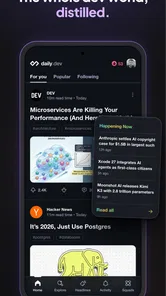
The first thing I noticed when I fired up daily.dev was its sleek interface. Navigating through the app feels intuitive, with a clean design that doesn't overwhelm you with unnecessary clutter. Setting it up was a breeze too! After a quick sign-up, I was immediately greeted with a curated feed of articles and news tailored to my interests. No more endless scrolling through irrelevant content!
Content Galore!
What truly sets daily.dev apart is the sheer variety of content it offers. From the latest in AI advancements to in-depth reviews of new developer tools, there's something for everyone. The app aggregates news from all over the web, ensuring that you're not missing out on any vital updates. It's like having your personal tech conference, available anytime, anywhere.
More From Our News Desk

Weather by Xiaomi Review: Clear at a Glance, Less Clear Up Close

X Under Pressure: Can It Recover When Posting Goes Wrong?

Clash of Clans Is Won Between the Battles

Android Auto Makes the Case for Quieter Car Software

MobiOffice: Transforming Mobile Productivity with Seamless Integration

EA SPORTS FC™ Mobile Soccer: Redefining Mobile Sports Gaming
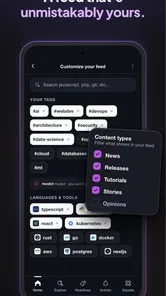
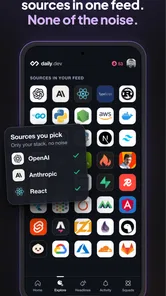
One of the standout features is the ability to customize your feed. Not into blockchain? No problem, just tweak your preferences, and the app adjusts accordingly. This level of personalization is an absolute game-changer for anyone tired of sifting through irrelevant information.
Making reading lead somewhere
Personalization works best when I make it a deliberate filter rather than trying to follow every possible topic. If I am focused on frontend work, for example, I would keep my interests narrow enough to make the feed useful, then broaden them when I am exploring a new area. That gives me a better signal-to-noise balance and avoids turning a quick check into an open-ended scroll. A useful habit is to stop after finding one worthwhile piece and carry its key question into a focused search elsewhere.
This is also where I see a trade-off compared with a conventional RSS reader. RSS is appealing when I already know which publications I trust and want precise control over their updates. daily.dev is more useful when I want a discovery layer that can surface material across developer topics without maintaining a hand-built list. If I need a formal reference or a reliable record of a specific project’s changes, I would still go straight to its official channels.
Choosing a routine that suits your work
I would not try to turn every quiet moment into a reading session. A better use is to check the feed at a natural pause, such as after finishing a task or before planning the next one, and save deeper reading for a time when I can concentrate. That separation helps me avoid skimming technical articles too quickly and mistaking a headline for an understanding of the subject.
It can also help to treat an article as a prompt for a small learning task. If a piece introduces an unfamiliar concept, I might write down the term, find a primary explanation, and try a minimal example later. That makes the app useful to learners as well as working developers, while keeping the difference clear between discovering an idea and actually learning how to use it.
Community and Engagement
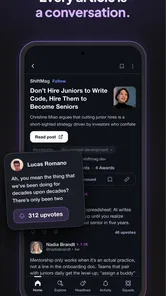
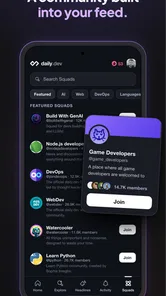
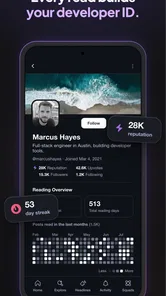
Another aspect that I absolutely love about daily.dev is its community-driven approach. Users can engage with articles by leaving comments, sharing insights, and even reacting to posts. It's a fantastic way to connect with fellow developers, exchange ideas, and perhaps even collaborate on projects. The app transforms the solitary act of reading news into a communal experience.
For me, the strongest use of that social layer is to compare how other developers interpret a story, not to treat a comment thread as the final technical answer. A discussion can reveal a practical concern or point me toward a different perspective, but I would verify consequential claims before relying on them. That distinction makes engagement more useful and keeps a lively reaction from becoming a substitute for evidence.
Moreover, the integration with other platforms is seamless. Whether you want to share an article on LinkedIn or save a piece for later on Pocket, daily.dev makes it incredibly easy.
What happens after a useful find?
The handoff from reading to action is where I would be selective. If an article is worth sharing with a teammate, I would pass along the piece together with the question it raised, rather than presenting it as a settled recommendation. That gives the other person context and makes it easier to discuss whether the idea applies to our project. For personal learning, the equivalent handoff is to move the topic into a note or a deliberate search, instead of assuming I will remember a headline later.
Compared with a general technology-news app, this developer focus is the main reason to choose it: the subject matter is closer to programming tools and working practice. A newsletter can be better when I want a human editor to narrow the reading for me, while an RSS setup can be better when source-by-source control matters most. I see daily.dev as a middle ground for discovery, not a replacement for either approach in every situation.
Where the routine can stumble
A personalized feed still depends on what I choose to follow and what the feed brings forward, so it cannot guarantee that I will see every important development. A narrow set of interests may leave useful adjacent topics out; a broad one can bring back the very noise I hoped to avoid. I would adjust the mix when my work changes, and use the feed as one input among several rather than as my only source of industry awareness.
It is also not the right fit for everyone who reads about technology. Someone who wants only official security advisories, a carefully edited general-news digest, or an exhaustive archive of chosen sources may be better served by those dedicated options. daily.dev is aimed at keeping a developer-oriented reading habit approachable, and that focus is a strength only when it matches what the reader actually needs.
Who will get the most from it?
I would recommend trying it if you are a developer, learner, or technically curious reader who wants a convenient way to encounter articles beyond the sites you already visit. It can be particularly handy for someone changing roles or learning a new area: use the feed to discover vocabulary and recurring themes, then move to tutorials, documentation, and hands-on practice for depth. It is less compelling if you already have a disciplined, trusted reading system and dislike algorithmic or personalized discovery.
It is also worth asking what you want the app to do when you are short on time. If your goal is to spot a few leads and choose one item to investigate, a personalized feed can make that decision easier. If you need a dependable checklist of release announcements, urgent security notices, or changes to a specific tool, I would subscribe to that project’s own updates instead. Those needs call for completeness and direct sourcing, not broad discovery.
The app is free, rated for Everyone, and has an average rating of 3.3 from around a thousand ratings, with over half a million installs. It was released in June 2021, and version 17 supports Android 4.4 and later. Those details make it easy to try, though popularity alone cannot tell me whether its selection will match your interests; the best test is whether the feed earns a place in your own routine.
Final Thoughts
In a world where information is power, daily.dev equips developers with the tools they need to stay informed and ahead of the curve. It's not just an app; it's a community, a resource, and a daily companion for anyone in the tech world. If you're looking for a way to streamline your news consumption and engage with like-minded individuals, give daily.dev a try. Trust me, you won't regret it!
My recommendation is more measured: try it as a lightweight discovery habit, then judge it by whether the stories lead you to worthwhile reading rather than simply filling spare minutes. I would keep the feed focused, use discussion as a source of perspectives, and take technical decisions back to primary sources. For a developer who wants a convenient route from a spare moment to a useful question, that is a sensible role for the app. For anyone who needs a complete, tightly controlled news record, a different tool should lead the workflow.
daily.dev - stay up to date Frequently Asked Questions
Can I use daily.dev on an older Android device?
The Android version supports devices running Android 4.4 or later, so it can be an option for users with older phones as well as newer ones. Before downloading, check which Android version your device is running. daily.dev is a News & Magazines app, built around a personalized feed of knowledge for developers.
What is daily.dev and how does it work?
Daily.dev is an application designed to keep developers updated with the latest news and trends in the tech industry. It aggregates articles, tutorials, and news from various sources, presenting them in a personalized feed tailored to your interests. Users can customize their feed by selecting preferred topics, ensuring they receive relevant content without the clutter.
Is daily.dev free to use, and are there in-app purchases?
Yes, daily.dev is free to download and use. It offers a comprehensive range of features without requiring any payment. There are no in-app purchases or premium subscriptions, making it a cost-effective tool for developers looking to stay informed. Users can enjoy full access to all features without worrying about hidden costs.
Can I customize the content I see on daily.dev?
Absolutely! Daily.dev allows users to personalize their feed by selecting topics and sources that interest them. This customization ensures that you receive content relevant to your specific preferences, be it programming languages, development tools, or industry news. The app's intuitive interface makes it easy to adjust your settings at any time.
Does daily.dev require an internet connection to function?
Yes, daily.dev requires an active internet connection to fetch and update content. The app continuously aggregates new articles and news, ensuring users receive the most up-to-date information. While you can browse previously loaded content offline, new updates and articles will only be available with an internet connection.
Pros
- User-friendly interface
- Curated tech news
- Customizable feed
- Real-time updates
- Offline reading
Cons
- Limited sources
- No dark mode
- Occasional bugs
- Ads in free version
- No social sharing











