

CVTz50
- 81.00
- 4.3
- Installs
- 100.00K
- Price
- $4.99

Screenshots
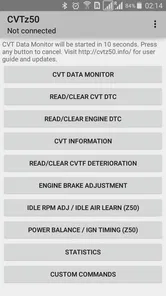
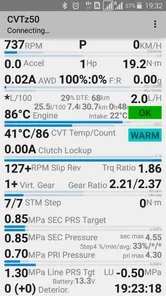
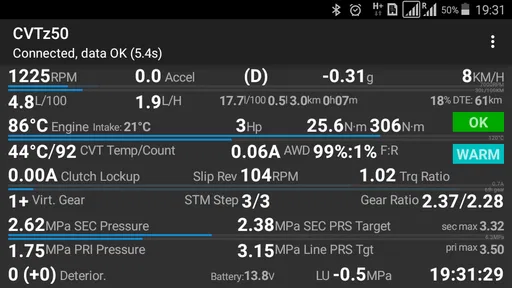
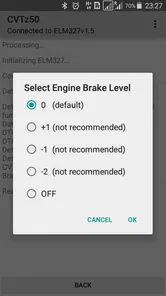
Analysis by Reviewed
I think this app makes the most sense when a driver wants to understand what a CVT is doing before deciding whether a symptom deserves attention. It is not a substitute for a mechanic, and I would not treat a live reading as a diagnosis on its own. Used with a suitable adapter and a little patience, though, it can help turn vague worry into useful observations to discuss with a technician.
Start with the car and adapter
The first practical question is whether it fits your vehicle and setup. This is a focused tool for Nissan-based vehicles with CVTs, not a universal scanner for every car or transmission. It works with an ELM327 adapter, so check that your vehicle and adapter are compatible before spending money. If you already own a generic OBD-II reader, do not assume it will provide the same access or behave reliably with this app.
That narrow focus is also its strongest distinction from general-purpose diagnostic apps. Broad scanners are often the better choice if you need to read engine codes across different makes, while this one is aimed at CVT information for its intended vehicles. I would choose based on the problem at hand: a transmission-focused view for a compatible Nissan-based car, or a general scanner for mixed vehicles and wider basic checks.
Build a useful comparison, not a one-off guess
A useful routine is to record a baseline when the car feels normal, then compare it with readings during a repeatable drive. Keep the route and driving conditions as similar as practical; a change in temperature or load can affect what you see, so one unusual number in isolation may not mean much. This is a more careful use of logging than checking the app once after a warning light appears and trying to infer the whole story from that moment.
For example, if the transmission feels different on a familiar commute, I would note when the symptom happens and compare the available live information with an ordinary drive. That record can help me explain the situation more clearly at a repair shop. It cannot prove that a component is failing, and a normal-looking screen should not override a persistent warning or troubling change in how the car drives.
Who will find it worthwhile
I would recommend it most to an owner of a compatible vehicle who is comfortable pairing a phone with an adapter and wants to follow CVT behavior over time. It can also suit a hands-on driver who wants more context before a service visit, rather than relying only on a generic code reader. The app is less compelling if you do not have the right adapter, drive a vehicle outside its intended range, or simply want a quick all-purpose scan with no setup.
There is a learning curve to interpreting vehicle data even when the controls are approachable. The useful habit is to treat the app as an observation tool: save relevant readings, note the driving conditions, and bring questions to a qualified mechanic instead of attempting repairs based only on an app screen. That keeps the information practical without giving it more authority than it deserves.
More From Our News Desk

 Gmail
GmailGmail in a Busy Inbox: Who Benefits Most?
From first account to crowded workday, Gmail earns its place through dependable search and flexible sorting—but its best fit depends on how much inbox maintenance you can tolerate.

 Prime Video
Switching to Prime Video: What Changes in Your Viewing Routine
Prime Video can make a compelling second home for streaming, but switching means learning a different catalog, rental layer, and route from browsing to playback.

 Universal TV Remote Control
Universal TV Remote Control Works Best as a Reliable Backup
A phone remote earns its place through quick setup and reliable habits. Here is how to get more from Universal TV Remote Control—and where its limits show.

 Weather - By Xiaomi
Weather by Xiaomi Review: Clear at a Glance, Less Clear Up Close
Xiaomi’s weather app makes everyday forecasts quick to scan, but its calm surface can leave useful details and recovery paths harder to find than they should be.

 X
XX Under Pressure: Can It Recover When Posting Goes Wrong?
A resilience-focused review of X, examining setup, mistaken posts, interruptions, weak connections, and the gaps that matter when recovery needs to be dependable.

 Clash of Clans
Clash of Clans Is Won Between the Battles
Its raids are quick; its community is a long-term project of coordination, teaching, rivalry, and shared responsibility—with all the friction that entails.
Latest News



Make the information useful at a service visit
A driver does not need to become a transmission specialist to get value from this kind of monitoring. I would keep the notes simple: what the car was doing, when I noticed it, whether the sensation repeated, and what the app showed at that time. A short, organized account is often more useful than arriving with a long collection of unexplained figures. It gives a technician a starting point without pretending to tell them what repair to make.
There is also a practical reason to avoid changing several things at once. If I switch adapters, phones, routes, or driving habits between comparisons, it becomes harder to tell whether a difference reflects the car or the setup. Keeping the routine consistent makes the observations easier to discuss, though it still does not turn them into a definitive test.
On an ordinary commute, for instance, I might notice that the car feels unlike its usual self during one stretch of stop-and-go traffic. I would wait until safely parked before checking notes, then make a record of the conditions and see whether the same pattern returns on another familiar trip. If it does, that context is more helpful to a repair shop than a single screenshot taken after the fact. If the car feels unsafe, I would stop driving and seek assistance rather than trying to reproduce the symptom for the app.
When another route is better
If your main need is a quick check across several makes, a broad scanner is a more sensible first purchase. If you want a professional assessment of a persistent transmission concern, a workshop visit is the better option; app readings can support the conversation but cannot replace hands-on inspection. And if you are not interested in connecting an adapter, learning what the information means, or keeping observations over time, the extra detail may not justify the effort.
That trade-off is central to the app’s appeal. Its vehicle focus may provide a more relevant view for the right owner than a basic all-purpose reader, but the same focus limits its usefulness elsewhere. I would decide whether that narrower access matches a real need in my own car before paying, rather than buying it in the hope that it will diagnose any vehicle issue.
Have you ever found yourself wondering if your car’s CVT (Continuously Variable Transmission) is operating at its best? Well, I stumbled upon an app called CVTz50, and let me tell you, it’s like having a personal car mechanic right in your pocket. If you’re a car enthusiast like me, you’ll want to keep reading.
Getting to Know CVTz50
So, what’s the deal with the CVTz50 app? Essentially, it’s designed to help you monitor and diagnose the health of your car’s CVT. This app is a game-changer for those of us who want to keep our cars in tip-top shape without having to make constant trips to the mechanic.
I was initially skeptical about how effective an app could be when it comes to vehicle diagnostics. But, after giving it a spin, I was pleasantly surprised. The app connects to your car’s onboard system through an OBD-II adapter, giving you access to a wealth of data. You can check things like transmission temperature, gear ratio, and even the current load. It's kind of like having an x-ray vision for your car's transmission system!
Live readings and logs in context
One of the features that really caught my attention is its real-time data monitoring. You can literally watch how your transmission is performing as you drive. This is invaluable if you’re trying to diagnose a problem or just want to make sure everything is running smoothly. Plus, the app provides error codes and detailed descriptions, which is a massive help in pinpointing any issues.
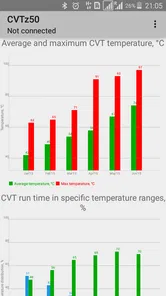
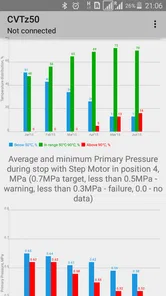
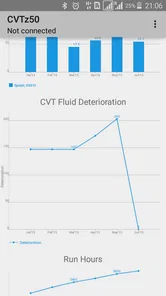
Another cool feature is the app’s ability to log data over time. You can track how your CVT performs over weeks or even months, which is great if you’re into data analysis or just want to keep a record of your car’s performance. And for those of us who are a bit forgetful, the app can set reminders for oil changes and other maintenance tasks.
Trust begins with a deliberate connection
For a vehicle diagnostic tool, I pay attention to the moment when a phone connects to a car: the readings may shape decisions about maintenance, so I prefer to keep the process deliberate. I would connect while parked, confirm the adapter is the one I intended to use, and avoid trying to configure or study screens while driving. The app’s usefulness depends on access to the car’s onboard information, but I would not assume anything about data collection or sharing without reviewing the app’s current privacy details and the choices shown on the device.
Before relying on any readings, I would also verify that the selected vehicle information and connection are correct, then compare the app’s output with the car’s own warning indicators and service guidance. An error description can help me frame a question; it is not the same as a confirmed mechanical diagnosis. If a warning appears or the vehicle behaves unsafely, I would stop treating the phone as the main authority and seek professional help.
Cost, audience, and practical expectations
CVTz50 is a paid Auto & Vehicles app from cvtz50.info, priced at $4.99, and it is rated for Everyone. Its average is 4.4 from around 4,600 ratings, with more than 100,000 installs. Those figures suggest that it has found an audience among drivers looking for this particular kind of CVT access, but popularity cannot establish compatibility with your exact car or adapter. I would check fit first, then weigh the price against whether I will use the data more than once.
The app was released on June 14, 2016, and its current version is 1.54, with Android 4.0 as the minimum operating system. That makes it relevant to people using older Android hardware, though I would still check that the phone and adapter work together in practice. If you want a broad scanner for several makes, or do not want to manage an adapter and interpret readings, a conventional workshop inspection or a general-purpose diagnostic option may be the better fit.
How I would approach the setup
Now, let’s talk about the user experience. The interface is incredibly user-friendly, which is a huge win in my book. Even if you’re not super tech-savvy, you’ll find navigating through the app’s features a breeze. The graphics are clean and easy on the eyes, which makes sifting through data a whole lot less daunting.
Installation was straightforward, too. After downloading the app, it took me just a couple of minutes to set it up and connect it to my car. The app’s instructions were clear, making the whole process hassle-free.
A cautious recommendation
In conclusion, if you’re someone who likes to keep a close eye on your car’s performance, the CVTz50 app is a must-have. It’s comprehensive, easy to use, and provides valuable insights that can help you maintain your vehicle efficiently. Whether you’re a seasoned car enthusiast or just someone who wants to avoid unexpected repairs, this app is definitely worth checking out.
So, next time you’re worried about your CVT, remember you’ve got a handy tool right on your smartphone. Happy driving!
CVTz50 Frequently Asked Questions
How can I tell whether CVTz50 is the right app for my vehicle before downloading it?
CVTz50 is aimed at drivers and technicians who want to diagnose CVTs in Nissan-based vehicles using an ELM327 adapter. It is listed in the Auto & Vehicles category and has an Everyone content rating. If your main goal is CVT diagnostics for a Nissan-based vehicle, its focus may suit you; check that your vehicle and adapter work with the app before relying on it.
What is CVTz50 and how does it work?
CVTz50 is a specialized diagnostic app designed for automotive enthusiasts and professionals dealing with Continuously Variable Transmissions (CVTs). It works by connecting to a vehicle's onboard diagnostics system through a compatible adapter, allowing users to monitor various transmission parameters, read error codes, and perform system tests. This helps in identifying issues and maintaining optimal performance of the CVT.
Is CVTz50 compatible with all vehicle models?
CVTz50 is primarily designed for vehicles equipped with CVTs, particularly those from specific manufacturers like Nissan, Subaru, and Mitsubishi. However, compatibility may vary depending on the vehicle's model and year. It's crucial to check the compatibility list provided by the app to ensure it supports your specific vehicle before downloading.
Does CVTz50 require any additional hardware to function?
Yes, to utilize CVTz50, users need an OBD-II adapter that connects to the vehicle's diagnostic port. This adapter serves as a bridge between the app and the vehicle's system. It is important to use a compatible adapter recommended by the app to ensure accurate data reading and seamless functionality.
What features does CVTz50 offer to its users?
CVTz50 provides a comprehensive range of features, including real-time monitoring of transmission parameters, reading and clearing diagnostic trouble codes, and performing system checks. Additionally, it offers data logging, which allows users to record and analyze transmission performance over time. These features make it a valuable tool for both diagnostics and preventive maintenance.
Pros
- User-friendly interface for easy navigation.
- Supports wide range of vehicle models.
- Provides real-time diagnostic data.
- Comprehensive error code explanations.
- Regular updates with new features.
Cons
- Requires compatible adapter for full functionality.
- Limited features in free version.
- Occasional connectivity issues.
- Complex setup for beginners.
- Some features require in-app purchases.











