CRIMEWATCH
- 89.00
- 3.4
- Installs
- 100.00K
- Price
- Free

Screenshots
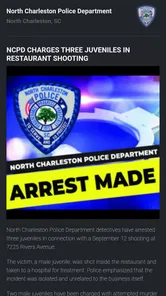


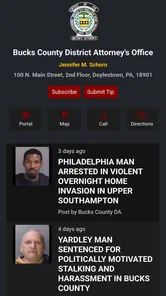
Analysis by Reviewed
CRIMEWATCH is the kind of news and community safety app I would open with a specific purpose rather than browse casually for long stretches. Its central idea is collaboration: bringing local crime-related information and community participation closer together in one mobile experience. That makes it potentially useful when I want to stay aware of what is happening around me, but it also means its value depends heavily on the quality and relevance of the information available in my area.
Developed by CRIMEWATCH Technologies, the free app has been available since November 17, 2015, and supports Android devices running version 7.0 or later. It is aimed at a Teen audience, which feels appropriate for a service dealing with crime and public safety. I found the concept more practical than flashy. The important question is not whether it entertains me, but whether it helps me understand local situations without making the experience feel slow, confusing, or unnecessarily demanding.
How CRIMEWATCH feels during everyday use
My first expectation with an app like this is quick access. News applications can tolerate a little waiting when I am reading a long article, but a community safety tool needs to feel reasonably direct when I am checking something relevant to my neighborhood. CRIMEWATCH is best approached with that expectation: it is a focused information tool, not a general social network or a full replacement for emergency services.
The app’s purpose is reflected in its store summary, “Safer communities through collaboration.” I read that less as a promise of instant answers and more as an explanation of the app’s role. It works best when people use it as one part of their awareness routine: checking local information, paying attention to notices, and using judgment before acting on anything they see.
One useful habit is to decide what I am looking for before opening it. If I am checking for a local incident, I can concentrate on relevant updates instead of treating the app like an endless news feed. That approach makes the experience feel faster because I am not asking it to serve several unrelated purposes at once. It also reduces the risk of becoming distracted by alarming stories that have no practical connection to my day.
Compared with a general news app, CRIMEWATCH has a narrower focus. A mainstream news service may offer broader regional or national coverage, while this app is more appealing to someone who wants community-level awareness. Compared with neighborhood social platforms, its subject matter is more focused, but I would still avoid assuming that every post or alert should be treated as verified fact without context.
What happens when I use it heavily
The most demanding moments are likely to come when several things happen at once: I may be checking local information while moving between places, switching away from the app to search for context, or returning after a busy period to catch up. In those situations, the app’s usefulness depends less on visual polish and more on whether I can quickly separate relevant information from background material.
More From Our News Desk

Weather by Xiaomi Review: Clear at a Glance, Less Clear Up Close

X Under Pressure: Can It Recover When Posting Goes Wrong?

Clash of Clans Is Won Between the Battles

Android Auto Makes the Case for Quieter Car Software

MobiOffice: Transforming Mobile Productivity with Seamless Integration

EA SPORTS FC™ Mobile Soccer: Redefining Mobile Sports Gaming
I would not use CRIMEWATCH as my only source during an urgent incident. For immediate danger, direct emergency services remain the appropriate choice. The app is better suited to awareness, follow-up, and community context. That distinction is important because a safety-oriented interface can create a false sense that opening it is the same as receiving an official emergency response. It is not.
A realistic everyday scenario would be checking the app before leaving for an evening appointment in an unfamiliar part of town. I could use it to become more aware of local developments, then make sensible decisions about timing and travel. If something concerning appeared, I would verify the situation through appropriate official channels rather than forwarding it immediately. This workflow gives the app a useful supporting role without asking it to do more than it can reasonably do.
For people who return frequently, a short checking routine makes more sense than constant monitoring. I would open it at a convenient time, review the information connected to my area, and close it once I had the context I needed. That is also a practical way to limit battery and attention demands. Safety information can be valuable, but continuously refreshing it can become stressful and does not automatically make a person safer.
Another trade-off appears when I compare it with ordinary news alerts. A broad news app may be better if I want one place for politics, weather, transport, and national headlines. CRIMEWATCH is more specialized, so its advantage is focus rather than breadth. If my main interest is general news, installing a dedicated community safety app may feel like an extra step. If local awareness is the priority, that narrower purpose is exactly what makes it worth considering.
Stability, recovery, and trust during a busy day
Reliability matters more here than it would in a casual reading app. If I open CRIMEWATCH after not using it for a while, I want to understand what I am seeing without having to reconstruct the entire context. I also want to be able to return to the app after switching to another screen and continue my check without treating the process as a major task.
The current release is version 4.0.2, which indicates that the app has continued through multiple stages of development rather than remaining frozen in its original form. I would still judge the experience on my own device and connection, because an app can behave differently depending on Android hardware, available storage, background activity, and network conditions. The version number alone is not a guarantee of perfect performance, but it is useful context when deciding whether the app is maintained enough to try.
When an app is connected to changing local information, a delay or incomplete refresh can be more confusing than a simple loading screen. My advice is to avoid making a serious decision from one isolated item. If the information affects travel, personal safety, or another important choice, I would look for confirmation and consider the time of the report. This is not a criticism unique to CRIMEWATCH; it is a necessary discipline for any rapidly changing safety feed.
Recovery is also about the user, not just the software. If I open the app during a stressful situation and find too much information at once, I would step back, identify the exact question I need answered, and use other appropriate resources where necessary. The app can support awareness, but it should not become the sole basis for judging a threat or accusing another person.
The average rating is 3.4 from around 236 ratings, with 89 written reviews. I see that as a mixed signal rather than a reason to dismiss the app. It suggests that the experience has not been universally smooth for everyone, so I would test it personally instead of assuming it will fit my routine. The relatively modest review volume also means I would place more weight on my local usefulness and device behavior than on the score alone.
Older phones and practical device limits
Because CRIMEWATCH supports Android 7.0 and later, it remains accessible to people who do not own a recent phone. That is a real advantage for a community-oriented service. A safety tool is less useful if its technical requirements exclude a large portion of the people it is meant to serve.
At the same time, an older operating system can come with practical compromises. Older phones may have less memory, slower storage, weaker batteries, or more aggressive background management. I would not assume that the app will feel equally responsive on every supported device. If my phone is already struggling with ordinary news apps, maps, and messaging, I would expect some friction when moving between CRIMEWATCH and other services during a busy situation.
Resource demands are especially relevant for people who keep many apps open or use their phone throughout the day. My own approach would be to use CRIMEWATCH intentionally, close it when finished, and check whether the phone remains comfortable afterward. I would avoid granting it more importance than the device can handle. A community safety app that leaves the phone slow or drains attention at the wrong time can undermine its practical value, even if the underlying idea is worthwhile.
Storage is another consideration for older devices. The app is free, but free does not mean costless in a broader sense: it still occupies space, uses network access, and asks for time and attention. On a phone with very little room left, I would first remove unused applications and clear unnecessary files rather than expecting one more installation to work smoothly.
For iPhone users, I would check the relevant platform requirements before planning around the app, since the Android compatibility detail does not automatically describe every device environment. In general, I would also keep the operating system reasonably current when possible. That improves the chances of a stable experience across any news or community application, although it cannot guarantee identical behavior from one phone to another.
Who gets the most value from it
CRIMEWATCH makes the most sense for people who care about local awareness and are willing to read information carefully. It could suit a resident who wants another way to follow community safety developments, a parent who wants to discuss neighborhood awareness with a teenager, or someone moving to a new area who wants a more focused source than a national news feed.
The Teen content rating is worth taking seriously. Crime-related information can be unsettling, and younger users may need guidance about separating useful awareness from fear-driven browsing. I would not hand the app to a child without explaining that reports and updates should be interpreted responsibly, that personal details should not be shared casually, and that urgent situations belong with emergency services.
I would skip it if I am looking for entertainment, broad news coverage, or a guaranteed real-time emergency alert system. It is also not the right choice for someone who tends to repost alarming information without checking it. In that case, a more structured official source may be a better starting point, with CRIMEWATCH used only as an additional perspective if it proves relevant locally.
Its strongest use case is not replacing everything else. It is adding a focused layer to a routine that might already include local authority information, general news, maps, and direct communication with people I trust. That layered approach is less dramatic than relying on one app, but it is more realistic and safer.
My performance verdict after weighing the trade-offs
I see CRIMEWATCH as a specialized, free community-information app rather than a complete safety solution. Its focus separates it from general news services, while its collaboration-centered purpose gives it a more local feel than a standard headline reader. The app is most convincing when I use it calmly and deliberately, especially for checking context around my community.
Speed expectations should remain practical. I would want quick access, but I would not judge its value solely by how fast a screen appears. The quality of the information, the relevance to my location, and my ability to interpret updates responsibly matter just as much. During heavy use, I would keep the workflow simple and avoid relying on it alone for urgent decisions.
On stability, the current version and continued availability make it reasonable to try, but the mixed average rating tells me to keep expectations measured. On device constraints, Android 7.0 compatibility is welcoming, although older hardware may still affect responsiveness and battery comfort. Those are important considerations for anyone using an older phone.
Overall, I would recommend trying CRIMEWATCH if local safety information is genuinely useful to my daily routine and I am comfortable treating it as one source among several. I would not recommend installing it merely because the subject sounds urgent. Its best contribution is steady awareness, not panic and not emergency replacement. Used with that distinction in mind, it can be a worthwhile addition to a carefully managed news and community-information setup.
CRIMEWATCH Frequently Asked Questions
Who publishes CRIMEWATCH, and what kind of app is it?
CRIMEWATCH is published by CRIMEWATCH Technologies and sits in the news and magazines category. Its focus is public-safety information and community updates rather than emergency dispatch. The app’s summary is “Safer communities through collaboration,” which reflects its role in connecting people with information shared by participating agencies. What appears in the app can vary depending on the community using the service.
Is CRIMEWATCH suitable for teenagers?
CRIMEWATCH has a Teen content rating, so families may want to consider that before downloading it for a younger user. The app covers public-safety topics, which can include crime reports and wanted-person notices; the material may be serious even when presented as community information. Parents and caregivers can review the app together and use the device’s available settings to manage access.
What is CRIMEWATCH and what can I use it for?
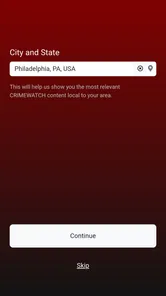
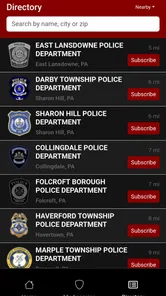
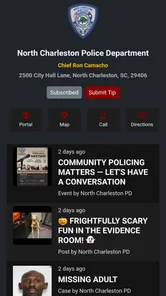
CRIMEWATCH is a public-safety app designed to help users access local crime information, safety alerts, wanted-person notices, community announcements, and, in supported areas, law-enforcement updates. After selecting an available participating agency or region, you can browse reports and notifications relevant to your location. The exact features and amount of information depend on whether local authorities support the platform.
Does CRIMEWATCH provide live crime reports or emergency assistance?
CRIMEWATCH can provide timely notifications and published information from participating law-enforcement agencies, but it should not be treated as a guaranteed live emergency feed. Information may be delayed, incomplete, or limited to selected incidents and announcements. If you are witnessing a crime, facing immediate danger, or need urgent medical or police assistance, contact your local emergency number instead of relying on the app.
Can I use CRIMEWATCH to report suspicious activity or submit a tip?
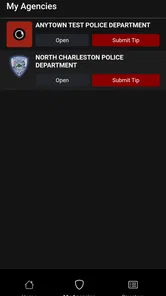
In some participating communities, CRIMEWATCH includes options for submitting tips, sharing information, or contacting a local agency. Availability varies by jurisdiction, and not every message is monitored continuously or handled as an emergency communication. Before submitting sensitive details, check the instructions provided in the app and avoid assuming that a tip has been received unless you receive an appropriate confirmation.
Pros
- Watch local crime alerts and safety updates in one place.
- Submit tips and information directly to participating authorities.
- Searchable incident details help you stay informed about your area.
- Push notifications can provide timely updates on developing cases.
- Useful community resource for identifying wanted individuals.
Cons
- Coverage depends on whether your local agency supports CrimeWatch.
- Some listings may be delayed or removed without notice.
- Incident details can vary widely between participating agencies.
- Frequent notifications may feel overwhelming in busy areas.
- Sharing sensitive information requires careful attention to privacy.











