Contacts - Calls, Phone Dialer
- 284.00
- 4.5
- Installs
- 500.00K
- Price
- Free
Screenshots
Analysis by Reviewed
I tend to judge a contacts app less by its first impression than by whether I still reach for it after the novelty wears off. A phone book is part of an everyday routine: I look up a person, place a call, check who rang earlier, and occasionally correct an old entry. Contacts - Calls, Phone Dialer brings those jobs together in one communication app. That simple scope is its appeal, but it also sets a high bar: the familiar tools need to feel convenient enough to justify changing a habit that may already work.
From quick first impression to a lasting habit
What feels useful in the first week
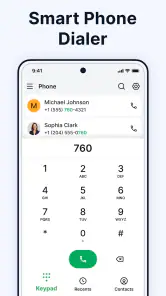
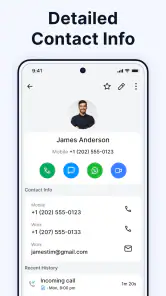
The first practical benefit is having contacts, dialing, and call history under one roof rather than treating them as separate tasks. If I want to call someone whose number I have saved, I can approach the job through the address book. If I am returning a call, the history gives me a natural starting point. That connection between finding a person and calling them is more valuable than a long list of decorative extras would be for someone who mainly wants a straightforward phone tool.
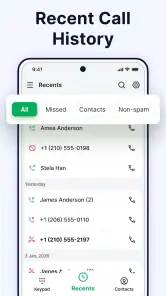
For example, imagine I receive a call while I am away from my desk and cannot answer. Later, I can check the call history, identify the entry I need, and continue toward calling back without first opening a separate contacts tool. The advantage is modest but real: fewer changes of context during a small task I repeat often. People who make routine calls to family, clients, local services, or colleagues are more likely to notice that convenience than someone who rarely uses the phone for voice calls.
The app is free and is rated for Everyone, so trying it does not involve a purchase decision or a specialized audience. Its store average is 4.5 from around 3.9 thousand ratings, and it has passed 500 thousand installs. Those figures suggest that it has attracted an established audience, though they cannot tell me whether its particular approach suits my habits. I would treat them as context, not as a substitute for checking whether the app fits the way I use my phone.
Why the routine matters more than novelty
Contacts apps are easy to judge too quickly. A clean first session can feel refreshing, especially if I have been frustrated with the way I currently move between a phone book and recent calls. But the lasting test is much less glamorous: can I find a person promptly when I am distracted, and can I return a call without second-guessing where to look? Because this app combines the address book, dialer, and call history, it is aimed at precisely that repeated loop.
I would give the app a fair trial during ordinary days, rather than trying to assess it only by exploring menus. Use it to look up a frequent contact, make a few calls, and return a call from the history. Notice whether the route feels natural without conscious effort. If it does, that small reduction in friction can matter more over time than a feature that is impressive once and then forgotten. If I keep reverting to the phone app I already know, the new setup has not earned its place, however tidy it may seem at first.
A practical way to test the change
Before making any new contact tool the center of my routine, I would try a low-risk workflow. I would use it for a handful of ordinary calls while keeping my existing method available, then check whether I can reliably reach the right person and review the calls I need to follow up on. This approach avoids turning a simple experiment into a disruptive migration. It also makes the real question clearer: does the app make a familiar task easier for me, or am I merely enjoying the feeling of trying something new?
You May Like

Clash of Clans Is Won Between the Battles

Android Auto Makes the Case for Quieter Car Software

MobiOffice: Transforming Mobile Productivity with Seamless Integration

EA SPORTS FC™ Mobile Soccer: Redefining Mobile Sports Gaming

How Microsoft OneDrive Became a Mobile Productivity Giant

How Google Translate Breaks Language Barriers Effortlessly
That trial is especially sensible for people whose address books are already busy. A small contact list makes almost any app feel easy; a larger one reveals whether the way the app presents and connects its tools suits the user. I would pay attention to whether I can confidently distinguish the person I intend to call from similarly named entries and whether the call history is useful in my actual routine. I am not assuming a particular search method or customization option; the point is to test the basic tasks the app is designed to bring together.
Month-to-month value depends on repetition
After the first week, the value is less about discovery and more about consistency. A contacts app does not need to entertain me; it needs to remain dependable as my list changes and calls come and go. The app’s core combination is promising for people who often move between saved numbers and recent calls. If those are recurring tasks, keeping them close together can make this a sensible everyday choice. If I mostly communicate through messaging, video calls, or another channel, I may simply not open a dialer often enough to notice a meaningful difference.
There is also a useful distinction between replacing a phone’s default calling experience and adding another way to manage contacts. I would not assume that installing an app automatically makes it the best place for every communication task. Instead, I would decide which jobs I want it to handle: perhaps looking up people and following up on calls, while continuing to use another familiar tool for other needs. That limited, intentional role can be more sustainable than trying to force every part of a phone routine into one app.
For someone who regularly calls the same people, the recurring benefit is easy to understand. The app offers a place to keep contact details and a route into calling, while call history supports the follow-up side of that habit. A person who makes only occasional calls may not gain enough from switching to justify relearning where things are. The right comparison is not whether this app has more options than every alternative; it is whether its joined-up focus saves enough thought in the calls I actually make.
Maintenance is part of the experience
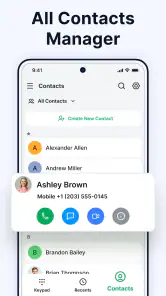
A contacts tool is only as useful as the information I rely on. When a number changes or an entry becomes outdated, I need to keep my address book accurate, regardless of which app I use. That ongoing tidying is not a special flaw of this product; it is the ordinary cost of maintaining a personal directory. Still, it affects whether the app feels dependable. A familiar contact name attached to an old number can undermine the convenience of having a dialer and address book together.
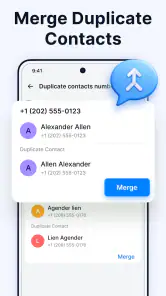
My practical tip is to treat contact upkeep as a small, occasional task rather than waiting until a call fails. When I notice a change, I can correct the entry while it is fresh in my mind. I would also be deliberate before creating a new entry during a rushed moment: a few seconds spent checking whether the person is already in my address book can prevent a cluttered list later. I am not relying on any unconfirmed merge or cleanup feature here; this is a straightforward habit that helps whichever contacts app I choose.
Keeping a call history useful takes a similar kind of judgment. Recent calls can help me remember whom I need to contact, but a history is not the same thing as a task manager. If I have an important follow-up, I should not assume that merely seeing the call later will be enough to remember it. I would make a separate reminder when the call has a deadline or requires an action. That small distinction prevents a phone log from being asked to do a job it was not designed to do.
Where friction can build up
The main trade-off is that another contacts and dialing app can add a step before it removes one. If I am comfortable with the phone tools already on my device, switching means learning a different route for familiar actions. Even a capable alternative can feel slower at first simply because my fingers already know the old routine. I would give it enough ordinary use to judge fairly, but I would not persist for the sake of novelty if I continue to reach for the previous app without thinking.
There is also a limit to the app’s central promise: bringing together contact management, calls, and history does not automatically solve every communication problem. Someone looking for messaging, team coordination, or a broader customer-management system should compare products built specifically for those needs. This app’s identity is much more focused on people and phone calls. That focus is a strength for a user who wants a direct calling workflow, but a reason to look elsewhere for someone whose daily communication happens mainly in other formats.
Another source of fatigue can be uncertainty about which app is responsible for a task. If I keep one tool for my address book and another for calls, I need to know which one I am updating and where I will look later. Consolidation can reduce that mental overhead, but only if the new routine becomes clear. During a trial, I would avoid making several changes at once. Use the app for the core contact-and-call loop first; then decide whether it genuinely deserves a broader role in how I use the phone.
Who should consider it, and who should skip it
I can see this app suiting someone who wants a dedicated place for contacts and phone calls, especially if moving between an address book and call history is a regular annoyance. It also makes sense for people who prefer a focused utility over a communication app centered on chat. Since it is free, the cost barrier is low, and a brief practical trial can answer more than browsing feature claims ever could. The developer is Messages App Evolution, and the current version is 2.0.21.
I would be more cautious if my existing phone setup already handles calls and contacts comfortably. A second app is not automatically an upgrade, and familiarity has genuine value when I need to call someone quickly. I would also skip it if my main goal is to manage conversations that happen through messaging platforms or to organize work beyond a personal contact list. The app is for general audiences, but a broad age rating does not mean every person needs a separate dialer.
Compared with the usual built-in phone and contacts tools, the meaningful question is how well the combined approach fits my own routine. A built-in option may be the better choice when I want to keep the phone’s existing setup and avoid introducing another interface. A dedicated alternative like this may be preferable when I specifically want contact management, dialing, and call history presented as parts of one communication tool. I would judge that comparison by completing real calls, not by assuming that one category of app is always superior.
My long-term verdict
Contacts - Calls, Phone Dialer makes the most sense when calls remain a regular part of daily life and I want a focused way to handle the people and call records around them. Its lasting value is not a novelty trick; it rests on a repeated sequence of finding someone, calling, and following up. If that sequence describes my week, the app has a clear reason to stay installed. If it does not, its central tools may sit unused no matter how convenient they sound.
It launched on September 9, 2025, and supports Android 11 or later. Those details matter when checking whether it fits a device, but they do not determine whether its workflow is right for me. I would install it only after confirming my phone meets that requirement, then test it during ordinary calls and contact lookups. For anyone already satisfied with a built-in dialer, there is no need to switch just because another option exists.
My recommendation is measured: try it if you make calls often and want contacts, dialing, and recent-call follow-up brought into one focused experience. Keep it if it becomes the route you reach for naturally and makes those repeated jobs feel simpler. Move on if your existing tools are quicker for you, or if your communication life revolves around services outside traditional phone calls. That is the test I would use after the first-week appeal fades: not whether the app is new, but whether it earns a place in the routine I actually keep.
Contacts - Calls, Phone Dialer Frequently Asked Questions
What is Contacts - Calls, Phone Dialer used for?
Contacts - Calls, Phone Dialer is designed to bring everyday calling and contact management together in one place. Depending on the features available in your version, you can use it to browse saved contacts, find a person by name or number, and start a call from the app’s dial pad or contact list. Check the app listing and permissions to confirm which features your device supports.
Does Contacts - Calls, Phone Dialer replace my phone’s default dialer?
It may offer calling and dial-pad features, but whether it can replace your phone’s built-in Phone app depends on your Android or iOS version and the app’s capabilities. On Android, you may need to select it as the default calling app in system settings. On iPhone, third-party apps generally cannot take over all of the system Phone app’s functions, so availability may differ.
What permissions might the app request, and why?
A dialer and contacts app may request access to contacts so it can display names and numbers, and phone-related permissions to support calling features. Depending on its design, it may also request access to call history or other device functions. Review each permission prompt before granting access, and consult the app’s privacy information to understand how personal data is handled.
Can I use Contacts - Calls, Phone Dialer to block unwanted calls?
Call blocking or spam identification may be available, but you should not assume these features are included without checking the app’s current feature list and settings. Blocking behavior can also depend on your device, operating system, carrier, and default-phone-app configuration. If blocking is important to you, confirm that the feature works on your specific device before relying on it.
Is Contacts - Calls, Phone Dialer free, and what should I check before downloading?
The app’s price, advertising, and optional in-app purchases can vary by platform, region, or version. Before downloading, check the official store listing for compatibility, recent updates, developer details, user reviews, and any stated data practices. Also verify that the permissions make sense for the features you want, and download only from a trusted app store.
Pros
- Combines contact management and calling in one app.
- Quick access to frequently used contacts saves time.
- A useful alternative to a device’s default dialer.
- Call history makes recent conversations easy to find.
- Contact details are conveniently available while placing calls.
Cons
- Some features may depend on your phone or Android version.
- Replacing the default dialer may require extra setup.
- The interface may feel unfamiliar to users of their built-in phone app.
- Contact access permissions are required for core features.
- Call-related features may not work the same on every device.

- Category
- Communication
- Version
- 2.0.21











