

Conduce: Tu App de Carros
- 6.00
- 4.4
- Installs
- 50.00K
- Price
- Free

Screenshots





Analysis by Reviewed
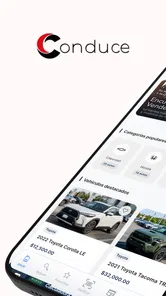
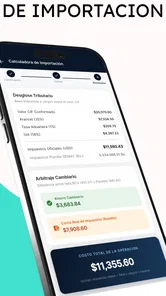
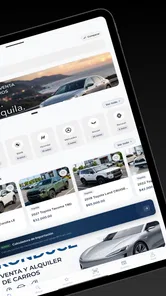
Buying a used car is often less stressful when the important details are gathered in one place, and that is the role I found most interesting in Conduce: Tu App de Carros. Developed by NAVEGA, this free Auto & Vehicles app is built around buying, selling, and securely verifying a car. Rather than treating it as another general marketplace, I see it as a tool for making the early stages of a vehicle decision more organized.
The central capability is the secure verification angle. That matters because a car listing can look convincing while still leaving a buyer with unanswered questions. Conduce gives the process a more deliberate shape: find a vehicle, review the available information, and use verification as part of the decision instead of relying only on attractive photos or a persuasive description. The real value is not simply finding a car; it is reducing uncertainty before taking the next step.
I would recommend trying it to anyone who is comparing vehicles, preparing to sell one, or wants a more structured way to approach a car transaction. At the same time, I would not treat any app as a substitute for seeing a vehicle in person or completing the checks that matter in a real purchase. Conduce is most useful as a decision-support layer, not as a magic guarantee.
Secure verification is the feature that gives Conduce its purpose
Many car apps are mainly browsing tools. They help people discover listings, compare asking prices, or contact sellers, but the user still has to assemble the trust-building process separately. Conduce stands out because secure verification is part of its stated purpose. That changes how I would use it: I would open the app not only when I am ready to buy, but also when I want to judge whether a potential transaction deserves more attention.
This distinction is especially important for private sales. A seller may know the vehicle well, but a buyer does not automatically know how complete or current the description is. Verification encourages a pause between “this looks interesting” and “I am ready to commit.” In practice, that pause can help a buyer prepare better questions and avoid making a decision based on appearance alone.
For sellers, the same capability can work in the opposite direction. A careful seller benefits from presenting a vehicle through a process that feels more trustworthy than an informal message and a few photographs. That does not guarantee a faster sale, but it can make serious buyers more comfortable moving from casual interest to a meaningful conversation.
I also like that the app’s identity is focused. It is not trying to be a navigation app, a repair log, or a broad automotive entertainment platform. Its purpose is connected to the transaction itself. That focus makes it easier to understand why I would install it: I would use it when trust and organization matter more than simply scrolling through cars.
More From Our News Desk

 Gmail
GmailGmail in a Busy Inbox: Who Benefits Most?
From first account to crowded workday, Gmail earns its place through dependable search and flexible sorting—but its best fit depends on how much inbox maintenance you can tolerate.

 Prime Video
Switching to Prime Video: What Changes in Your Viewing Routine
Prime Video can make a compelling second home for streaming, but switching means learning a different catalog, rental layer, and route from browsing to playback.

 Universal TV Remote Control
Universal TV Remote Control Works Best as a Reliable Backup
A phone remote earns its place through quick setup and reliable habits. Here is how to get more from Universal TV Remote Control—and where its limits show.

 Weather - By Xiaomi
Weather by Xiaomi Review: Clear at a Glance, Less Clear Up Close
Xiaomi’s weather app makes everyday forecasts quick to scan, but its calm surface can leave useful details and recovery paths harder to find than they should be.

 X
XX Under Pressure: Can It Recover When Posting Goes Wrong?
A resilience-focused review of X, examining setup, mistaken posts, interruptions, weak connections, and the gaps that matter when recovery needs to be dependable.

 Clash of Clans
Clash of Clans Is Won Between the Battles
Its raids are quick; its community is a long-term project of coordination, teaching, rivalry, and shared responsibility—with all the friction that entails.
Latest News



What verification changes for a buyer
The biggest practical change is psychological, but it has concrete consequences. Without a verification step, a buyer can easily spend time comparing paint colors, interiors, and headline prices before asking whether the vehicle deserves a closer look. With verification included in the workflow, I would reverse that order. I would first consider the credibility of the vehicle information, then compare the details that actually affect ownership.
That approach is useful when two cars appear similar. If one listing is easier to assess and gives me a clearer path toward secure confirmation, I may prefer it even if the other one looks more appealing at first glance. This is a subtle advantage: the app can influence not only which car I choose, but also the order in which I ask questions.
There is a trade-off, however. Verification is valuable only when the user engages with it carefully. I would not assume that seeing a verification-related option means every possible mechanical, legal, or ownership issue has disappeared. I would still compare the vehicle information with the physical car, the documents, and the seller’s answers. The app can support good judgment, but it cannot replace it.
How I would use it during a real search
Imagine that I am looking for a practical used car after my current vehicle begins requiring more repairs. I would start by using Conduce to identify vehicles that fit my needs, then narrow the list to the ones whose information seems worth investigating. Instead of contacting every seller immediately, I would use the app’s buying and verification focus to create a short list.
For each candidate, I would write down the questions that need answers before arranging a visit. I would want to know what the seller can demonstrate, which details are supported through the app’s process, and what still needs to be checked independently. This is one of the more useful workflows because it prevents the familiar problem of forgetting important questions during an exciting conversation.
Before meeting a seller, I would also compare the listing information with the car’s visible condition. If the description suggests careful ownership but the interior, tires, or warning lights tell a different story, I would treat that difference as a reason to investigate rather than dismissing it. Conduce can help organize the transaction, but the buyer still needs to notice inconsistencies.
At the meeting, I would use the app as a reference point rather than as the entire inspection. I would verify that the vehicle being shown matches the one I considered, review the relevant information again, and avoid transferring money simply because the digital experience felt reassuring. That last step is important: a secure-looking workflow should encourage care, not overconfidence.
A useful routine for sellers
If I were selling my own car, I would prepare before publishing or sharing anything. I would gather the vehicle details I can support, make sure the information is consistent, and use the verification-oriented workflow to make the listing easier for a serious buyer to evaluate. Clear information is more useful than exaggerated language, especially when trust is the main concern.
I would also expect potential buyers to ask questions that go beyond the listing. That is healthy. A seller who becomes frustrated by reasonable questions may lose credibility, while a seller who answers clearly can make the process more efficient. Conduce is useful here because it frames the interaction around a vehicle transaction rather than an informal exchange with no structure.
One non-obvious advantage for sellers is that verification can help filter conversations. People who are genuinely interested in buying may be more willing to follow a structured process, while casual messages may naturally fall away. I would not see that as a disadvantage; fewer but better-prepared conversations can save time and reduce the temptation to accept the first offer without thinking.
Where the app fits better than ordinary car-search habits
The best scenario for Conduce is a buyer who is serious enough to care about trust but still early enough in the process to benefit from organization. Someone comparing several used cars, purchasing from a private seller, or selling a vehicle without a large dealership behind them is likely to gain the most.
Consider a person who finds a promising car through a social media post or a message from a friend. The usual next step might be a long chat, scattered photographs, and a meeting arranged before the buyer has a clear record of the vehicle information. Conduce offers a more purposeful alternative: move the transaction into an environment centered on buying, selling, and verification, then use that structure to decide whether the meeting is worth arranging.
This is also helpful for people who are not confident with cars. An experienced buyer may already have a personal checklist and know which documents or mechanical signs to examine. A less experienced buyer can benefit from having a dedicated place to slow down and think. The app does not turn a beginner into a mechanic, but it can reduce the chance of treating a polished listing as sufficient evidence.
I can also see value for families buying a car together. One person may search, another may review the information, and a third may attend the viewing. A focused app makes it easier to keep the conversation about the same vehicle and the same transaction rather than losing details across separate chats. The practical benefit is coordination, not just discovery.
How it compares with the usual alternatives
Compared with a general classifieds platform, Conduce’s appeal is its emphasis on secure verification. A broad marketplace may offer more variety or a larger mix of unrelated listings, but it can leave the buyer responsible for creating a trust process from scratch. Conduce is more attractive when the quality of the transaction matters more than browsing the biggest possible collection.
Compared with a dealership visit, the app gives the buyer more control at the research stage. A dealership may provide staff, financing conversations, and a physical place to inspect cars, while Conduce is useful before that point or when dealing directly with a seller. I would choose the dealership route when I want in-person assistance and a more traditional purchase environment. I would choose Conduce when I want to organize the search and verification myself.
Compared with a messaging app, Conduce is more purposeful. Messaging is convenient, but important information can become buried beneath short replies, repeated questions, and unrelated conversation. A vehicle-focused workflow helps keep attention on the car and the transaction. The compromise is that both sides need to participate in that workflow; if a seller refuses to provide clear information or avoids the verification process, the app cannot force cooperation.
Compared with a mechanic’s inspection, Conduce serves a different stage. A mechanic can assess physical condition in ways an app cannot, while Conduce can help decide which vehicle is worth taking to that inspection. I would use both when the purchase is significant: first organize and filter the opportunity, then arrange an independent physical check before finalizing anything.
Small habits that make the verification workflow more useful
My first tip is to use the app before becoming emotionally attached to a particular car. Once I have imagined owning a vehicle, I may unconsciously explain away warning signs. Starting with verification keeps the process closer to evidence and makes it easier to walk away when the information does not line up.
My second tip is to treat every verified detail as a prompt for a follow-up question, not as the end of the investigation. If the information supports a vehicle’s identity or history within the app’s process, I would still ask what I can inspect personally and what documents I should see. This avoids the common mistake of confusing one reassuring signal with complete certainty.
My third tip is to use the app to compare the quality of the transaction, not only the cars. Two vehicles can have similar specifications, but one seller may communicate clearly, provide consistent information, and cooperate with verification. That seller may be the safer choice even when the vehicles look alike on paper. The app’s strongest effect may therefore be helping me evaluate behavior and transparency alongside the vehicle itself.
A fourth useful habit is to keep a short written checklist outside the excitement of the viewing. I would note the questions that must be answered, the details that need matching, and the conditions under which I would stop negotiating. Conduce can support the process, but a personal checklist protects me from rushing when the seller creates urgency.
Limitations I would consider before installing
The app is not the right choice for someone who only wants a quick visual search and has no interest in a structured transaction. If I were casually browsing cars for entertainment, a broad marketplace might feel faster. Conduce makes more sense when I am willing to spend time checking information and thinking about whether a seller and vehicle deserve further attention.
It may also feel limited to users who expect one app to handle every part of ownership. Conduce’s clear focus is the buying, selling, and verification stage. I would not choose it as my main tool for route planning, maintenance scheduling, fuel tracking, or general car ownership tasks. Its value comes from staying close to the transaction rather than covering the entire automotive experience.
Another point of friction is responsibility. A verification-centered app can make the process feel safer, but the buyer still needs to inspect the car, review documents, confirm that the person selling it has the right to do so, and use sensible payment practices. Anyone unwilling to perform those checks may gain less from the app because the most important protection still depends on their decisions.
The available audience is also worth considering. Conduce has an average rating of 4.4 from around 291 ratings and has passed 50 thousand installs, which suggests that it has attracted a meaningful group of users without making it a universal household tool. I would read that as a sign of a focused, still-specialized service rather than a reason to expect the same depth of inventory or activity found in the biggest automotive platforms.
The app is free, which removes the main barrier to testing it during a car search. It is rated for teens, so it is presented for a general audience beyond young children, but that should not be confused with being a substitute for adult supervision in a high-value transaction. Buying a car involves money, documents, and risk regardless of the app’s age classification.
On the technical side, the current version is 2.99.3 and it supports Android from version 7.0 onward. That makes it accessible to people using older Android devices, although I would still keep the application updated when possible. A verification workflow is only convenient if the app runs reliably when I need to review information, contact someone, or prepare for a meeting.
Who benefits most from the focused approach
I think the strongest match is a first-time buyer who wants a calmer process. A beginner may not know every mechanical detail, but can still learn to slow down, compare information, and ask better questions. Conduce gives that person a useful starting structure without pretending that the app alone can certify the entire condition of a vehicle.
Private sellers are another strong audience. If I were selling a car without the reputation or physical facilities of a dealership, I would value a tool that helps show buyers I am willing to participate in a more secure process. The benefit is not just presentation; it is the chance to make serious conversations more focused.
Busy buyers can benefit as well. Someone searching after work or between family responsibilities may not have time to manage scattered conversations with many sellers. A focused workflow can help narrow attention and reduce wasted meetings. I would still reserve enough time for a proper inspection, but I could use the app to decide which appointments deserve that time.
On the other hand, an expert buyer with an established network, a trusted mechanic, and a familiar dealership may find less added value. If that person already has a reliable verification routine, Conduce may duplicate steps rather than improve them. The app is most useful when it adds structure that the user does not already have.
My final view after using it as a transaction tool
What I appreciate most about Conduce is that it focuses attention on the part of car buying that is easy to underestimate: deciding whether the information and the transaction deserve trust. Its buying and selling features give the process a clear purpose, while secure verification encourages a more careful pause before a buyer commits time or money.
I would recommend it as a companion for researching a used car, comparing sellers, and preparing for a serious conversation. I would not recommend relying on it alone for mechanical, legal, or payment decisions. The best results come when I combine its structured approach with an in-person inspection, document checks, and the willingness to walk away from an unclear deal.
For me, that balance is what makes the app worthwhile. It does not need to replace every automotive service to be useful. It only needs to make the path from “this car looks interesting” to “this transaction is worth pursuing” more careful and manageable. If that is the stage where you need help, Conduce: Tu App de Carros is a sensible free app to try, especially when secure verification matters more to you than endless browsing.
Conduce: Tu App de Carros Frequently Asked Questions
Is Conduce: Tu App de Carros free, and what should I expect when installing it?
Conduce: Tu App de Carros is free to download and focuses on buying, selling, and securely verifying cars. It is listed as an Auto & Vehicles app from NAVEGA, with a Teen content rating. Before installing, make sure your device meets the minimum operating-system requirement, and use the official app store so you get the genuine app and its current release.
Who is Conduce: Tu App de Carros best suited for?
The app may be useful if you are exploring cars to buy, considering selling a vehicle, or looking for a way to verify a car securely. Its appeal depends on whether its listings and services fit your location and needs. If you are only browsing, it can help with early research; if you are preparing a transaction, treat the app as one part of a careful decision rather than a substitute for checks and due diligence.
What is Conduce: Tu App de Carros and what can I use it for?
Conduce: Tu App de Carros is designed to help users find, compare, and manage information related to cars from a mobile device. Depending on the available features and your location, you may be able to explore vehicle listings, review specifications, compare options, contact sellers or dealerships, and organize cars that interest you. It is useful for people researching a purchase, although availability can vary by country and local market.
Is Conduce: Tu App de Carros available for both Android and iPhone?
The app may be offered for Android and iOS, but compatibility depends on the device model, operating system version, and the developer’s current release policy. Before downloading, check the official Google Play Store or Apple App Store listing to confirm that your phone is supported. Store availability, language options, and certain features may also differ depending on your region and the version installed.
Do I need to create an account to use Conduce: Tu App de Carros?
Some basic functions may be available without registration, such as browsing general vehicle information or viewing selected listings. However, an account may be required to save favorite cars, receive notifications, contact advertisers, publish information, or synchronize activity across devices. Registration can also involve providing personal details, so review the app’s privacy policy and only share information you consider necessary.
Pros
- Quickly connects users with nearby drivers for everyday trips.
- Trip details and driver information are easy to review before booking.
- Useful option for coordinating shared rides and reducing travel costs.
- Simple interface makes common actions easy to find.
- Can help reduce the need for private car ownership in urban areas.
Cons
- Availability may be limited outside major cities or busy travel times.
- Ride prices and waiting times can vary depending on local demand.
- Requires location access and a stable internet connection to work properly.
- The experience depends heavily on the number of active local drivers.
- Users should review privacy and payment policies before sharing personal details.











