Color Analysis - Dressika
- 333.00
- 4.3
- Installs
- 5.00M
- Price
- Free

Screenshots
Analysis by Reviewed
I like Color Analysis - Dressika best as a practical starting point for people who want to make more deliberate choices about color, not as a final authority on what they should wear. It’s a free beauty app from Seasonal Color Analysis AI, and its focus is personal palettes, hair color, makeup and clothes. That mix makes it useful when you’re curious about how a shade might suit you, but the recommendations still work best as ideas to test in real life.
What you get before paying
You can try the app without an upfront purchase, while optional in-app purchases range from $0.99 to $39.50 per item. That’s a broad range, so I’d explore the free experience first and decide whether you actually use its guidance before spending. I wouldn’t treat the free label as a promise that every tool or suggestion is included; check the purchase screen for the specific item and terms before confirming anything.
That distinction matters because color advice is personal, and a palette is only valuable if it helps with choices you really make. If you’re looking for a quick way to narrow down lipstick shades or avoid buying clothes that sit unworn, the app may offer useful direction. If you only want an occasional answer, a paid feature may not be worth it for you.
When a palette helps in daily life
The most useful way I’d approach a color analysis is as a decision aid, not a rulebook. For example, if I were choosing a jacket for work, I’d use the palette to narrow a crowded shop to a few plausible colors, then judge the cut, comfort, and actual fabric in person. That keeps the app focused on one real choice instead of turning a broad style question into a supposed formula for every outfit.
It can also help with a small, low-risk experiment. Before buying another lipstick, I’d compare the suggested shades with products I already own and notice which ones I reach for. If a recommended color is close to a shade I like, that gives me a useful starting point; if it looks unfamiliar or unflattering on me, I wouldn’t buy it just because a screen says it belongs in my palette.
Lighting is an easy detail to overlook. A selfie taken beside a window can look quite different from one taken under warm indoor bulbs, and phone screens vary too. I’d keep the photo setup consistent if I wanted to compare results, use natural light when possible, and avoid treating tiny differences between palette colors as meaningful. The advice is more useful for broad direction than for deciding whether two nearly identical shades are distinct.
Discover Your True Colors
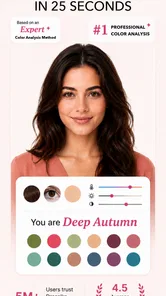
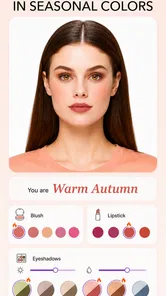
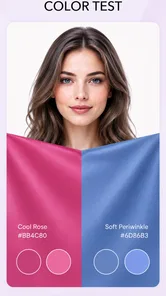
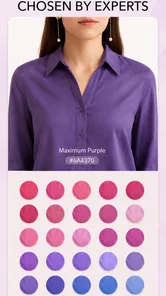
First things first, Color Analysis - Dressika is all about helping you find the colors that best suit you. The app uses your skin tone, eye color, and hair color to determine your ideal color palette. I was skeptical at first, but after a quick selfie and a few taps, I was amazed at how accurate it was. It turns out, there’s a whole world of colors that I had been ignoring! The app suggests colors that I never would have picked for myself, and yet, when I tried them, I felt more vibrant and confident.
More From Our News Desk
 Instagram
’s Power Comes From Its Place in Your Phone
A close look at how Instagram turns Meta’s reach, recommendation systems and everyday camera habits into durable platform power—and what that costs users.

 Gmail
Gmail in a Busy Inbox: Who Benefits Most?
From first account to crowded workday, Gmail earns its place through dependable search and flexible sorting—but its best fit depends on how much inbox maintenance you can tolerate.

 Prime Video
Switching to Prime Video: What Changes in Your Viewing Routine
Prime Video can make a compelling second home for streaming, but switching means learning a different catalog, rental layer, and route from browsing to playback.

 Universal TV Remote Control
 Works Best as a Reliable Backup
A phone remote earns its place through quick setup and reliable habits. Here is how to get more from Universal TV Remote Control—and where its limits show.

 Weather - By Xiaomi
Weather by Xiaomi Review: Clear at a Glance, Less Clear Up Close
Xiaomi’s weather app makes everyday forecasts quick to scan, but its calm surface can leave useful details and recovery paths harder to find than they should be.

 X
X Under Pressure: Can It Recover When Posting Goes Wrong?
A resilience-focused review of X, examining setup, mistaken posts, interruptions, weak connections, and the gaps that matter when recovery needs to be dependable.
Latest News



Easy to Use Interface
One of the things I love about this app is its user-friendly interface. Even if you’re not tech-savvy, you’ll find it a breeze to navigate. The layout is clean, and everything is straightforward. From uploading your photo to browsing through your color palette, each step is intuitive. Plus, the app provides tips on how to incorporate these colors into your wardrobe, which is a huge plus for those who are fashionably challenged, like me.
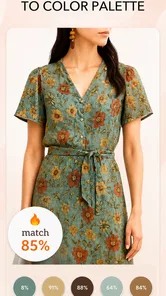
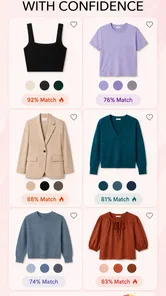
The app also includes a virtual wardrobe feature, where you can upload pictures of your clothes and see how they match with your recommended color palette. It’s like having a personal stylist in your pocket. Planning outfits has never been so easy and fun!
Make the suggestions useful
A useful way to test a palette is to compare it with items you already own before shopping. Choose a few tops in different shades and see whether the suggested colors help you identify combinations you genuinely like. This keeps the app from turning into a reason to replace your wardrobe; its better use is often helping you get more from what is already hanging there.
For a realistic everyday test, I’d use it while getting ready for a workday or a dinner out: check the palette, pick two possible outfits, then compare them in daylight rather than relying only on a screen. A phone display can make colors look different from the fabric in front of you, so I’d treat the recommendation as a shortlist, not a verdict. If a supposedly ideal shade feels wrong in person, trust your own eyes and comfort.
From outfit planning to packing
The wardrobe feature can be more useful when you give it a narrow job. Rather than photographing every garment at once, I’d start with a handful of pieces I wear often, especially items I struggle to combine. Looking at those alongside a palette may reveal whether the issue is color coordination or something else, such as shape or occasion. That distinction matters: a color tool can help with shades, but it cannot make an uncomfortable or impractical outfit work.
For travel, I’d use the same selective approach. I could check a few tops and bottoms that already travel well, then see whether their colors make it easier to mix outfits. The benefit is not a promise that every item will match; it is a way to think through a smaller set before packing. If a favorite piece falls outside the suggested palette, there is no reason to leave it at home if I enjoy wearing it.
When an analysis seems surprising, I’d resist changing several things at once. Try one suggested clothing color in a top near the face, or test one makeup shade, and see how it feels in ordinary settings. Changing hair color, makeup, and wardrobe together makes it harder to tell what actually helped. A gradual approach also reduces the chance of spending money on a dramatic change based on a single selfie.
Stay Ahead of Fashion Trends
What’s more, Color Analysis - Dressika keeps you updated with the latest fashion trends. The app regularly updates its suggestions based on current trends, so you’re always in the loop. Whether it’s the season’s must-have colors or the latest fashion hacks, Dressika ensures you’re never out of style. It’s like having a fashion magazine that tailors its content just for you.
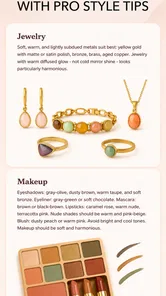
Color Analysis - Dressika doesn’t just stop at clothes; it extends to makeup recommendations too. It suggests shades of lipstick, eyeshadow, and blush that complement your color analysis, making your shopping trips a lot less overwhelming. Say goodbye to those daunting, overstuffed makeup aisles!
How it compares with other ways to choose colors
Compared with a general fashion article, the appeal here is having recommendations tied to your own appearance rather than advice written for everyone. Compared with asking a friend, it offers a consistent reference you can return to when looking at clothes and makeup. Neither comparison makes it a replacement for a trusted opinion or a try-on: friends may know your taste, while an in-person test shows how a product actually looks and feels.
A professional color consultation may be a better fit for someone who wants a detailed, interactive assessment and is willing to seek one out. On the other hand, Dressika is more convenient for casual exploration because it gives you a starting point from a photo. I see its strongest role as helping someone organize ideas before shopping, not as proving that a particular palette is objectively correct. Personal style, cultural preferences, and the colors you simply enjoy still count.
It is also worth separating color matching from broader beauty advice. A palette can help you think about shade choices, but it does not settle questions such as whether a lipstick’s texture suits you, whether a foundation matches your skin, or whether a hairstyle fits your routine. Those decisions need their own checks. If color is only a minor part of what you want help with, a general styling resource or hands-on advice may serve you better.
Where it fits—and where it doesn’t
Compared with asking friends or browsing general beauty articles, a personalized palette gives you one consistent reference point across clothing and makeup. It can help when you’re trying a new hair color, narrowing down a makeup purchase, or packing for a trip and want a smaller set of shades that work together. Still, it isn’t a substitute for seeing fabric under different lighting or trying makeup on your own skin; those checks matter more than a flattering screen preview.
I’d especially recommend it to someone who enjoys experimenting but wants a little structure, or to anyone who repeatedly buys colors they later struggle to style. I’d skip it if you already know what you like and don’t want app-based suggestions, or if you expect a selfie analysis to settle every question about fit, undertone, and personal taste. The app is rated for Everyone, has a 4.2 average from around 35,000 ratings, and has been installed over 5 million times, but those figures don’t make every recommendation right for every person.
For someone with a limited shopping budget, the best value may come from using the free access to reconsider what is already in the closet rather than treating the app as a shopping list. I’d avoid buying new clothes simply to match a result. If you do consider an optional purchase, first decide what specific task it would help with and check its price and terms before confirming. The available purchase range is wide enough that it makes sense to judge each item on its own rather than assume every paid option offers the same value.
Questions about using a photo are worth thinking through before starting. I’d choose an image where my face is clearly visible and avoid strong colored lighting, since a tinted environment can influence how skin and hair appear on screen. If the first result does not feel convincing, I’d take another photo under more neutral light before making a style decision. I would not let a single result overrule what I know about how a shade looks on me in person.
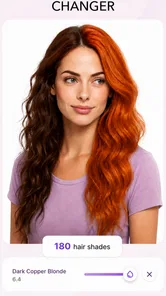
Hair suggestions deserve extra caution because a color change can be a bigger commitment than trying a top or lipstick. I’d use the app’s hair-color ideas to explore possibilities, then consider upkeep, salon advice, and how the shade looks in person before making a change. The same principle applies to makeup: a suggested tone may point me in a promising direction, but texture, finish, and comfort are separate questions that a palette cannot answer.
The practical question is whether it earns a place in your routine. The app is free to start, runs on Android 7.0 or later, and version 2.3.5 is the current release. I’d begin with one specific decision—such as choosing between two lipstick shades or checking whether a top fits your palette—rather than uploading everything at once. That makes it easier to judge whether the advice is genuinely helpful before considering any optional purchase.
My buy-or-skip verdict
My recommendation is to try it if you are curious about personal color analysis and want a convenient way to explore clothes, makeup, and hair-color ideas in one beauty app. Its value is clearest when you use it to narrow choices, test suggestions against items you own, and stay open to your own judgment. It is less compelling if you want definitive answers, already have a reliable approach to color, or would rather get hands-on advice.
There is no need to turn a palette into a complete makeover. A small test—one outfit combination or one makeup shade—can tell you whether the guidance fits your taste. If it helps you make a choice you feel good wearing, it has done something useful; if it does not, you can move on without treating the result as a failure. That is a sensible way to approach a free-to-start app with optional paid items.
In conclusion, if you’re looking to revamp your style or just need a little guidance in the fashion department, Color Analysis - Dressika is the way to go. It’s like having a stylist, fashion magazine, and personal shopper all rolled into one convenient app. So, go ahead, give it a try, and unleash your true colors!
Color Analysis - Dressika Frequently Asked Questions
Does Color Analysis - Dressika need access to my photos or camera?
The app’s color analysis is based on a photo, so you will need to provide an image to use that feature. Before granting camera or photo-library permissions, consider which option you prefer and review the permission prompts on your device. You can also check the app’s privacy information if you want to understand how images are handled before uploading one.
Can I use Color Analysis - Dressika to try different hair colors and makeup looks?
Yes, hair color and makeup are among the style areas covered by the app, alongside personal color palettes and wardrobe ideas. These tools can help you explore how different shades might fit your look before making a change or choosing products. Treat the suggestions as visual guidance rather than a guarantee of how a color will appear in real life.
Is Color Analysis - Dressika free to download and use?
Color Analysis - Dressika is free to download, so you can explore its beauty-focused color analysis features without an upfront purchase. The app also offers in-app purchases, with individual items ranging from $0.99 to $39.50. Check the purchase details shown in the app before confirming anything, especially if you only want to try its basic palette and styling tools.
What is Color Analysis - Dressika, and who develops it?
Color Analysis - Dressika is a beauty app by Seasonal Color Analysis AI. Its tools focus on personal color palettes and related style choices, including hair color, makeup, and wardrobe planning. The app is intended for people who want guidance on choosing shades that work with their appearance, whether they are exploring color analysis for the first time or refining their everyday style.
What is the primary function of Color Analysis - Dressika?
Color Analysis - Dressika is designed to help users determine the colors that best suit their personal style and complexion. By analyzing skin tone, hair, and eye color, the app provides personalized color palettes that enhance your appearance. This makes it easier for users to choose clothing and accessories that complement their natural features.
Pros
- User-friendly interface for quick navigation.
- Accurate color analysis with AI technology.
- Wide range of color palettes and styles.
- Real-time recommendations based on trends.
- Enhances fashion sense with detailed insights.
Cons
- Requires internet for full feature access.
- Limited free features; subscription needed.
- Occasional bugs in color recognition.
- High battery consumption during usage.
- Advertisements in free version can be intrusive.