CNN
- 175.00
- 3.2
- Installs
- 500.00K
- Price
- Free

Screenshots
Analysis by Reviewed
I found CNN most useful when I wanted a familiar news source that could move between written updates and live television without making me open several different services. It is a free news and magazines app from CNN, aimed at keeping the day’s major developments close at hand. My overall view is positive but qualified: it works best as a quick, recognizable news companion, while people who want a calmer, broader, or more customizable news routine may prefer another option.
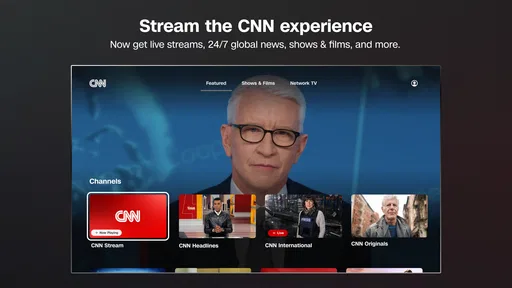
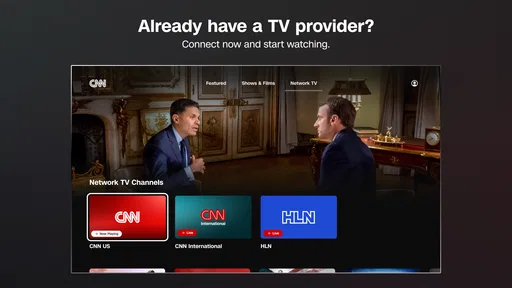
The app has a straightforward purpose. I can use it to follow current stories, check breaking developments, and watch CNN, CNN International, and HLN from one place. That combination is its clearest advantage. Many news readers are strongest at headlines and articles but leave live video to a separate television app. CNN makes the relationship between those formats feel more natural, especially when a developing story is easier to understand through a live report than through a short text update.
My main recommendation is to treat CNN as a fast first stop, not as your only source for every subject. It is convenient, recognizable, and especially practical when I want immediate awareness. At the same time, the experience can feel less satisfying for readers who want extensive personalization, a quieter interface, or a carefully balanced mix of perspectives.
How CNN feels in everyday use
I find the best way to judge a news app is to ask what I need from it in the moment: a quick overview, a live explanation, or a range of viewpoints. CNN is most useful when I want to move between a brief read and the network’s coverage, so I’d use it as a deliberate check-in rather than a feed to keep open all day. That distinction helps clarify where it fits—and where another kind of news app may suit me better.
A practical mix of articles and live coverage
When I open the app with only a minute or two available, its value is easy to understand. I can scan the current news, identify the stories receiving attention, and decide whether I need a quick article or a longer viewing session. That choice matters during a busy morning. Instead of watching television continuously, I can read enough to understand what has changed and return later if the story develops.
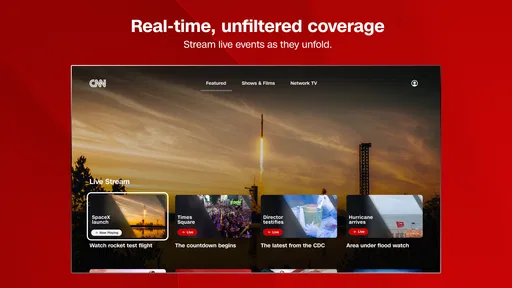
The live-video side is also useful in a different situation: when a major event is unfolding and a static headline feels incomplete. Watching CNN, CNN International, or HLN can provide a stronger sense of timing and context than repeatedly refreshing a text page. I would use that option during a significant announcement, an ongoing public event, or a fast-moving story where the latest broadcast discussion is more helpful than an isolated paragraph.
That does not mean video is always the better choice. If I am commuting, working, or trying not to attract attention in a quiet room, written updates are more practical. A good habit is to use the app in two passes: scan first, then watch only when the subject genuinely benefits from live explanation. This prevents the television component from turning a quick check into an accidental long session.
More From Our News Desk

Weather by Xiaomi Review: Clear at a Glance, Less Clear Up Close

X Under Pressure: Can It Recover When Posting Goes Wrong?

Clash of Clans Is Won Between the Battles

Android Auto Makes the Case for Quieter Car Software

MobiOffice: Transforming Mobile Productivity with Seamless Integration

EA SPORTS FC™ Mobile Soccer: Redefining Mobile Sports Gaming
Why the familiar CNN identity helps
Because the developer is CNN, the app feels more focused than an aggregator that gathers headlines from many unrelated publishers. That focus can be reassuring when I want to know what CNN is emphasizing at a particular moment. It also makes the app easier to recommend to someone who already follows the network and wants its mobile experience rather than a completely different news reader.
There is a trade-off, though. A focused publisher app is not the same as a broad news marketplace. I would not choose this as my sole tool if my priority were comparing many outlets side by side or building a highly customized feed around niche subjects. The app’s strength is direct access to CNN’s news and broadcasts, not unlimited source diversity.
Using it without letting news take over the day
I think the most effective workflow is intentional rather than constant. I would open CNN at a planned time, scan the leading stories, read the items that affect my work or family, and close it. For a developing story, I would return when there is a meaningful update instead of repeatedly checking every few minutes. This approach makes the app useful without allowing the breaking-news format to dictate my attention.
Another practical approach is separating “awareness” from “research.” CNN is well suited to helping me notice what matters today. If a subject affects an important decision, I would then compare reporting, consult primary information where appropriate, and avoid treating one news app as a complete investigation. That is not a flaw unique to CNN; it is simply the responsible way to use a fast-moving news service.
What the current release means for compatibility
The current version is 26.7.1, and the app requires Android 8.0 or later. That makes the operating-system requirement reasonably approachable for people using an older but still supported Android phone. I would still check the phone’s software before installing, particularly on a device that has not received updates for a long time.
CNN is free to install, which removes the main barrier for someone who wants to try it before committing to a news routine. The listing also identifies in-app purchases ranging from one dollar to ninety-nine dollars per item. That is worth remembering before assuming that every part of the experience is covered by the basic free installation. I would review any purchase screen carefully and avoid tapping through quickly when I am only trying to watch or read something.
The content rating is Everyone 10+, so parents should understand that the app is intended for a slightly older general audience rather than very young children. News can include upsetting subjects even when an app is easy to operate. For a child using it independently, I would pay attention to the types of stories being followed and discuss how breaking coverage can change as more information arrives.
The strongest reason to install it
The strongest case for CNN is the handoff between headline reading and live television. I can begin with a short update, decide that the event deserves more attention, and move toward a broadcast without changing my entire news setup. That is a meaningful convenience, especially for people who already recognize CNN’s presentation and want a mobile way to follow it.
It is also a good fit for households where different people consume news differently. One person may want to read a few updates while another prefers live coverage. A single app can serve both habits, although the quality of that experience will depend on how much each person values CNN specifically.
The meaningful weakness: focus can become a limitation
The same editorial focus that makes CNN easy to understand can make it feel narrow beside a general news aggregator. I may get a clear view of the stories CNN is covering, but I do not get the same built-in comparison that comes from reading several publishers in one place. Readers who strongly value contrasting editorial approaches may need a second app or browser routine.
The average rating is 3.2 from around 550 ratings, with about 175 written reviews. I would read that as a sign to keep expectations realistic rather than as a reason to dismiss the app. News applications often serve very different preferences: one person values live video, another wants a clean text feed, and someone else may judge the entire experience by notifications or playback behavior. The rating suggests that CNN will not satisfy everyone equally.
My own hesitation would be around friction rather than the basic idea. A news app can be useful in principle but still become tiring if I only want a quiet list of articles and instead encounter a strong emphasis on urgent coverage or video. CNN’s format is most convincing when I want immediacy. For slow reading, deep background, or a distraction-free digest, I would look elsewhere.
Three useful ways to get more from it
First, I would use the written side as a filter for the video side. Rather than opening a broadcast automatically, I would scan the story and ask whether live footage or discussion adds something. This saves time and reduces the chance of turning every small update into a full viewing session.
Second, I would compare the roles of CNN and a general aggregator instead of forcing one app to do everything. CNN can be my direct route to its coverage and channels, while an aggregator can show how other publishers frame the same event. That combination is more useful than expecting either service to provide perfect breadth and perfect depth alone.
Third, I would be especially careful with developing stories. Early reports can change, and a live broadcast may emphasize what is known at that moment rather than provide a final account. I would note the time and status of an update, then revisit the story later before repeating it to someone else or acting on it. This is a small habit, but it makes a fast news app much more reliable in practice.
Who will appreciate CNN most?
I would recommend it to people who already follow CNN and want a convenient Android companion for both current articles and live channels. It also suits busy readers who want a quick awareness check during the day, then occasional video when a major story deserves more attention. The free entry point makes experimenting easy, provided the possibility of in-app purchases is kept in mind.
It may also work well for someone replacing a television-first routine with a phone-based one. The app gives that person a way to stay connected to CNN’s coverage without being in front of a television set. I would particularly consider it for a user who values familiarity more than having every possible source in one feed.
Who should choose another news app?
I would skip CNN as a primary news tool if I wanted a heavily personalized reading experience built around specialist subjects, local reporting, or a wide range of competing publishers. A general aggregator or a publication with stronger topic controls would be a better starting point in that case.
I would also look elsewhere if I dislike live-news urgency or prefer a once-a-day briefing. CNN’s appeal is tied to staying close to current developments, so it is not the natural choice for someone who wants news to arrive slowly and quietly. Likewise, readers who mainly want long-form analysis should not install it expecting the same experience as a dedicated magazine or research publication.
How it compares with familiar alternatives
Compared with a broad news aggregator, CNN feels more coherent but less varied. I spend less time sorting through unrelated sources, and the transition to CNN’s live channels is more direct. In return, I give up some of the convenience of comparing publishers and building a feed around many independent interests.
Compared with a dedicated television streaming service, CNN is more useful for quick reading. I do not need to begin with a full viewing session when I only want to know what has changed. The compromise is that someone whose main goal is television access may find a broader streaming platform more flexible for entertainment and non-news content.
Compared with reading CNN through a mobile browser, the app feels like the more natural choice for repeated use. It keeps the news experience in a dedicated space and puts the network’s mobile presentation first. A browser remains preferable for people who do not want another installed app, want to switch among many sites, or are cautious about purchase prompts and app-specific behavior.
My final verdict
CNN is a capable, focused news app with one especially clear advantage: it connects quick mobile reading with access to CNN, CNN International, and HLN coverage. That makes it easy for me to recommend to existing CNN viewers and to busy readers who want a recognizable source for breaking developments. Its free price and broad Android compatibility make trying it uncomplicated, while the Everyone 10+ rating is a useful reminder that news content is not aimed at very young children.
I would not present it as the perfect all-purpose news solution. Its publisher-centered approach is less suitable for people who demand maximum source variety, deep customization, or a calm digest. The 3.2 average from around 550 ratings also supports a measured recommendation rather than blind enthusiasm. Still, if your priority is staying close to CNN’s current reporting and moving naturally between text and live coverage, I think CNN earns a place on your phone. Use it deliberately, compare important stories when necessary, and it becomes a practical daily companion rather than just another stream of alerts.
CNN Frequently Asked Questions
What devices and operating systems can run the CNN app?
CNN is a news app for Android and iOS, with a minimum operating-system requirement of version 8.0. Before downloading, check that your device meets this requirement and has enough available space for the app. The developer is CNN, and the app is intended for a broad audience, with an Everyone 10+ content rating.
What is the CNN app used for?
The CNN app is designed to keep you informed with breaking news, live updates, in-depth articles, video reports, and coverage from around the world. Its main strength is the variety of content, covering politics, business, technology, entertainment, health, sports, and major international events in one place. It is useful for readers who want quick headlines as well as more detailed reporting.
Is the CNN app free to download and use?
Yes, the CNN app is free to download on Android and iOS devices. However, access to some articles, videos, live coverage, or premium content may depend on your location, television provider, or a CNN subscription. In-app purchases are available, ranging from around one dollar to around one hundred dollars per item, so check the purchase details before confirming any transaction.
Does CNN provide live news and video coverage?
CNN offers video clips, live updates, and coverage of important events through the app. In some regions, users may also be able to watch live CNN television streams, but this often requires signing in through a participating cable, satellite, or streaming TV provider. The exact live features can vary by country, so not every user will receive the same access.
Can I receive breaking-news notifications from CNN?
Yes, the CNN app supports push notifications for breaking news and other important updates. During setup, you can usually choose whether to allow notifications, and the app may provide options for managing the types of alerts you receive. Notifications are helpful for major events, although users who prefer a quieter experience should review the settings and disable unnecessary alerts.
Pros
- Fast access to breaking news and live updates worldwide.
- Wide range of sections
- including politics
- business
- health
- and entertainment.
- Personalized notifications help users follow topics and developing stories.
- Video reports and live coverage add context beyond written articles.
- Clean layout makes browsing headlines and saving stories straightforward.
Cons
- Some content may require a CNN subscription or participating TV provider.
- Frequent notifications can feel excessive unless carefully customized.
- Video playback may consume significant mobile data and battery.
- Coverage can reflect CNN’s editorial perspective and regional priorities.
- App performance and available features may vary by country.












