

Club Car Wash Mobile App
- 401.00
- 4.5
- Installs
- 100.00K
- Price
- Free

Screenshots
Analysis by Reviewed
I approached Club Car Wash Mobile App as a practical tool rather than something I would browse for entertainment. It belongs to the Auto & Vehicles category and is built by Club Car Wash Operating, LLC for people who want a simpler way to manage their car wash membership. After using it, my impression is straightforward: the app is most useful when your main goal is to keep membership details close at hand and reduce the small bits of friction that usually come with handling a recurring car-care service.
The app is free to install and carries an Everyone age rating, which makes its audience broad. It has reached over one hundred thousand installs, with an average score of 4.5 from roughly seven hundred ratings and about four hundred written reviews. Those figures suggest that it is doing an important job for many members, although they should not be mistaken for proof that every part of the experience will suit every driver.
How I used it for the everyday membership routine
The most sensible way to use this app is to treat it as a membership companion. Instead of thinking of it as a general car-wash discovery tool, I would open it when I need to check or manage the service connected to my Club Car Wash account. That distinction matters because it sets the right expectation: the value comes from making an existing relationship easier to handle, not from replacing every possible car-care decision.
My baseline workflow would be simple. I would install the app, sign in or connect it to my membership, then spend a few minutes checking that the account information looks correct before relying on it during a busy day. That first check is easy to skip, but it is one of the most useful habits. A membership app is only convenient when the account it displays is the one I expect to use.
For a realistic example, imagine leaving work with a dusty car and only a short window before picking someone up. The useful preparation happens earlier: I would make sure the app is installed, my membership is accessible, and I know where the relevant account controls are. Then the app becomes a quick reference instead of something I have to set up while parked outside the wash.
This is where the product feels more practical than relying on a browser bookmark or searching through old messages. A dedicated app gives the membership its own place on the phone. I do not have to remember which page contained the account information, and I am less likely to confuse it with a different service. That may sound minor, but repeated small conveniences are exactly what make a membership worth managing digitally.
I also recommend opening the app occasionally when nothing urgent is happening. That is not because it demands constant attention, but because it lets me notice whether the account view still makes sense before I am in a queue or rushing between errands. The best workflow is preventive: check the account calmly, then use it quickly when the car actually needs attention.
More From Our News Desk

 Gmail
GmailGmail in a Busy Inbox: Who Benefits Most?
From first account to crowded workday, Gmail earns its place through dependable search and flexible sorting—but its best fit depends on how much inbox maintenance you can tolerate.

 Prime Video
Switching to Prime Video: What Changes in Your Viewing Routine
Prime Video can make a compelling second home for streaming, but switching means learning a different catalog, rental layer, and route from browsing to playback.

 Universal TV Remote Control
Universal TV Remote Control Works Best as a Reliable Backup
A phone remote earns its place through quick setup and reliable habits. Here is how to get more from Universal TV Remote Control—and where its limits show.

 Weather - By Xiaomi
Weather by Xiaomi Review: Clear at a Glance, Less Clear Up Close
Xiaomi’s weather app makes everyday forecasts quick to scan, but its calm surface can leave useful details and recovery paths harder to find than they should be.

 X
XX Under Pressure: Can It Recover When Posting Goes Wrong?
A resilience-focused review of X, examining setup, mistaken posts, interruptions, weak connections, and the gaps that matter when recovery needs to be dependable.

 Clash of Clans
Clash of Clans Is Won Between the Battles
Its raids are quick; its community is a long-term project of coordination, teaching, rivalry, and shared responsibility—with all the friction that entails.
Latest News



What I would check before depending on it
The first thing I would confirm is access. If the app asks me to sign in, I would use the same account details associated with my Club Car Wash membership rather than creating a second identity by mistake. This is a small but important distinction for anyone who has more than one email address or has previously managed a service through a website.
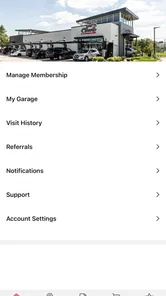
Next, I would look through the membership area slowly enough to understand the labels. Even a clean interface can become confusing if I only glance at it during a rushed visit. I want to know where membership information lives, where account details can be reviewed, and which screen acts as the starting point when I open the app. Learning that structure once is more useful than repeatedly searching for the same control.
I would also check whether the app is showing current information before making assumptions about what I can use. A mobile account screen is helpful, but it is still an interface to a service relationship. If something looks unexpected, such as a membership detail I do not recognize, I would resolve that before arriving at the wash rather than treating the phone display as an automatic guarantee of access.
One of the more useful habits for families or households is deciding who should manage the account. If several people use the same vehicle, passing a phone around at the last moment is not an efficient system. I would choose one primary account holder, keep the login details handled responsibly, and make sure the people who need the service understand the basic routine. That reduces confusion without pretending the app is a shared household dashboard.
There is also a practical device consideration. The current version is 20.4.0 and requires iOS 12 or later. For someone using a reasonably maintained iPhone, that requirement should be easy to understand, but it is still worth checking before planning around the app. If the phone is older or cannot run the required system software, a mobile membership workflow may not be the best foundation for that driver.
Settings and phone habits that make it less frustrating
I would begin with the app’s available account and notification settings, but I would avoid changing options simply because they are present. The useful question is whether a setting helps me notice something important without turning a basic car-wash membership into another source of noise. If notifications are offered, I would keep only the ones that support my actual routine and silence anything that feels unnecessary.
That approach is especially helpful for people who already receive many service alerts. A car-wash app should not compete with banking, travel, work, and safety notifications. I prefer a quiet setup in which the app is easy to open when I need it, while the phone remains calm the rest of the time.
I would also place the app where it is easy to reach, but not necessarily on the first home-screen position. A folder for vehicle-related services can be useful if I manage fuel, parking, insurance, or maintenance apps on the same phone. The benefit is not cosmetic. Grouping these tools creates a repeatable “car errand” workflow, so I know where to look when I am already thinking about the vehicle.
Another good habit is keeping the app updated through the normal app-store process. The developer may improve account handling or correct problems over time, and an outdated installation can create avoidable confusion. I would not treat every update as a reason to relearn the entire product, but I would glance at the interface after a significant change so that I am not searching for a familiar control under pressure.
Privacy and phone security also deserve common-sense attention. Because the app relates to a membership account, I would protect the device with the phone’s normal lock method and avoid leaving an account open on a shared handset. That is not a criticism of this particular app; it is simply the sensible way to handle any service account that lives on a mobile device.
Shortcuts that come from repetition, not guesswork
The fastest users are not necessarily the ones who tap quickly. They are the ones who remove unnecessary decisions. With this app, that means opening it for a specific reason, going directly to the membership area, checking the information that matters, and closing it when the task is finished. I found that much more reliable than exploring every screen during a time-sensitive visit.
I would create a small personal checklist: confirm that I am signed in, review the membership information I normally need, and make sure the displayed account matches the vehicle or household arrangement I expect. Repeating the same sequence means I can spot an unusual detail more easily. It also prevents me from confusing a successful app launch with a successful account check.
A second shortcut is preparing before a recurring errand. If I usually wash the car after grocery shopping or on the way home from work, I would open the app earlier in the day, while I have a stable connection and enough time to deal with an account issue. This is a better use of the app than waiting until I am already at the entrance and discovering that I need to recover access.
For drivers who share cars, I would keep the workflow written down in plain language rather than relying on memory. Something as simple as “open the app, check the membership screen, then follow the normal wash routine” can prevent a family member from wandering through unrelated account areas. The app works best when it supports a known process instead of becoming the process itself.
I also would not assume that installing the app automatically improves every part of car ownership. It can help with membership management, but it does not replace maintenance reminders, fuel planning, insurance documents, or a mechanic’s advice. Keeping those jobs separate makes the app’s role clearer and avoids expecting one focused tool to become an all-purpose vehicle assistant.
Where the app is genuinely useful
The strongest use case is a driver who already values Club Car Wash membership and wants a convenient mobile way to stay connected to it. For that person, the app can reduce dependence on paper, remembered account details, or a browser session. It is especially appealing to people who wash regularly and prefer a repeatable digital routine over handling the membership only when something goes wrong.
It can also help someone who is often moving between errands. A driver does not need a long session; the benefit is having the relevant membership tool available at the moment it is needed. That makes the app a good fit for people who want fewer steps between deciding to use the service and confirming that their account is ready.
The app is less compelling for someone who washes a car only occasionally, does not have a Club Car Wash membership, or dislikes keeping service apps on a phone. In those cases, a normal website, direct contact with the business, or an occasional in-person interaction may be simpler. Installing a dedicated app is not automatically worthwhile just because it is free.
I would also be cautious about recommending it as the only option for a driver with an unreliable phone, limited access to mobile data, or difficulty maintaining account credentials. The mobile workflow depends on being able to open the application and reach the correct account at the right time. Anyone in that situation should keep a practical backup routine rather than assuming the app removes every possible point of friction.
How it compares with ordinary alternatives
Compared with handling membership through a mobile browser, a dedicated app feels more focused. A browser can be perfectly adequate for occasional account tasks, especially for people who do not want another installation. The app’s advantage is convenience through repetition: it has a designated place on the phone and is easier to associate with the Club Car Wash account.
Compared with managing everything in person, the app is more private and less dependent on remembering a conversation or carrying paperwork. That does not make in-person help obsolete. If an account needs clarification or something looks wrong, speaking with the business may still be the better route. The app is strongest for routine access, not for resolving every unusual situation.
Compared with a general vehicle-management app, this product is narrower. A broader automotive app may cover fuel, service schedules, parking, or expenses, while this one is centered on Club Car Wash membership. I see that narrow focus as both its strength and its boundary. It avoids unnecessary features, but it also means I would not install it expecting a complete car-maintenance command center.
The free price removes one barrier to trying it, but free does not mean it will be useful to everyone. Its value depends on having a reason to manage a Club Car Wash membership from a phone. If that describes you, the focused design is a benefit. If it does not, the app may simply add another icon without improving your routine.
Limitations I noticed in the overall approach
The biggest limitation is dependence on the membership context. This is not a universal car-wash comparison service, and I would not use it to decide between unrelated providers. Its purpose is more specific, so drivers who want broad local discovery or a complete record of vehicle spending may need other tools alongside it.
There is also a difference between account convenience and service certainty. Seeing membership information in an app is useful, but it does not mean every possible question about eligibility, account changes, or unusual circumstances can be answered from the screen. I would treat the app as the first place to check routine information, not as a substitute for support when the situation falls outside the normal path.
Another limitation is that a focused app can feel unnecessary if I only use it once or twice. Occasional users may prefer a browser because it avoids another installed application. The more regular the membership usage, the more the dedicated mobile workflow earns its place.
Finally, the app’s practical success depends on good personal organization. If I use several email addresses, share vehicles without a clear account arrangement, or ignore updates and phone security, the app cannot compensate for that confusion. Experienced use comes from combining the app with consistent habits rather than expecting a single tap to solve account management.
My verdict after building a repeatable routine
Club Car Wash Mobile App is a sensible free companion for an existing Club Car Wash member who wants membership management to feel less scattered. I like its focused role, and I would recommend it to a friend who regularly uses the service and prefers having the account available on an iPhone rather than relying on paper or a browser search.
My recommendation comes with a clear condition: set it up before the urgent moment. Confirm access, learn the membership screen, review the settings that affect your routine, and keep the phone and app maintained. Those steps turn it from another service icon into a dependable part of a car-care habit.
I would skip it if I rarely wash my car, do not use Club Car Wash membership, or want a broad vehicle-management platform. For everyone else, the app earns its place through small repeated conveniences rather than flashy extras. With a 4.5 average and more than one hundred thousand installs, it has clearly found an audience, and my own view is that its best quality is the same thing that limits it: it stays focused on making one membership easier to manage.
The developer, Club Car Wash Operating, LLC, has packaged the service in a way that should feel approachable for general users, including those looking for an Everyone-rated app. I would not call it essential for every driver, but for the right member it can remove enough everyday friction to become a tool I open without thinking. That is a modest achievement, yet it is exactly the kind of usefulness I want from an Auto & Vehicles app.
Club Car Wash Mobile App Frequently Asked Questions
What devices and software do I need to use the Club Car Wash app?
Club Car Wash Mobile App is available for Android and iOS, and the current version is 20.4.0. It requires iOS 12 or later on Apple devices. Before downloading, check that your phone’s operating system is compatible and that you have enough space for the app. The app is free to download, while membership fees and wash purchases are separate.
Who develops the Club Car Wash app, and is it suitable for all ages?
The app is developed by Club Car Wash Operating, LLC and is rated Everyone, so its content is suitable for a general audience. It is an Auto & Vehicles app focused on helping customers manage their Club Car Wash experience. If you are considering it for a family member, remember that making membership or wash purchases may involve account and payment decisions that should be reviewed by an adult.
What is the Club Car Wash mobile app used for?
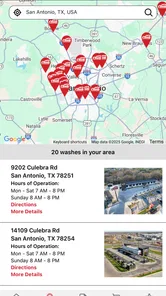
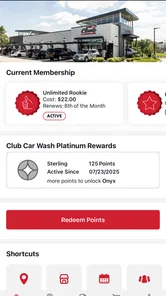
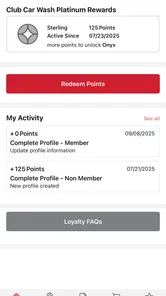
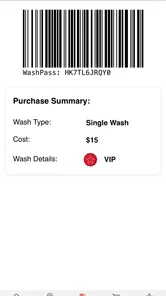
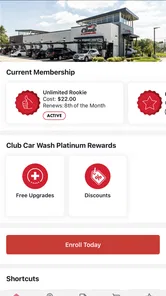
The Club Car Wash mobile app is designed to make managing your car wash visits more convenient. Depending on your location and membership, you can use it to review wash plans, manage an unlimited wash membership, locate participating Club Car Wash sites, view account information, and access available digital wash options. Features may vary by market, so check the app for services offered at your nearest location.
Can I purchase or manage a Club Car Wash membership through the app?
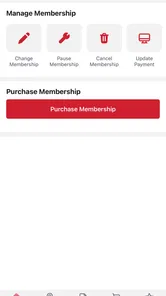
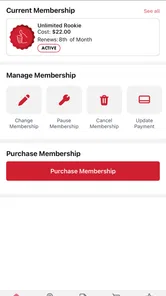
In many participating locations, the app allows customers to explore membership options and manage an existing Club Car Wash Unlimited plan. You may be able to review your plan, update account details, check billing information, or make changes according to the available options. Membership terms, pricing, cancellation rules, and supported features can differ by location, so read the details carefully before subscribing.
Does the app work at every Club Car Wash location?
The app is intended to support Club Car Wash customers, but not every feature is necessarily available at every location. Participating sites may differ in wash plans, payment options, membership recognition, promotions, and app functionality. Before traveling, use the location tools in the app or check the official Club Car Wash information to confirm that your preferred service and membership are accepted at the selected wash.
Pros
- Quickly locate nearby Club Car Wash sites using GPS or manual search.
- Digital membership access makes it easier to manage wash benefits on the go.
- Saved vehicle details can speed up account and service selection.
- App notifications may help users remember scheduled washes or promotions.
- Clean interface is generally easy for first-time users to navigate.
Cons
- Features and availability may vary depending on your local Club Car Wash site.
- Some functions require an active account or paid membership.
- GPS-based location results can be inaccurate without precise location access.
- Promotional offers may include restrictions
- expiration dates
- or participating sites.
- The app is less useful for customers who only purchase occasional washes.











