

CL theme 3D Glass
- 0.00
- 0.0
- Installs
- 5.00K
- Price
- $1.99
Screenshots
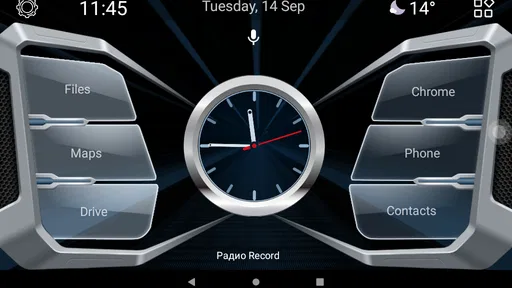
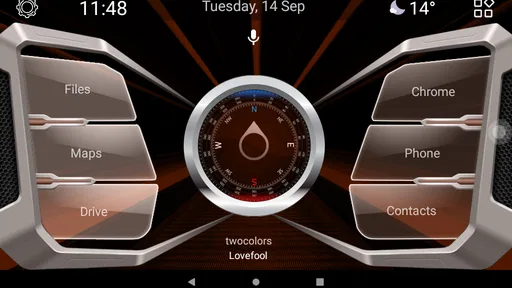
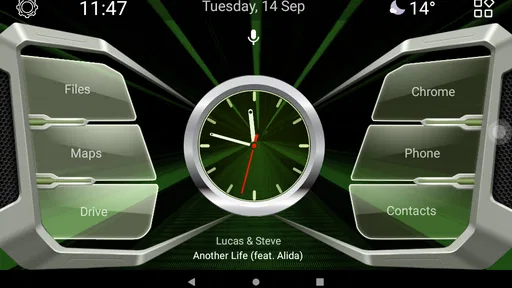
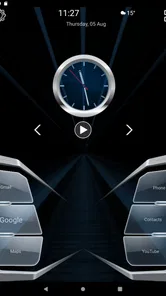
Analysis by Reviewed
I would start with one practical distinction: CL theme 3D Glass is a theme for Car Launcher, not a general wallpaper or phone-customization app. That makes it most relevant when your Android phone is already set up for a car-focused launcher and you want to change its appearance. I’d treat it as a visual layer for that setup, rather than expecting it to add navigation, music controls, or other driving tools of its own.
Start with the launcher you already use
Before paying for a theme, check that Car Launcher is part of your usual routine. A theme is only useful if it can be applied within the launcher it is made for; it is not a replacement for the launcher itself. The developer is almaeg01, and the app costs $1.99. It has an Everyone age rating and supports Android 5.0 and later, so the key question is less about the phone’s age than whether your launcher setup suits it.
A sensible first session is to install or open Car Launcher, then apply the theme and look at the result from the screen you actually use in the car. I wouldn’t judge a driving layout only while browsing it at home: check whether its appearance feels clear at a glance and whether it works with the shortcuts and apps you already rely on. If your current launcher is not Car Launcher, this purchase is unlikely to change your experience until you switch.
Visual Delight
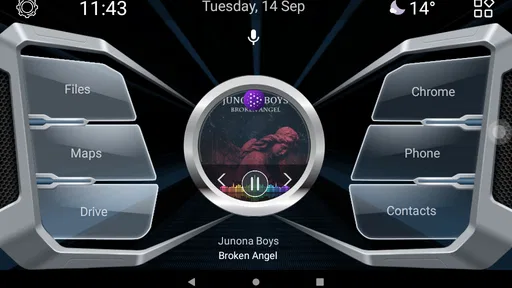
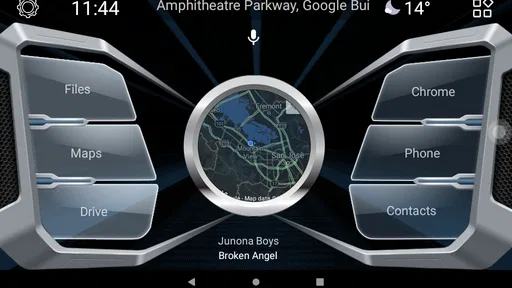
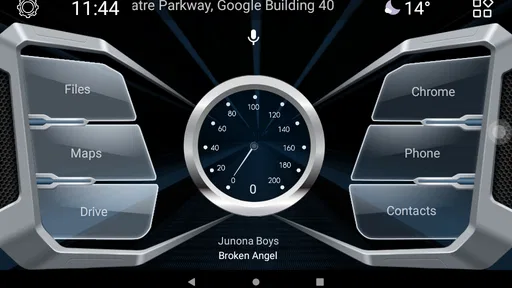
Ever wondered how to turn your phone into a work of art? Well, brace yourself because 3D Glass Theme is here to transform your home screen into a mesmerizing spectacle. If you've been scouring the app store for something that will make your phone stand out, look no further. I've been playing around with this app, and let me tell you, it's like having a mini art gallery right at your fingertips.
One of the first things that strike you about the 3D Glass Theme is its stunning visuals. The app offers a rich collection of 3D wallpapers that almost leap out of the screen. Whether you're into abstract designs or nature-inspired art, there's something here for everyone. The 3D effect adds depth and an almost tangible feel to the images, making your phone look like it's straight out of a sci-fi movie.
Make appearance work for the drive
In a parked-car setup, I’d spend a few minutes checking the theme against the display brightness and the light in the cabin. A glass-like look can be attractive, but a striking background is not automatically the easiest thing to read over. If you find yourself pausing to pick out an icon or label, that is a good reason to choose a simpler look or adjust the launcher’s own layout rather than prioritizing decoration.
For an everyday example, imagine connecting your phone before a commute and wanting the same launcher screen ready each time. The useful habit is to settle on a small set of familiar shortcuts first, then decide whether the theme makes those choices easy to recognize. That repeatable setup matters more than changing the appearance whenever you get in the car. Make adjustments while parked, not while driving.
More From Our News Desk

 Gmail
GmailGmail in a Busy Inbox: Who Benefits Most?
From first account to crowded workday, Gmail earns its place through dependable search and flexible sorting—but its best fit depends on how much inbox maintenance you can tolerate.

 Prime Video
Switching to Prime Video: What Changes in Your Viewing Routine
Prime Video can make a compelling second home for streaming, but switching means learning a different catalog, rental layer, and route from browsing to playback.

 Universal TV Remote Control
Universal TV Remote Control Works Best as a Reliable Backup
A phone remote earns its place through quick setup and reliable habits. Here is how to get more from Universal TV Remote Control—and where its limits show.

 Weather - By Xiaomi
Weather by Xiaomi Review: Clear at a Glance, Less Clear Up Close
Xiaomi’s weather app makes everyday forecasts quick to scan, but its calm surface can leave useful details and recovery paths harder to find than they should be.

 X
XX Under Pressure: Can It Recover When Posting Goes Wrong?
A resilience-focused review of X, examining setup, mistaken posts, interruptions, weak connections, and the gaps that matter when recovery needs to be dependable.

 Clash of Clans
Clash of Clans Is Won Between the Battles
Its raids are quick; its community is a long-term project of coordination, teaching, rivalry, and shared responsibility—with all the friction that entails.
Latest News



Customization Galore
What I loved about this app is the level of customization it offers. You can mix and match different themes, widgets, and icons to create a look that's uniquely yours. The interface is intuitive, making it easy even for those who aren't particularly tech-savvy. Plus, you can preview changes in real-time, so there's no guesswork involved.
I’d approach those options in a deliberate order: decide what you need visible, arrange the launcher around that routine, and only then fine-tune the look. For a driver who mainly wants quick access to a few familiar apps, a stable arrangement is usually more helpful than constant redesign. If you prefer a standard Android home screen or use another car launcher, its built-in themes may be the more straightforward choice; this one is specifically tied to Car Launcher.
Settings worth checking before settling in
Because the theme depends on the launcher, the useful settings to review are the ones Car Launcher exposes for its screen and shortcuts. Check the result in portrait or landscape as you normally use the phone, and make sure the items you reach for remain easy to distinguish. I would also preview the layout after making one change at a time. That makes it simpler to tell whether a setting actually improved clarity or merely made the screen busier.
The practical trade-off is personalization versus legibility. A more elaborate appearance may suit a parked display or a passenger-facing setup, while a driver who wants minimal visual distraction may be happier with a plain launcher theme. The app is aimed at appearance, so anyone expecting it to supply a complete driving interface or add functions to Car Launcher should look elsewhere.
Performance and Usability
Now, we all know that some apps can be a bit of a drag on your phone's performance. But thankfully, that's not the case here. The 3D Glass Theme runs smoothly without any noticeable lag. It's lightweight, so it doesn't hog your phone's resources, which is a huge plus in my book. Navigating through the app is a breeze, thanks to its user-friendly layout.
The current version is 1.4, and the app has passed 5,000 installs. Those details give a sense of its place as a focused theme rather than a full-featured launcher, but I would base the decision on whether its look fits your own Car Launcher screen. If you change phones or stop using that launcher, the theme’s usefulness naturally depends on whether you keep that same setup.
And let's not forget about the battery. Often, apps with high graphical content tend to drain your battery quickly, but this app is surprisingly efficient. I've been using it for a few days now, and I haven't noticed any significant battery drain, which is a big relief.
Who should choose this look?
I’d recommend considering it if you already use Car Launcher, want a more distinctive visual style, and are comfortable making the launcher itself part of your car setup. It is less suitable if you want a standalone wallpaper collection, need a new navigation or media app, or prefer to keep your phone’s home screen untouched. Compared with choosing a general Android wallpaper, a launcher theme can feel more cohesive within its intended environment, but it also has a narrower use: it depends on that launcher being the one you use.
One useful way to judge the purchase is to ask whether you will see the themed screen often enough to value the change. If Car Launcher is your regular dashboard, a tailored look may feel worthwhile; if you open it only occasionally, a free or built-in appearance option may be enough. Released on September 18, 2021, CL theme 3D Glass is a focused choice for a specific setup, not a universal makeover for every Android phone.
Making the setup repeatable
One small but useful test is to use the same screen in two different situations: first while parked in daylight, then later when the cabin lighting has changed. I would not rebuild the layout between those checks. Keeping the shortcuts fixed makes it easier to notice whether the visual treatment itself remains comfortable, rather than confusing a new arrangement with an improvement in the theme.
There is also a sensible boundary between configuring a dashboard and decorating a phone. If your phone serves as a personal device for most of the day, consider whether you want its everyday home screen to be tied to the car-oriented look. A separate routine for driving can be appealing, but it is only worthwhile if switching into Car Launcher feels natural and does not leave you hunting for your usual phone apps afterward.
When a different option makes more sense
The main comparison is not with another full-featured driving tool, but with the theme options already available in the launcher you use. A built-in style is the lower-friction choice if you only want a quick visual change, while a general wallpaper is more flexible if the same image should appear across a standard home screen. This theme makes more sense when you specifically want a coordinated appearance inside Car Launcher and are happy to keep that dependency in mind.
I would skip it if your priority is adding practical driving functions, changing the look of several unrelated apps, or getting a new launcher in one purchase. It is also a poor fit if you rarely use the car-focused screen or find decorative backgrounds harder to scan. A theme can make a familiar setup feel more personal, but it cannot make an inconvenient launcher routine convenient by itself.
A careful first-use routine
For a first setup, I’d make one change at a time: apply the theme, inspect the screen, and then adjust the launcher’s own arrangement only if something is difficult to find. That order helps avoid a common trap with customization, where several visual and layout changes happen together and it becomes unclear which one caused the problem. Once the screen feels readable, leave it alone for a few commutes before deciding whether more tweaking is genuinely useful.
If the theme does not appear or the result is not what you expected, the first practical check is whether Car Launcher is installed and active, since this is not a standalone replacement for it. I would also return to the launcher’s normal appearance settings and check the layout there rather than assuming the theme supplies a separate driving workflow. This keeps troubleshooting focused on the relationship between the theme and its intended launcher.
Final Thoughts
All in all, if you're looking to add some pizzazz to your phone, 3D Glass Theme is definitely worth a download. It's visually stunning, easy to use, and doesn't compromise on performance. So go ahead, give your phone the makeover it deserves and watch it transform into a visual masterpiece.
My more practical verdict is that this is worth considering when Car Launcher is already central to your routine and you want its screen to feel more personal. Set it up while parked, keep the layout easy to scan, and judge the result by how comfortably it fits your everyday use—not just by its first impression. For someone outside that Car Launcher setup, another launcher’s own theme or a simple wallpaper is the better match.
CL theme 3D Glass Frequently Asked Questions
Does CL theme 3D Glass require Car Launcher to work?
CL theme 3D Glass is a theme for Car Launcher, so its purpose is to customize that launcher rather than replace it with a standalone home-screen app. If you already use Car Launcher, the theme can give its interface a glass-inspired look. Before downloading, make sure Car Launcher is installed and that you are comfortable using a launcher theme to personalize its appearance.
What is the main feature of CL theme 3D Glass?
The CL theme 3D Glass app transforms your device's interface with a stunning, modern 3D glass effect. It enhances the visual appeal of your smartphone by providing a sleek and futuristic design for your home screen and icons, making your device stand out with its unique style.
Is CL theme 3D Glass compatible with all Android devices?
While CL theme 3D Glass is designed to work with most Android devices, compatibility can vary. It's crucial to check if your device meets the necessary software requirements and supports theming features. Generally, it works best with devices running the latest versions of Android for optimal performance and visual effects. It requires Android 5.0 or later and is intended for use with Car Launcher.
Does the CL theme 3D Glass app affect the performance of my device?
The CL theme 3D Glass app is optimized to ensure minimal impact on your device's performance. However, as it utilizes 3D graphics and animations, it may slightly affect battery life and processing speed, especially on older devices. Users with newer smartphones are unlikely to notice any significant performance changes.
How can I install the CL theme 3D Glass app?
Installing the CL theme 3D Glass app is straightforward. You can download it from the Google Play Store. After downloading, follow the on-screen instructions to apply the theme. Ensure your device is compatible and meets the app's requirements for a smooth installation process. Since it is a theme for Car Launcher, open that launcher to use the design after installing the app.
Pros
- Visually stunning 3D glass effects.
- Customizable themes for personalization.
- Smooth performance without lags.
- User-friendly interface design.
- Regular updates with new features.
Cons
- Consumes more battery life.
- Limited free theme options.
- Ads can be intrusive at times.
- Requires internet for full features.
- Some features locked behind paywall.












