ChatGPT Video: AI Maker
- 0.00
- 0.0
- Installs
- 10.00K
- Price
- Free

Screenshots
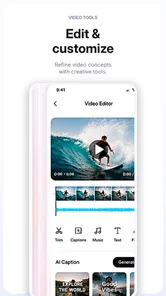
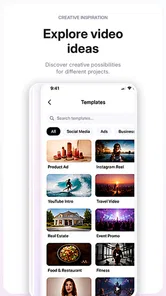
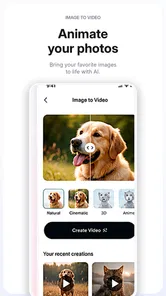
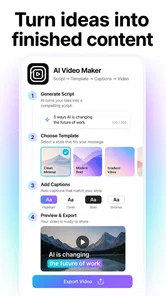
Analysis by Reviewed
ChatGPT Video: AI Maker is the kind of social app I would open when I have an idea for a short video, post, or advertising concept but not enough time to build everything from scratch. In my experience, its appeal is less about replacing a full creative team and more about turning a rough thought into something I can develop quickly. It comes from Clawdi, is free to start, and is aimed at creating AI-assisted content inside a single marketing workspace.
That positioning makes it interesting for small businesses, independent creators, community managers, and anyone who regularly needs social content. I would not treat it as a complete substitute for a professional video editor or a carefully planned campaign platform. Instead, I see it as a fast starting point: a place to shape an idea, test different directions, and prepare material for a social feed or promotion.
The app is listed for Everyone and runs on Android 7.0 or later. Its current version is 1.1.5, while the developer has built a product that is still relatively young in the wider app landscape, with over ten thousand installs. That matters because I approach it as a practical AI studio that may suit quick creation better than long-established, highly specialized editing suites.
How the connection affects the creative workflow
I’d treat the connection as part of the creative process, not just a technical detail: a clear brief and a steady signal make it easier to compare useful directions rather than settle for the first draft. The next section looks at how that affects the handoff from an initial idea to material you can review and refine.
Why a stable connection matters during idea-to-content work
The most important thing to understand is that an AI content workflow depends heavily on communication between the app and its online services. When I am asking for a video concept, post draft, or advertising direction, the useful part of the experience is not just tapping buttons. It is sending an instruction, waiting for processing, reviewing the result, and refining it. A weak connection can interrupt that rhythm at exactly the point where the app is supposed to save time.
This makes ChatGPT Video: AI Maker feel different from a traditional editor. In a conventional mobile video app, I can often trim a clip, adjust a caption, or rearrange a timeline immediately. Here, the creative process is more conversational and generation-oriented. If the network is slow, the delay is not merely an inconvenience; it changes how I think. I am more likely to settle for the first acceptable result instead of continuing through several revisions.
For that reason, I would use it when I have a reliable Wi-Fi or mobile-data connection, especially for larger creative tasks. A quick text idea may be easy to send, but video-related work can involve more processing and more waiting. I would avoid starting an important campaign draft while moving through an area with inconsistent coverage.
More From Our News Desk

Weather by Xiaomi Review: Clear at a Glance, Less Clear Up Close

X Under Pressure: Can It Recover When Posting Goes Wrong?

Clash of Clans Is Won Between the Battles

Android Auto Makes the Case for Quieter Car Software

MobiOffice: Transforming Mobile Productivity with Seamless Integration

EA SPORTS FC™ Mobile Soccer: Redefining Mobile Sports Gaming
A useful workflow for social posts and short campaigns
I found the best way to approach an AI marketing tool is to separate planning from polishing. I would begin with a compact brief: who the audience is, what action I want, what tone fits the brand, and where the content will appear. That gives the app a clearer direction than a vague request such as “make something engaging.”
After the first result, I would not immediately ask for a completely new concept. A better approach is to refine one element at a time. I might keep the central message but change the opening, shorten the wording, make the tone more conversational, or ask for a stronger call to action. This reduces unnecessary generation and makes it easier to understand which change improved the result.
That step-by-step method is especially useful when connectivity is imperfect. If a request fails or takes longer than expected, I have a clear point to return to rather than losing an entire creative direction. It also helps control the amount of data used during repeated attempts, which is important for anyone relying on a limited mobile plan.
What it feels like on a phone
On mobile, the main advantage is immediacy. I can think of a promotion while away from my desk and turn that thought into a structured content request without opening several separate tools. For a local seller preparing a weekend offer, a freelancer drafting a client concept, or a community manager responding to a timely topic, that reduced friction can be more valuable than advanced editing controls.
The trade-off is that phones are not ideal for judging every visual detail. A small screen is fine for checking whether a message makes sense, whether the tone feels right, and whether the overall idea is usable. It is less comfortable for close inspection of composition, text placement, or the fine balance between visual elements. I would use the app on a phone for ideation and first-pass production, then review important material carefully before publishing.
One realistic scenario would be a café owner who notices that a rainy afternoon has reduced walk-in traffic. From a phone, the owner could prepare a short promotional concept, request several wording directions, and shape a social post around a same-day offer. The app could help turn a rushed thought into a clearer campaign idea. It would not remove the need to check the offer, correct the business details, or make sure the final presentation matches the café’s identity.
Mobile use is convenient, but not automatically efficient
It is easy to assume that an AI app always saves time. In practice, the time saved depends on how clearly I communicate. If I keep sending broad prompts and accepting inconsistent results, I can spend longer correcting the output than I would have spent writing a simple post myself.
My advice is to keep a small reusable brief in your notes. Include the audience, preferred voice, key product facts, words to avoid, and the desired action. Pasting that foundation into a session gives the app useful context and reduces repeated explanations. It also makes different versions easier to compare because the central requirements stay consistent.
Another practical habit is to draft while connected to a dependable network, then review the wording before requesting another version. That prevents a cycle of unnecessary retries caused by unclear instructions. For mobile creators, the strongest benefit is not unlimited generation; it is the ability to make each request more deliberate.
Handling delays, failed requests, and unfinished ideas
Any connection-dependent creative tool can become frustrating when a request does not complete. The safest approach is to treat each stage as a separate checkpoint. I would keep the original brief in a note, save useful text outside the app when possible, and avoid assuming that a page or generation state will always remain available after an interruption.
If a request appears stuck, I would first check the connection before rewriting the entire idea. A failed attempt does not necessarily mean the prompt was poor. When trying again, I would make the request shorter and more focused rather than adding more instructions. This is both easier for the system to process and easier for me to evaluate.
Recovery is also where the app’s limitations become noticeable. A traditional editor usually gives me direct control over a saved project, while an AI workflow can feel more dependent on the continuity of the session. I would therefore avoid using it as the only place where important campaign copy exists. For a business announcement or paid promotion, keeping a separate copy of the approved wording is sensible.
Protecting the quality of the final result
The fastest generated draft is rarely the final draft I would publish. I would check names, prices, dates, claims, spelling, and calls to action manually. This is particularly important for advertising material, where a small factual error can cause confusion or make a promotion unusable.
I would also watch for generic language. AI-generated marketing often sounds polished while saying very little. To make a result more specific, I would provide concrete details about the product, the customer’s problem, and the reason to act now. A request built around real information is more useful than one built around adjectives such as “exciting,” “premium,” or “viral.”
A non-obvious strength of this kind of workflow is that it can help me compare angles before committing to one. For example, I might ask for a direct sales version, a friendly community version, and an educational version of the same message. The value is not that every version will be publishable. The value is seeing which framing best matches the audience.
Keeping data use under control
Because the app is designed around AI creation, repeated requests can become the main source of network use. I would avoid generating many near-identical versions just because the process feels effortless. Writing a precise brief first is the simplest way to reduce waste.
When I am using mobile data, I would reserve the app for smaller planning tasks and wait for Wi-Fi before experimenting with more involved video creation. I would also review the first output carefully before asking for another. If the problem is only one sentence or one tone choice, a narrowly worded revision is more sensible than starting over.
The pricing model deserves attention as well. The app is free to download, but in-app purchases are listed from $38.99 to $389.99 per item. Those are substantial purchase levels, so I would not move from casual testing to paid use without understanding exactly what a purchase unlocks and whether it fits my workflow. For a hobbyist, the free entry point may be enough to explore the concept. For a business, the cost should be judged against the time saved and the amount of usable content produced.
I would also be cautious about entering sensitive business material into any AI marketing workflow. Before using private customer details, confidential plans, or unreleased campaign information, I would review the app’s current privacy and account terms directly. That is not a reason to avoid the app, but it is a reason to keep prompts focused on the information genuinely needed for the task.
Where it beats familiar alternatives
Compared with a standard social scheduling app, ChatGPT Video: AI Maker is more useful at the beginning of the process. A scheduler helps organize finished content, while this app is aimed at helping produce the idea and its presentation. Compared with a conventional video editor, it offers a more guided route for someone who knows what they want to communicate but does not want to build every element manually.
Its weakness is the same as its point of difference. A dedicated editor is usually better when I need exact timing, detailed visual adjustments, or precise control over an established brand template. A writing assistant may be better for a simple caption when I do not need video or campaign thinking. A full marketing platform may be preferable for teams that need approvals, asset management, and a broader publishing workflow.
I would choose this app when the problem is “I need a useful creative direction now.” I would choose another tool when the problem is “I need pixel-level control,” “I need a complete content calendar,” or “I need a formal team review process.” That distinction prevents disappointment and makes the app easier to evaluate fairly.
Who should try it, and who should skip it
It is a good fit for solo creators, small shops, independent service providers, and social users who often begin with a blank page. It can also help someone who has plenty of ideas but struggles to turn them into a clear post or campaign outline. The free starting point makes experimentation approachable, although the higher-priced in-app purchases mean I would remain careful before treating it as a regular business expense.
I would be less enthusiastic for professional editors who already have a refined production workflow. They may find the conversational generation approach less precise than the tools they already use. I would also skip it if my work depends on constant offline access, highly controlled brand assets, or detailed collaboration features that are not central to an AI creation studio.
The Everyone age rating makes it broadly accessible, but suitability still depends on how responsibly the generated material is reviewed. Younger users may enjoy experimenting with ideas, while business users should take extra care with factual accuracy and spending decisions.
My connectivity verdict
ChatGPT Video: AI Maker makes the most sense as a connected creative companion rather than a complete production environment. Its strongest moment is when I have a real communication goal, limited time, and enough information to give the AI useful direction. It can help me move from a rough thought to several workable content routes, especially for social posts and early advertising concepts.
The experience becomes less attractive when the network is unreliable, when I need exact editing control, or when I expect the first generated result to be ready for publication. I would use it with a stable connection, keep important drafts backed up elsewhere, and treat every generated result as material to review rather than an unquestionable final answer.
My recommendation is to test the free experience carefully before considering any purchase. If you want a mobile-first way to explore AI-assisted videos, posts, and campaign ideas, this app is worth a look. If your priority is offline reliability, advanced manual editing, or a complete professional marketing system, a more specialized alternative will probably serve you better.
ChatGPT Video: AI Maker Frequently Asked Questions
What devices and operating systems can run ChatGPT Video: AI Maker?
ChatGPT Video: AI Maker is a social app for creating AI videos, posts, and ad campaigns. It requires Android 7.0 or later, so check your device’s operating system before downloading. The app is free to install, and its content rating is Everyone, making it suitable for a broad audience. As with any creative app, a compatible device is only the first step; the available tools and results may depend on the app version.
Who makes ChatGPT Video: AI Maker, and how popular is it?
ChatGPT Video: AI Maker is developed by Clawdi and is presented as an all-in-one AI marketing studio. It has passed 10,000 installs, which gives prospective users a basic sense of its reach without saying whether it will suit their individual workflow. The name includes “ChatGPT,” but that alone does not mean OpenAI developed it. Check the developer identity and app details before installing, and do not assume it has the same policies or capabilities as an official OpenAI service.
What is ChatGPT Video: AI Maker, and what can I use it for?
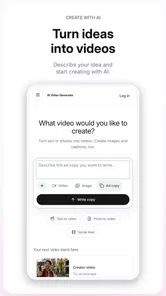
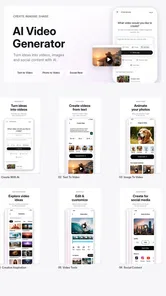
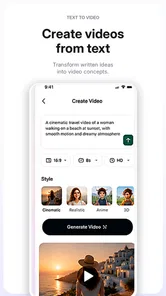
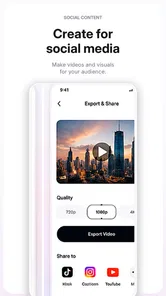
ChatGPT Video: AI Maker is an AI-powered creative app designed to help users produce video content from written ideas, prompts, images, or other supplied media. It may be useful for social media clips, promotional videos, presentations, storytelling, and quick experiments with visual concepts. Its stated focus also includes creating posts and ad campaigns, so it may appeal to people looking for a single place to develop different kinds of marketing content. The exact tools can vary by version, so review the in-app feature list before downloading if you need specific editing or export options.
Is ChatGPT Video: AI Maker officially developed by OpenAI?
The app’s name includes “ChatGPT,” but that does not automatically mean it is an official OpenAI application. The developer is Clawdi, so treat it as a separately published app rather than an OpenAI product. Before installing, check the developer name, publisher information, privacy policy, user reviews, and app details carefully. Official ChatGPT services should be identified through OpenAI’s verified channels. Avoid entering sensitive information or assuming that an independently published app has the same security, policies, or capabilities as the official ChatGPT service.
Does ChatGPT Video: AI Maker create complete videos automatically?
The app may automate parts of the video-making process, such as generating scripts, scenes, captions, images, voiceovers, or transitions, but the final result usually depends on the prompt and the material provided. AI-generated videos can require editing to correct inaccurate text, awkward timing, unsuitable visuals, or pronunciation issues. Treat the app as a creative assistant rather than a guaranteed one-click replacement for professional video production. It is sensible to review each result before sharing it, especially when it is intended to represent a business or convey factual information.
Pros
- Turns text prompts into engaging short videos with minimal effort.
- Useful for creating social media content
- ads
- and quick visual concepts.
- AI-generated visuals can help users overcome creative blocks.
- Simple workflow makes video creation accessible to beginners.
- Suitable for experimenting with multiple video ideas quickly.
Cons
- Output quality can vary significantly between different prompts.
- Advanced editing controls may be limited compared with professional editors.
- AI processing may take longer for complex or high-resolution videos.
- Some features or exports may require a paid subscription.
- Generated videos may contain visual inconsistencies or unnatural details.











