Chat Cloner Secretly View Chat
- 97.00
- 4.5
- Installs
- 1.00M
- Price
- Free

Screenshots
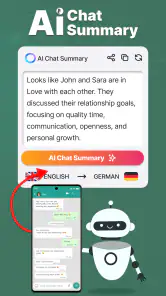




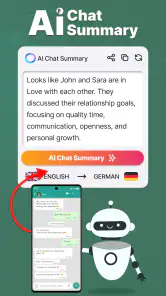
Analysis by Reviewed
I would approach Chat Cloner Secretly View Chat as a companion for managing chat access across devices, not as a replacement for the messaging apps where conversations happen. Its core idea is useful when you want to scan a web QR code and sync a chat to your phone, but it works best when you have a clear, legitimate reason to use that workflow. I would keep the other person’s privacy and the messaging service’s rules in mind rather than treating “secret” viewing as permission to inspect someone else’s messages.
The Magic of Chat Cloning
Alright, let's talk about what makes Chat Cloner Secretly View Chat so intriguing. At first glance, it seems like any other chat app, but when you dig a little deeper, you realize it's got some tricks up its sleeve. Essentially, it allows you to clone chats from different platforms and view them secretly. Whether you want to keep tabs on your own conversations across multiple devices or have a backup of important discussions, this app has got you covered.
Features That Stand Out
One of the coolest features is its ability to synchronize chats without any fuss. No more worrying about losing important messages or not being able to access your chat history on a new device. It's a seamless transition that makes life just a tad bit easier.
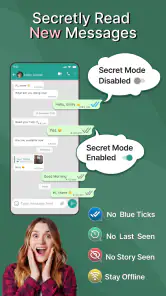
Another standout feature is the privacy it offers. You can view chats without triggering those pesky "read" receipts. It's perfect for when you want to be a stealthy ninja, browsing through messages without letting the other person know you've seen them. Plus, the app's interface is super user-friendly, making it a breeze to navigate even for the tech-challenged among us.
A Sensible First Setup
For my own chats, I would start by checking which messaging service and device combination the app supports, then follow the QR-pairing steps carefully. A QR scan is a linking step, not a magic transfer: keep the source device available, confirm the session on the screen you intend to use, and check that the conversation you expect is actually visible before relying on it. If you are setting this up for a practical reason, such as keeping your own messages reachable while switching between a phone and a larger screen, test with a low-stakes conversation first.
I would also make a habit of reviewing active linked sessions in the original messaging service and ending any you no longer need. That is a useful safety check for any web-linked chat workflow, especially on a shared or borrowed computer. Avoid scanning a QR code you did not request, and do not use someone else’s account or device without clear permission. Those precautions matter more than any convenience gained from reading messages quietly.
One detail I would settle before pairing is which device should remain the source of truth. If I am only checking messages on a second screen, I keep the original app and its account controls central, then use the linked view as a convenience. That makes it easier to recover if access stops working and reduces the temptation to treat a second screen as a separate, complete copy of my chat history.
You May Like

Clash of Clans Is Won Between the Battles

Android Auto Makes the Case for Quieter Car Software

MobiOffice: Transforming Mobile Productivity with Seamless Integration

EA SPORTS FC™ Mobile Soccer: Redefining Mobile Sports Gaming

How Microsoft OneDrive Became a Mobile Productivity Giant

How Google Translate Breaks Language Barriers Effortlessly
Settings and Habits That Make It Easier
Before using it regularly, I would check the app’s available settings rather than assume the default behavior suits me. Look for options that affect notifications, display, and how the app handles a connected session, then choose only what you understand and need. I would not treat a quiet viewing mode as a backup strategy: if a conversation is important, keep a separate copy through the messaging service’s own export or backup tools where available.
A small routine helps avoid confusion: connect only the device you plan to use, confirm the right chat is showing, and disconnect when the session is no longer useful. If you rely on several conversations, make a short note of which device is paired and why. This is not glamorous, but it prevents the common mix-up of assuming a chat has synced when the QR link was never completed or has since expired.
I would be especially careful about notification choices on a device other people can see. A message preview can reveal more than the chat window itself, so I would check what appears on the lock screen and whether a shared screen is visible from the room. This is a practical privacy check, not a special capability to assume the app provides. The safest routine is to use a device you control and keep its screen private.
It also helps to make pairing a deliberate task rather than something done in a hurry. I would first confirm that I am signed into the intended account on the source device, then scan only the QR code shown for the session I mean to create. Afterward, I would open the specific conversation I need and verify that it is current. This small sequence catches the most avoidable mistakes: linking the wrong account, expecting an old conversation to appear automatically, or walking away before the connection is actually ready.
Faster Patterns for Everyday Use
A realistic use case is checking your own messages during a busy workday when your phone is charging across the room. I would pair the device I use for work, scan the QR code myself, and glance at the relevant conversation during a break instead of repeatedly picking up my phone. For a one-off task, such as finding an address someone sent, that can be more convenient than moving between screens; for constant access, the messaging service’s official desktop or multi-device option may be simpler and more dependable.
Another useful habit is to treat the app as a viewing convenience, not the one place where a conversation lives. If a message contains a deadline, booking detail, or reference you will need later, save it through the original service’s normal tools. That distinction keeps the clone workflow from becoming a single point of failure and makes it easier to tell whether you are seeing current messages or relying on an old session.
For repeated use, I would keep the workflow narrow: pair for the device and task I actually need, check the conversation, then close or unlink the session when I am finished. That is more dependable than trying to keep several screens connected without a clear reason. It also makes troubleshooting simpler because there are fewer active sessions to inspect if the expected chat is not visible.
This approach suits short, specific checks better than treating the app as a full messaging workstation. If I need to reply, send attachments, or manage a long conversation, I would switch to the original service’s app or its official web client. The clone-style workflow is most helpful when I want to consult a message while staying focused on another device, not when I need every part of the messaging experience in one place.
Where the Trade-Offs Show
Chat Cloner is a communication app from G.K. Apps Studio. It is free to install, carries an Everyone age rating, and includes optional in-app purchases priced from around $1.19 to $22.99 per item. Its current version is 5.2, and it runs on Android 6.0 or later. The app has a 4.5 average from around 9,900 ratings and over 1 million installs, which suggests that many people have tried it, but those figures do not tell me whether a particular chat service or device setup will suit my needs.
The main limitation is that QR-based syncing depends on the messaging service’s own linking behavior and on having access to the account and device being paired. It should not be confused with a universal archive that can retrieve every old message from any platform. If you need long-term records, dependable restoration, or official support for a specific service, its built-in backup and linked-device tools are the safer place to start. I would also skip this app if your goal is to secretly monitor another person: convenience does not make that an appropriate use.
Compared with ordinary messaging apps, this is a helper for accessing chats rather than a place to start new conversations with all your contacts. Compared with a service’s official web client, it may appeal if you want a separate utility, but the official option is usually the clearer choice when you care most about documented account controls and a familiar support path. That is the trade-off I would weigh before pairing anything.
There is also a difference between seeing a conversation on another screen and having a dependable record of it. A linked session can make a message easier to consult, but I would not assume it preserves the complete history, remains connected indefinitely, or can restore anything if the original account changes. Anyone choosing this for work or record-keeping should confirm that the original messaging service’s own backup process meets their needs before relying on a viewing utility.
Cost is worth considering in the same practical way. The app is free to install, while optional purchases are available, so I would try the basic workflow with a real but low-stakes use case before spending money. If the extra device access is only occasionally useful, the free option or the service’s existing tools may be enough. If the workflow does not solve a recurring problem, paying for extras would not make the underlying account-linking limits disappear.
Why It Might Be Worth Your Time
So, why should you give this app a shot? Well, if you're someone who juggles multiple devices or platforms, this app is a lifesaver. It keeps everything in one place, so you don't have to hop around trying to find that one message from weeks ago. Plus, the peace of mind knowing your chats are backed up and accessible anytime is priceless.
Moreover, in today's world where privacy is a major concern, having the ability to view chats without leaving a trace is a huge plus. It's like having a superpower – the power of invisibility in the digital realm.
I would describe its strongest appeal more narrowly: it can make a particular viewing routine feel less awkward when my phone is not the device I want to use. That is useful for a person who already understands QR linking and only needs their own chats on a second screen. It is less compelling for someone who expects one tap to migrate a whole account or automatically create a lasting archive.
A good test is to choose one conversation that is not urgent and try the workflow while both devices are available. If it appears where expected and the process feels comfortable, I would then decide whether it saves enough effort to become a regular habit. If setup is confusing, the session is unreliable, or the official client already handles the same task, there is little reason to add another step to everyday messaging.
Who Should Use It—and Who Should Look Elsewhere
I can see the appeal for someone who wants to view their own conversations on another device and is comfortable with QR pairing. It may also suit a person who only needs occasional access and is willing to check that the session is active before depending on it. If you rarely switch devices, already use an official desktop client, or want a robust archive for work records, the extra linking step may add more hassle than value.
My practical verdict is to try it only with your own account, start with one device, and keep the original messaging app’s recovery and privacy controls in charge. Chat Cloner can make a particular cross-device routine more convenient, but it is not a substitute for consent, a reliable backup plan, or the official tools offered by the chat service. Used with those limits in mind, it has a clear niche; if you need guaranteed history or broader account management, I would choose the original service’s options instead.
I would skip it outright if the reason for installing it is to read somebody else’s messages without permission. A name or feature that suggests discreet viewing does not change the basic responsibility to respect account ownership and private conversations. For family, work, or shared-device situations, the better starting point is a transparent arrangement and the controls provided by the messaging service, not an attempt to bypass someone’s expectations.
For a small team or a busy household, I would also think about whether a second linked view is actually the right answer. If multiple people need access to shared information, a group conversation or an agreed shared channel is usually clearer than linking an individual account to extra devices. That keeps responsibility visible and avoids confusion about who can see private messages. This app is better suited to one person checking their own conversations than to informal account sharing.
When deciding between this and an official web client, I would ask one simple question: do I want a separate utility for occasional access, or do I want the most direct route supported by the messaging service? If the latter matters more, the official option is the sensible pick. If the former describes a real inconvenience in my day and I am comfortable with the QR-based setup, trying this app cautiously may be worthwhile.
In conclusion, Chat Cloner Secretly View Chat isn't just an app; it's a tool that simplifies and enhances your digital communication experience. Whether you're using it for personal reasons or professional ones, it's an app that brings convenience and peace of mind. So, go ahead, give it a whirl, and discover how it can fit into your daily routine.
Chat Cloner Secretly View Chat Frequently Asked Questions
Is Chat Cloner Secretly View Chat free to download, and are there purchases inside the app?
Chat Cloner Secretly View Chat is free to download, so you can try the app without paying upfront. It also offers in-app purchases, with prices ranging from $1.19 to $22.99 per item. Check the purchase details shown in the app before confirming anything, especially if you plan to use it beyond the free features.
Which devices and operating systems can run Chat Cloner Secretly View Chat?
The app is available for Android devices running version 6.0 or later. Its current version is 5.2, and it is rated for Everyone. Before downloading, check your device’s operating system version and available storage in the app store to make sure installation is possible and the app can run comfortably.
Who developed Chat Cloner Secretly View Chat, and how popular is it?
Chat Cloner Secretly View Chat is a communication app developed by G.K. Apps Studio. It has an average rating of 4.5 from around 9.9 thousand ratings, with 97 written reviews, and has been installed over one million times. These figures offer a quick sense of its audience, but they do not replace checking whether its features and privacy implications suit your needs.
What is Chat Cloner Secretly View Chat used for?
Chat Cloner Secretly View Chat is designed to allow users to clone messaging apps and view chats without the original user's knowledge. It is mainly used for monitoring purposes, enabling users to keep track of conversations happening on different messaging platforms such as WhatsApp, Facebook Messenger, or other popular chat applications.
Is Chat Cloner Secretly View Chat safe to use?
While the app offers a certain level of safety with encrypted data transfers, users should be cautious as using such apps may violate privacy policies and terms of service of the messaging platforms. It's important to understand the legal implications and ensure that you have the necessary permissions to monitor someone's chats.
Pros
- Easy to use interface for beginners.
- Does not require root access.
- Supports a wide range of chat apps.
- Offers stealth mode for privacy.
- Regular updates and bug fixes.
Cons
- May violate privacy policies.
- Limited customer support.
- Some features require payment.
- Possible data security risks.
- Can be detected by some apps.

- Category
- Communication
- Version
- 5.2











