

Charging Station Locator
- 4.00
- 2.8
- Installs
- 10.00K
- Price
- Free
Screenshots
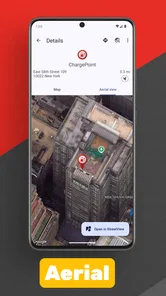
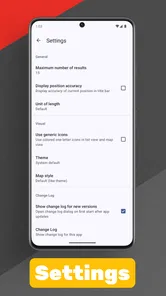
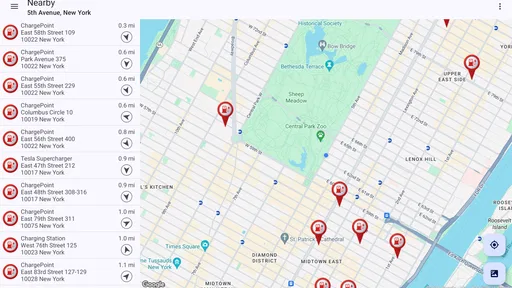
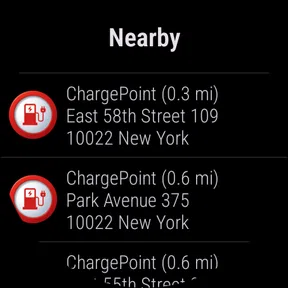
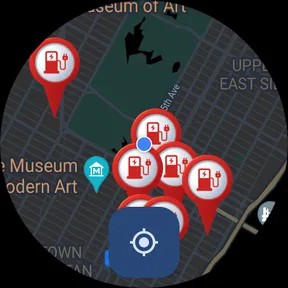
Analysis by Reviewed
Finding a public charger sounds simple until I am already driving, the battery is low, and the first search result leaves me unsure whether the station is nearby, suitable, or even worth the detour. Charging Station Locator is aimed at that exact moment: it is a free Auto & Vehicles app from POSITIVE INFINITY that helps me look for charging stations near my current position or in another part of the world. I found the idea useful, but the experience depends heavily on how carefully I check the results before setting off.
The app has a straightforward purpose rather than trying to become a complete electric-car companion. It is best understood as a map-based starting point for charger research. That distinction matters. I would use it to identify possible places to charge, compare the general location of options, and plan a stop. I would not treat a map pin alone as proof that a connector is compatible, available, accessible, or operating at the moment I arrive.
With an average rating of 2.8 from roughly fifty ratings, the public response is mixed. That does not automatically make the app unusable, but it does tell me to approach it as a practical utility that may require patience. It has passed ten thousand installs, is rated for Everyone, and remains free to download, while optional in-app purchases are listed at $1.99 per item. Those details make it easy to try without committing to a subscription, although the modest review history means I would test it before depending on it for an unfamiliar long-distance route.
Where the experience can become difficult
I find the biggest difficulty is not locating a pin but deciding how much confidence to place in it when time or battery is tight. I would slow the process down before leaving, especially in an unfamiliar area, and separate a useful lead from a confirmed stop. The next checks help make that distinction practical rather than stressful.
The first search is not the whole answer
The most common mistake with a charging-station map is assuming that finding a marker means the trip is solved. In practice, I need several pieces of information before I can rely on a location: whether it is open to the public, whether the plug matches my vehicle, whether payment or membership is required, and whether the station is positioned somewhere I can actually enter and leave easily. A locator can narrow the search, but it cannot replace that final check.
This is especially important when searching away from home. A station that looks close on the map may be on private property, inside a car park with restricted hours, or on the opposite side of a divided road. I therefore treat every result as a candidate rather than a guarantee. Before driving there, I open the location in my usual navigation tool, inspect the surrounding roads, and look for an alternative nearby. That small habit is more valuable than simply choosing the first marker displayed.
Location searches need a clear purpose
There are two different jobs I might ask the app to do. The first is finding a charger around me right now. The second is researching a destination or a future stop somewhere else. Mixing those tasks can make the result less useful. For an urgent stop, I want the nearest realistic option and a backup. For planning, I want to scan several areas along the route and compare how much flexibility I have.
More From Our News Desk

 Gmail
GmailGmail in a Busy Inbox: Who Benefits Most?
From first account to crowded workday, Gmail earns its place through dependable search and flexible sorting—but its best fit depends on how much inbox maintenance you can tolerate.

 Prime Video
Switching to Prime Video: What Changes in Your Viewing Routine
Prime Video can make a compelling second home for streaming, but switching means learning a different catalog, rental layer, and route from browsing to playback.

 Universal TV Remote Control
Universal TV Remote Control Works Best as a Reliable Backup
A phone remote earns its place through quick setup and reliable habits. Here is how to get more from Universal TV Remote Control—and where its limits show.

 Weather - By Xiaomi
Weather by Xiaomi Review: Clear at a Glance, Less Clear Up Close
Xiaomi’s weather app makes everyday forecasts quick to scan, but its calm surface can leave useful details and recovery paths harder to find than they should be.

 X
XX Under Pressure: Can It Recover When Posting Goes Wrong?
A resilience-focused review of X, examining setup, mistaken posts, interruptions, weak connections, and the gaps that matter when recovery needs to be dependable.

 Clash of Clans
Clash of Clans Is Won Between the Battles
Its raids are quick; its community is a long-term project of coordination, teaching, rivalry, and shared responsibility—with all the friction that entails.
Latest News



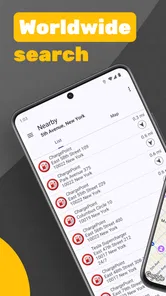
I get better results when I decide which of those jobs I am doing before searching. If I am already on the road, I avoid spending time exploring distant locations that do not help the immediate problem. If I am planning ahead, I search the destination and likely stopping areas instead of relying only on my current position. The worldwide search concept is useful here, but it still requires sensible filtering by distance and route.
Map confidence can be misleading
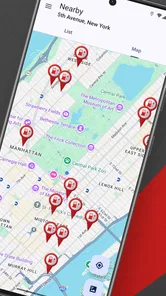
A clean map view often creates more confidence than the underlying information deserves. Pins are visually persuasive: once I see several of them, it is tempting to assume I have plenty of choices. I remind myself that geographic proximity is only one part of the decision. A charger five minutes away is not a good option if my vehicle cannot use it or if reaching it requires a long detour through a congested area.
My practical approach is to shortlist two or three possibilities, then verify the details that matter for my car and journey. I also consider the direction in which I will leave the station. A location that is technically close may be awkward if I need to cross traffic or reverse a route. This is a non-obvious strength of using a locator carefully: it helps me think in terms of usable stops rather than merely visible points on a map.
Why the rating deserves context
The rating of 2.8 is low enough that I would not recommend installing this and immediately deleting every other charging resource. At the same time, a small review pool does not explain which part of the experience caused frustration. The sensible response is to keep expectations modest and judge the app against the specific task I need it to perform.
For a quick visual search, it may be enough. For live charger status, payment, route management, or vehicle-specific charging advice, I would look to a dedicated network app, the vehicle manufacturer’s system, or a navigation service with broader trip-planning tools. Charging Station Locator can sit alongside those tools, but I would not make it the only source of information on a trip where a failed stop would cause real trouble.
Setup checks that prevent avoidable trouble
I like to test the search while parked, then confirm that the map is centered on the intended place and that my phone has a reliable connection. I also keep my vehicle’s connector needs in mind before treating any result as a candidate. These small checks prevent avoidable confusion; if a result still seems wrong, a simple recovery routine is the sensible next step.
Start with a controlled test
Before I need the app urgently, I run a short test while parked and connected to a reliable internet connection. I search for a known area rather than beginning with an unfamiliar destination. This lets me see whether the map loads, whether nearby results appear, and whether I can move from a general search to a specific location without pressure.
That test is worth doing because charging problems are often blamed on the application when the real issue is the phone, the signal, or the destination itself. If the app behaves normally at home but struggles in a particular car park, the environment may be responsible. If it fails everywhere, I have learned that before depending on it with a low battery.
Check the phone before blaming the map
I make sure the phone has a stable connection and enough battery for the search, navigation, and any follow-up verification. I also keep the device’s location setting ready when I want nearby results. If the app is being used to search somewhere else in the world, I enter that place deliberately instead of assuming the current position will automatically change to the destination I have in mind.
These are basic checks, but they address the most frustrating kind of failure: a user expecting a local result while the phone is not providing a dependable location, or a user searching remotely while still reading the map as if it were centered on the car. I prefer to confirm the visible area and the intended town or street before selecting a marker.
Prepare the information the app cannot decide for me
I keep my vehicle’s connector type, charging limits, and preferred networks in mind while reviewing results. The locator’s job is to help me find places; it is still my responsibility to decide whether each place fits my car and my plan. If I am traveling with a vehicle that has unusual connector requirements, I am more cautious and verify every candidate through another source.
I also check whether the stop makes sense for the time of day. A charger at a retail location may be convenient during opening hours but less practical late at night. A station near a major road may be easy to reach in one direction and inconvenient in the other. These checks turn a basic map search into a usable charging plan.
Use the free entry point sensibly
Because the app is free, I can evaluate its core usefulness without paying first. I would begin with ordinary searches and only consider an optional purchase if I clearly understand what it adds and whether that addition solves a problem I actually have. The listed price of $1.99 per item is approachable, but a small payment is still not a reason to overlook an unclear workflow.
My advice is to test the free experience on a familiar route before spending anything. If the basic map does not help me identify dependable candidates, an optional purchase is unlikely to fix the larger issue of unsuitable locations or incomplete planning. The purchase decision should follow a successful trial, not replace one.
Keep a second source ready
I would not remove my vehicle manufacturer’s charging tools or the apps for networks I regularly use. Those services may be better suited to connector details, account access, payment, or current station information. The locator is more useful as an independent way to discover possibilities, particularly when I am exploring an area I do not know.
This two-source approach also gives me a recovery path. If the map shows a promising station but the network’s own information disagrees, I pause and investigate instead of taking the risk. The extra step may feel slower, yet it is much faster than arriving at an unusable charger with no practical alternative.
Recovering when a search or result goes wrong
When a search returns nothing useful or a marker seems questionable, I avoid repeatedly retrying the same action under pressure. I broaden the place search, check a familiar location as a reference, and compare promising addresses with another source before navigating. If those steps do not restore confidence, I switch tools and keep the original search as a clue rather than a conclusion.
When nearby results do not appear
If I open the app and see no useful nearby stations, I first check whether I am looking at the correct area. I then try a broad search for the town or district rather than repeatedly tapping the same location. A small change in the search area can reveal whether the issue is a narrow map view or a genuinely limited selection.
Next, I compare the result with a familiar location. If I know that a charger exists in my neighborhood but it does not appear, I treat that as a warning to verify the app’s coverage before using it for a long journey. I do not keep refreshing indefinitely while the vehicle is waiting. At that point, I switch to a second source and use the locator later for comparison.
When a marker looks promising but details are unclear
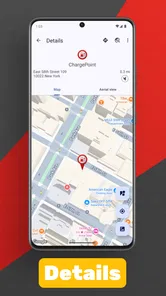
I avoid navigating immediately. Instead, I inspect the marker and write down the exact address or nearby landmark, then confirm it elsewhere. If the location is inside a complex site, I look for the entrance rather than just the pin. This is particularly useful at shopping centers, hotels, hospitals, and large parking areas where a map point may be geographically correct but operationally vague.
I also check the route from the charger back to my intended journey. A station is not truly convenient if it leaves me facing the wrong direction or forces an awkward exit. This simple route check is one of the best ways to avoid a technically accurate but practically poor result.
When the app feels slow or unresponsive
I begin with safe, general steps: stop moving, check the connection, close and reopen the app, and try a simpler search. If the phone is handling several demanding tasks at once, I reduce the workload before trying again. I do not attempt to troubleshoot while driving, and I do not let the search distract me from finding a safe place to stop.
If the problem continues, I use another navigation or charging source rather than repeatedly forcing the same screen to respond. A locator is helpful only when it reduces uncertainty. Once it becomes the main source of delay, changing tools is the sensible recovery.
When the selected station is not usable
Finding a backup before leaving is the most effective recovery plan. I choose one alternative that is reasonably close to the first and another along the route if the journey is long. I save or note the locations in whatever navigation method I normally trust, because relying on memory after the battery becomes low is unnecessary stress.
If I arrive and the station cannot be used, I reassess the situation rather than assuming the app caused the failure. The location may be correct while the charger is occupied, restricted, offline, or incompatible. The app helped me reach a possibility; the final decision still depends on conditions at the site and information from the relevant operator.
When the app is not the cause
A map result can be accurate while the station itself is inaccessible, incompatible, or affected by local conditions, and a slow response can come from a weak connection rather than the app. I treat those as separate questions instead of blaming one tool for every setback. That distinction matters most when choosing whether to keep troubleshooting or move to a backup source.
Network coverage can change the outcome
A charging search made in a basement car park, rural area, or crowded event can behave differently from one made at home. Weak connectivity may delay map content or prevent a result from loading. If the app works normally elsewhere, that points toward the local connection rather than a permanent application problem.
I plan around this by researching before entering areas where coverage may be poor. I keep the address of the intended stop available and avoid waiting until the final few miles to begin searching. This does not make the app offline software, but it reduces the amount of live searching I need to do at the worst possible time.
Vehicle compatibility remains a separate question
The app can help me locate a station, but it cannot make an incompatible connector work. I check my car’s requirements before selecting a stop, especially when traveling internationally or using a vehicle I do not drive every day. I also consider whether the charging speed is appropriate for the time I have available.
This is where a vehicle-specific system may be better. It can connect the search to the car’s charging needs and route planning more directly. Charging Station Locator is more appealing when I want a broad place-finding tool, not when I expect the software to manage every technical detail of the charging session.
Station access is a real-world issue
A pin cannot tell me everything about the final approach. Construction, road closures, private parking rules, event traffic, or a locked gate can turn a nearby result into a poor choice. I therefore inspect the route and, when possible, confirm the site through another current source.
This is also why I prefer not to judge the app solely by whether every marker leads to a perfect stop. Public charging information can change, and different services may update at different times. The app is most valuable when I use it to widen my options, then apply common sense before committing to the drive.
International searches need extra caution
The ability to look for stations anywhere in the world is attractive to travelers, but international charging involves more than geography. Connector standards, payment methods, roaming arrangements, language, parking rules, and operating hours can all differ. I would use the app to discover possible areas, then verify the practical details with local network information.
For a foreign trip, I would also plan a larger buffer than I would at home. An unfamiliar station may be harder to reach or explain if something goes wrong. The worldwide search is a useful research aid, but it should be paired with a route plan that includes alternatives and enough remaining range to reach them.
My practical verdict after using it
After weighing its narrow purpose against the care needed to verify a stop, I would keep this as a discovery aid rather than rely on it alone. The free entry point makes a low-commitment trial reasonable, while the modest average rating is a reminder to test it on a familiar route first. My verdict comes down to whether a second source is already part of your charging routine.
Who will get the most from it
I see Charging Station Locator as a useful secondary tool for electric-car drivers who want a simple way to explore charging possibilities near a current position or in a destination area. It can be handy when I am visiting a new town, checking whether a meeting location has charging nearby, or looking for broad options before opening a network’s own app.
It is also suitable for someone who prefers to separate discovery from payment. I can use the locator to build a shortlist, then move to the appropriate operator or navigation service for confirmation. That workflow avoids asking one small app to perform every part of the charging process.
Who should choose something else
I would skip it as my only charging solution if I need dependable live availability, integrated route planning, automatic vehicle compatibility checks, or a complete payment workflow. In those situations, a manufacturer’s system, a trusted charging network app, or a full navigation platform is likely to be a better primary choice.
I would also be cautious if I regularly travel through remote areas where a missing or questionable result could leave me stranded. The mixed public rating reinforces that caution. The app may still be worth testing, but I would not build a high-stakes journey around it until I had personally confirmed that its results suit my routes and vehicle.
The workflow I recommend
My preferred routine is simple: search the area, shortlist more than one station, verify the address and connector elsewhere, check the route direction, and keep a backup. I do this before the battery becomes critically low. On a normal day, the process takes little effort and gives the app a clear role without exaggerating what a locator can guarantee.
I also keep the app updated through ordinary device maintenance and retry a simple search if something behaves unexpectedly. If the issue remains, I move to my backup source instead of spending the journey diagnosing it. That approach is safer and more realistic than expecting a map utility to recover every time.
Overall, I find the concept practical but limited. Charging Station Locator from POSITIVE INFINITY is free, accessible to an Everyone audience, and focused on one useful task: helping me discover charging locations. Its value comes from widening the search, not from replacing verification. Use it as a discovery layer, not as a promise that the next charger will be available and compatible.
My final recommendation is therefore conditional. If you want a lightweight way to investigate charging options, it is reasonable to try, especially for familiar routes and destination research. If you need a complete, highly dependable charging companion, pair it with a stronger primary service or choose that alternative instead. In my experience, the app works best when I use its map to begin the decision and my own checks to finish it.
Charging Station Locator Frequently Asked Questions
Does Charging Station Locator require an account or personal information to get started?
Charging Station Locator is intended to help drivers discover charging stations, and you can begin by searching near your position or entering a destination. If the app requests location access, allowing it can make nearby searches more convenient; entering a destination manually is another option. Review any sign-in or permission prompts in the app and choose the settings that suit your preferences.
Who developed Charging Station Locator, and what should I know about its user feedback?
Charging Station Locator is developed by POSITIVE INFINITY and is listed in the Auto & Vehicles category. Its average rating is 2.8, based on 54 ratings, with 4 written reviews, so feedback is limited and mixed. Reading the available comments alongside the app’s features can help you decide whether it suits your needs before installing it.
What is Charging Station Locator, and what does it do?
Charging Station Locator is a navigation and discovery app designed to help electric vehicle drivers find nearby charging stations. After opening the app, you can search around your current position or enter a destination manually. Depending on the available data, it may show station locations, connector types, charging speeds, operating status, opening hours, and other useful details before you begin your journey.
Can Charging Station Locator find chargers for my specific electric vehicle?
The app can help you identify charging stations, but compatibility should always be checked carefully before starting a trip. Charging networks may use different connector standards, power levels, and access requirements. Look at the station details for supported plugs and charging speeds, then compare them with your vehicle. Some stations may also require an adapter, a separate network application, or a membership.
Does Charging Station Locator provide accurate, real-time station availability?
Charging Station Locator can be useful for checking whether stations are nearby, but the accuracy of availability information depends on the data supplied by charging networks and other sources. A charger marked as available could become occupied or unavailable before you arrive. For important journeys, verify the status through the relevant operator and consider selecting a backup station along your route.
Pros
- Quickly finds nearby EV charging stations using your current location.
- Useful filters help narrow results by connector type and charging speed.
- Station details can make planning longer electric-vehicle trips easier.
- Map-based browsing offers a clear overview of charging options in unfamiliar areas.
- Helpful for comparing nearby stations before choosing where to stop.
Cons
- Coverage and station details may vary depending on your country or region.
- Some listings may have outdated availability or pricing information.
- Location access is required for the most useful search experience.
- Results may include stations that require memberships or separate payment apps.
- Heavy map and location use can increase battery and mobile data consumption.











