

CFMOTO RIDESYNC
- 398.00
- 4.5
- Installs
- 10.00K
- Price
- Free
Screenshots
Analysis by Reviewed
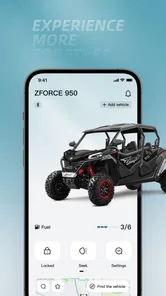
CFMOTO RIDESYNC is the kind of companion app I would install when I want my CFMOTO vehicle and phone to feel like part of the same setup, rather than treating the vehicle as an isolated machine. It sits in the Auto & Vehicles category and is developed by CFMOTO Powersports, Inc., with a clear focus on connecting with a ride, keeping its software current, and making ride information easier to understand. My overall view is positive: it has a practical purpose, a free entry point, and a more focused experience than trying to manage everything through generic phone tools. At the same time, its value depends heavily on owning a compatible CFMOTO vehicle and being willing to use a companion app as part of your riding routine.
The app is available for everyone and costs nothing to download, which makes trying it a low-risk decision for the right owner. Its current version is 1.0.7, and it runs on Android 7.0 or later. That broad operating-system requirement is useful if you keep an older phone for riding or do not upgrade devices frequently. The store lists a 4.4 average from around 910 ratings, with more than 397 written reviews and over 10K installs. Those numbers suggest a reasonably established user base without making this feel like a huge, universal platform.
What CFMOTO RIDESYNC does well in everyday riding
I find the app’s everyday value is less about checking a screen during a ride and more about making the moments before and after one easier to manage. In this section, I’ll focus on how a deliberate parked-and-review routine can help a CFMOTO owner get more from its connected tools, before weighing where a broader riding app may be a better fit.
A focused connection between rider and vehicle
The strongest part of CFMOTO RIDESYNC is its narrow purpose. Instead of being a general navigation tool or a social riding network, it is designed around the relationship between a CFMOTO vehicle and the person using it. That focus matters because vehicle companion apps are most useful when they reduce small points of friction: checking relevant information, keeping the app ready before a ride, and having a single place for connected functions instead of searching through unrelated phone applications.
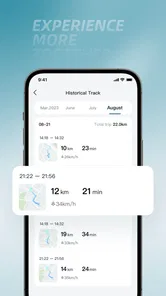
I appreciate that the app’s central idea is easy to understand. You are not installing it because you want another feed to browse. You install it because you want your phone to participate in the ownership experience. The promise of connecting, updating, and analyzing a ride gives the app three useful jobs: acting as a bridge, helping keep the connected system current, and turning ride information into something you can review rather than simply forget once you park.
That makes it more purposeful than a standard vehicle logbook. A manual log can record fuel, maintenance, or distance, but it depends on remembering to enter everything. A phone-based companion can fit more naturally into a routine because the app is already associated with the vehicle. The trade-off is that the experience is tied to the CFMOTO ecosystem, while a manual spreadsheet or broad riding app can be used with almost anything.
A practical pre-ride and post-ride workflow
A realistic way to use it is to open the app before leaving, make sure the connection is ready, and then check the relevant information after returning. I would not treat that as a mandatory ritual for every short trip. For a quick errand, opening an app may feel like extra work. For a longer outing, a new route, or a day when I want to compare how the vehicle behaved, the routine becomes more worthwhile.
More From Our News Desk

 Gmail
GmailGmail in a Busy Inbox: Who Benefits Most?
From first account to crowded workday, Gmail earns its place through dependable search and flexible sorting—but its best fit depends on how much inbox maintenance you can tolerate.

 Prime Video
Switching to Prime Video: What Changes in Your Viewing Routine
Prime Video can make a compelling second home for streaming, but switching means learning a different catalog, rental layer, and route from browsing to playback.

 Universal TV Remote Control
Universal TV Remote Control Works Best as a Reliable Backup
A phone remote earns its place through quick setup and reliable habits. Here is how to get more from Universal TV Remote Control—and where its limits show.

 Weather - By Xiaomi
Weather by Xiaomi Review: Clear at a Glance, Less Clear Up Close
Xiaomi’s weather app makes everyday forecasts quick to scan, but its calm surface can leave useful details and recovery paths harder to find than they should be.

 X
XX Under Pressure: Can It Recover When Posting Goes Wrong?
A resilience-focused review of X, examining setup, mistaken posts, interruptions, weak connections, and the gaps that matter when recovery needs to be dependable.

 Clash of Clans
Clash of Clans Is Won Between the Battles
Its raids are quick; its community is a long-term project of coordination, teaching, rivalry, and shared responsibility—with all the friction that entails.
Latest News



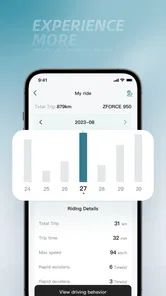
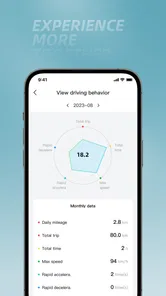
The post-ride side is where the analysis angle becomes more interesting. Riders often remember the destination and the general feeling of a trip, but not the details that help them make better decisions later. Reviewing ride information can help identify patterns in how a vehicle is being used. For example, I could compare a relaxed local trip with a longer outing and use the difference to plan future rides more sensibly. The important benefit is not collecting information for its own sake; it is having something concrete to look back on.
A useful habit is to review the app after parking rather than waiting several days. That keeps the ride fresh in my mind and makes it easier to connect what I see in the app with what I noticed on the road. I would also avoid opening it while moving. The app belongs in the preparation and review parts of a ride, not in the rider’s attention during traffic.
Updates are more valuable than they first appear
The update function is another meaningful strength. Vehicle software is easy to ignore because the machine may continue working normally, but staying current can be part of responsible ownership. Having a dedicated app that includes update-related functionality gives riders a clearer place to handle that task than relying on vague reminders or hoping a service visit covers everything.
My advice would be to deal with updates while the vehicle is parked and the phone has a dependable connection. I would not begin an update just before leaving for an important trip. That is a small but important ownership detail: convenience should not turn into a last-minute interruption. If the app makes the process easier to find and understand, it earns its place even during weeks when I do not use the analysis tools.
This is also where the app differs from generic alternatives. A navigation app can help me get somewhere, and a notes app can hold maintenance reminders, but neither is designed to serve as the CFMOTO-specific bridge for connected vehicle tasks. The dedicated approach is less flexible, but it is more relevant when the task concerns the vehicle itself.
Why the free price changes the decision
Because CFMOTO RIDESYNC is free, I do not have to justify a subscription before discovering whether it fits my habits. That is especially helpful for a new owner who is still learning which connected features are genuinely useful. I can install it, establish a routine, and decide whether the information and update tools add enough value to keep using it.
Free does not automatically mean frictionless. I still need a compatible CFMOTO setup, a phone that meets the Android requirement if I am on that platform, and enough patience to complete the initial connection properly. The app is not a universal replacement for every riding tool. Its cost advantage is strongest when I already own the relevant vehicle and want the official companion experience.
Where it fits beside familiar alternatives
Compared with a generic motorcycle or powersports tracking app, CFMOTO RIDESYNC has a more direct relationship with the vehicle brand. A general app may be better for riders who switch between several manufacturers, want a broad community, or prefer one logbook for every machine. It may also be more convenient for someone whose main goal is route planning rather than vehicle connectivity.
Compared with a phone’s built-in health or location tools, the dedicated app has a clearer automotive purpose. Those built-in tools can track movement in a broad sense, but they do not replace an app intended to connect the rider with a CFMOTO vehicle and support vehicle-related updates. On the other hand, a general tool may feel faster for a person who only wants a simple map, a timer, or a manually entered note.
Compared with visiting a dealer for every software-related task, an official companion app can be more convenient for routine ownership. I would still regard professional service as important for mechanical concerns or anything that feels unsafe. The app is best viewed as a digital companion, not as a substitute for qualified inspection, maintenance, or judgment.
The meaningful weakness: usefulness depends on routine and compatibility
The biggest limitation is not that the app lacks a flashy feature. It is that its usefulness can drop sharply if I do not regularly connect it to my vehicle. A person who rides occasionally, never reviews ride information, and prefers handling updates through other channels may open it only a few times. In that situation, the app can feel like another ownership obligation rather than a helpful tool.
The connection itself can also become a source of frustration if I expect it to behave like a casual phone application. Vehicle pairing is more sensitive to timing and setup than opening a news app. I would approach the first connection with the vehicle stationary, the phone prepared, and enough time to solve a problem without rushing. If I were planning a major ride, I would test the connection beforehand rather than discovering an issue in a parking area at the start of the trip.
Another trade-off is concentration. The more information an app presents, the more tempting it can be to check it constantly. That is the wrong mindset for riding. I would use CFMOTO RIDESYNC as a before-and-after tool, not as something to interact with while traveling. Riders who want a completely hands-off experience may prefer a simpler setup, even if it provides less vehicle-specific information.
There is also a practical distinction between owning the app and understanding the information it presents. Analysis can reveal patterns, but it does not automatically tell me why a ride felt different or what mechanical action I should take. I would use the information as context, then combine it with the vehicle’s documentation and sensible maintenance habits. Treating an app screen as a diagnosis would be an avoidable mistake.
Three ways I would get more from it
First, I would make the initial setup part of a calm ownership session rather than doing it immediately before a departure. I would connect while parked, check that the app recognizes the intended vehicle, and perform any available update-related task before I need the vehicle urgently. This turns a potentially annoying first-use hurdle into a one-time preparation step.
Second, I would use the analysis function selectively. Instead of checking every ride without a purpose, I would review trips that answer a question: how a longer outing compares with local riding, whether my recent usage matches the kind of riding I planned, or whether a change in routine is reflected in the ride record. That approach keeps the app useful and prevents it from becoming a collection of numbers I never act on.
Third, I would create a simple weekly ownership check. Once a week, when the vehicle is parked, I would open the app, look for relevant information, and confirm that the connection and software status are not being neglected. This is more realistic than promising myself I will inspect the app after every trip. It also gives occasional riders a manageable way to stay familiar with the companion system.
Who should install it?
I think CFMOTO RIDESYNC is a strong fit for a CFMOTO owner who likes having official digital tools nearby and wants more than a basic map on a phone. It is particularly suitable for riders who enjoy reviewing their outings, want a dedicated place for connected vehicle tasks, or are comfortable building a small pre-ride and post-ride routine. The free price makes experimentation easy, and the Everyone content rating keeps the app broadly accessible.
It is also a sensible choice for someone who has just entered the CFMOTO ecosystem and wants to learn what the connected ownership experience offers. Installing it early means I can understand the workflow before a long trip rather than treating the app as an emergency download. The current version, 1.0.7, is the version I would expect a new user to encounter, and the Android 7.0 minimum means the app is not limited to only recent Android phones.
I would be less enthusiastic about recommending it to a rider who owns several brands and wants one neutral app for all vehicles. In that case, a cross-brand tracker may reduce duplication, even if it cannot provide the same CFMOTO-specific connection. I would also tell a rider who only wants turn-by-turn navigation to choose a navigation-focused app instead. CFMOTO RIDESYNC is not most valuable when judged as a map; it is most valuable as a vehicle companion.
Someone who dislikes recording or reviewing ride information may also find the analysis side unnecessary. That does not make the app poor, but it means the person is paying in attention rather than money. If the only desired benefit is occasional software maintenance, the app may still be worthwhile, but expectations should remain modest. Its best experience comes from using several parts of its purpose together.
My final verdict after weighing convenience against friction
My verdict is that CFMOTO RIDESYNC is a worthwhile free companion for the CFMOTO owner it is designed to serve. Its strongest qualities are its focused connection to the vehicle, its support for update-related ownership tasks, and its ability to make ride information more useful after a trip. The experience feels more relevant than cobbling together a notes app, a generic tracker, and unrelated phone utilities.
The app is not essential for every rider, and I would not recommend installing it simply because it exists. Its value depends on compatibility, a successful connection, and a willingness to check it at sensible moments. The initial setup may require patience, and riders who prefer a brand-neutral tool or only need navigation may be better served elsewhere.
For me, the deciding point is that it offers a practical digital layer without charging an entry fee. I would install it before a planned ride, complete the connection while parked, handle updates deliberately, and use the analysis features to answer real questions rather than stare at records. Used that way, CFMOTO RIDESYNC feels like a useful part of CFMOTO ownership instead of another app competing for attention. It earns my recommendation for owners who want a more connected and organized riding routine, while remaining an easy skip for anyone seeking a universal riding platform.
CFMOTO RIDESYNC Frequently Asked Questions
Does CFMOTO RideSync work with both Android and iPhone?
RideSync is designed as a phone companion for compatible CFMOTO vehicles, but the experience depends on your device as well as the motorcycle’s connected equipment. Before downloading, check that your phone’s operating system meets the app’s requirements and that your vehicle supports RideSync. The app is free, and its listed minimum Android requirement is 7.0.
Who makes CFMOTO RideSync, and is it a general motorcycle app?
CFMOTO Powersports, Inc. develops RideSync as an app in the Auto & Vehicles category. It is intended to connect with compatible CFMOTO motorcycles and powersports vehicles rather than serve as a universal companion for every motorcycle brand. The app’s core purpose is to connect, update, and analyze your ride, with the available tools depending on the connected vehicle.
What is CFMOTO RideSync used for?
CFMOTO RideSync is a companion app for compatible CFMOTO motorcycles and powersports vehicles. After pairing your phone with the vehicle, it can provide functions such as navigation, ride information, vehicle status, trip tracking, and selected connected features. The exact tools depend on the motorcycle model, instrument cluster, region, and app version, so users should confirm compatibility before downloading.
Which CFMOTO motorcycles are compatible with RideSync?
Compatibility is not universal across every CFMOTO model. RideSync generally works with vehicles equipped with a supported connected dashboard or communication system, but availability may vary by country, model year, trim level, and firmware. Before relying on the app, check the official CFMOTO documentation or the supported-vehicle list and make sure both the motorcycle software and mobile application are updated.
How do I connect CFMOTO RideSync to my motorcycle?
To connect RideSync, install the official app, create or sign in to your account if required, enable Bluetooth and location permissions, and follow the in-app pairing instructions. The motorcycle usually needs to be switched on while pairing. Keep the phone close to the dashboard and avoid connecting through several Bluetooth devices at once, as existing pairings can interfere with setup.
Pros
- Turn-by-turn navigation is convenient for planning motorcycle trips.
- Ride data and trip history help track distance
- routes
- and riding habits.
- Designed to work with compatible CFMOTO motorcycles and their displays.
- Useful vehicle information can be accessed from a connected smartphone.
- Route sharing can make it easier to coordinate rides with other riders.
Cons
- Features may be unavailable on motorcycles without supported connectivity hardware.
- Bluetooth pairing can require repeated setup after changing phones.
- Navigation quality depends heavily on map coverage and mobile data.
- Background location access may increase battery consumption during long rides.
- Some functions may vary by motorcycle model
- region
- or app version.











