

CDisplayEx Comic Reader
- 621.00
- 4.9
- Installs
- 100.00K
- Price
- $5.99

Screenshots
Analysis by Reviewed
I start a comic-reading session with a practical question: are my files already on the device, or do I still need to bring them over? That distinction matters more than it sounds. CDisplayEx Comic Reader is a paid comics app from Progdigy Software, priced at $5.99, and it makes most sense if you already have digital issues you want to read rather than expecting a built-in comics shop. Its 4.8 average from around 7,800 ratings suggests plenty of readers find it useful, but the real test is how comfortably it fits the way you collect and read.
Before the first page: getting your library ready
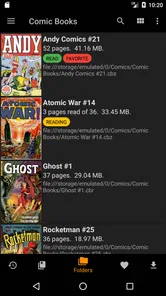
My most useful habit is to sort files into series folders before opening the reader. That small bit of housekeeping makes a bigger difference than trying to fix a scattered library while I’m already looking for a particular issue. If I’m moving comics from a computer or another storage location, I first make sure I know where the files are going; a reader can display a collection, but it cannot make a disorganized archive feel organized by itself.
This is also where the app’s format support can save time. The original description lists CBR, CBZ, and PDF among the formats it handles, which covers common comic archives as well as ordinary documents. I’d still check a file with a single issue before copying a large collection, especially if it came from an unfamiliar source. That is a sensible way to catch a file problem early instead of blaming the reader after a long transfer.
Choose a small test before moving a whole collection
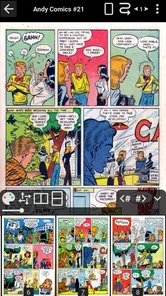
When I set up a reader for the first time, I would not begin by transferring every issue I own. I’d pick one short comic, one with a page full of dialogue, and perhaps one with a large splash illustration. Those examples answer practical questions quickly: does the archive open, can I read the lettering comfortably, and does the artwork still look good when I fit the page to the screen? This is a more useful test than judging the app from its opening screen alone.
It also helps separate different kinds of trouble. If the test issue is hard to read, I can try zoom and layout choices before investing time in the rest of the library. If a particular file will not open, I can check that file on its own rather than conclude that the whole collection is unsuitable. For anyone moving comics from a computer, that short trial keeps the first handoff manageable and makes it easier to spot a bad or oddly organized file early.
Getting Cozy with CDisplayEx
Ever tried reading a comic on a regular PDF reader? It's not always the best experience, right? That's where CDisplayEx comes in. This app is specifically designed for comic book lovers, and it shows. The moment you open it, you’re greeted with a user-friendly interface that’s as intuitive as it is stylish. It supports a variety of formats, like CBR, CBZ, PDF, and more. So, no matter where your comics are stored or what format they're in, this app has got you covered. Plus, the app is super lightweight, so it won’t hog up all your device’s resources.
Features That Pack a Punch
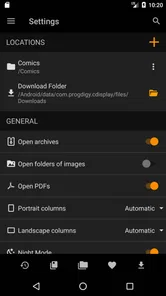
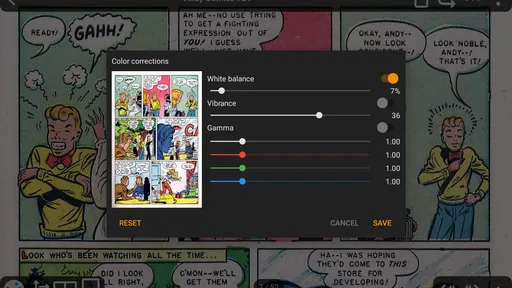
One of the coolest things about CDisplayEx is its customizable settings. You can tweak everything from the page layout to the zoom settings, ensuring that every comic looks just right on your screen. And let me tell you, the color rendering is top-notch. The pages are vibrant and crisp, making every superhero battle and dramatic reveal pop off the screen.
More From Our News Desk

 Gmail
GmailGmail in a Busy Inbox: Who Benefits Most?
From first account to crowded workday, Gmail earns its place through dependable search and flexible sorting—but its best fit depends on how much inbox maintenance you can tolerate.

 Prime Video
Switching to Prime Video: What Changes in Your Viewing Routine
Prime Video can make a compelling second home for streaming, but switching means learning a different catalog, rental layer, and route from browsing to playback.

 Universal TV Remote Control
Universal TV Remote Control Works Best as a Reliable Backup
A phone remote earns its place through quick setup and reliable habits. Here is how to get more from Universal TV Remote Control—and where its limits show.

 Weather - By Xiaomi
Weather by Xiaomi Review: Clear at a Glance, Less Clear Up Close
Xiaomi’s weather app makes everyday forecasts quick to scan, but its calm surface can leave useful details and recovery paths harder to find than they should be.

 X
XX Under Pressure: Can It Recover When Posting Goes Wrong?
A resilience-focused review of X, examining setup, mistaken posts, interruptions, weak connections, and the gaps that matter when recovery needs to be dependable.

 Clash of Clans
Clash of Clans Is Won Between the Battles
Its raids are quick; its community is a long-term project of coordination, teaching, rivalry, and shared responsibility—with all the friction that entails.
Latest News



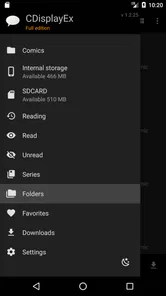
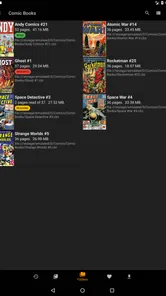
The app also offers smooth scrolling, which is a game-changer for those of us who like to binge-read entire series. You won't get that annoying lag or stutter that some other readers have. Plus, it has a handy library management feature. You can organize your collection by series, issue number, or whatever method you prefer. Gone are the days of endlessly scrolling to find that one issue you want to read.
Making a reading session work
For a realistic routine, I’d pick the next issue at home, open it once to check how its pages fit the screen, then keep it ready for a commute or lunch break. With offline reading, a connection isn’t needed once the comic is available on the device. That makes the app a good fit for travel or places where reception is unreliable, though it also means you should think ahead: an issue you have not yet placed on the device will not be waiting there when you need it.
Small reading choices can improve the experience. I’d use zoom for pages with dense lettering, then return to a comfortable whole-page view for artwork and pacing. Rather than applying one setting and assuming every comic will look right, I’d test it on a dialogue-heavy page and a full-page illustration. The trade-off is that adjusting a reader to personal taste takes a little time, but it is worthwhile if you read different art styles or page sizes.
Compared with a general PDF viewer, a comic-focused reader is the more natural choice when you mainly open comic archives and want reading controls suited to pages and panels. A broader document app may be preferable if comics are only an occasional part of your reading, or if you want one place for many kinds of documents. CDisplayEx’s library organization is useful once a collection grows, but it still depends on keeping your own files and folders in reasonable order.
From finding an issue to picking up where you left off
A collection can be tidy and still take effort to browse if every title is buried among unrelated files. I’d keep a clear series name in the folder structure and use a consistent issue order, then reserve a simple “reading next” location for the handful of comics I expect to open soon. That creates a useful handoff: I can choose what to read while I have time, then open it later without searching through the full archive on a small screen.
This approach is especially helpful when I alternate between a long series and one-off books. The folder layout stays focused on where a comic belongs, while the short reading queue reflects what I’m currently following. It avoids turning the library itself into a temporary pile. The trade-off is that I’m doing some organization outside the reading session, but a little deliberate sorting is often quicker than repeatedly hunting for the next issue.
For a lunch break, I’d prepare the comic before leaving home, open it once to confirm it is ready, and then use the break to read rather than troubleshoot. If I’m sharing a device or moving between devices, I would treat the file itself and the reading position as separate parts of the handoff: having the issue available does not automatically mean my place has followed me. Keeping that expectation clear prevents a common disappointment when a personal archive is not managed like a cloud-based reading service.
Who will get the most from it
I’d recommend it to readers who already own digital comics, keep several series on a device, and value being able to read offline. It is also a practical option for someone who wants to try a comic reader without committing to a subscription-style reading routine: the listed price is a one-time $5.99 purchase. The app is rated Everyone, and Progdigy Software has built it specifically around comic reading rather than general browsing.
On the other hand, I’d skip it if what you want is a storefront that helps you discover and buy new issues, or if you only read comics occasionally and a PDF app already suits you. The price is harder to justify when you have very few files. It has 50,000-plus installs and 557 written reviews, but popularity alone cannot decide whether its focused approach matches your habits. It was released on April 15, 2018, so I’d also judge it by how it behaves on my own device rather than assuming that age alone means either reliability or a problem.
How it fits beside other ways to read comics
The choice is less about which reader is universally best and more about where your comics come from. A digital storefront is a better fit if you want recommendations, purchasing, and a ready-made catalog in one place. A broad PDF reader can be sensible if you mostly read documents and only occasionally open a comic. CDisplayEx makes more sense when your starting point is a collection of files and your main goal is to open them comfortably.
That distinction matters for readers with a mixed library. If the files are already organized and you value control over what is stored on your device, a dedicated file reader can feel direct and uncluttered. If you would rather avoid managing archives and want new issues to appear through a service, the file-first approach adds work instead of removing it. I would decide based on the source of my collection, not just on the fact that both options display comic pages.
There is another practical difference: with a personal archive, you decide how to name, group, and keep track of issues. That flexibility can be a strength for a collector with a preferred order, but it also means the app cannot rescue an inconsistent archive automatically. I’d be comfortable with that arrangement if I enjoy maintaining my files; I’d choose a catalog-based service if I want the reading app to do more of that organizational work for me.
Why You’ll Love It
If you’re anything like me, you probably read comics everywhere—on the bus, during lunch breaks, or even in bed. The CDisplayEx Comic Reader understands that, and its offline reading feature is a blessing. Download your comics when you’re connected to Wi-Fi, and read them anywhere, anytime, without worrying about data usage. It’s like carrying around a mini comic book store in your pocket, without the extra weight.
Oh, and did I mention the app is ad-free? That’s right, no pesky pop-ups disrupting your reading flow. It’s these little touches that make a big difference, turning a good app into a must-have for any comic book fan.
Small adjustments that pay off over a long read
One useful way to tune the experience is to think about the comic rather than search for one perfect setting. A page built around tiny dialogue may reward a closer zoom, while an expressive layout often works better when I can see the full page and understand how the panels lead into one another. I’d switch deliberately instead of leaving the zoom enlarged after a single dense page; otherwise, the next page can feel awkwardly cropped or require extra navigation.
For a long session, I’d also choose a comfortable reading position before settling in. A phone is convenient for short waits, but page size and lettering can make a tablet or a larger display more comfortable for detailed art. That is not a reason to avoid the app on a smaller device; it is a reminder that the same comic can demand different settings depending on where and how I’m reading it. Testing a few pages before a long commute helps me avoid fiddling with controls when I would rather follow the story.
Another small but useful habit is to keep original archives intact while arranging copies for reading. It gives me a straightforward fallback if I later want to rename folders or try another reader, and it reduces the risk of turning a cleanup attempt into a confusing collection. The app is most satisfying when the library is ready to browse; a little care at the file stage can make the reading side feel much simpler.
When the workflow needs a fallback
If a comic does not appear where I expect, I would first check the file’s location and whether it opens on its own, then revisit how the collection is arranged. Keeping a small “currently reading” folder can make handoffs between finding a title and opening it much simpler, especially when the full archive is large. For travel, I’d confirm the next issue is accessible before leaving rather than relying on a last-minute search.
The main limitation is that a reader’s convenience depends on the quality of the collection you bring to it. It can make supported files pleasant to read, but it is not a substitute for a cataloging system, a comics shop, or a general-purpose document manager. If your priority is discovering new titles, choose a service built around that; if your priority is opening and reading files you already have, this focused approach is a better match.
I would also be cautious about treating a large archive as a single task. If the library is spread across locations or has inconsistent names, I’d move a few issues first, check that I can find them, and only then continue. That gradual workflow is less impressive than importing everything at once, but it makes mistakes easier to identify and correct. Readers with a very small collection may not need this planning; for them, the app’s purchase is worth considering only if the comic-specific experience is noticeably better than the viewer they already use.
A final question I’d ask before buying is whether I want a reader or a reading service. CDisplayEx is suited to opening comics I already have, while a service-based alternative may be better for discovery and a ready-to-browse catalog. I’d also consider how often I read: frequent use across several series makes a dedicated app easier to justify than occasional use of a handful of files. Those distinctions are more helpful than assuming that a high average rating guarantees a fit for every reader.
So, is the CDisplayEx Comic Reader worth a download? Absolutely. Whether you’re a casual reader or a die-hard fan, this app is designed to enhance your comic reading experience. With its fantastic features and user-friendly design, it’s a digital companion you’ll wonder how you ever lived without. Happy reading, and may your comic adventures be ever thrilling!
CDisplayEx Comic Reader Frequently Asked Questions
Who makes CDisplayEx Comic Reader, and is it suitable for all ages?
CDisplayEx Comic Reader is a comics app from Progdigy Software. Its Everyone content rating makes it suitable for a broad audience, although the rating of the app does not determine whether every comic you open is appropriate for every reader. If you are choosing comics for a child, consider the content of those individual books as well as the app’s rating.
What is CDisplayEx Comic Reader and what features does it offer?
CDisplayEx Comic Reader is a popular app designed for reading digital comic books. It supports a wide range of comic book formats such as CBR, CBZ, PDF, and ePUB. The app offers features like smooth scrolling, customizable viewing options, and the ability to manage your comic collection efficiently. It also includes a night mode for comfortable reading in low light conditions.
Is CDisplayEx Comic Reader available for both Android and iOS devices?
CDisplayEx Comic Reader is available for Android devices, allowing users to enjoy their favorite comics on smartphones and tablets. However, there is no official iOS version of the app. iOS users might need to look for alternative comic reader apps that offer similar functionality and features to enjoy their digital comics on Apple devices.
How user-friendly is the interface of CDisplayEx Comic Reader?
The interface of CDisplayEx Comic Reader is designed to be user-friendly and intuitive, making it easy for both new and experienced users to navigate. The app offers a clean layout with customizable settings, allowing readers to adjust the viewing experience to their preference. Features like quick access to your library and seamless page turning enhance the overall reading experience.
Does CDisplayEx Comic Reader support cloud storage integration?
Yes, CDisplayEx Comic Reader supports cloud storage integration, allowing users to access their comic collections from various cloud services. This feature is particularly useful for readers who want to save space on their devices or access their comics from different locations. The app supports popular cloud services, making it easy to sync and manage your comics.
Pros
- User-friendly interface for easy navigation
- Supports various comic file formats
- Fast loading time for large files
- Customizable reading settings
- Offline reading capability
Cons
- Ads in free version can be intrusive
- Limited features without premium
- Occasional crashes reported
- No cloud sync across devices
- Interface may seem outdated to some












