CDisplayEx Comic Reader Lite
- 285.00
- 4.4
- Installs
- 1.00M
- Price
- Free

Screenshots
Analysis by Reviewed
I reach for CDisplayEx Comic Reader Lite when I want to read comics already saved on my device, rather than browse a shop or subscription catalogue. That distinction matters: this is a comic reader from Progdigy Software, not a place to discover or purchase new issues. It’s free, rated for Everyone, and has a 4.4 average from around 14,000 ratings, with over a million installs. For readers who keep their own files, that makes it an easy app to consider.
A practical way to start reading
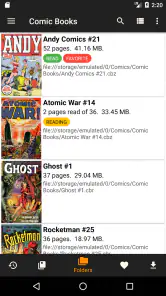
My basic routine is simple: open a file, settle on a comfortable page layout, and use the controls to move through the story. The supported formats include CBR, CBZ and PDF, which covers many common digital comic collections. If you’re moving from a general file viewer, the benefit is having comic-oriented reading options in one place; if you already use another dedicated reader, the choice comes down to which controls and habits feel most natural to you.
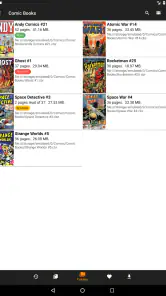
A useful everyday example is reading a few pages during a commute, then returning to the same issue at home. I’d use a bookmark when I want to revisit a particular panel, rather than rely on memory or repeatedly swipe through pages. For a large collection, taking a little time to arrange the library can also make the next reading session quicker. The trade-off is that the app works best when your files are already organised; it isn’t a replacement for a digital comics storefront.
Settings that make a difference
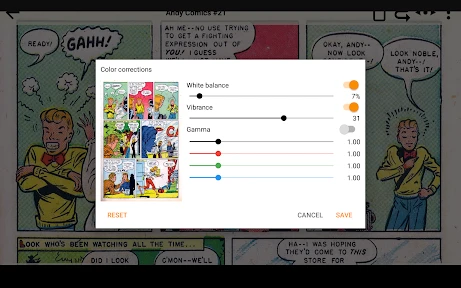
Before settling in, I’d check brightness, contrast and color temperature instead of assuming the default look will suit every screen or room. A page that looks comfortable in daylight may feel too bright in bed, so switching between day and night mode is a practical adjustment, not just a cosmetic one. I’d also try zooming on a detailed panel and then returning to the full page, since frequent close-ups can interrupt the flow if you use them on every page.
Continuous page view and smooth scrolling are useful when I want a more uninterrupted read, while page-by-page movement can feel better when I’m taking in panel composition. Neither approach is automatically best: a tall screen and a wide comic page create different compromises. I’d test both with an issue I know well before choosing a default, especially if I alternate between a phone and a tablet.
Habits for a smoother library
The app’s controls become more useful when I build a repeatable routine around them. I keep related issues together in my own collection, use bookmarks for scenes worth revisiting, and avoid changing several display settings halfway through a story unless the lighting has genuinely changed. These small habits reduce the time spent searching and fiddling, leaving more attention for the artwork.
Its focus is narrower than that of comic services built around accounts, recommendations and buying or borrowing titles. That is a strength if you value a reader for files you already have, but a limitation if you want one app to supply the comics too. The Lite edition is free, so it’s a low-cost way to see whether this file-based workflow suits you. The app’s category is comics, and its release date was April 15, 2018; I’d still judge it by how comfortably it handles the files and reading style I use today.
More From Our News Desk

Clash of Clans Is Won Between the Battles

Android Auto Makes the Case for Quieter Car Software

MobiOffice: Transforming Mobile Productivity with Seamless Integration

EA SPORTS FC™ Mobile Soccer: Redefining Mobile Sports Gaming

How Microsoft OneDrive Became a Mobile Productivity Giant

How Google Translate Breaks Language Barriers Effortlessly
Where the trade-offs show
As a reader, I wouldn’t expect a file-focused app to solve every collection problem. Your experience depends partly on how clearly your issues are named and grouped, and on whether the format you have opens as expected. If your main goal is curated discovery, synchronized reading across services, or a built-in way to get new comics, a storefront or subscription app is likely a better starting point. If you already own compatible files and want straightforward page controls, this is a more direct fit.
I also wouldn’t treat a fast first impression as a promise that every unusually large or awkwardly organised file will behave identically. When something feels cumbersome, I’d first try a smaller issue, adjust the viewing mode, and check whether the file itself is the source of the trouble. That simple test helps separate a reader preference from a collection problem without turning setup into a project.
Who I’d recommend it to
I’d point casual readers toward it if they have a few downloaded issues and want to start reading without paying for the reader itself. Collectors who maintain their own folders may appreciate the combination of library organisation, bookmarks and display adjustments, particularly on a tablet where artwork has room to breathe. Someone who mainly reads manga or other right-to-left material should test their usual files and page flow before committing to a routine, rather than assume every reading preference will feel identical.
For an everyday habit, I’d keep a current issue easy to find, use a bookmark when stopping mid-story, and switch display settings to match the room instead of pushing brightness up for every page. That makes the app feel less like a file browser and more like a dependable reading tool. It won’t make a messy archive tidy by itself, but a consistent naming and grouping habit pays off each time you return.
Making a file-based reading routine work
For me, the biggest practical question is not whether a reader can open one comic, but whether it fits the way I get back to a collection over several days. I’d keep the issue I’m currently reading in a clearly named folder, then place completed or next-in-line issues nearby. That gives the library a useful shape without expecting the app to decide what I should read. If you share files between devices, remember that a file reader is only one part of that process: the files themselves still need to be available where you plan to read.
A small routine for interrupted reading
Comics are easy to pause between scenes, so I’d make the stopping point deliberate. If I’m putting the phone away for a short stretch, I can use a bookmark for a panel or page I want to revisit, then return to the issue through the library when I’m ready. For an ordinary pause in the middle of a page, I’d simply note where I am rather than create bookmarks for every stop. Keeping bookmarks for meaningful points makes them more helpful when I later want to find a reveal, a visual detail, or a passage I plan to show someone.
A realistic routine might be reading on a bus in the morning, where I want quick, comfortable page movement, and continuing on a tablet at home, where I can spend longer with the artwork. I’d check the layout on each device rather than assume one viewing choice works equally well on both. A setting that reduces unnecessary scrolling on a phone may not be the most satisfying way to view a full page on a larger screen. The useful habit is to make one small adjustment for the device and lighting, then leave the rest of the controls alone unless the reading conditions change.
Getting useful results from display controls
Brightness and contrast are worth adjusting with a page that contains both dark artwork and pale speech bubbles. A setting that makes shadows look clear can also make a bright page harsh, so I’d judge the whole page rather than one dramatic panel. Color temperature is another personal choice: I would compare it in the room where I usually read, since the same screen can feel different in daylight and at night. Day and night modes give a quick starting point, but they don’t remove the need to decide what looks comfortable to me.
Zoom is best treated as a tool for a specific moment, not the default view for an entire issue. I use it to inspect small lettering or a dense panel, then return to a full-page view to recover the relationship between panels. That change in scale matters because comic storytelling depends on pacing and page composition as well as individual drawings. If I’m zooming constantly just to read the dialogue, I’d test a different device or page layout before blaming the file or the app.
Choosing between readers and comic services
Compared with a general document viewer, a dedicated comic reader is the more natural choice when I want comic files and reading controls together. CDisplayEx handles common comic archive formats as well as PDF, so it can suit someone whose collection includes more than one kind of file. But a storefront or subscription service answers a different question: it helps users find and obtain comics, while this app is for reading files already in their possession. Neither approach replaces the other, and choosing between them depends on whether the immediate need is access to titles or a comfortable way to read a personal library.
Other dedicated readers may suit someone whose priority is a particular interface, a broader library workflow, or a reading preference that they want to test directly. I wouldn’t switch simply because another app has a longer feature list; I’d compare the everyday tasks that matter to me, such as opening my usual files, finding the next issue, adjusting a page, and returning to a saved point. The best fit is the one that makes those repeated steps feel easy. If a service’s catalogue and account-based access matter more than keeping local files, a service built around that model is the clearer choice.
When I would look elsewhere
I would skip this reader if I expect it to provide a catalogue, suggest what to read next, or take care of getting comics for me. A file-based library also puts some responsibility on the reader: I need to know where my files are and keep them organised enough to find. That may be a welcome trade for collectors who already maintain folders, but it can feel like extra work for someone who wants to open an app and browse a ready-made selection.
I’d also be cautious about building a workflow around files that are unusually large or poorly arranged before testing them. If one issue takes effort to use, I’d compare it with a smaller, familiar file and switch between viewing modes. This isn’t a guarantee that every file will behave the same way; it’s a sensible way to work out whether the difficulty is tied to a particular file or to my preferred reading style. For a collection that is already easy to browse elsewhere, moving it just to try a new reader may not be worth the effort.
A considered recommendation
Progdigy Software’s comic reader has been available since April 15, 2018, and the current audience around it reflects a well-established app: it has around 285 written reviews alongside its ratings. I take that as useful context, not a reason to assume it will suit every reader. Its free price makes it reasonable to try with a few files from my own collection, while its Everyone age rating makes its intended audience broad. I’d still decide based on the actual reading experience rather than popularity alone.
If I were helping a friend choose, I’d first ask how they get comics. If they already have CBR, CBZ or PDF files and want a dedicated place to read them, I’d suggest trying this app with a typical issue, a detailed page, and their usual device. If they mainly want new titles, guided discovery, or a service that manages access to a catalogue, I’d point them toward a different kind of app. That distinction is more useful than treating every comic app as though it solves the same problem.
Why Choose CDisplayEx Comic Reader Lite?
First off, let’s talk about the user interface. It’s super intuitive and user-friendly, which means you won’t be wasting time trying to figure out how to open your comics. CDisplayEx Comic Reader Lite supports a wide variety of file formats including CBR, CBZ, PDF, and more. So, no matter how you get your comics, this app has got you covered.
Reading Experience
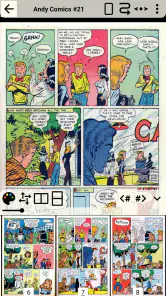
One of the standout features for me is the reading experience. You can zoom in and out with ease, making it perfect for those intricate panels that deserve a closer look. The app also offers smooth scrolling and a continuous page view, which makes reading comics so much more enjoyable. It feels like flipping through the pages of a real comic book, minus the paper cuts!
Customization and Features
What’s cool about this app is the level of customization it offers. You can adjust the brightness, contrast, and even the color temperature to suit your reading environment. Plus, there’s an option to switch between day and night mode, which is a blessing for late-night reading sessions. You know, when you should be sleeping but just need to read one more issue!
Another nifty feature is the ability to bookmark your favorite pages. This is super helpful if you’re like me and love to revisit key scenes or panels. You can even create a custom library to organize your collection just the way you like it.
Performance and Usability
Now, let’s talk about how well this app performs. In my experience, it’s incredibly fast and responsive. I didn’t notice any lag or crashes, even when loading larger files. This makes a huge difference, especially when you’re in the middle of an epic storyline and don’t want any interruptions.
The app is also lightweight, so it doesn’t hog your device’s resources. This is great news for those of us with older phones or limited storage space. Plus, it’s free to download, which is always a bonus!
Final Thoughts
In conclusion, CDisplayEx Comic Reader Lite is a fantastic app for anyone who loves comics. It combines functionality with a great user experience, making it a must-have for comic enthusiasts. Whether you’re a casual reader or a hardcore collector, this app has something for everyone. So go ahead, give it a try, and let your comic adventure begin!
CDisplayEx Comic Reader Lite Frequently Asked Questions
Can I transfer my existing comic files to the device before using CDisplayEx Comic Reader Lite?
Yes. CDisplayEx Comic Reader Lite is intended for reading digital comics that you have available on your device, so you can prepare your collection before opening the app. Make sure the files are accessible from the device you plan to read on. This is especially useful if you want to read away from home or without relying on an online reading service.
Is CDisplayEx Comic Reader Lite available for iPhone and Android?
CDisplayEx Comic Reader Lite is presented as an Android app, and its description focuses on reading digital comics on Android devices. If you are choosing a reader for another platform, check that platform’s app store for an appropriate version before downloading. The app is in the Comics category and is developed by Progdigy Software.
Does CDisplayEx Comic Reader Lite need an internet connection to read comics?
CDisplayEx Comic Reader Lite is a comic reader for opening digital files on your device, so reading a comic you already have available can be done without relying on an online reading service. You will need internet access for tasks that require a connection, such as downloading the app. If you plan to read while traveling, make sure the comic files are accessible on your device first.
Who makes CDisplayEx Comic Reader Lite, and is it suitable for everyone?
CDisplayEx Comic Reader Lite is developed by Progdigy Software and is intended for reading digital comics. It is listed for Everyone, making it suitable for a broad audience from an age-rating perspective. As with any comic reader, the actual material you open depends on the files in your collection, so parents may still want to check the content of individual comics before children read them.
What is CDisplayEx Comic Reader Lite?
CDisplayEx Comic Reader Lite is a lightweight and user-friendly application designed for reading digital comic books on Android devices. It supports various file formats, including CBR, CBZ, and PDF, providing a seamless reading experience with features like customizable viewing options and smooth page transitions. Perfect for comic enthusiasts who prefer reading on-the-go.
Pros
- User-friendly interface for easy navigation.
- Supports multiple comic formats.
- Fast loading times for large files.
- Offline reading mode available.
- Customizable viewing options.
Cons
- Ads in the free version.
- Limited features without premium.
- Occasional crashes reported.
- Some formats may not render well.
- No cloud sync support.
- Category
- Comics
- Version
- Varies with device