CBC News: Breaking & Local
- 1.91K
- 4.6
- Installs
- 1.00M
- Price
- Free

Screenshots



Analysis by Reviewed
What makes a news app useful to me is not simply how many headlines it can display, but whether it helps me notice what matters without turning every spare moment into a scroll session. That is the question I keep coming back to with CBC News: Breaking & Local. Its central appeal is the combination of national reporting with stories tied to where I live, so I can move from a major Canadian development to a local issue in the same place. That mix gives the app a practical role beyond being another feed of breaking alerts.
A Canadian perspective with room for local stories
CBC News is made by the Canadian Broadcasting Corporation, and its focus feels most useful when a national story has consequences close to home. A policy announcement, for example, is easier to follow when I can also look for the regional context rather than treating the headline as an abstract event. The app is free, which makes it easy to try as a regular source alongside a newspaper, radio station, or other news app.
I would not treat any single news app as a complete picture of the world. CBC’s value is that it gives Canadian coverage a clear place in my daily reading, while also bringing in world and sports news. If I want a specialized financial briefing, a highly local community bulletin, or a publication with a distinct editorial viewpoint, I may still need another source. The useful question is not whether this replaces every other outlet, but whether it earns a dependable spot in the mix.
Making a quick check more useful
One habit that works well is to open the app with a small question in mind: what changed since I last checked, and does it affect my day? I can scan the prominent stories first, then choose one to read more carefully instead of tapping every headline that looks urgent. When a story is developing, I find it helpful to return to the same subject later and see how the coverage has moved on, rather than relying on an isolated push notification or a fragment seen in a social feed.
That approach also helps separate immediate updates from background reading. A breaking headline may tell me what happened, but a fuller article is where I look for context, relevant details, and what remains uncertain. I try not to mistake a fast update for the whole story. For complicated subjects, comparing CBC’s account with another reputable outlet can reveal which facts are widely established and which questions are still being reported.
What's the Buzz About?
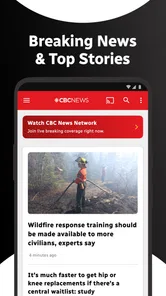
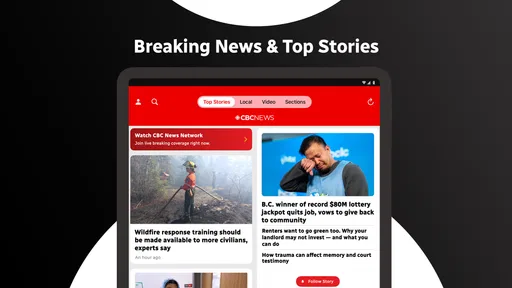
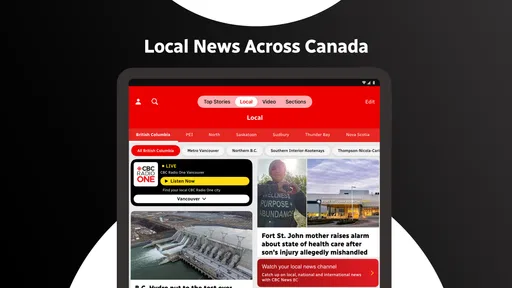
First off, the moment you open CBC News: Breaking & Local, you're greeted with a clean and intuitive interface. It's like the app is saying, "Hey, I'm here to make your news-reading experience seamless!" The layout is designed to ensure that even if you're a newbie, navigating through the app feels like a breeze. With the top stories prominently displayed, it’s just a tap away to dive into what’s trending.
Features That Stand Out
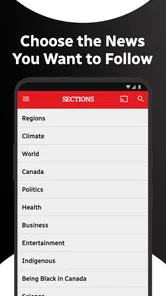
One feature that caught my attention is the personalized news feed. You can customize it according to your interests, whether it's politics, entertainment, or sports. This means you’re not just reading any news, but the news that matters to you. Another cool aspect is the live streaming of CBC News Network. It's like having a TV in your pocket, allowing you to catch live broadcasts anytime, anywhere.
More From Our News Desk

Weather by Xiaomi Review: Clear at a Glance, Less Clear Up Close

X Under Pressure: Can It Recover When Posting Goes Wrong?

Clash of Clans Is Won Between the Battles

Android Auto Makes the Case for Quieter Car Software

MobiOffice: Transforming Mobile Productivity with Seamless Integration

EA SPORTS FC™ Mobile Soccer: Redefining Mobile Sports Gaming
For those who love digging deeper into stories, the app provides in-depth analysis and stories that are well-researched. The investigative journalism here is top-notch, ensuring you get more than just the headlines. And if you're someone who likes their news on-the-go, the audio feature lets you listen to news articles, making your commute productive.
Choosing what deserves attention
Personalization is most helpful when I use it as a filter, not as a wall. If I shape a feed only around the subjects I already follow, I could miss a story that affects the wider community. I’d keep a few broad interests in the mix and occasionally browse beyond my usual topics. That small habit makes a customized feed feel like a shortcut through the day rather than a narrow view of it.
The practical choice between reading, listening, and watching depends on the moment. If I’m waiting in a queue, reading a short update is convenient; if I’m walking or doing a routine task, audio can make a story easier to fit in. Live video is better when I want to follow a broadcast, but it is not automatically the best way to catch up: a written report is often easier to scan, revisit, or consult quietly. I’d pick the format that suits the situation instead of treating every item as something I need to consume in every form.
That flexibility also points to a limitation. Audio and video are not substitutes for close reading when a report includes qualifications, names, or a sequence of events I want to check. I would use them to keep up, then open the article itself if I need to remember the detail accurately. The app’s range of formats is useful, but it still asks me to choose how much attention a story deserves.
Local News? They've Got You Covered!
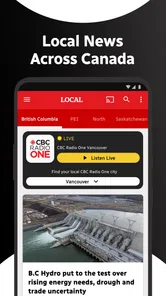
One of the standout features is the local news section. It’s tailored to keep you informed about what's happening in your vicinity. Whether it's a new policy implementation or an upcoming event, you're always in the loop. The app uses your location to ensure you receive news that's relevant to your area, which I found incredibly handy.
When the local angle matters most
The local section is easiest to appreciate when I connect it to a real decision. On a weekday morning, I might check it before leaving home to see whether there is a nearby development worth knowing about, then read the full report later if it affects my plans. It is also useful when a regional announcement is getting national attention: local reporting can make the practical impact clearer than a broad summary alone.
Location-based relevance is convenient, but I would not assume that a location setting will surface every community concern or replace a specialist local outlet. If I am following a school board, a neighborhood group, or a small-town event closely, I may want to seek out the dedicated source that covers it day by day. CBC’s local coverage works best as a dependable starting point, not as a promise that every street-level update will appear.
There is a useful privacy-and-relevance trade-off here. Using location can make local stories easier to find, while someone who prefers not to share location information may choose to look for regional coverage manually. I would make that choice based on how much I value automatic locality versus control over what information I share. Either way, it is worth checking that the area being shown is the one I actually care about, especially if I move around or follow news in more than one place.
How it fits beside other news sources
Compared with a social media timeline, CBC News gives me a more deliberate place to read a reported story rather than encountering a headline mixed with reactions, jokes, and reposts. That does not mean a news app can settle every question on its own; it means I can use it to get out of the fast-moving stream and into a fuller account. Compared with a newspaper app, the attraction here is the combination of Canadian national, local, world, and sports coverage in one destination, rather than a single publication’s particular mix.
Radio and live television serve a different purpose. They are convenient when I want someone to guide me through a developing story, while an app is easier when I need to check a particular detail at my own pace. CBC News Network’s live stream gives the app a broadcast option, but I would not keep video running just to collect headlines if I have only a minute. For a quick check, the written feed is more practical; for a longer listen or a live event, audio or streaming may be a better fit.
My tip is to assign each source a job. I use CBC for a Canadian reporting baseline and local context, then turn to a specialist outlet when I need depth in a narrow field or a highly granular local update. This keeps the app from being judged against a task it is not meant to perform, and it reduces the temptation to treat one feed as an all-purpose verdict.
Who will get the most from it?
I’d recommend CBC News to readers who want Canadian coverage to sit alongside international headlines, and who appreciate being able to tune a feed to their interests. It is also a sensible option for someone who alternates between reading and listening, or who wants a local angle without opening a separate source every time. Its Teen content rating is worth noting for families deciding whether it is appropriate for a younger reader; parents may still want to discuss how to handle distressing or rapidly changing news.
It may be a weaker fit for someone who wants only a tightly focused topic feed, needs exhaustive coverage of one neighborhood, or prefers a publication with a very different editorial perspective. A reader who dislikes personalized feeds may also prefer a fixed front page or a newspaper with a clearly defined daily edition. I’d try the app if the mix of Canadian and local reporting sounds useful, but I would not force it into a routine if another format better matches how I read.
On Android, it is a free News & Magazines app with a 4.7 average from around 86,000 ratings and more than a million installs. It has been available since February 19, 2011, and version 5.2.0 supports Android 7.0 and newer. Those figures suggest that it has found a substantial audience, but they do not tell me whether its particular coverage fits my habits; that is something I would judge by using it for the stories I actually follow.
Why You Should Give It a Try
In the age of information overload, having a reliable news source is crucial. CBC News: Breaking & Local not only keeps you updated but does so with precision and reliability. Whether you're sipping your morning coffee or taking a break at work, this app ensures you're never out of the loop. It’s like having a personal news curator right in your pocket.
So, if you're tired of sifting through countless unreliable sources, give CBC News a whirl. It’s not just about staying informed; it’s about having the world at your fingertips. And honestly, who wouldn't want that?
A practical way to start
If I were trying it for the first time, I’d begin by checking the main stories and choosing a few topics that I genuinely follow, rather than customizing everything at once. Then I’d look at the local coverage and see whether it reflects the place I want to keep track of. After a few days, I could adjust my interests based on what I actually read, not on what I imagine I might want to read. That gives personalization a chance to become useful without making setup feel like another chore.
I’d also decide in advance what I want from alerts and updates. News can be important without requiring an interruption the moment it appears, so I prefer to check headlines when I have the attention to understand them. If a developing story matters to me, I can return to it deliberately and read the latest coverage. That simple distinction between staying informed and being constantly interrupted makes any news routine more manageable.
The app has 1.9K reviews, and its Teen rating signals that its subject matter is intended for older children and adults rather than very young readers. For me, the best test is still whether it earns a place in an ordinary day: does it help me understand a Canadian or local story, and can I use it in the format that suits the moment? If yes, CBC News is a worthwhile free option to keep close. If I need a narrower beat or a different editorial lens, I’d pair it with another source instead of expecting one app to do everything.
CBC News: Breaking & Local Frequently Asked Questions
What kind of news can I follow in CBC News: Breaking & Local?
CBC News: Breaking & Local is a news app for readers who want national, world, and sports coverage in one place. It also presents local news, with stories organized into categories so you can browse subjects that interest you. The mix makes it useful for checking major headlines as well as exploring coverage beyond a single topic.
Is CBC News: Breaking & Local suitable for younger users?
The app has a Teen content rating, so it may be suitable for some younger readers, depending on their age and family preferences. News coverage can include serious or upsetting events, and parents may want to consider that when deciding whether it is appropriate. The app’s focus is current affairs, including local, national, and international stories.
What devices and operating systems can run CBC News: Breaking & Local?
CBC News: Breaking & Local is available for Android and iOS devices, so you can use it on either platform. On Android, it requires version 7.0 or later. The app is developed by the Canadian Broadcasting Corporation and is categorized as a news and magazines app. Its age rating is Teen, which is worth checking if you are choosing apps for a younger user.
Is CBC News: Breaking & Local a popular and well-regarded app?
The app has an average rating of 4.7, based on around 86,000 ratings, and users have written about 1,900 reviews. It has also passed the one-million-install mark, suggesting it has reached a broad audience. These figures can help you gauge its reception, though your experience may depend on the stories and features you use most.
What is CBC News: Breaking & Local and what features does it offer?
CBC News: Breaking & Local is a comprehensive news application that provides users with the latest local, national, and international news. The app features live streaming of CBC News Network, personalized news alerts, and an easy-to-navigate interface that allows you to browse news by category, such as politics, business, technology, and more. It also offers real-time breaking news and weather updates, making it a go-to source for staying informed on current events.
Pros
- User-friendly interface for easy navigation.
- Real-time news updates keep you informed.
- Wide range of topics covered.
- Customizable notifications for preferred news.
- Offline reading mode available.
Cons
- Contains ads that can be intrusive.
- Limited video content compared to rivals.
- Requires stable internet for updates.
- Occasional app crashes reported.
- Not all news articles have multimedia.











