Case Status
- 1.72K
- 4.9
- Installs
- 500.00K
- Price
- Free

Screenshots
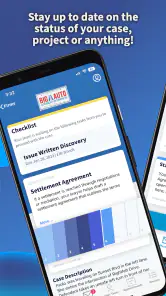
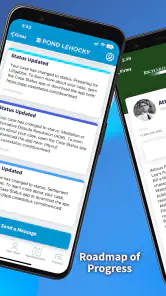
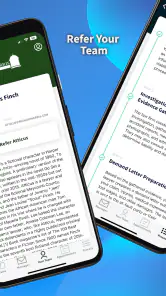
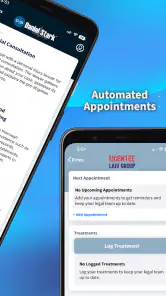
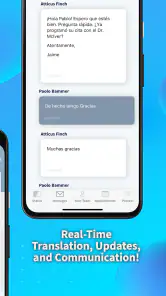

Analysis by Reviewed
Following a legal case can be stressful even when nothing urgent is happening. I know the feeling of checking messages, searching through paperwork, and wondering whether an update has been missed. Case Status, developed by Case Status, Inc, is designed for that narrow but important communication problem: it gives people a place to stay informed about the progress of a legal case instead of relying entirely on scattered conversations or repeated calls.
What makes this app worth considering is its focus. It is not trying to be a general social network, a document editor, or a replacement for legal advice. It belongs in the communication category, and its value depends on how well it connects a person with the status information their legal team chooses to share. I found that focused approach easier to understand than an overloaded client portal, although it also means the experience depends heavily on whether the relevant legal office uses the service consistently.
Case Status is free, rated for Everyone, and supports devices running Android 6.0 or later. Its current version is 2.6.38. The app has been available since October 13, 2017, and its audience is substantial, with more than 500 thousand installs. A 4.9 average from roughly 25 thousand ratings and about 1.7 thousand reviews suggests that many users find its basic purpose useful, but I would still judge it by the needs of the particular case rather than by its rating alone.
How Case Status handles readability and navigation
The strongest part of a focused case-status app is that it can reduce the number of places a user has to look. Instead of treating legal communication like a general inbox, Case Status centers attention on the case itself. That matters for people who are already dealing with unfamiliar terminology, appointments, forms, and deadlines. A simpler path to the latest case information can make the whole process feel less intimidating.
In my experience, clarity is especially valuable when a person is checking the app under pressure. Someone may be waiting for a hearing update, trying to understand whether a next step has been posted, or simply confirming that their case is still moving. A communication tool should make that first check quick. Case Status is best understood as a place for that check, not as a system that explains every legal term or tells you what legal decision to make.
That distinction is important for readability. Plain status information can be easier to absorb than a long email chain, but legal updates may still contain words that require explanation. I would not assume that seeing a new status means understanding its legal significance. If an update is unclear, I would use the app to notice it promptly and then contact the appropriate legal professional rather than guessing from the wording.
For older users or anyone who is not comfortable with mobile apps, the narrow purpose can be reassuring. There are fewer reasons to explore than in a full case-management platform. A useful habit is to open the app at a calm moment, identify where the current case information appears, and decide how you will verify important updates. That small preparation can make later checks less confusing.
You May Like

Clash of Clans Is Won Between the Battles

Android Auto Makes the Case for Quieter Car Software

MobiOffice: Transforming Mobile Productivity with Seamless Integration

EA SPORTS FC™ Mobile Soccer: Redefining Mobile Sports Gaming

How Microsoft OneDrive Became a Mobile Productivity Giant

How Google Translate Breaks Language Barriers Effortlessly
Readability also depends on the phone being used. People with reduced vision may prefer a larger display, system text enlargement, or stronger contrast settings. Those adjustments are device-level choices, so I would test them before relying on the app for time-sensitive communication. If enlarged text causes important content to become awkward to read, a legal office may need to provide the same information through another channel.
One practical insight is to separate “new information” from “action required.” An app can help you notice that a case status has changed, but the status itself may not tell you whether you must submit something, attend somewhere, or call someone. I would keep a short note beside each important update: what changed, when I saw it, and what question remains. This turns a passive status check into a more reliable personal workflow.
Why a focused case view can be easier than ordinary communication
Compared with ordinary email, a dedicated case-status service can reduce the chance that an update gets buried among unrelated messages. Email is flexible and familiar, but it often mixes legal information with newsletters, receipts, family conversations, and spam. Text messages are quick, yet they can be difficult to organize over a long case. A focused app has a clearer purpose, which is its main advantage.
The trade-off is that a general channel is often better for detailed back-and-forth. Email makes it easier to search a long explanation, attach a document, or keep a written conversation in one place. A phone call may be better when the user needs immediate clarification or has difficulty reading a legal update. I see Case Status as a useful layer for awareness, not automatically the best tool for every kind of communication.
For someone managing several legal matters, I would pay close attention to how clearly the app distinguishes them. Confusing one case with another would be a serious problem, especially when names, dates, or legal terms look similar. My advice is to pause before acting on any update and confirm that it belongs to the right matter. That is a simple safeguard, but it is more important than speed.
Motor, sensory, and cognitive considerations
Case Status may be helpful for users who find repeated phone calls physically tiring or who need to review information at their own pace. Reading a status when ready can be less demanding than waiting on hold or trying to remember a conversation. It also gives users a chance to involve a trusted person in reviewing an update, provided they are comfortable doing so.
For people with limited dexterity, the most useful approach is to reduce unnecessary handling. I would keep the phone stable on a desk, use the device’s built-in accessibility controls, and avoid checking important updates while walking or multitasking. Legal information deserves deliberate attention. A focused app can support that routine, but it cannot remove the physical demands of unlocking a phone, navigating touch controls, or reading a screen.
Users with hearing loss may appreciate a written communication route more than a voice-first process, particularly when the alternative is a phone call. At the same time, written status information is not automatically accessible to everyone. A person with low vision may need enlarged text or another format, while someone with a reading disability may need help interpreting dense wording. I would treat the app as one communication option and ask the legal office for an alternative if the content is difficult to access.
Cognitive load is another consideration. Legal cases can involve unfamiliar names, multiple dates, and long periods without visible progress. The app’s focused purpose may reduce distraction, but it does not prevent anxiety or confusion when an update is vague. A useful routine is to check at a planned time rather than repeatedly opening the app throughout the day. After each check, write down the next question instead of trying to solve everything immediately.
That routine is particularly useful for people who experience memory difficulties. I would not rely on memory alone for an important deadline or instruction. If the app displays a change that matters, record the wording in a secure personal note and confirm what it means through the appropriate contact. The app can help surface information; the user still needs a dependable way to remember and interpret it.
There is also a sensory advantage to choosing when to engage. A person who is sensitive to noise can review written information without entering a busy office or making a call in a loud place. Someone who becomes overwhelmed by screens may prefer a larger device or assistance from a support person. These are practical ways to make the experience more inclusive without assuming that one interface will work equally well for everyone.
A realistic everyday case-checking routine
Imagine that I am waiting for an update while working a shift and cannot take a long call. During a break, I open Case Status in a quiet place, check the latest information, and notice that something has changed. Rather than making a rushed decision, I note the wording and the time, then contact the legal office when I can give the issue proper attention. The app has helped me notice the change without forcing the entire conversation into a stressful moment.
Another realistic situation is a family member helping someone who is less confident with smartphones. The user can open the app while the trusted person sits nearby, enlarge the display if needed, and review the status together. The important boundary is consent and privacy: assistance should support the user’s control, not replace it. I would avoid sharing case information casually, even if the app makes checking it convenient.
For people with limited data access or inconsistent connectivity, timing matters. I would avoid waiting until the last possible moment to check a case update, especially if the information could require a response. The app is most useful when it fits into a broader plan that includes a known contact method for clarification and a personal record of important developments.
Situational access: where the app helps and where alternatives win
Case Status makes the most sense for users whose legal team actively communicates case progress through it. If the service is part of the relationship with the legal office, it can provide a more direct way to stay aware than searching through old messages. That is the central use case, and it is a good one for people who want a quick, repeatable check rather than a large collection of legal tools.
It is less convincing as a standalone solution for someone who expects to find legal forms, detailed explanations, document drafting, billing information, or comprehensive appointment management in the same place. A full client portal may be better when a case involves many kinds of files and tasks. Email may be preferable for a long written explanation. A phone call may be the right option when the user needs immediate human clarification.
People who share devices should think carefully about privacy before using any case-communication app. I would use a personal device where possible, keep the screen from being visible to strangers, and avoid leaving case information open in public. These are not reasons to reject the app; they are reminders that convenience and privacy must be balanced whenever sensitive information appears on a screen.
Situational access also includes language and literacy. A user may be able to navigate a simple interface but still struggle with legal English or formal wording. In that situation, the best workflow is to use the app for visibility and arrange interpretation or explanation through the legal office. Translating an important legal update casually through a general tool could introduce mistakes, so I would not treat the app as a substitute for qualified assistance.
One less obvious trade-off is the difference between notification and understanding. A prompt that encourages someone to check a new status can be useful, but frequent alerts may increase stress for users who already feel anxious about their case. I would choose a checking routine that supports calm attention. If notifications become distracting, the user should consider adjusting the phone’s notification behavior while preserving another way to notice genuinely important information.
Remaining barriers before making it part of a legal routine
The biggest barrier is not necessarily navigation; it is dependence on the communication habits of the legal office. If updates are delayed, incomplete, or not posted in a way the user understands, a polished app cannot solve the underlying problem. I would ask the office how Case Status fits into its normal communication process and which channel should be used for urgent questions.
Another barrier is the risk of treating a status as a complete record. A short update may omit context that would be obvious to the legal team but unclear to the client. I would keep copies of important messages and maintain a simple timeline outside the app. That timeline can include dates, questions, and confirmed next steps, giving the user a more dependable overview than memory alone.
People using older phones should check compatibility before planning around the app. The minimum operating system is Android 6.0, which makes the app available to many older devices, but device age can still affect comfort, battery life, screen size, and general responsiveness. Someone who struggles with a small or unreliable phone may have a better experience using another communication route or a larger device.
There is also a human barrier: some users may feel that checking an app means they should understand the case without asking questions. I think the opposite is healthier. Use the app to identify what has changed, then ask for an explanation whenever the wording, timing, or consequence is unclear. Legal communication should not become a test of how much technical language a client can decode alone.
Finally, the free price removes a financial obstacle, but it does not remove the practical costs of owning a compatible device, maintaining access to it, or finding help when needed. For a person with limited digital confidence, the best choice may be a combination of the app and a trusted support person. For someone who cannot reliably use a smartphone, a direct phone or in-person process may be more inclusive.
My inclusive verdict on Case Status
I see Case Status as a focused communication companion rather than a complete legal-service platform. Its strongest quality is the possibility of making case checking more direct and less scattered. The free access, Everyone age rating, long availability, and support for Android 6.0 or later make it approachable for a broad range of users, while its strong user response indicates that the basic idea has connected with many people.
My recommendation is strongest for a client whose legal office already uses the service and who wants a clear place to look for case progress. It can also suit people who prefer written updates, need to check information at their own pace, or find repeated calls difficult. I would pair it with a personal timeline, a reliable way to ask questions, and device accessibility settings that make reading and touch interaction comfortable.
I would be more cautious for anyone expecting full document management, detailed legal explanations, urgent two-way support, or a complete replacement for email and phone communication. Those users may need a broader portal or more personal contact. The app should also be skipped as a sole source of information when the user cannot reliably read the screen, protect private content, or understand the status wording without assistance.
The most inclusive way to use Case Status is to treat it as an early-warning and organization tool, not as a substitute for human explanation. In that role, it can help different users stay oriented while leaving room for accessibility adjustments, support from trusted people, and communication methods that better fit a particular ability or situation. That balance is why I would recommend trying it when it is part of the legal team’s workflow, while keeping another confirmed route available for anything important or unclear.
Case Status Frequently Asked Questions
How much storage space should I leave for Case Status?
Case Status is a communication app for following updates about a legal case, so its main purpose is practical rather than entertainment-focused. Before downloading, make sure your device has enough available space for the app and its normal operation. Keeping some free storage can also help your device install updates and continue running smoothly.
Who develops Case Status?
Case Status is developed by Case Status, Inc. Knowing the developer can help you identify the intended app when searching in an app store and distinguish it from other tools with similar names. Its stated purpose is to help users stay updated on the status of a legal case, so consider whether that matches the information you want to follow.
How popular is Case Status?
Case Status has been installed over 500,000 times and has an average rating of 4.9 from around 25,000 ratings. These figures can give you a general sense of its reach and reception, but they do not guarantee that it will work with your specific case. Read user feedback and make sure its purpose suits your needs before installing.
Is Case Status free to download, and what should I know before installing it?
Case Status is a free communication app from Case Status, Inc, intended to help people stay updated on the status of a legal case. Its free price makes it easy to try, but you should still consider whether it fits the case system and information you need to follow. Check that your device meets the minimum operating system requirement before installing.
What is Case Status, and what can I use it for?
Case Status is an application designed to help users check and follow the progress of a legal, immigration, court, or administrative case from a mobile device. Depending on the supported jurisdiction and case type, you may be able to enter a receipt number, case number, or other identifying information to view updates, notices, processing stages, and recent activity without visiting a website every time.
Pros
- Clear updates on immigration case progress and status changes.
- Useful access to receipt details and case history in one place.
- Push notifications can help users notice important updates quickly.
- Simple interface makes checking case information straightforward.
- Available on mobile
- making status checks convenient while traveling.
Cons
- Information may appear later than updates shown on official channels.
- Not every immigration case or service may be supported.
- Requires accurate receipt details to retrieve the correct case.
- Notifications depend on enabled permissions and a reliable connection.
- The app cannot explain decisions or predict how long a case will take.

- Category
- Communication
- Version
- 2.6.38











