

CarShield
- 938.00
- 4.5
- Installs
- 100.00K
- Price
- Free

Screenshots
Analysis by Reviewed
Car ownership rarely becomes difficult at the exact moment you have time to deal with it. A payment is due while you are rushing to work, a contract detail matters when you are already stressed, or a roadside problem leaves you standing beside the car with a phone in your hand. CarShield is built around those unglamorous moments. It is a free Auto & Vehicles app from CarShield that brings contract viewing, payments, and roadside requests into one mobile place.
I found the appeal easy to understand during the first few uses. Instead of searching through old messages or trying to remember where account information is kept, I could open one app and start with the task that mattered. That does not make vehicle ownership exciting, but it can make routine administration less scattered. The important question, though, is whether that convenience lasts after the initial setup. In my view, it can, especially for people who actively use CarShield’s service, but it is not an app that creates much value for someone who rarely needs to check a contract, make a payment, or request roadside help.
What CarShield feels like in the first week
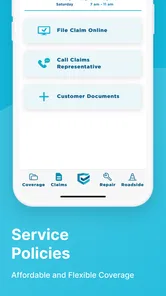
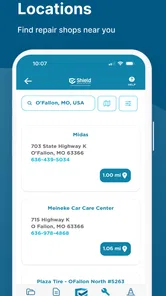
The first-week experience is shaped by the app’s narrow purpose. This is not a general driving companion, a navigation tool, a fuel tracker, or a repair diary. It is an account-management tool focused on three practical jobs: checking coverage information, handling payments, and starting a roadside request. That focus is a strength because I did not have to wade through unrelated vehicle features to reach the administrative tasks.
CarShield is listed as an app for Everyone, and its basic role is understandable even if you are not especially comfortable with technology. The workflow makes most sense when you already have a relationship with CarShield and want a mobile way to manage it. If you are comparing vehicle service plans, researching repair shops, or looking for directions, this is the wrong place to begin. Its usefulness starts after the service becomes part of your vehicle routine.
The most useful first-week habit is to open the app when you are calm, not only when something goes wrong. I would check the contract area, make sure the account details are familiar, and understand where the payment and roadside actions live. That small preparation matters because roadside situations are poor times to learn an unfamiliar interface. A person dealing with a dead battery or a disabled car benefits from knowing the path before needing it.
There is also a practical distinction between viewing information and understanding it. A contract screen can help you locate your plan details, but it does not automatically replace reading the terms or knowing what kind of situation may qualify for assistance. I would use the app as a convenient access point, then keep my expectations tied to the actual contract. That is one of the less obvious trade-offs: mobile access reduces searching, but it does not remove the need to understand coverage.
Payments are another area where the app can earn its place quickly. Having the payment task near the contract information creates a useful connection between “what am I responsible for?” and “how do I handle it?” I prefer that arrangement to keeping account documents in one place and payment reminders in another. Still, I would not treat the app as my only memory aid. A recurring reminder in the phone’s calendar can remain useful, particularly for anyone who does not open vehicle apps regularly.
More From Our News Desk

 Gmail
GmailGmail in a Busy Inbox: Who Benefits Most?
From first account to crowded workday, Gmail earns its place through dependable search and flexible sorting—but its best fit depends on how much inbox maintenance you can tolerate.

 Prime Video
Switching to Prime Video: What Changes in Your Viewing Routine
Prime Video can make a compelling second home for streaming, but switching means learning a different catalog, rental layer, and route from browsing to playback.

 Universal TV Remote Control
Universal TV Remote Control Works Best as a Reliable Backup
A phone remote earns its place through quick setup and reliable habits. Here is how to get more from Universal TV Remote Control—and where its limits show.

 Weather - By Xiaomi
Weather by Xiaomi Review: Clear at a Glance, Less Clear Up Close
Xiaomi’s weather app makes everyday forecasts quick to scan, but its calm surface can leave useful details and recovery paths harder to find than they should be.

 X
XX Under Pressure: Can It Recover When Posting Goes Wrong?
A resilience-focused review of X, examining setup, mistaken posts, interruptions, weak connections, and the gaps that matter when recovery needs to be dependable.

 Clash of Clans
Clash of Clans Is Won Between the Battles
Its raids are quick; its community is a long-term project of coordination, teaching, rivalry, and shared responsibility—with all the friction that entails.
Latest News



CarShield has a 4.5 average from around 4.9 thousand ratings, which suggests that many users find the overall experience worthwhile. I do not read that number as a guarantee that every account or roadside situation will feel smooth. An app can be easy to use while the surrounding service experience depends on circumstances outside the screen. For me, the rating supports trying it when I already use CarShield, rather than downloading it simply because it belongs to the automotive category.
Where the early convenience is strongest
The strongest early use case is a household with one or more vehicles and a busy schedule. Imagine noticing a payment while preparing dinner, then needing to confirm a contract detail before arranging a repair. A single-purpose account app is less distracting than searching email, opening a browser, and trying to identify which information is current. That kind of small reduction in friction is easy to overlook, but it is exactly the sort of convenience people keep when it saves effort repeatedly.
Another useful scenario involves a shared vehicle. If one person usually handles the account but another person drives the car, having a familiar mobile entry point can make the administrative side less dependent on one person’s memory. I would still be careful about account security and about who is authorized to make decisions, but the app can help turn vehicle support from a private pile of paperwork into something easier to access when the responsible driver is away.
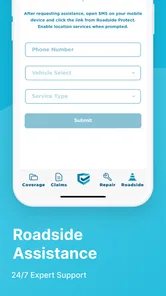
Roadside requests are where preparation matters most. I would not wait until the car is stopped on a shoulder to decide whether the phone has enough battery, whether the account can be accessed, or whether the driver knows the vehicle’s location. The sensible workflow is to install and sign in ahead of time, keep the app available, and know the request route. That is a concrete advantage over relying on a forgotten document or trying to search for assistance under pressure.
Why the value can continue month after month
After the novelty fades, CarShield’s value becomes quieter. It does not need to be opened every day. In fact, daily use would probably be a sign that the app is being asked to do more than it was designed for. Its recurring value comes from being ready for occasional but important tasks: a scheduled payment, a contract check, or roadside assistance when ordinary plans fail.
I think of it as a maintenance tool for the service relationship rather than a driving companion. That distinction helps set realistic expectations. A navigation app earns attention every trip, while CarShield may sit untouched for weeks. The absence of daily activity is not necessarily a weakness if the app is dependable when its specific jobs arise. The test is whether it saves enough searching and uncertainty during those moments to justify keeping it installed.
For users who make payments through the app, the monthly routine can be straightforward. I would open it around the time I normally review household bills, confirm the relevant account information, and complete the payment rather than treating it as an emergency task. This creates a repeatable habit without requiring the app to become a constant part of the day. The advantage is less about speed and more about reducing the number of places where vehicle obligations are stored.
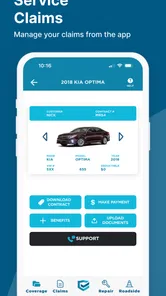
Contract access may be even more valuable over time because vehicle questions tend to appear unexpectedly. When a repair issue arises, people often want to know what they have before calling a shop or deciding how urgent the next step is. The app gives a direct place to begin that check. I would use it to orient myself, then ask for clarification when the situation is complicated. That approach avoids both extremes: ignoring the contract and assuming that a quick screen answers every coverage question.
Roadside access has a similar pattern. Most months may pass without needing it, but the feature can justify the app’s presence if it prevents a frantic search during a breakdown. The trade-off is that occasional features are easy to forget. I would periodically make sure I still know how to reach the request function, especially after changing phones or reorganizing apps. A tool that exists but cannot be found under stress is only partly useful.
CarShield has passed the early adoption stage for many people, with over 100 thousand installs and hundreds of published reviews. Those figures show that it is not merely a personal experiment in mobile account management. Even so, lasting value depends on matching the app to your behavior. Someone who prefers handling every payment through a bank, keeps printed documents nearby, and has no interest in mobile roadside requests may not notice much benefit after installation.
How it compares with the usual alternatives
The usual alternative is a browser, email, paper documents, or a phone call. A browser can work well when you need a larger view or want to manage several unrelated accounts. Paper can be reassuring when a phone battery is low. Calling may be preferable when you need a person to explain a complicated situation. CarShield’s advantage is concentration: the relevant account actions are grouped in an app designed for the service rather than mixed with general web pages.
That concentration is not automatically superior. A website may be easier on a larger screen, and a conversation may resolve uncertainty faster than reading account information. I would choose the app for quick, familiar actions and keep other routes in mind for exceptions. The best long-term setup is not loyalty to one channel; it is knowing which channel fits the task. CarShield helps most when the task is routine and the account is already established.
It is also different from broad automotive apps. Those may offer fuel prices, maintenance reminders, vehicle records, maps, or trip tools. CarShield does not need to compete with all of them because it serves a more specific purpose. The benefit is a cleaner focus, while the limitation is obvious: installing it will not replace the other tools you use to operate and maintain a vehicle.
Maintenance burden and the small habits that matter
The maintenance burden is fairly light, but it is not zero. The app’s current version is 2.8.0, and it requires Android 7.0 or later. That makes compatibility worth checking before relying on it, particularly if you keep an older phone in the car for emergencies. A supported device is only one part of readiness; the account must also be accessible, and the driver should know how to use the relevant action.
I would keep the app updated through the normal device process and avoid uninstalling it simply because it is quiet for long periods. Its purpose is occasional readiness. At the same time, I would not allow it to become the only place where important information exists. Keeping a basic record of the vehicle, account contact details, and emergency essentials elsewhere is sensible because roadside problems can involve a dead phone, weak signal, or a driver who is not the usual account holder.
One useful maintenance habit is to review the contract area whenever the vehicle situation changes. A new driver, a replaced car, or a change in how the vehicle is used can make old assumptions unreliable. The app can provide a convenient checkpoint, but the responsibility still belongs to the account holder to notice whether the information matches the current situation. This is a better use of the app than opening it randomly and hoping it tells you what deserves attention.
Another tip is to separate payment confirmation from payment memory. After completing a payment, I would keep whatever confirmation the app presents in the normal way available on the device, while also checking the bank or card record when appropriate. That is not a criticism of CarShield specifically; it is a practical safeguard for any payment tool. The app reduces friction, but a second look can prevent confusion when several household bills are processed close together.
Roadside readiness deserves its own check. I would make sure location services, phone connectivity, and battery are not obvious obstacles before a trip, without assuming that the app alone solves every emergency. If I were driving someone else’s vehicle, I would ask who manages the CarShield account and what information I should have available. This is a non-obvious limitation of account-based assistance: the person holding the phone and the person authorized to request help may not always be the same person.
Where fatigue can set in
The main source of fatigue is the app’s narrowness. After the first useful setup, there may be nothing new to discover. Users who expect frequent updates, driving insights, maintenance tracking, or everyday vehicle tools could open it a few times and then forget it. That is not a flaw in a focused account app, but it does mean the product must be judged by reliability and access rather than entertainment or feature depth.
There can also be mental friction when a user is unsure whether to use the app, visit a website, or call. The app is best for direct account actions, while unusual coverage questions or emotionally stressful breakdowns may call for human help. If the situation is urgent or unsafe, I would prioritize personal safety and appropriate emergency assistance rather than spending time navigating a phone. CarShield’s roadside function is useful preparation, not a replacement for judgment.
Another possible fatigue point is the gap between seeing contract information and interpreting it. A mobile display is convenient, but convenience can encourage quick assumptions. I would avoid making a repair decision solely from a glance at the app when the wording or circumstances are unclear. The app earns trust when it helps me find the right information; it should not be treated as permission to skip careful reading.
People who dislike managing payments on a phone may also find limited reason to keep it. A bank’s bill-pay system may be more comfortable for someone who wants all financial obligations together. Likewise, a driver who already has a dependable emergency process and prefers speaking with support may choose another route. The right question is not whether the app has many features, but whether its three focused actions fit your real vehicle routine.
Who should keep it installed
I would recommend CarShield to an existing CarShield customer who wants quick mobile access to contract details, payments, and roadside requests. It is especially sensible for drivers who travel often, share a vehicle, manage several household obligations, or simply do not want to hunt through paperwork when something goes wrong. The free price also removes a major barrier to trying it, provided the service relationship itself is relevant to you.
I would be more cautious about recommending it to someone who is only researching vehicle protection, wants a complete maintenance planner, or expects navigation and driving tools. The app is not a general-purpose answer to vehicle ownership. It is also not the best sole emergency plan for a driver whose phone is old, unreliable, or commonly out of battery. In those cases, a backup contact method and basic roadside preparation matter more than adding another icon to the screen.
For families, I would make the installation decision together rather than assuming every driver should manage the account independently. Decide who handles payments, who can request roadside help, and what information other drivers should know. That simple agreement prevents a common real-world problem: an app is installed on one person’s phone while another person is the one stranded. The tool works better when the household’s responsibilities are clear.
For a person who uses the app only once a month, I would not call that a failure. A monthly payment or contract check may be enough to earn its place, and an unused roadside option can still be valuable as preparation. But I would periodically ask whether it is actually reducing effort. If every task still ends with a call or a separate website, the app may not be adding enough to justify the habit.
My long-term verdict on CarShield
After the first-week appeal fades, CarShield becomes a practical background tool rather than a daily destination. That is a good outcome for this type of app. I do not need it to entertain me or fill a dashboard with information. I need it to make a few vehicle-service tasks easier to reach when they matter. Its strongest long-term quality is that it keeps contract access, payments, and roadside requests close together.
Its limitations are equally clear. The focused feature set will feel thin beside broader automotive apps, and mobile access cannot replace careful contract reading, a backup emergency plan, or human assistance for complicated questions. The app also depends on preparation: a user who waits until a breakdown to install it may lose much of its practical benefit. Those are manageable weaknesses, but they should shape how you use it.
CarShield was released on May 4, 2021, and the ongoing version is 2.8.0, so it has had time to settle into the role of a service companion rather than a novelty experiment. Developed by CarShield, it is free to use and aimed at an Everyone audience. I would keep it installed if I had an active CarShield account, particularly after setting up a simple monthly review and checking the roadside path before needing it.
My recommendation is therefore specific rather than universal: download it when you want a convenient mobile doorway into your CarShield account, not because you expect a complete vehicle-management suite. For the right driver, the lasting value is preparedness with less searching. If that describes your routine, CarShield earns a permanent place on the phone. If you do not use its service or prefer a bank, browser, and phone-based workflow, the app may remain unused after the initial curiosity wears off.
CarShield Frequently Asked Questions
What can I do in the CarShield app?
CarShield is an Auto & Vehicles app for managing parts of your CarShield account. You can view contracts, make payments, and request roadside assistance. These tools can make it easier to check your agreement or handle a payment without relying only on paper documents. The app is free to download, and its content rating is Everyone.
Who is the CarShield app for, and what should I know before installing it?
The app is developed by CarShield and is intended for people who want to access CarShield services from a mobile device. Its available features include viewing contracts, making payments, and requesting roadside assistance. It has an average rating of 4.5 from around 4.9 thousand ratings, with over 900 written reviews, which can offer a general sense of user feedback but cannot predict every person’s experience.
What is CarShield, and how does it work?
CarShield is a vehicle service contract provider that helps cover the cost of certain mechanical breakdowns after a covered component fails. Depending on the plan, coverage may include systems such as the engine, transmission, electrical components, air conditioning, or other parts. You typically contact CarShield or an approved repair facility before authorizing repairs, and the contract determines what is eligible, subject to exclusions and deductibles.
What types of vehicles and repairs can CarShield cover?
Coverage depends on the plan selected, the vehicle’s age and mileage, and the terms of the service contract available in your state. Plans may be offered for cars, trucks, SUVs, and some specialty vehicles, but not every vehicle qualifies for every option. CarShield generally focuses on covered mechanical or electrical breakdowns, while maintenance, normal wear, cosmetic damage, and pre-existing problems may be excluded.
How much does CarShield cost, and is there a deductible?
CarShield pricing is not identical for every driver because it can vary according to the vehicle, mileage, coverage level, contract length, location, and payment schedule. Most plans require a monthly payment, and a deductible may apply when a covered repair is approved. Before enrolling, review the full contract carefully and confirm the total cost, deductible amount, cancellation terms, and any fees rather than relying only on an advertised starting price.
Pros
- Helps organize vehicle protection details in one place.
- May offer roadside assistance through eligible plans.
- Useful for drivers comparing coverage options digitally.
- Can simplify communication with customer support.
- Supports managing protection for multiple vehicle needs.
Cons
- Availability and benefits may vary by state and selected plan.
- Some repairs or components may be excluded from coverage.
- Claims may require diagnosis
- authorization
- and additional paperwork.
- Monthly plan costs can add up over time.
- App usefulness depends on an active CarShield membership.











