

CarRx by Elo GPS
- 52.00
- 4.6
- Installs
- 10.00K
- Price
- Free

Screenshots
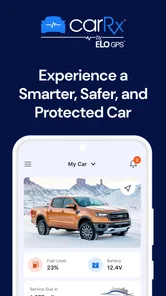
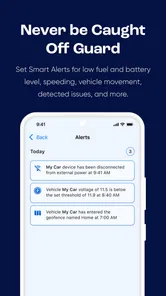
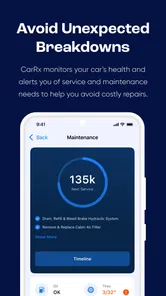
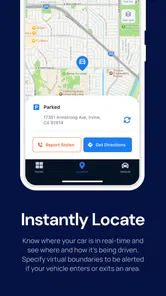
Analysis by Reviewed
When a car is shared by several people, the difficult part is often not driving itself but keeping everyone informed. One person takes the vehicle to work, another needs it for school or errands, and someone else may be the one who notices a warning light or remembers the next service task. CarRx by Elo GPS is built for that kind of vehicle-focused routine, rather than for general household organization. I found it most interesting as a way to keep car-related information in one place while making the vehicle feel a little easier to manage.
It belongs to the Auto & Vehicles category and is developed by Connected Dealer Services, LLC. The app is free, has an Everyone age rating, and its store summary presents the idea of a smarter, safer, protected car. That wording is broad, so the practical question is more useful: can it help a household coordinate around one vehicle without turning every trip into a conversation about keys, maintenance, and responsibility?
How CarRx fits into a shared household car
My clearest use case is a family or household with one primary car and several regular drivers. Imagine leaving early for work while another household member plans to use the same vehicle later. Instead of relying entirely on memory or scattered messages, the app can serve as the car-centered reference point. The value is not that it replaces communication; it gives those conversations a common place to start.
That distinction matters. CarRx is not a household calendar, a messaging service, or a complete family-management system. I would not install it expecting to assign chores, reserve the car in a formal timetable, or create detailed profiles for every person in the home. Its purpose is narrower and more useful when treated honestly: it is an app for the vehicle, and the household coordination benefits come from everyone using that vehicle information consistently.
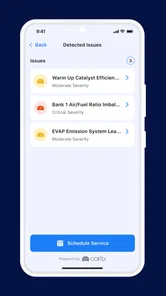
A realistic evening routine shows where it can help. One driver returns home after a long day and notices that the car needs attention. Rather than leaving a vague note such as “check the car,” that person can use the app as the starting point for reviewing the vehicle’s status and deciding what needs to happen next. The next driver then has a better chance of understanding the issue before setting off. That small change can prevent the familiar situation where one person assumes another has handled it.
The strongest household benefit is shared awareness, not automated family control. If your goal is to make sure everyone understands what is happening with the car, CarRx makes sense. If your goal is to monitor every member of the family as though the app were a parenting dashboard, it is probably the wrong tool.
One vehicle, several drivers, and realistic expectations
Shared use works best when the household agrees on a simple habit: the person who notices something records or checks it promptly, and the next driver looks at the relevant information before using the car. That sounds obvious, but it is exactly the kind of routine that gets lost when vehicle details live in one person’s memory.
More From Our News Desk

 Gmail
GmailGmail in a Busy Inbox: Who Benefits Most?
From first account to crowded workday, Gmail earns its place through dependable search and flexible sorting—but its best fit depends on how much inbox maintenance you can tolerate.

 Prime Video
Switching to Prime Video: What Changes in Your Viewing Routine
Prime Video can make a compelling second home for streaming, but switching means learning a different catalog, rental layer, and route from browsing to playback.

 Universal TV Remote Control
Universal TV Remote Control Works Best as a Reliable Backup
A phone remote earns its place through quick setup and reliable habits. Here is how to get more from Universal TV Remote Control—and where its limits show.

 Weather - By Xiaomi
Weather by Xiaomi Review: Clear at a Glance, Less Clear Up Close
Xiaomi’s weather app makes everyday forecasts quick to scan, but its calm surface can leave useful details and recovery paths harder to find than they should be.

 X
XX Under Pressure: Can It Recover When Posting Goes Wrong?
A resilience-focused review of X, examining setup, mistaken posts, interruptions, weak connections, and the gaps that matter when recovery needs to be dependable.

 Clash of Clans
Clash of Clans Is Won Between the Battles
Its raids are quick; its community is a long-term project of coordination, teaching, rivalry, and shared responsibility—with all the friction that entails.
Latest News



I also think the app is more suitable for a household with a clear primary vehicle than for someone managing a large collection of cars. With one car, the information has an obvious audience. With multiple vehicles, the usefulness depends on how clearly each vehicle can be distinguished and how disciplined the household is about checking the correct one. I would not assume that adding more cars automatically makes the app more valuable; it may instead make organization more important.
Another practical point is that all drivers do not need to have the same level of interest. The person who handles maintenance may use CarRx frequently, while another driver may only need occasional information before a trip. That uneven participation is normal. The app can still help, but only if the household avoids treating one person as the permanent data keeper without communicating what matters.
Setup should establish boundaries before convenience
For a shared vehicle, installation is only the beginning. I would first decide who should be responsible for the account and who should be allowed to access vehicle information. That is not a feature claim about CarRx; it is a sensible household boundary. One person should know which account is being used, where the sign-in details are kept, and what happens if the vehicle changes hands.
This is especially important when a car is used by adults and younger drivers. The app has an Everyone age rating, which makes it broadly suitable from a store-rating perspective, but that does not automatically answer every household question about access, supervision, or privacy. Parents and guardians should still decide what information a young driver genuinely needs and whether the child should use the app directly or simply receive relevant instructions from an adult.
I would also avoid setting up CarRx casually on a borrowed phone or a device that several unrelated people use. A shared household tablet can be convenient, but it creates a different boundary from a personal phone. Before choosing that arrangement, think about who can open the device, whether notifications may be visible to others, and whether the account should remain signed in. These are ordinary digital-safety decisions, yet they matter more when the app is connected to a real vehicle.
The same caution applies when a household member moves out or stops using the car. Remove access through the normal account and device-management steps available to you, and do not assume that changing drivers informally changes account ownership. Keeping a short record of who manages the account is a surprisingly useful practice, particularly when a vehicle is shared between relatives or roommates.
What to check before handing the car to someone else
I recommend a short setup conversation rather than a rushed installation. Decide which vehicle the app represents, who will keep the account organized, and what the household considers urgent. A warning that requires immediate attention should not be buried in an app conversation or left for the next driver to discover. CarRx can support awareness, but it should not replace professional advice, roadside assistance, or emergency services.
That boundary is one of the most important trade-offs. A connected vehicle app can make information easier to notice, but it cannot physically inspect every mechanical component or guarantee that a driver interprets a warning correctly. If the car behaves dangerously, the correct response is to stop driving when safe and seek qualified help. I would never use this app as permission to continue driving simply because the app does not display an alarming message.
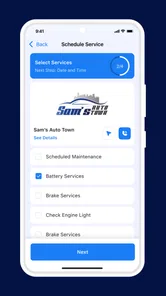
For a household, the best setup is therefore conservative: use the app to organize vehicle-related attention, then use a qualified technician for diagnosis and repairs. This prevents the common mistake of treating a digital status view as a complete substitute for maintenance knowledge.
Coordination without turning the app into a family control panel
CarRx makes more sense when coordination is practical and specific. Who has the car? Does the next driver know about a vehicle issue? Has someone already taken responsibility for arranging service? These questions are easy to ask but surprisingly difficult to track when information is spread across text messages, paper receipts, and memory.
I would use the app alongside a simple household rule: important vehicle information should be shared in one agreed way, while scheduling the car itself can remain in the calendar or messaging tool the household already prefers. This division keeps CarRx focused on the vehicle and avoids forcing it to become a general-purpose planning system.
For example, a parent may manage maintenance while two adult children share the car. The parent can remain the person who makes final service decisions, but the other drivers can still be informed about what they need to know before using the vehicle. That is a healthier arrangement than giving every driver equal responsibility for technical decisions they may not understand.
Roommates can use the same approach. One person may pay for fuel or service, another may drive more often, and a third may only use the vehicle on weekends. The app is helpful when it reduces uncertainty about the car itself. It is less helpful if the roommates expect it to settle disputes about fuel costs, driving schedules, or personal obligations. Those issues need a separate agreement.
A non-obvious advantage of this separation is that it reduces notification fatigue. If every household discussion is pushed into the vehicle app, important car information can become harder to notice. Keeping the app for vehicle matters and using existing communication tools for broader household planning gives each tool a clear job.
When a regular car app or manual method may be better
The usual alternative for many drivers is the manufacturer’s own app, a service-center portal, or a paper maintenance folder. A manufacturer app may be the better choice when you want brand-specific functions tied closely to a particular vehicle. A paper folder may be better for someone who prefers receipts, inspection notes, and service invoices in physical form. A basic notes app can even be enough for a single driver who only wants to record dates and reminders.
CarRx is more appealing when the household wants a dedicated vehicle-oriented experience without building its own system from scratch. Its focus can be easier to understand than a general notes app, especially for people who do not want to design categories and reminders themselves. The trade-off is that a dedicated app may feel unnecessary if your car already has a reliable official application or if only one person ever drives it.
I would also not recommend choosing it solely because the word “protected” sounds reassuring. Protection is not a substitute for insurance, secure driving habits, a maintained vehicle, or a clear emergency plan. The app can be part of responsible ownership, but it should not be treated as a guarantee that the car or its occupants are protected in every situation.
Age, trust, and the right amount of access
The Everyone rating makes CarRx approachable for a broad audience, but households still need to match access to maturity and responsibility. A teenager who drives the family car may benefit from knowing the vehicle’s relevant status and expectations. That does not mean the teenager should automatically control account decisions, interpret technical issues alone, or be responsible for approving repairs.
Trust works better when expectations are explicit. I would tell younger or occasional drivers which information they should check, what signs mean “do not drive,” and whom to contact if something seems wrong. I would also explain that the app is not a replacement for an adult’s judgment or a mechanic’s inspection. This creates a useful safety habit without pretending that software can supervise every decision.
For adult households, the issue is less about age and more about consent and transparency. If several people use the vehicle, everyone should understand what the app is being used for. Shared awareness is reasonable; secret monitoring can damage trust. I would make the app part of an open vehicle-management routine rather than quietly installing it on someone else’s phone.
That approach also helps with account changes. When a driver leaves the household, borrows another car, or stops using the shared vehicle, review who still needs access. It is a small administrative step, but it prevents old arrangements from continuing indefinitely.
Performance, access, and everyday friction
CarRx is free, which lowers the barrier to trying it in a household. Its current version is 3.3.4, and it supports devices running Android 7.0 or later. That makes it potentially usable on older Android phones that may still be kept as secondary household devices. I would still test the app on the actual phone each driver uses, because an older operating system, limited storage, or an infrequently used device can make any connected app less convenient.
The app has an average rating of 4.7 from around 312 ratings, with over 10K installs. Those figures suggest that existing users generally respond well to it, but they should not replace your own trial. A highly rated app can still be a poor match for a household that wants a full calendar, extensive multi-user permissions, or a detailed maintenance database.
One friction point is behavioral rather than technical: the app only helps when people remember to consult it. The driver who never opens it will not gain much from its vehicle-centered information. For that reason, I would introduce it during a calm moment at home, not during a roadside problem. Show each regular driver where to look and agree on what should be reported immediately.
Another limitation is the danger of overconfidence. A clean-looking status screen can feel more definitive than it really is. Drivers should continue paying attention to sounds, smells, dashboard warnings, tire condition, and changes in handling. CarRx can make digital information easier to use, but it cannot turn an inexperienced driver into a mechanic.
Who will benefit most from CarRx?
I would recommend it first to households that share a vehicle, want a more consistent way to stay aware of car-related matters, and are willing to establish clear account responsibility. It is also a sensible option for a primary driver who wants a focused automotive app rather than a general notes tool.
It is less convincing for someone who owns a car alone, rarely needs to coordinate with anyone, and already has an effective maintenance routine. In that case, the extra app may add another place to check without solving a real problem. I would also look elsewhere if your main requirement is formal vehicle booking, detailed expense splitting, advanced parental supervision, or a complete replacement for a manufacturer’s connected-car service.
That does not make CarRx weak; it makes its boundaries clearer. The app’s value depends on matching its vehicle-centered purpose to a real household need. When that need exists, even modest improvements in shared awareness can be worthwhile. When it does not, a simpler method may be more efficient.
My household verdict
After looking at CarRx as a shared-car tool rather than a general family app, I see a practical niche for it. It can help a household move vehicle information out of one person’s head and into a routine that other drivers can understand. The best results come from combining the app with explicit account boundaries, open communication, and sensible safety rules.
My recommendation is to try it if your household regularly shares one car and often loses track of vehicle responsibilities. Start with one account owner, agree on who needs access, and decide which situations require a mechanic or emergency help instead of an app check. That setup makes the experience more useful and avoids expecting features that a vehicle app is not designed to provide.
Connected Dealer Services, LLC has positioned this free Auto & Vehicles app around a smarter, safer, protected-car experience, but my own view is more grounded: its real strength is coordination around the car. CarRx is worth considering when several trusted drivers need a common vehicle reference point. It is not the right choice for covert monitoring, full family scheduling, or technical diagnosis. Used within those limits, CarRx can become a helpful part of a household’s driving routine without taking over the rest of family life.
CarRx by Elo GPS Frequently Asked Questions
Is CarRx by Elo GPS free to download?
CarRx is listed as a free Auto & Vehicles app, so you can install it without paying for the download. That does not necessarily mean every connected-car feature is free to use: access may depend on compatible equipment, an associated account, or a service plan. Check what is included with your vehicle service before relying on a particular feature.
Which phones can run CarRx by Elo GPS?
CarRx requires Android 7.0 or later. If you use an iPhone, check the current App Store listing for its iOS requirements and device compatibility before installing. The app is rated for Everyone, and keeping your operating system and the app up to date can help avoid avoidable compatibility or connection issues.
What is CarRx by Elo GPS, and what does it do?
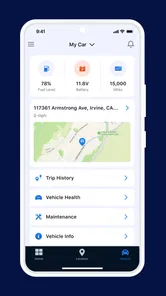
CarRx by Elo GPS is a vehicle-focused application designed to work with compatible Elo GPS hardware and services. It can help users view important vehicle information, monitor location or activity, and access connected-car features through a mobile device. The exact tools available may depend on the installed tracker, account type, vehicle, subscription, and regional service availability. Its store summary describes the experience as “Smarter, Safer & Protected Car,” reflecting its focus on connected vehicle support.
Do I need an Elo GPS device or subscription to use CarRx?
In most cases, CarRx is intended to be used with a compatible Elo GPS device or an account provided through an associated vehicle service. Simply installing the app may not provide access to all features. Before downloading, check whether your vehicle already includes the required equipment, whether activation is necessary, and whether the service involves recurring fees or a specific plan.
Is CarRx by Elo GPS available for both Android and iPhone?
CarRx by Elo GPS may be offered for supported Android and iOS devices, but compatibility can vary according to the operating-system version, phone model, and app release. It is best to review the requirements on the official Google Play or App Store listing before installation. Keeping your phone and the application updated can also help prevent login, notification, or connection problems.
Pros
- Tracks vehicle location and routes with reliable GPS data.
- Helps monitor driving habits
- including speed and harsh driving events.
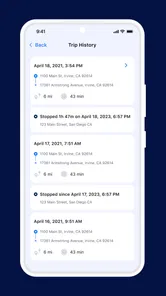
- Provides useful trip history for reviewing vehicle activity.
- Can support theft recovery with real-time location information.
- Useful for managing multiple vehicles from one account.
Cons
- Requires compatible Elo GPS hardware to provide full tracking features.
- Ongoing cellular service may require a separate subscription or fees.
- Location accuracy can drop in tunnels
- garages
- or areas with weak signals.
- Background tracking may increase battery use on supported mobile devices.
- Some advanced alerts and reports may depend on the selected service plan.











