

CarHome Ultra Unlocker
- 423.00
- 4.0
- Installs
- 50.00K
- Price
- $19.99
Screenshots
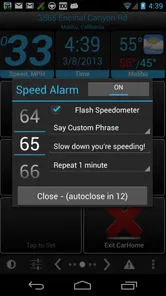
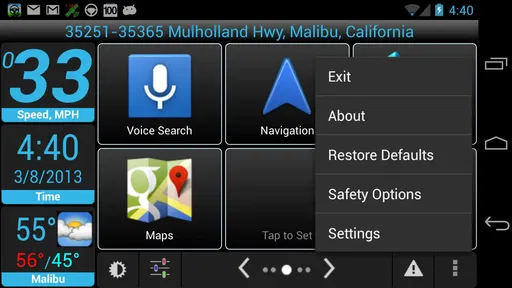
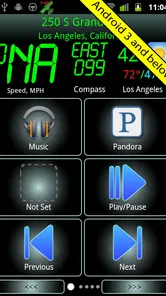
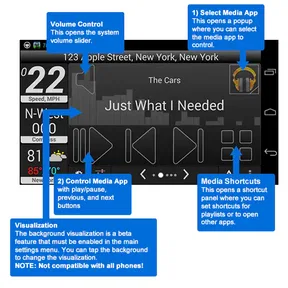
Analysis by Reviewed
I spent time with CarHome Ultra Unlocker as a driving-focused utility rather than treating it like a normal music player. That distinction matters. Its purpose is to make a phone easier to use from the driver’s seat, with a simplified car dock interface for music and phone management. In my experience, the appeal is less about adding entertainment and more about reducing the amount of small, distracting interaction required while the car is moving.
This is an Android app in the Auto & Vehicles category, developed by TheSpinningHead. It has a 4.0 average from around two thousand ratings and has passed fifty thousand installs, so it is not an obscure experiment with no user history. At the same time, I would not confuse that track record with a guarantee that it will suit every phone or every modern dashboard. The app comes from an earlier generation of Android software, and that age is central to deciding whether it belongs in your setup.
What the car dock experience is really trying to solve
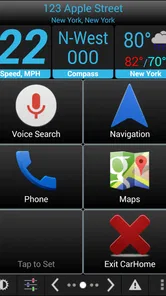
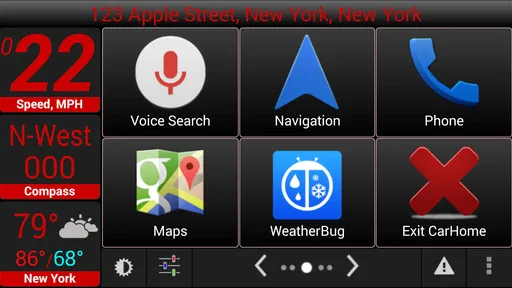
The basic problem is familiar: once a phone is mounted in a vehicle, ordinary Android controls can feel too small, too busy, or too easy to press incorrectly. A conventional launcher is designed for handheld use, not quick glances and deliberate taps from a seated driver. CarHome Ultra presents a more vehicle-oriented starting point, putting the functions you are most likely to need into a layout intended for use in the car.
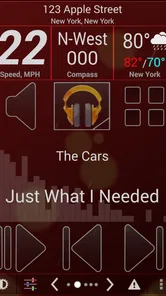
I found the concept most useful when the phone itself was serving as the center of a modest in-car setup. Instead of unlocking the device, finding a music app, adjusting playback, and then returning to the home screen, the dock-style approach gives those actions a more direct place. That does not make phone use while driving safe by itself, but it can reduce unnecessary menu hunting when you are parked or when a passenger is handling the screen.
The store summary describes it as a way to listen to music and manage the phone, and that is the right expectation. It is not a complete replacement for a vehicle’s infotainment system, nor is it a navigation service, streaming subscription, or hands-free assistant. I would see it as a front end for the phone functions you already use, with the main value coming from the driving context.
One practical scenario shows where it makes sense. Imagine leaving work with the phone already mounted, wanting to resume an album and keep the display on a simple car-oriented screen. With a conventional launcher, you may have to move through several small controls. With a dedicated dock interface, the routine can be more consistent: mount the phone, open the car screen, select the needed function, and leave the rest alone. The gain is not dramatic in a laboratory sense; it is the removal of repeated little annoyances.
That convenience depends heavily on your hardware and habits. If your vehicle already has a large display, reliable steering-wheel controls, Bluetooth integration, and a polished phone projection system, a separate dock app may feel redundant. If you use an older Android phone as a dedicated dashboard device, however, the concept is easier to appreciate. The app’s minimum operating-system requirement is unusually low by current standards, which makes it relevant to older hardware but also signals that its design belongs to a different mobile era.
More From Our News Desk

 Gmail
GmailGmail in a Busy Inbox: Who Benefits Most?
From first account to crowded workday, Gmail earns its place through dependable search and flexible sorting—but its best fit depends on how much inbox maintenance you can tolerate.

 Prime Video
Switching to Prime Video: What Changes in Your Viewing Routine
Prime Video can make a compelling second home for streaming, but switching means learning a different catalog, rental layer, and route from browsing to playback.

 Universal TV Remote Control
Universal TV Remote Control Works Best as a Reliable Backup
A phone remote earns its place through quick setup and reliable habits. Here is how to get more from Universal TV Remote Control—and where its limits show.

 Weather - By Xiaomi
Weather by Xiaomi Review: Clear at a Glance, Less Clear Up Close
Xiaomi’s weather app makes everyday forecasts quick to scan, but its calm surface can leave useful details and recovery paths harder to find than they should be.

 X
XX Under Pressure: Can It Recover When Posting Goes Wrong?
A resilience-focused review of X, examining setup, mistaken posts, interruptions, weak connections, and the gaps that matter when recovery needs to be dependable.

 Clash of Clans
Clash of Clans Is Won Between the Battles
Its raids are quick; its community is a long-term project of coordination, teaching, rivalry, and shared responsibility—with all the friction that entails.
Latest News



A dated foundation can be both an advantage and a warning
The current version is 1.7, and the app was released in March 2011. I would treat those details as part of the product’s identity rather than incidental store information. Compatibility with older Android versions can be valuable if you have a spare device that no longer supports current automotive apps. It can also mean that the interface, system integration, and expectations around permissions may not match what users now expect from newer software.
For me, the strongest case is a stable, single-purpose phone mounted in an older car. In that role, a lightweight car dock can be more practical than installing a modern, resource-heavy dashboard suite. The weaker case is a recent phone where the operating system already offers a mature driving mode or where the car supports a newer projection standard. In that situation, the older interface may add another layer instead of simplifying the experience.
The paid price is $19.99, so this is not a casual download I would recommend buying without thinking about the workflow first. The price makes the unlocker a commitment, especially when many current phones include basic driving-oriented tools or can use the car manufacturer’s own system. I would only consider paying after confirming that the dock layout solves a real problem for your particular vehicle and phone.
How I would set it up before relying on it
I would begin with the phone at home, not in traffic. Open the dock interface, identify the buttons you expect to use, and test each one while the device is mounted at the same angle it will have in the car. This reveals whether the controls are genuinely easy to reach or merely look larger in theory. It also gives you a chance to remove unnecessary steps from your routine before driving.
Next, I would test the music path from beginning to end. Start playback, pause it, resume it, change tracks, and return to the dock screen. If your music is stored in a particular player, the important question is not whether the dock looks attractive but whether it gets you to that player without confusing transitions. A car interface is only useful when the complete chain works predictably.
I would also test the phone-management actions with the car parked. A dock application can make access more direct, but direct access is not the same as safe access while moving. I would reserve typing, browsing, account changes, and anything that requires extended attention for when the vehicle is stopped. The best setup is one that lets you prepare before departure and then leaves you with very little to do.
Another worthwhile check is what happens after the phone restarts, loses Bluetooth, or is removed from the mount. Older car utilities can become frustrating when the real-world routine differs from the ideal one. I would deliberately disconnect and reconnect the phone, close the app, and reopen it. If the app returns to a sensible state, it is easier to trust as part of a daily commute. If it makes you reconstruct the setup each time, the advertised convenience quickly disappears.
Trust, controls, and the moments that deserve care
When I assess an app intended to sit in a car, I think about trust in a practical way. I want to know what I can see, what I can control, and how much attention the app demands. The visible product information establishes the developer, price, age rating, version, and purpose, but those facts do not replace checking the actual Android prompts shown during installation and use. I would read every permission request on the device rather than assuming that a car dock needs broad access simply because it manages the phone.
That is especially important with an older application. Android’s permission model has changed over the years, and a request that once appeared normal may deserve closer scrutiny today. I would not grant access automatically. If a permission appears unrelated to the action I am trying to perform, I would pause, look at the system explanation, and decide whether the feature is worth that access. If Android offers a choice such as denying, allowing only while in use, or allowing selected content, I would choose the narrowest option that still permits the function I need.
The safest setup is the one where every enabled control has a clear reason. That principle is more useful here than a blanket claim that the app is safe or unsafe. A dock interface may need to interact with phone functions, but the appropriate level of access depends on what you actually use. I would keep the configuration minimal, avoid connecting accounts that are not needed for the driving workflow, and review Android’s permission manager after installation so the final state matches my intention.
Data-sensitive moments are easy to overlook because the app is used in a familiar setting. Music controls may seem harmless, while phone-management actions can expose contacts, call activity, messages, or other personal information depending on the Android features being opened. I would be particularly careful when a passenger is using the mounted screen. A large, convenient interface is helpful for navigation through the app, but it can also make private information easier to display in front of someone else.
My approach would be to separate preparation from driving. Before leaving, choose the music, connect the device, and check that the desired screen is ready. During the journey, avoid exploring unfamiliar menus. If a call or notification requires more attention than a quick glance, I would stop somewhere safe or let a passenger handle it. The app can simplify access; it cannot remove the privacy and distraction risks that come with putting personal phone content in view.
I would also pay attention to account controls. The product is presented as a car dock utility, not as a social platform or a service that needs a public profile. That makes it sensible to avoid creating or linking accounts unless the app or a specific function clearly requires one. If the app presents sign-in choices, I would look for a guest path or a way to use only local functions. Keeping the driving screen separate from unnecessary account activity gives me more control over what is exposed.
Where user agency matters most
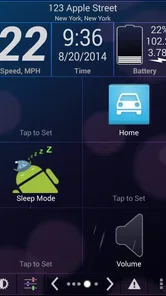
The best part of a dedicated dock is that it can make the user’s choices more deliberate. You decide which phone functions belong in the car, which music source you want ready, and whether the screen should be used at all while moving. I would treat the app as a customizable doorway, not as something that should take over every part of the phone. If a button leads to a feature I never use, I would leave it out of my routine rather than filling the screen with options.
I would also keep an exit plan. If the dock interface becomes inconvenient, conflicts with the phone’s current driving mode, or behaves poorly after an operating-system update, I would disable it and return to the normal launcher or the vehicle’s built-in system. Paying for an unlocker does not mean you should tolerate a workflow that no longer works. A good purchase decision includes knowing how easily you can stop using it.
That is one of the trade-offs of buying an older utility. The low minimum OS requirement may help owners of legacy devices, but newer Android releases can change how background behavior, notifications, permissions, and default applications operate. I would verify the app on the exact phone intended for the car before making it the foundation of a daily routine. The experience on an old dedicated handset may be quite different from the experience on a current flagship.
Compared with a normal launcher, the app’s advantage is focus. A normal launcher gives you broad access to everything, while a car dock narrows the experience around the tasks that make sense behind the wheel. Compared with a manufacturer’s infotainment system, its advantage is flexibility: you can use the phone you already own and build a setup around it. Its disadvantage is that it may lack the deep vehicle integration, physical controls, and current safety refinements of a factory system.
Compared with modern phone projection, the decision is even clearer. Projection systems are usually preferable when your car and phone support them reliably because they are designed around the vehicle display and controls. CarHome Ultra makes more sense when projection is unavailable, when you want a dedicated older phone in the dashboard, or when you prefer a simple local screen for music and basic phone access. I would not choose it merely because it exists; I would choose it to fill that specific gap.
Who should buy it, and who should leave it alone
I can recommend considering it to someone with an older Android handset, a simple phone mount, and a clear desire for large, car-oriented access to music and phone functions. It may also suit a driver who wants a consistent dashboard routine without replacing the car or buying extra hardware. The Everyone content rating makes it broadly accessible from an age-classification standpoint, although responsible use still depends on the driver and the situation.
I would be more cautious for someone who expects modern voice control, seamless vehicle integration, or an interface that has clearly evolved alongside the latest Android design. I would also skip it if the car already provides everything needed through a dependable built-in system. Paying $19.99 for a second interface is difficult to justify when it does not remove a real inconvenience.
There is another group that should think twice: anyone who wants to use the phone actively while driving. No launcher can turn texting, browsing, or extended menu navigation into a safe activity. The app’s purpose is best understood as reducing friction for prepared, limited actions, not encouraging more interaction. If your ideal dashboard involves frequent tapping, the better solution is to change the routine, rely on voice or vehicle controls where available, and keep the phone out of reach when necessary.
After testing the concept against everyday use, I see a focused tool with a clear niche rather than a universal automotive solution. The 4.0 average and established install base suggest that many users find the idea worthwhile, but the older release history and current version make compatibility and expectations important. I would not buy it on the name alone, and I would not install it without reviewing the Android prompts and testing the complete music-and-mount workflow while parked.
My cautious verdict is that CarHome Ultra Unlocker is worth considering when you have an older Android phone and a genuine need for a dedicated car dock. Its value comes from simplifying a narrow set of actions, not from replacing a modern infotainment system. I like the focused approach, but I would keep permissions limited, avoid unnecessary account access, prepare everything before driving, and compare the cost with the controls already available in your car. For the right legacy setup it can still be practical; for a recent, well-integrated vehicle, the usual built-in or projection-based alternative is likely the better choice.
CarHome Ultra Unlocker Frequently Asked Questions
What should I know about CarHome Ultra before downloading it?
CarHome Ultra is an Auto & Vehicles app by TheSpinningHead that provides a simplified, vehicle-friendly interface for listening to music and managing your phone. It is designed for use while driving, with large shortcuts intended to make common functions easier to reach. Its age rating is Everyone, and the app is available for Android devices that meet its system requirements.
Is CarHome Ultra Unlocker a separate app from CarHome Ultra?
Yes. CarHome Ultra Unlocker is a companion licensing app, while CarHome Ultra is the app that provides the car-focused interface. The unlocker is generally not the dashboard you use for music or phone management; its role is to help the main application verify access to its full version. You should install the main CarHome Ultra app as well if you want to use its driving interface.
What is CarHome Ultra Unlocker used for?
CarHome Ultra Unlocker is designed to unlock the full version of the CarHome Ultra Android app. CarHome Ultra provides a simplified, vehicle-friendly interface with large shortcuts for navigation, music, phone calls, contacts, and other driving-related functions. The unlocker itself is generally not the dashboard interface; instead, it verifies the purchase or license so the main application can use its premium features without the usual trial limitations.
Does CarHome Ultra Unlocker work on iPhone or iPad?
CarHome Ultra Unlocker is intended for Android devices and is not an iOS application. It is normally used alongside the Android version of CarHome Ultra, so iPhone and iPad users should not expect it to unlock features in Apple’s App Store version or in another dashboard app. Before downloading, check the Android version requirements and confirm that your phone supports the main CarHome Ultra application.
How do I use the unlocker after installing it?
In most cases, you first install the official CarHome Ultra application and then install the corresponding Unlocker from a trusted source. The unlocker may not display a normal interface or may only show a short confirmation screen. Open CarHome Ultra afterward and allow it to verify the license. If the premium functions remain locked, restart the app, check that both packages are installed correctly, and verify that you are using the compatible version.
Pros
- Unlocks the full CarHome Ultra feature set after a single purchase.
- Provides a car-friendly interface with large
- easy-to-tap controls.
- Supports customizable shortcuts for navigation
- contacts
- and media apps.
- Works well with Android Auto-style in-car setups and dashboard mounts.
- Offers useful location-based features such as parking position reminders.
Cons
- Requires CarHome Ultra to be installed; it is not a standalone dashboard app.
- Compatibility may vary across Android versions and phone manufacturers.
- Some advanced functions depend on permissions and connected apps.
- The interface looks dated compared with newer driving dashboard applications.
- Limited value if you rarely use your phone in a vehicle or already have Android Auto.











