

Card Maker for PKM (Poke Fan)
- 4.01K
- 4.1
- Installs
- 1.00M
- Price
- Free
Screenshots
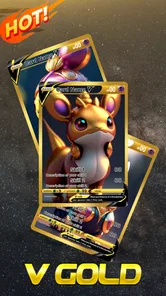
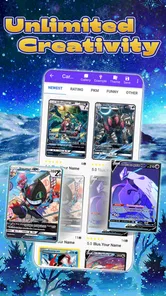
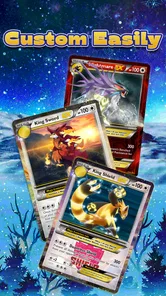
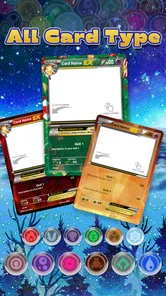
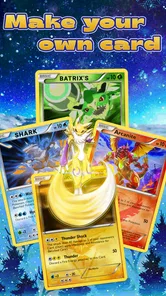
Analysis by Reviewed
I find it helps to approach Card Maker for PKM (Poke Fan) as a playful design tool rather than a shortcut to making tournament-ready cards. Its appeal is the chance to shape a card around an idea, then share the result. That makes it especially enjoyable for fan art, jokes among friends, or a small creative activity with a child. If you mainly want to browse official cards or manage a collection, a catalog or collection-tracking app will be a better fit.
Where the first attempts can feel awkward
Starting a design is straightforward, but a custom card still needs a little planning. It is easy to focus on the picture and leave the name, stats, or ability text until later; then the layout may feel crowded. I get better results by deciding on a simple concept first, keeping the wording short, and choosing an image that leaves enough room for the text. The app gives you room to customize, but that freedom also means the finished card depends on your own editing choices.
If a design looks messy, I would simplify it before adding more decoration. A strong image, readable text, and a few deliberate choices usually work better than trying to use every available option. Treat the first version as a draft: make one change at a time, then check whether the card still reads clearly at a glance. That small habit saves time when you are trying different looks.
Setup checks and a smoother workflow
Before making a card to share, I would check that the image and text are positioned as intended and that the final version is saved where I can find it. For a physical card you already own, the scanner may be a useful starting point for a personalized variation, but I would keep the original nearby and compare the result before editing. A scan is a starting point for a creative project, not a reason to assume every detail will transfer exactly as you expect.
A practical workflow is to make one simple test card first. Try a short name and ability, save or share that draft, and see whether the result is easy to view outside the editor. Once that works, move on to a more detailed design. If sharing does not go as planned, first check that the card has been saved and try the share action again; if you only need a personal copy, saving it to your gallery is the more direct route.
Unleashing Creativity
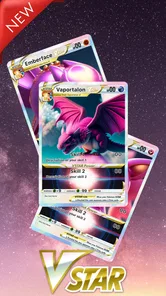
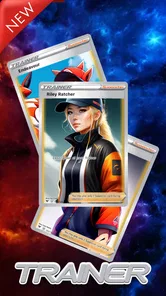
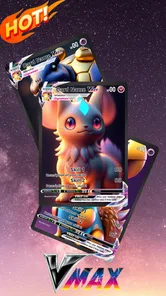
The first thing that struck me about Card Maker for PKM (Poke Fan) is its user-friendly interface. It’s so intuitive that even if you’re not tech-savvy, you’ll find it a breeze to navigate. You can easily start designing cards from scratch or use one of the many templates available. The app offers a variety of design elements like backgrounds, character images, and text options, which means you're only limited by your imagination. I spent hours tinkering with different designs, and each time, it felt like I was discovering a new layer of creativity.
Features That Stand Out
One of the standout features is the ability to customize every aspect of your card. You can adjust the card’s stats, add unique abilities, and even incorporate your favorite Pokémon images. The app supports high-resolution images, ensuring your designs look crisp and professional. Plus, the sharing options are fantastic—once you’ve created your masterpiece, you can easily share it with friends or save it to your gallery.
More From Our News Desk

 Gmail
GmailGmail in a Busy Inbox: Who Benefits Most?
From first account to crowded workday, Gmail earns its place through dependable search and flexible sorting—but its best fit depends on how much inbox maintenance you can tolerate.

 Prime Video
Switching to Prime Video: What Changes in Your Viewing Routine
Prime Video can make a compelling second home for streaming, but switching means learning a different catalog, rental layer, and route from browsing to playback.

 Universal TV Remote Control
Universal TV Remote Control Works Best as a Reliable Backup
A phone remote earns its place through quick setup and reliable habits. Here is how to get more from Universal TV Remote Control—and where its limits show.

 Weather - By Xiaomi
Weather by Xiaomi Review: Clear at a Glance, Less Clear Up Close
Xiaomi’s weather app makes everyday forecasts quick to scan, but its calm surface can leave useful details and recovery paths harder to find than they should be.

 X
XX Under Pressure: Can It Recover When Posting Goes Wrong?
A resilience-focused review of X, examining setup, mistaken posts, interruptions, weak connections, and the gaps that matter when recovery needs to be dependable.

 Clash of Clans
Clash of Clans Is Won Between the Battles
Its raids are quick; its community is a long-term project of coordination, teaching, rivalry, and shared responsibility—with all the friction that entails.
Latest News



Another nifty feature is the card scanner. This allows you to scan and import existing cards into the app, making it super easy to tweak and personalize them. It’s a great way to modernize your physical collection or simply have digital backups of your favorite cards.
Making a card that works beyond the editor
A useful way to think about the finished design is as a small visual message, not just a collection of fields to fill in. If I am making a card for someone else, I start with the detail they will recognize—a favorite character, a shared joke, or a memorable moment—and let that guide the image and wording. This keeps the design personal without forcing every available element into the same card.
I also find it helps to write the ability text outside the layout first, then trim it before placing it. A sentence that sounds funny in conversation can become difficult to read once it sits beside the artwork. Short wording gives the image breathing room and makes the card easier to understand when someone views it quickly on a phone. For a child’s activity, I would let them invent the idea and choose the image, then help them shorten the text rather than taking over the design.
There is a practical distinction between making a card for a group chat and making one to print. A design that looks clear on a phone may not be equally legible at a different size, so I would check the saved image at the intended viewing size before treating it as a finished physical project. The app is most dependable as a route to a shareable fan design; I would not assume that a digital result is automatically a print-ready file or an official game piece.
Choosing it for the right kind of project
In everyday use, I can picture opening it after a game night to turn a friend’s in-joke into a custom card, then sharing the image in a group chat. It also suits a parent and child who want a low-pressure art activity: agree on a creature concept, write a short ability together, and compare a couple of designs. The useful trade-off is that the app encourages imagination, not balanced game design; custom stats and abilities are best treated as part of the fun unless everyone playing agrees on their own rules.
Compared with drawing a card from scratch in a general image editor, a dedicated card maker gives you a more focused starting point, with templates and card-oriented details to work around. A drawing app may offer finer control over illustration, while a collection app is better for organizing real cards. I would choose this one when the goal is to make and share a fan-made design, not when I need a polished graphic-design workflow or an accurate digital inventory.
It is also a sensible choice for a short creative session rather than a project that needs a strict production process. I would use it to make one-off gifts, playful character concepts, or a small set of cards for friends who already understand that they are fan creations. If I were preparing a large, consistent collection, I would first decide whether the editor gives me enough control to keep every card aligned; a general design program is usually better when precision and repeatable layout matter more than a quick card-focused starting point.
When an issue may be outside the editor
If a saved card does not appear where you expected, I would first check the gallery location and make sure I used the save option rather than only sharing the design. If an image or scan is awkward to work with, trying a clearer view of the original and keeping the design simpler can help identify whether the problem is the source material or the layout. For general access trouble, checking that the device meets the app’s minimum operating-system requirement is a sensible first step; repeated problems may call for restarting the app and trying the basic workflow again.
If a card seems to lose clarity after it leaves the editor, I would inspect the saved result itself before rebuilding the design. That separates a layout issue from a problem with how the image is being viewed or shared. Sending the saved card to yourself first is a low-stakes way to check that the intended version is the one arriving, especially when you have several drafts with similar names or artwork.
For a scan that does not look right, I would avoid making several edits at once. Compare the source card with the imported version, identify what needs changing, and then adjust only that part. This is a simple way to avoid confusing an imperfect starting image with a change made during customization. If the source itself is hard to capture clearly, a fresh attempt with the card evenly positioned and visible is more useful than spending time decorating a poor starting point.
What to expect from the app and its audience
Card Maker for PKM is a free comics app from PA Mobile Studio, with a Teen content rating. It has an average rating of 4.1 from around 22,000 ratings, and has been installed over a million times. The current version is 2.7.4, and optional in-app purchases range from $1.99 to $4.99 per item. It first appeared in 2016, so it has been around long enough to build a sizable audience, though I would still judge it by whether its card-making approach fits the project I have in mind.
The app is available on devices running Android 7.0 or later, which is worth checking before you plan a project around it. It is free to get started, while optional purchases sit alongside the core app experience. I would try a small design before spending anything: that quickly tells you whether the editing style and available options suit you. The audience figures suggest this is not an obscure experiment, but popularity alone cannot tell you whether its workflow matches your taste.
Who will enjoy it, and who should pass
The app is a good match for Pokémon fans who like inventing characters, playful abilities, or personalized gifts, and for anyone who wants a simple way to turn an idea into a shareable card. I would skip it if I needed official card data, a dependable collection database, or professional control over every visual detail. It is also less suitable for someone who dislikes arranging text and images by trial and error: the creative freedom is part of the appeal, but it asks you to make design decisions rather than doing all the work for you.
It may also be the wrong tool if your main goal is to learn the rules of the official trading card game. A custom design can borrow the visual language of cards without serving as a reliable guide to real card effects or competitive balance. For that purpose, official materials or a card reference resource make more sense. I would keep this app in the creative lane: it is for imagining and sharing, not for checking what is legal or current in a real collection.
Features That Stand Out
One of the standout features is the ability to customize every aspect of your card. You can adjust the card’s stats, add unique abilities, and even incorporate your favorite Pokémon images. The app supports high-resolution images, ensuring your designs look crisp and professional. Plus, the sharing options are fantastic—once you’ve created your masterpiece, you can easily share it with friends or save it to your gallery.
Another nifty feature is the card scanner. This allows you to scan and import existing cards into the app, making it super easy to tweak and personalize them. It’s a great way to modernize your physical collection or simply have digital backups of your favorite cards.
For me, the scanner makes most sense as a reference aid for a creative variation, not as a substitute for keeping track of a collection. If you want a personal redesign, having the physical card beside you lets you check details while you work. If you want a reliable inventory, though, a dedicated collection tool is the more appropriate choice; a custom editor and a database solve different problems, even when both involve cards.
Perfect for Every Fan
Whether you’re creating cards for fun, for a fan club, or to enhance your gaming experience, this app caters to all. It’s also a fantastic tool for parents looking to engage their kids in a creative activity that combines fun with learning. I found myself getting lost in the process, and it’s a joy to see your ideas come to life in such a tangible way.
The app developers have also done a commendable job of keeping it updated with new features and templates, so there’s always something fresh to explore. Regular updates mean the app continues to evolve, keeping it relevant and exciting.
How I would approach a first session
I would begin with one card rather than planning a whole set. Pick a clear concept, choose the central image, and decide what the card should communicate before adjusting its details. Save a basic version early, then compare later changes with that draft. This gives you a point to return to if extra effects or wording start making the design harder to read.
When making several related cards, I would keep a small note of the choices I want to repeat, such as the character theme or the general tone of the text. That is a simple consistency check, not a promise that the app will automatically reproduce a layout. It helps prevent a set from feeling unrelated while leaving room for each design to have its own personality.
If the first result is not quite right, I would change one visual or text choice at a time and look at the full card again. The temptation is to keep adding details because the editor invites experimentation, but a clearer design often comes from removing an element. This is especially useful when the card is meant to be understood in a quick glance rather than studied closely.
Final Thoughts
In conclusion, Card Maker for PKM (Poke Fan) is more than just an app; it’s a gateway to a world of creativity and imagination. It’s perfect for fans of all ages and offers endless possibilities for customization. If you’re a Pokémon fan looking to add a personal touch to your collection, this app is definitely worth checking out. So go ahead, unleash your creativity, and let your Pokémon journey take a creative turn!
Card Maker for PKM (Poke Fan) Frequently Asked Questions
What is the age rating for Card Maker for PKM (Poke Fan)?
Card Maker for PKM (Poke Fan) has a Teen content rating. That makes the rating worth checking before installing, particularly if the app is for a younger user. Its focus is designing and sharing custom Pokémon-style cards, so families can consider whether that creative activity and any images a user chooses to include are appropriate for them.
Who develops Card Maker for PKM (Poke Fan), and how much does it cost to download?
PA Mobile Studio develops Card Maker for PKM (Poke Fan), and the app is free to download. It also offers in-app purchases priced from $1.99 to $4.99 per item, so optional purchases may affect the overall cost if you choose them. The free download lets you get started without an upfront payment; check purchase details before confirming any transaction.
What devices and system requirements should I check before downloading Card Maker for PKM (Poke Fan)?
Card Maker for PKM (Poke Fan) is an app for making custom Pokémon-themed cards, and its minimum operating system requirement is Android 7.0. Before downloading, check the Android version on your device to make sure it meets that requirement. The app is free to download, so you can try its card-making tools without paying upfront.
What is Card Maker for PKM (Poke Fan) and how does it work?
Card Maker for PKM (Poke Fan) is a creative app designed for Pokémon enthusiasts to create custom Pokémon cards. It provides a user-friendly interface where you can choose templates, customize card details like name, type, and abilities, and add images. The app allows you to save, share, and print your creations, offering a fun and interactive way to engage with the Pokémon community.
Is Card Maker for PKM (Poke Fan) free to use?
Card Maker for PKM (Poke Fan) is free to download and use, providing access to a basic set of tools and features. However, it may offer in-app purchases or premium content, such as additional templates and design options, which can be bought to enhance your card-making experience. Be sure to check for any costs before purchasing premium features. In-app purchases range from $1.99 to $4.99 per item.
Pros
- Easy-to-use interface for card creation
- Extensive customization options available
- Supports high-quality card exports
- Regular updates with new features
- User community for sharing creations
Cons
- Limited free template options
- Ads can be intrusive at times
- Occasional bugs in older devices
- Requires internet for full functionality
- Premium features behind paywall












