

Car Trader – Buy & Sell Cars
- 20.00
- 3.2
- Installs
- 10.00K
- Price
- Free

Screenshots
Analysis by Reviewed
Buying or selling a used car is rarely a one-person decision in my household. Someone notices the listing, another person checks whether the price makes sense, and a third person may need to arrange a viewing or think about insurance and running costs. I tested Car Trader – Buy & Sell Cars with that kind of shared-use situation in mind, and I found it most useful as a simple place to begin a local search rather than as a complete replacement for careful research.
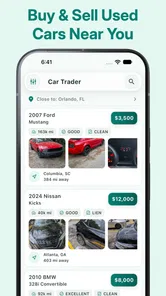
The app sits in the Auto & Vehicles category and is developed by Car Trader Technologies Corp. Its main appeal is straightforward: it brings nearby used-car listings and local buyer-and-seller contact into a mobile app that costs nothing to download. That sounds basic, but the local angle changes how I use it. Instead of browsing cars as an abstract shopping exercise, I can focus on vehicles that might realistically be viewed, discussed, and collected without turning every promising result into a long-distance project.
My overall impression is mixed but useful. The app can save time during the first stage of a search, especially when several people are trying to agree on what to look at. At the same time, its average rating of 3.2 from roughly sixty-six ratings suggests that the experience has not been equally smooth for everyone. I would not treat it as the only tool for a major purchase, but I can see a practical role for it in a household that wants to compare nearby options quickly.
How it works when several people share the search
The most realistic use case is a household where one person needs a car but other people help with the decision. Imagine a parent looking for a first vehicle for a young adult, or two partners replacing an older car before a commute changes. One person can browse during a lunch break, save the details mentally or share them through the household’s usual messaging method, and then discuss which listings deserve attention.
That workflow is valuable because used-car shopping often becomes messy when every person searches a different marketplace. One person may find a private seller, another may look at a dealer site, and a third may rely on social media posts. A local-focused app gives the group a common starting point. I like using it to create a shortlist based on location and general suitability before moving to more demanding checks.
However, I would not assume that the app creates a shared household garage, a synchronized shortlist, or separate profiles for each family member. I found it better to think of the app as an individual browsing tool that supports household coordination outside the app. That distinction matters. If you expect everyone to see the same notes, messages, or saved searches automatically, you may be disappointed.
My preferred routine is simple. I decide the household’s non-negotiables first, such as the type of vehicle, acceptable distance, and a realistic spending ceiling. Then I browse without contacting sellers immediately. This prevents an enthusiastic family member from messaging several sellers before everyone agrees on what the household actually wants.
More From Our News Desk

 Gmail
GmailGmail in a Busy Inbox: Who Benefits Most?
From first account to crowded workday, Gmail earns its place through dependable search and flexible sorting—but its best fit depends on how much inbox maintenance you can tolerate.

 Prime Video
Switching to Prime Video: What Changes in Your Viewing Routine
Prime Video can make a compelling second home for streaming, but switching means learning a different catalog, rental layer, and route from browsing to playback.

 Universal TV Remote Control
Universal TV Remote Control Works Best as a Reliable Backup
A phone remote earns its place through quick setup and reliable habits. Here is how to get more from Universal TV Remote Control—and where its limits show.

 Weather - By Xiaomi
Weather by Xiaomi Review: Clear at a Glance, Less Clear Up Close
Xiaomi’s weather app makes everyday forecasts quick to scan, but its calm surface can leave useful details and recovery paths harder to find than they should be.

 X
XX Under Pressure: Can It Recover When Posting Goes Wrong?
A resilience-focused review of X, examining setup, mistaken posts, interruptions, weak connections, and the gaps that matter when recovery needs to be dependable.

 Clash of Clans
Clash of Clans Is Won Between the Battles
Its raids are quick; its community is a long-term project of coordination, teaching, rivalry, and shared responsibility—with all the friction that entails.
Latest News



For a shared device, I would also be deliberate about who uses the app and when. A person browsing casually can change the direction of the search without meaning to, especially when an attractive-looking car appears. Keeping a short note outside the app with the agreed requirements makes the browsing more disciplined and reduces repeated conversations.
Setting boundaries before anyone contacts a seller
Car Trader is free to use, which makes it easy for more than one person in a household to try it. That convenience is helpful, but free access can also encourage impulsive browsing. I recommend setting boundaries before the first search: decide who has authority to arrange a viewing, who checks the vehicle history, and who handles any discussion about payment or trade-in arrangements.
This is not about making the process formal for its own sake. A used-car listing can create pressure quickly. A seller may say that another person is interested, or a family member may feel that a bargain will disappear unless someone responds immediately. A clear household rule helps: browsing is open to everyone, but no deposit, payment, or meeting is agreed without a second person reviewing the details.
The app’s in-app purchases range from $5.99 to $19.99 per item. That makes account and spending boundaries worth discussing before children or other household members use the same device. I would not hand over a shared phone and assume that every purchase decision is obvious. The safest approach is to keep purchase approval with the adult who manages the vehicle budget and to review any purchase prompt carefully.
I also recommend separating the app’s convenience from the household’s financial decision. Finding a nearby car is only the beginning. The total cost may include registration, insurance, repairs, tires, fuel, and inspection work. A listing that looks affordable inside a browsing session may not fit the household once those costs are considered.
One useful trick is to create two shortlists mentally: vehicles worth investigating and vehicles that are merely interesting. The first group should meet the agreed practical requirements. The second can include unusual models or tempting low prices, but it should not drive the conversation. This keeps the app enjoyable without letting the most eye-catching listing control the purchase.
Coordinating messages, viewings, and follow-up
The strongest role I found for the app is early coordination. A household can use it to identify local possibilities, then divide the work. One person checks whether the model suits the driver, another researches common maintenance concerns, and another prepares questions for the seller. This division works particularly well when the main driver is busy or less confident about cars.
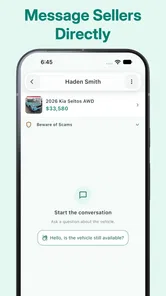
I would avoid having several household members contact the same seller independently. That can create confusion and make the family appear disorganized. Instead, choose one contact person and keep the others involved through a shared note or ordinary messaging conversation. Before sending a message, record the listing details, the seller’s asking price, the location, and the questions that still need answers.
When arranging a viewing, I would treat the app as the source of the lead, not as proof that the vehicle is suitable. Confirm the meeting details directly and avoid assuming that a listing remains available simply because it is still visible. It is also sensible to have someone accompany the buyer, especially when the buyer is inexperienced or the seller is unknown to the household.
A practical viewing plan is more helpful than a long list of technical terms. Check whether the car matches the description, inspect the body in daylight, look for warning lights, and ask for the documents needed to establish ownership and maintenance history. Take notes immediately afterward rather than relying on memory. If several cars are viewed in one day, details blend together quickly.
Another non-obvious benefit of a local search is that it can make a second viewing more realistic. If the car is nearby, a household member who knows more about mechanics may be able to join later. That is a better use of local convenience than treating distance as the only measure of value. A cheap car that requires a difficult journey can be less practical than a slightly less exciting option nearby.
On the other hand, the local focus can narrow the selection. If the household needs a rare trim, a particular fuel type, or a very specific body style, a larger marketplace may offer more choice. I would use this app first when proximity matters, then expand the search elsewhere if the shortlist becomes too small.
Age, trust, and sensible participation
The app carries an Everyone content rating, so its general subject matter is suitable for a broad audience. That does not mean every part of a car transaction is appropriate for a child to manage alone. A young person can help identify preferred colors, body styles, or practical features, but an adult should remain responsible for seller contact, meetings, documents, and money.
This distinction is especially important on a shared device. A child may understand how to browse listings but not recognize the risks of sharing a home address, arranging a private meeting, or trusting a dramatic claim about urgency. I would explain that the app helps locate people selling cars; it does not independently establish that every seller or vehicle is trustworthy.
For teenagers learning about car ownership, the app can be a useful educational starting point. I would ask them to compare several vehicles rather than focusing on the first attractive result. They can learn to notice mileage, age, location, and the difference between a low asking price and a genuinely affordable car. The adult’s role is to turn browsing into questions and verification, not simply to approve or reject listings.
Trust also matters between household members. If one person uses the app privately and presents only the most appealing details, the rest of the group may make a decision without seeing the full context. I prefer a rule that every serious candidate is discussed with the same basic information. A screenshot or written summary can help, but it should be treated as a conversation aid rather than a substitute for opening the listing and checking it again.
I would also be cautious about storing sensitive information on a device that many people use. Do not assume that everyone who can open the app should be able to handle account-related actions or purchase prompts. Keep personal conversations and financial decisions with the appropriate adult, and use normal device security when the phone or tablet is shared.
What the app does well, and where it feels limited
Its clearest strength is focus. Car Trader is not trying to be a general-purpose social platform or a broad shopping catalog. It is aimed at browsing used cars and connecting local buyers and sellers. That makes the opening stage less overwhelming than searching across unrelated classified categories.
I also appreciate the low barrier to trying it. The app is free, supports Android devices running at least version 7.0, and the current version is 1.8.2. For a household with an older Android phone, that compatibility can be more useful than a visually richer marketplace that demands a newer device. The trade-off is that an older supported operating system does not automatically guarantee the smoothest experience on every handset.
The app was released on November 9, 2015, and that history gives me a particular expectation: I judge it more as a practical utility than as a cutting-edge buying platform. I do not open it expecting the same depth of tools, polished filtering, or transaction guidance that may be available in larger, more established marketplaces. Its value depends on whether the local listings and contact process fit the user’s needs.
The rating and review volume also encourage realistic expectations. With around twenty reviews and a 3.2 average, I would install it to explore rather than assume that every search will be effortless. If the app feels slow, inconsistent, or short on the exact filters I need, I would not waste an afternoon trying to force it to replace a larger marketplace.
Compared with dealer websites, the app may feel more direct because it brings private local listings into the same browsing experience. That can mean more variety, but it also means the buyer must take more responsibility for checking the car and the seller. Compared with general classified apps, its vehicle focus is more convenient, although a general service may have stronger communication tools or a larger audience.
Compared with visiting dealerships, the app is better for early discovery and informal comparison. It is not automatically better for warranties, financing explanations, or a standardized buying process. If a buyer values those protections and wants staff available at a physical location, a dealer remains the more suitable route even if the app helps reveal what similar cars are being advertised nearby.
Practical habits that make a household search better
I found three habits particularly useful. First, search with a shared checklist, not with a vague wish for a “good car.” Write down the intended use, the number of passengers, the normal journey, and the maximum distance for a viewing. This prevents the household from chasing listings that look attractive but do not fit daily life.
Second, separate discovery from commitment. During the first pass, collect possibilities without sending emotional or urgent messages. During the second pass, remove cars that fail the basic requirements. Only then should one person contact the seller. This two-stage approach reduces duplicate messages and makes it easier to compare candidates fairly.
Third, plan the inspection before the meeting. Decide who will attend, what questions need answers, and what documents should be reviewed. If the main driver is a young person, let them ask some questions while an experienced adult checks the details. That gives the driver useful ownership experience without making them responsible for risks they may not yet understand.
One further trade-off is worth remembering: nearby does not always mean convenient. A car may be close geographically but difficult to inspect because of the seller’s schedule, poor lighting, or an unsuitable meeting place. Conversely, a vehicle slightly farther away may deserve attention if it matches the household’s needs and can be viewed safely. Use the local search as a filter, not as an automatic reason to choose.
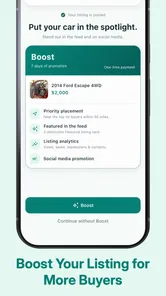
If the household is selling a car rather than buying one, the same boundaries apply in reverse. Agree on the asking strategy before publishing or discussing the vehicle, choose one person to manage inquiries, and avoid allowing several people to promise different arrangements. Keep the description accurate and prepare the vehicle’s documents before serious conversations begin.
Who should use it and who should look elsewhere
I would recommend Car Trader to someone who wants a quick, local way to explore used cars and who is comfortable doing the serious verification independently. It is especially suitable for a household that needs to coordinate a shortlist, compare nearby possibilities, and involve more than one person in the decision without immediately committing to a dealer.
It is less suitable for buyers who need a highly structured purchase journey. If you want extensive vehicle-history integration, formal financing, warranty explanations, or a large national inventory, a specialist marketplace or dealer network may serve you better. The app can still be a useful comparison point, but I would not make it the only place you search.
I would also skip relying on it alone if the buyer is very inexperienced and expects the app to confirm whether a car is safe or fairly priced. The app helps with discovery and connection; it does not remove the need for inspection, documentation checks, and sensible meeting arrangements. That responsibility remains with the buyer and the adults supporting the decision.
For shared-device use, the best fit is a household with clear account and spending boundaries. Everyone can contribute ideas, but one designated adult should coordinate seller contact and financial decisions. That arrangement keeps the app useful for younger participants without confusing browsing access with authority to transact.
My household verdict
After using it as a local used-car browsing tool, I see Car Trader – Buy & Sell Cars as a practical first step rather than a complete buying system. Its free access, vehicle-specific focus, and nearby-search purpose make it convenient when a household wants to discover possibilities and discuss them together. The app is at its best before the serious transaction begins.
I would install it when proximity and shared planning matter, especially if the household is willing to keep notes, divide responsibilities, and verify every promising listing independently. I would not install it expecting a polished end-to-end purchase experience or assume that its presence of a listing guarantees a safe deal.
The final decision comes down to expectations. Use it to widen a local shortlist, organize a conversation, and find cars that may be realistic to view. Then move beyond the app for inspection, paperwork, budgeting, and trust. With those boundaries in place, it can earn a useful place on a shared household device. Without them, its simplicity may encourage rushed decisions that the app itself cannot prevent.
Car Trader – Buy & Sell Cars Frequently Asked Questions
Is Car Trader – Buy & Sell Cars free to download, and are there in-app purchases?
Car Trader – Buy & Sell Cars is free to download, so you can install it without paying an upfront price. The app also offers in-app purchases, with items ranging from $5.99 to $19.99 each. Before choosing a paid option, check what it includes and whether it suits your needs; you can begin by browsing the marketplace without making a purchase.
What is Car Trader – Buy & Sell Cars, and what can I do with it?
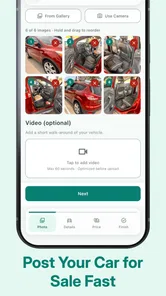
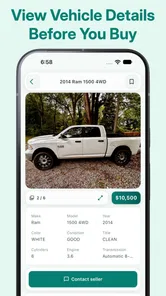
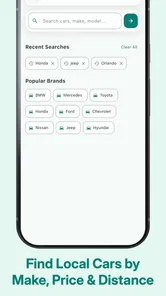
Car Trader – Buy & Sell Cars is a marketplace app designed to help users browse, compare, and advertise vehicles. You can search listings by make, model, price, mileage, location, body style, and other details. The app is useful for discovering cars from dealers or private sellers, saving interesting listings, contacting sellers, and creating your own advertisement when you want to sell a vehicle.
Can I trust the cars and sellers listed in Car Trader?
The app provides access to vehicle listings, but users should not assume that every advertisement or seller has been independently verified. Before making a decision, review the complete description, inspect the photos carefully, confirm the vehicle identification number, check its history, and arrange an in-person inspection or professional mechanical assessment. Never send money or personal documents until the seller and vehicle have been properly verified.
How do I contact a seller or arrange a viewing?
After finding a suitable vehicle, you can generally use the contact options shown on the listing, such as messaging, calling, or another method provided by the seller. Keep your first conversations focused on the car’s condition, ownership history, service records, price, and availability. Arrange viewings in a safe public location when possible, and be cautious if a seller pressures you to complete the transaction quickly or refuses reasonable questions.
Does Car Trader – Buy & Sell Cars charge fees for buying or selling?
Browsing vehicle listings is typically free, although the exact costs can depend on the platform, market, seller type, and current advertising options. Sellers may encounter charges for creating an advert, promoting a listing, or adding premium visibility features. Before publishing an advertisement or paying for an upgrade, review the displayed pricing, duration, renewal terms, and refund policy so there are no surprises.
Pros
- Detailed listings include photos
- prices
- mileage
- and seller information.
- Search filters make it easy to narrow results by make
- model
- price
- and location.
- Useful for comparing many vehicles before contacting a seller.
- Direct contact options can speed up questions and appointment arrangements.
- Listings are regularly updated to help reduce time spent on unavailable cars.
Cons
- Listing quality and accuracy can vary between individual sellers.
- Some vehicles may have limited photos or incomplete descriptions.
- Popular cars can attract many buyers and disappear quickly.
- Extra costs such as taxes
- delivery
- or dealer fees may not be shown upfront.
- Availability and features may differ depending on your country or region.











