CaptionCall
- 980.00
- 4.0
- Installs
- 500.00K
- Price
- Free

Screenshots

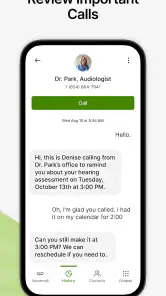
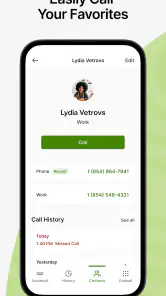
Analysis by Reviewed
I find CaptionCall most useful when a phone conversation matters enough that I want to follow it without relying on hearing every word. It is a communication app from CaptionCall, LLC, built around live captions during calls. For someone who has trouble hearing speech over a phone connection, that changes the experience from guessing at missed phrases to reading along as the conversation unfolds.
A practical call routine
The app makes the most sense as part of a repeatable routine: open it before a call, make sure the screen is comfortable to read, and keep your attention on both the speaker and the captions. That approach is especially helpful for calls about appointment details, delivery arrangements, or instructions where names and times are easy to mishear. I would still ask the other person to repeat a crucial detail if the caption looks uncertain; text is useful support, not a reason to assume every word is exact.
For example, if a clinic calls while I’m at home, I can follow the spoken conversation and use the displayed text to check the appointment time. That is a more dependable workflow than trying to remember a string of details from audio alone. I’d keep a pen nearby for information I need to act on, rather than treating a captioned call as a substitute for my own notes.
Making the routine work in everyday situations
I’d use the same basic approach for a call from a pharmacy, a service provider, or a family member coordinating plans. Before the conversation starts, I’d put the phone where I can see the screen without holding it awkwardly, then keep a notepad within reach if the caller gives several details. That small preparation matters because captions help me follow speech, but they do not decide which information I need to remember or act on.
For a short call, I would focus on the immediate exchange rather than trying to capture every line. If someone gives a date, address, or spelling, I’d repeat it back and compare what I heard with what appeared on screen. This is a practical habit for any captioning tool: use the text to catch a possible misunderstanding, then confirm important details with the caller instead of treating the display as an official record.
What to check before relying on it
CaptionCall is free, has an Everyone content rating, and is intended for eligible users. I’d check that the current setup works with my phone and that I’m comfortable reading captions on its screen before making it my only way to handle important calls. The app is listed for Android and iOS, and the Android minimum is version 9. Its current version is 29.2.2512, so I’d also keep it updated through the usual app-store process.
Captioning can be harder to follow when several people speak, a caller talks quickly, or the connection is noisy. I find it sensible to pause the conversation and ask for a repeat when a key point does not match what I heard. If privacy is important, I’d also consider who can see the screen during a call and avoid leaving sensitive captions visible afterward.
You May Like

Clash of Clans Is Won Between the Battles

Android Auto Makes the Case for Quieter Car Software

MobiOffice: Transforming Mobile Productivity with Seamless Integration

EA SPORTS FC™ Mobile Soccer: Redefining Mobile Sports Gaming

How Microsoft OneDrive Became a Mobile Productivity Giant

How Google Translate Breaks Language Barriers Effortlessly
Settings and habits worth checking
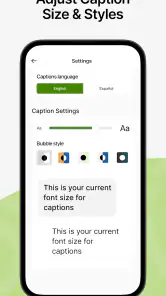
Rather than searching for elaborate controls, I’d start with the choices that affect whether captions are easy for me to use: screen readability, phone compatibility, and a comfortable way to position the device during a call. The earlier article describes adjustable font size; that is worth checking before a long conversation, especially if I expect to read while listening. A quick test with a familiar caller can show whether the text is comfortable at the size I choose.
I’d also make updating the app part of ordinary phone maintenance. That is not a guarantee that every call will be captioned perfectly, but using the current version avoids knowingly staying on an older build. If a call is important, I’d check the setup beforehand rather than discovering in the middle of a conversation that the screen, sound, or connection is not working as I expect.
Privacy calls for a similarly simple habit. Captions may show names, appointment details, or other personal information while the conversation is taking place, so I’d angle the display away from people nearby and close or put away the phone when the call ends. If I’m in a shared space, taking the call somewhere quieter can help me concentrate and reduce the chance that someone else reads the screen.
Faster patterns for common calls
For repeat calls to the same office or person, I’d keep a short checklist on paper: the question I need answered, the details I need to confirm, and anything I should write down. This is not an app feature; it is a way to make captioning more useful. It keeps me from splitting attention between reading every caption and remembering why I called in the first place.
When the caller gives a sequence of details, I’d handle one item at a time. I can ask them to pause, check a name or time on the screen, and read the detail back before moving on. That is often quicker than letting a misunderstanding carry through the rest of the conversation. For a call involving several decisions, I’d also summarize the agreed next step aloud before hanging up.
CaptionCall suits people who want spoken phone calls to remain conversational but need text as another way to follow them. It is less suited to someone whose main goal is a searchable written archive, or to anyone who prefers not to manage a screen while talking. In those cases, a message or email may be more useful, provided the other person can communicate that way and the exchange does not need to happen by phone.
Where it fits among call tools
Compared with an ordinary phone call, live captions add a visual channel without asking the other person to change how they speak. That can be more practical than switching to text messages when a conversation needs quick back-and-forth. On the other hand, messaging is often better when a written record is the main goal or when both people can comfortably type. CaptionCall is specifically aimed at phone-call access, not a general-purpose transcription workspace.
Against speakerphone alone, captions offer a different kind of support: turning up the volume may help when speech is quiet, but it does not necessarily make every word clearer. Reading along can provide a second route to understanding. Still, a captioning app is not a substitute for a quieter setting or asking someone to slow down when the audio itself is difficult to follow.
I would not recommend it as a novelty for someone who has no difficulty hearing calls, or as a guaranteed word-for-word record for legal, medical, or other high-stakes conversations. Those situations call for confirmation through an appropriate written channel. Its strongest use is everyday spoken communication where captions make it easier to stay involved.
Limits that matter in practice
The main trade-off is attention. I may need to listen, read, and respond at the same time, which can feel tiring during a long or complicated call. A fast speaker, overlapping voices, or a noisy connection can make the text harder to use, so I would not assume that captions remove every obstacle. If I start losing the thread, asking the caller to pause or repeat one point is more useful than trying to catch up silently.
There is also a difference between following a conversation and keeping a dependable record of it. Even when captions are helpful in the moment, I would verify names, numbers, and instructions with the speaker, and use a suitable written confirmation when accuracy has consequences. That distinction is especially important for appointments or financial arrangements: captions can support the exchange, but my own confirmation is still part of the workflow.
If you’ve ever struggled with hearing on the phone, then you know how frustrating it can be to miss out on important conversations. That’s where CaptionCall steps in as a lifesaver. So, let me walk you through my experience with this app, which is designed to make phone calls accessible for everyone.
What is CaptionCall?
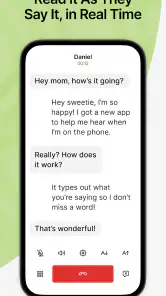
CaptionCall is a revolutionary service that provides real-time captioning for phone calls. Imagine having a personal assistant transcribing your calls so you don’t miss a single word. It’s available on both Android and iOS, so pretty much anyone with a smartphone can benefit from it. The app is especially useful for people with hearing loss, but honestly, it’s a cool gadget for anyone who wants to make sure they catch every detail in a conversation.
Using the App
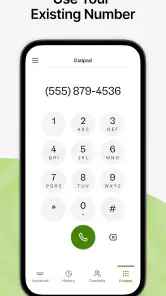
Getting started with CaptionCall was pretty straightforward. After downloading it, the setup was a breeze. You just need to register and verify your number, and you’re all set. The interface is simple and user-friendly, so you won’t need a tech wizard to figure it out. During calls, the captions are displayed in large, easy-to-read text, and you can adjust the font size if needed. It’s like having subtitles for your phone calls!
Performance and Features
I’ve tried a few captioning apps before, but what sets CaptionCall apart is its accuracy and speed. The captions appear almost instantly, allowing for a smooth conversation flow. There’s also a handy feature that lets you save transcripts of your calls. This is perfect for when you need to refer back to something important that was said. The call quality remains clear, and the app doesn’t hog your phone’s resources, which is a massive plus in my book.
Accessibility and Convenience
One of the standout aspects of CaptionCall is its focus on accessibility. It’s not just about captioning; the app is designed to make communication easier for everyone. Whether you’re hard of hearing or just want to make sure you’re catching every word, it’s got you covered. Plus, it’s free for eligible users, which is a huge bonus!
Who I’d recommend it to
I’d point someone toward this app if phone calls are still their preferred way to arrange appointments, ask questions, or keep in touch, but hearing speech through a handset makes those exchanges unreliable. The useful distinction is that captions support the call rather than replace it: I can ask a follow-up question in the moment instead of waiting for a text reply. For someone who wants that kind of live, two-way interaction, the format makes sense.
I’d be more cautious about recommending it to a person who rarely makes voice calls, prefers written communication, or finds reading while listening distracting. A text conversation can be easier to review later and does not require keeping a phone screen in view while someone speaks. The right choice depends on what causes the difficulty: if the problem is understanding spoken calls, captions may help; if the problem is simply wanting a written record, messaging is often the more direct option.
The app is free and has an average rating of 4.0 from around 3.8 thousand ratings, with roughly 980 reviews and over 500 thousand installs. Those figures suggest that it has found a substantial audience, but they are not a substitute for checking whether its call workflow fits my own needs. CaptionCall is developed by CaptionCall, LLC, and its current version is 29.2.2512. I would treat the rating as broad context, not proof that every person will find the captions equally helpful.
Building confidence without over-relying on captions
One useful way to become comfortable with the app is to start with a low-pressure call. I’d try a conversation with someone I know, use an easy topic, and notice whether I can divide my attention between the voice and the text. Then I’d adjust my routine—where I sit, how I position the phone, and whether I need to write down key details—before using it for a call that carries more consequences.
For a more demanding conversation, I’d make the purpose explicit at the start: I’m following along with captions and may ask for a pause or repeat. That is a small social adjustment, but it can make the exchange smoother than pretending I caught something I did not. It also helps the other person understand why I might take a moment before responding.
CaptionCall’s value is not that it makes every call effortless. Its value is that it can give me another way to stay in the conversation when hearing alone is not enough. The best results come from pairing the captions with sensible habits: confirm critical details, take notes when needed, and choose another communication method when the written exchange is the more reliable fit.
In conclusion, CaptionCall is more than just an app; it’s a bridge between accessibility and everyday communication. If you or someone you know struggles with hearing over the phone, this app is a game-changer. It’s practical, reliable, and easy to use. Give it a try, and experience the difference it makes in staying connected with your loved ones.
CaptionCall Frequently Asked Questions
Can I use CaptionCall to caption calls in a language other than English?
CaptionCall is a communication app focused on displaying captions for phone conversations, which can make it easier to follow spoken dialogue. Before downloading, consider whether its captioning supports the language you need for your calls. The app’s central purpose is to turn speech into readable text, helping users with hearing loss keep track of what is being said.
Who is CaptionCall intended for, and is it suitable for everyday communication?
CaptionCall is intended to assist people with hearing loss during phone conversations by showing spoken words as text. It may be useful for everyday communication when reading along makes calls easier to follow. The app is listed for Everyone, but its main benefit is specifically related to phone call captioning, so it is most relevant to users who want that accessibility support.
What is CaptionCall and how does it work?
CaptionCall is a specialized communication app designed to assist individuals with hearing loss by providing real-time captions of phone conversations. Users can view the text of their conversations on their device or an external screen, ensuring they don’t miss any important details. The app uses advanced voice recognition technology to transcribe spoken words into text, making phone calls accessible and easier to understand for those with hearing difficulties.
Is CaptionCall available for both Android and iOS devices?
Yes, CaptionCall is available for download on both Android and iOS devices. This ensures that users can access the service regardless of their preferred mobile platform. The app can be found in the Google Play Store for Android devices and the Apple App Store for iOS devices, allowing for a seamless installation process.
Are there any costs associated with using CaptionCall?
CaptionCall is typically offered at no cost to qualified individuals with hearing loss. The app and its services are funded through the Telecommunications Relay Service (TRS) program, which is supported by a federal fund. Users may need to provide documentation of their hearing loss to qualify for the free service, ensuring that those who need it most can access it without financial burden.
Pros
- User-friendly interface for all age groups.
- Accurate and quick transcription service.
- Free to use for eligible individuals.
- Compatible with most smartphones.
- Enhances accessibility for the hearing impaired.
Cons
- Limited to US residents only.
- Requires a stable internet connection.
- Not available in offline mode.
- Registration process can be lengthy.
- Limited customer support options.

- Category
- Communication
- Version
- 29.2.2512











