Call Blocker - Block Numbers
- 4.67K
- 4.3
- Installs
- 1.00M
- Price
- Free

Screenshots

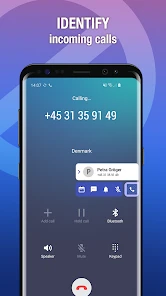
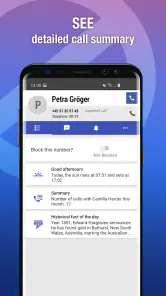
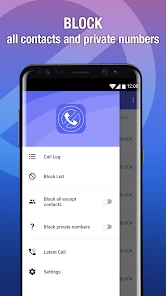
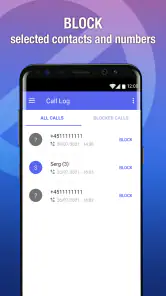
Analysis by Reviewed
When nuisance calls arrive in clusters, the hard part is not just declining them; it is deciding which unfamiliar numbers deserve another chance and which should never interrupt you again. I like that Call Blocker - Block Numbers gives me a hands-on way to make that distinction. Its value is less about installing a filter and forgetting it, and more about building a call routine that stays useful without shutting out people I actually need to hear from.
Where the first-week appeal comes from
In the first few days, the most satisfying part is how direct the basic task feels: a number bothers you, you find it, and you choose whether to block it. That simplicity suits someone who wants to take action after a particular call rather than learn a complicated screening system. I would begin with a narrow rule, see how it fits my normal calls, and only then decide whether broader controls are worth using.
The app is most appealing if unknown callers are a recurring interruption but you still want to decide for yourself what counts as unwanted. It is less suitable if your ideal solution is an invisible service that identifies every caller automatically or makes every screening decision without your input. I see its strongest use as practical, user-directed call management—not a promise that every troublesome call will disappear on its own.
A small routine that helps it last
To make the app useful beyond the novelty of the first week, I would attach blocking to a simple habit: review a suspicious call when I have time, check whether the number has a repeat pattern, and add a block only when I am comfortable with the choice. That is better than reacting to every ring while distracted. It also helps keep the block list understandable, which matters when a legitimate caller later asks why you missed them.
For example, imagine I am expecting a repair service but have not been given the technician’s number. A call from an unfamiliar local number could be spam, but blocking a whole area code before the appointment might also prevent the useful call. I would leave broad rules alone until the job is finished, then review the call log and block only numbers that clearly appear to be repeat nuisances. This kind of timing is a small but important trade-off: waiting may mean one more interruption, while acting too broadly can cost a call I wanted.
What is Call Blocker - Block Numbers?
So, you might be wondering what’s so special about this app. Call Blocker - Block Numbers is this nifty app designed to help you regain control over who gets to buzz your phone. It's a communication app from Spam Call Blocker Apps, and the free download makes it easy to try before deciding whether its optional purchases suit you. With a 4.3 average from around 38,000 ratings and over a million installs, it has clearly found an audience. It is rated for Everyone, and version 2.4.0.1566 requires Android 10 or later. The app is all about providing a straightforward way to block unwanted calls, and trust me, the appeal is easy to understand once interruptions become a regular nuisance.
Easy Peasy Setup
Setting up the app is as easy as pie! Once you’ve downloaded and installed it, you’re greeted with a user-friendly interface. You don’t need to be a tech wizard to navigate it, which is a huge relief for someone like me who’d rather avoid tech headaches. Simply tap a few buttons, and voila, your phone’s annoying callers are a thing of the past! Still, I’d treat the first setup as a small decision rather than a one-tap cure: choose carefully what you block, because broad rules can catch legitimate calls as well as unwanted ones.
You May Like

Clash of Clans Is Won Between the Battles

Android Auto Makes the Case for Quieter Car Software

MobiOffice: Transforming Mobile Productivity with Seamless Integration

EA SPORTS FC™ Mobile Soccer: Redefining Mobile Sports Gaming

How Microsoft OneDrive Became a Mobile Productivity Giant

How Google Translate Breaks Language Barriers Effortlessly
Features that Make Life Simpler
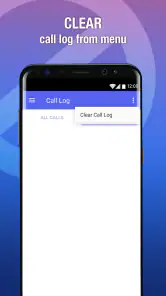
What I absolutely adore about this app is its array of features. You can manually add numbers to block, or if you’re feeling like Sherlock Holmes, you can dig into its call logs to pick out those pesky numbers. It even allows you to block entire area codes! Imagine that, blocking a whole region of spammers with just a couple of taps.
That area-code option is powerful, but I would use it sparingly. If you are waiting for a local appointment, delivery, or a call from someone using a number you do not recognize, a broad block could get in the way. A safer routine is to start with numbers you can identify in the call log, then consider wider blocking only when the pattern is clear. The whitelist can help preserve calls from people you already know, but it is not a substitute for thinking through which unknown callers might matter.
Plus, it’s got this neat feature where you can create a whitelist. This means that your important calls from family and friends won’t get lost in the mix. It’s like having your personal call bodyguard!
My Personal Experience
Since I started using it, the peace of mind is unreal. I’ve gone from dodging calls every few minutes to enjoying my day without interruptions. I can’t express how much I appreciate not having to dig my phone out every five seconds just to decline a call.
A realistic use for me is a busy workday: after an unfamiliar number rings during a meeting, I can check the call log later and decide whether it deserves a block instead of reacting in the moment. That keeps the decision deliberate and makes the app more useful than simply silencing every unknown caller. If you share a phone or regularly receive calls on behalf of a small business, though, aggressive blocking may be a poor fit; missed enquiries can cost more than the interruptions. In that situation, the phone’s built-in call controls or a lighter approach may be safer.
And the best part? It doesn’t drain my phone's battery. I was initially worried that having another app running might slow things down or drink up my battery life, but nope! It’s as if it’s not even there.
Keeping It Useful Over Time
The lasting value depends less on installing it than on maintaining a sensible block list. I would revisit that list occasionally, especially after using area-code blocking or adding several entries from the call log. If an expected call does not arrive, check whether a broad rule might explain it before adding more restrictions. This small habit helps keep the app from turning into a set-and-forget filter that quietly blocks something important.
One practical way to reduce the chance of a mistaken block is to keep the whitelist for people whose calls should get through, then treat unfamiliar numbers as a separate decision rather than adding every possible contact pre-emptively. That is especially useful for someone whose family, workplace, or regular service providers call from more than one number. The whitelist protects known callers, but it cannot tell you whether a new number belongs to a legitimate person; that judgment still rests with you.
How it fits beside other call controls
Compared with relying only on the phone’s built-in options, this app’s practical draw is the combination of individual number blocking, call-log selection, area-code rules, and a whitelist. Those choices offer more hands-on control, while a simpler built-in setting may be preferable if you only want a basic way to screen calls and do not want to maintain another app. The trade-off is clear: more control is useful when spam patterns repeat, but it also asks you to make and review more decisions.
Compared with a broad setting that silences unfamiliar callers, choosing numbers from the call log can be a less blunt approach: I can respond to the particular calls that have already bothered me instead of treating every unknown caller alike. That matters if I sometimes receive calls from a clinic, courier, school, or new customer. On the other hand, someone who wants a hands-off caller-identification service may prefer a different kind of call-screening tool. This app’s appeal is its blocking controls, not a reason to expect every unknown number to be identified for you.
When the extra control is worth the effort
I would recommend trying it if repeated nuisance calls interrupt work, study, caregiving, or rest, and you are willing to make occasional decisions about your block list. It can also suit someone who gets a small number of persistent calls from the same numbers and wants a straightforward way to stop those specific interruptions. In those situations, the useful payoff is not a dramatic one-time cleanup; it is being able to handle repeat offenders consistently.
I would skip it, or keep its rules very conservative, if your phone is a main contact point for a business, you are actively waiting for callbacks, or you cannot afford to miss calls from people who may not be in your contacts. The same goes for anyone who dislikes maintaining another app or would rather use a basic built-in control. Blocking is only helpful when the cost of a missed call is lower than the cost of letting it ring through.
Final Thoughts
If you're tired of the constant barrage of spam calls, then Call Blocker - Block Numbers might just be your new best friend. It's intuitive, efficient, and most importantly, it keeps those unwanted calls at bay. It’s like having a little guardian angel for your phone, ensuring peace in your digital space.
The app is free to start, with in-app purchases ranging from $2.99 to $19.99 per item, so I would check the purchase choices before committing to anything paid. It was released on August 25, 2017, and its current version is 2.4.0.1566. For someone who wants to choose specific numbers and keep trusted contacts reachable, it can earn a lasting place through that recurring control. If you rarely receive nuisance calls, prefer not to manage a block list, or cannot risk screening unfamiliar callers, you may be better off sticking with your phone’s built-in tools. For everyone else, I’d try it with narrow rules first, then widen them only when experience shows they are safe.
Call Blocker - Block Numbers Frequently Asked Questions
Is Call Blocker - Block Numbers suitable for users who only want to reduce interruptions?
Call Blocker - Block Numbers is a communication app focused on blocking spam calls and scams. Its purpose may appeal to anyone looking for a way to manage unwanted calls, rather than a general messaging or phone service. Before downloading, consider which callers you want to block and whether you are comfortable adjusting call-blocking settings to suit your needs.
What operating system does Call Blocker - Block Numbers require?
Call Blocker - Block Numbers requires Android 10 or later. Check your phone’s operating-system version before downloading so you can confirm that it meets this requirement. The app is rated for Everyone, making its content suitable for a broad audience. Its current version is 2.4.0.1566, and it was released on August 25, 2017.
Can I use Call Blocker - Block Numbers on more than one device?
Whether the app can be installed or configured across multiple devices depends on the devices and the app store accounts you use. The app is intended to help manage unwanted calls on a phone, so consider setting up blocking separately on each device where you want that protection. Review the app’s settings after installation to make sure they match the calls you want to block.
Is Call Blocker - Block Numbers available for my phone, and what does it cost?
Call Blocker - Block Numbers is a communication app available for devices running Android 10 or later. It is free to download, with in-app purchases ranging from $2.99 to $19.99 per item. The app is rated for Everyone, so its content is intended for a broad audience. Check that your device meets the minimum operating-system requirement before installing.
Who makes Call Blocker - Block Numbers, and is it widely used?
The app is developed by Spam Call Blocker Apps and focuses on blocking unwanted calls. It has more than 1 million installs, an average rating of 4.3 from around 38,000 ratings, and about 4,700 reviews. Those figures can offer a general sense of its reach and user feedback, while your experience may depend on your device and how you configure its blocking options.
Pros
- Easy to use interface for blocking calls.
- Allows personalized blocklists.
- Minimal impact on device performance.
- Does not require much storage space.
- Regular updates enhance security.
Cons
- May block wanted calls mistakenly.
- Limited features in the free version.
- Ads in the free version can be intrusive.
- Some numbers still manage to get through.
- Customer support response is slow.

- Category
- Communication
- Version
- 2.4.0.1566











