C-SPAN Now
- 462.00
- 3.8
- Installs
- 100.00K
- Price
- Free

Screenshots
Analysis by Reviewed
When a political story is reduced to a short clip or a quick headline, I often want to see the event that prompted it. C-SPAN Now is built around that useful difference: it gives viewers a way to follow public proceedings and policy discussions directly, rather than relying only on someone else’s summary. I find that approach most valuable when the details and the order of events matter.
What direct coverage adds
The app’s central appeal is not simply that political video is available on a phone; it is that I can follow an event at greater length and judge its context for myself. A clipped exchange may be striking, but without what came before or after, it can be difficult to tell why it happened or how it fits into the discussion. Watching a proceeding unfold gives me more material to assess, even if it does not do the interpretive work for me.
That difference matters most when a story turns on wording, timing, or a response to a particular question. I can use the coverage to check whether a quote represents a major argument or one moment in a longer exchange. It is a slower way to get oriented than scanning a headline, but the extra context can make the time worthwhile when I care about the issue.
Choosing between live viewing and catching up
Live coverage suits a moment when I want to follow an event as it happens and can give it my attention. On-demand viewing is more practical when a meeting conflicts with work, errands, or family plans. Rather than treating live video as the only meaningful way to use the app, I see the ability to return to coverage later as an important part of its value.
I would not try to watch every minute of a long proceeding just because it is available. If I have a specific question, I start with that and use the relevant coverage to understand the exchange around it. If I am simply trying to learn what happened today, a concise report is usually a better first stop; I can turn to C-SPAN Now when I want to inspect the source material behind the report.
The value of watching events unfold
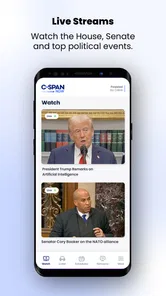
So, C-SPAN Now is your gateway to all things political and governmental in the U.S. Imagine having the ability to stream live coverage of Congressional sessions, White House events, and other public affairs programming right from your smartphone. It’s like having a front-row seat to the nation’s most important discussions, without leaving your couch!
Live coverage, then a closer look
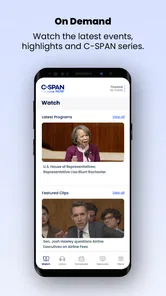
What I love about this app is its simplicity. You don’t need to be a tech wizard to navigate through its features. At the heart of its offerings is live streaming. Whether it’s a heated debate in the Senate or a significant Supreme Court ruling, you can catch it all live. And if you missed it, no worries! The app archives all the content, so you can watch it at your convenience.
More From Our News Desk

Weather by Xiaomi Review: Clear at a Glance, Less Clear Up Close

X Under Pressure: Can It Recover When Posting Goes Wrong?

Clash of Clans Is Won Between the Battles

Android Auto Makes the Case for Quieter Car Software

MobiOffice: Transforming Mobile Productivity with Seamless Integration

EA SPORTS FC™ Mobile Soccer: Redefining Mobile Sports Gaming
That live-first approach changes how I use political news. If I see a claim about an exchange during a hearing, I can look for the longer event rather than judging it from a brief excerpt alone. Watching the surrounding discussion can reveal whether a remark was a central point, a response to an earlier question, or just one moment in a much broader proceeding. It takes more time than reading a summary, but it gives me a better basis for deciding what deserves attention.
Using the library with a purpose
Another cool feature is the on-demand video library. It’s perfect for those times when you want to dive deep into specific topics like healthcare reforms or foreign policy discussions. The library is rich with content, making it a valuable resource for students, educators, or anyone keen on understanding the nitty-gritty of policy-making.
A practical way to get more from that library is to start with a question, not simply browse at random. For example, if a policy debate comes up in class or at work, I’d use the topic as a guide, then watch enough of the relevant discussion to understand the arguments and context. This is especially helpful for comparing what different participants actually say. It’s less suited to someone who wants a fast, edited explainer with the main points already distilled.
A straightforward viewing experience
Using the app feels like a breeze. The interface is clean, and getting to the content you want is straightforward. I found the search functionality robust, helping me quickly find the discussions or topics I was interested in. Plus, the app runs smoothly without any hiccups, which is always a big plus in my book!
For a realistic everyday use, picture checking the news during a lunch break and seeing that a public hearing is drawing attention. I’d use the live stream if I had time to follow it, or return to the archived coverage later when I could concentrate. That choice is the real convenience: I don’t have to make a developing event fit into my schedule. Still, long proceedings demand patience, and the app is not a substitute for concise reporting when I only have a few minutes.
How it differs from a typical news feed
Compared with a general news app, this one puts more emphasis on primary-source viewing than on a constant flow of short articles and headlines. That makes it a useful companion when I want to check the substance behind a political story, but not necessarily the best single app for keeping up with every kind of news. I would pair it with a publication that offers concise summaries and broader coverage, using each for what it does best.
The unedited nature of the footage is a strength, but it also calls for some judgement. Seeing an event directly does not automatically explain its background or tell me which details are most important. I try to treat the stream as evidence to examine, not as a complete analysis. For viewers who want someone to interpret developments for them, a reported article or explainer will usually be the more efficient choice.
Putting the coverage to work
A useful workflow is to let a written report identify the event, then use the video to examine the part that raises a question. That keeps the app from becoming an endless stream of political footage and gives each viewing a purpose. I might note the names of participants or the point in the discussion I want to revisit, then return to the relevant coverage when I have enough time to follow the exchange properly.
This approach also helps when two accounts emphasize different moments. I can compare their descriptions with what was said in the proceeding itself, while remembering that footage alone may not supply the history behind a policy or the consequences of a decision. For background, timelines, and expert interpretation, a well-reported article or specialist publication still does a different job better.
On a busy day, I would avoid opening a long stream just to feel caught up. Instead, I’d decide whether I need a quick summary or firsthand context. If the exact exchange matters, the app’s video focus is a genuine advantage; if I need a broad picture of domestic and international news in a short break, a conventional news feed is more efficient. That distinction makes it easier to use the app selectively rather than expecting it to replace every source.
Who will get the most from it
One thing that stands out is the app’s commitment to providing unfiltered, unbiased content. In a world where media bias is a hot topic, knowing that you’re getting raw, unedited footage straight from the source is reassuring. It helps you form your own opinions based on actual events, not just media presentations.
I’d recommend it most to people who follow U.S. government, students looking for material to explore, and anyone who wants to understand how a public discussion develops from one exchange to the next. It may be less useful if you rarely watch video, want international headlines alongside domestic politics, or prefer brief summaries over full proceedings. The app is free, is rated for Everyone, and is published by National Cable Satellite Corporation. Its current version is 1.24.0, and it requires Android 7.0 or later. It has a 4.1 average from around a thousand ratings, with over a hundred thousand installs.
For students, the strongest use is not to treat a stream as a finished lesson, but as material to examine alongside class readings or a specific research question. Watching participants make and answer arguments can bring the process to life in a way a short recap cannot. I would still take notes and check key details against reliable reporting, especially when the purpose is to explain what a policy means beyond the room where it was discussed.
It is also a sensible choice for people who follow a particular issue over time. Returning to public discussions can help you notice how arguments shift between appearances and how a question is handled in different settings. The trade-off is that this takes patience and active attention; the app is not designed to turn every long event into a neat takeaway for you. If you mainly want quick alerts or a digest of the day, a news service built around short text updates will fit better.
One practical question is whether the app can replace a standard news source. I wouldn’t use it that way. Its value is strongest as a viewing companion for public affairs coverage, while a conventional publication is more useful for a fast overview, background reporting, and stories outside U.S. government. Combining the two gives me both orientation and a way to inspect the underlying discussion when it matters.
My take after using it
In a nutshell, if you’re someone who wants to stay informed about U.S. politics without the frills, this app is definitely worth checking out. It’s an educational tool, a news source, and a means to engage with democracy all rolled into one. So next time you find yourself wondering about the latest legislative changes or political maneuvers, just open it, and you’re good to go!
My recommendation comes with one clear condition: use it when you want to watch, not when you need every answer delivered in a few lines. The live and archived coverage makes it easier to fit public proceedings around real life, but the viewer still has to decide what matters and supply any wider context. For someone curious enough to do that, C-SPAN Now offers a focused way to get closer to the events behind the headlines; for someone who wants a quick, broad daily briefing, another kind of news app should come first.
C-SPAN Now Frequently Asked Questions
Who develops C-SPAN Now, and what kind of content should I expect?
C-SPAN Now is an app from National Cable Satellite Corporation, focused on news and public affairs. Its purpose is to give users a front-row seat to major political events and policy discussions, with coverage centered on government and public life. If you want direct access to political proceedings and related programming rather than a general news feed, its focus may suit you.
What is C-SPAN Now and what features does it offer?
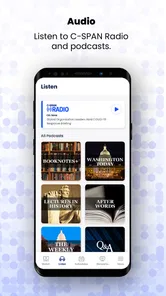
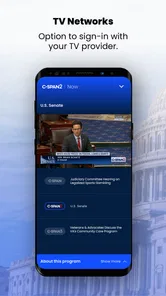
C-SPAN Now is a mobile app that provides users with live and on-demand access to public affairs events from the U.S. Congress, the White House, and other political venues. Key features include live streaming of C-SPAN's three channels, access to radio broadcasts, podcasts, and a rich archive of past events. The app is designed to keep users informed about political happenings directly from the source, offering a comprehensive view of government proceedings.
Is C-SPAN Now free to use or does it require a subscription?
C-SPAN Now is free to download and use, providing access to a wealth of live and archived content without any subscription fees. However, users should be aware that while the app itself does not charge a fee, streaming video content may incur data charges depending on your mobile plan. It's advisable to check with your service provider to understand any data costs associated with using the app.
On which devices is C-SPAN Now available?
C-SPAN Now is available for both Android and iOS devices, making it accessible to a wide range of users. You can download it from the Google Play Store for Android devices or the Apple App Store for iOS devices. The app is designed to work seamlessly across smartphones and tablets, ensuring that users can stay informed on-the-go regardless of their device preference.
Can I watch C-SPAN's live coverage on C-SPAN Now without cable?
Yes, C-SPAN Now allows you to watch live coverage of C-SPAN's channels without needing a cable subscription. This app provides a direct streaming service, enabling you to access important political broadcasts live as they happen. It's a great solution for those who want to stay updated on political events without relying on traditional cable TV services.
Pros
- Offers live streaming of government proceedings.
- Includes on-demand videos and podcasts.
- User-friendly interface with easy navigation.
- Provides unbiased coverage of political events.
- No subscription or login required.
Cons
- Limited to U.S. government content.
- No offline viewing options available.
- Occasional streaming lags and buffering.
- Lacks interactive features or social sharing.
- Ads may interrupt the viewing experience.











