Business Insider: News & more
- 3.97K
- 3.6
- Installs
- 1.00M
- Price
- Free

Screenshots

Analysis by Reviewed
When a news app feels noisy or hard to navigate, it can turn a quick check-in into a chore. I find that Business Insider works best when I use it with a clear purpose: catch up on business and technology, then follow the stories that matter to me. It is a free news and magazines app from Business Insider, Inc., with optional in-app purchases, so getting started does not require a subscription purchase. The trade-off is that paid options may appear as you explore, and readers who want every article without cost should check what is available to them before making the app part of a daily routine.
Before making it part of your day
I would approach the app as a publication to check deliberately, not as a feed that needs to stay open all day. That distinction matters if you are trying to keep up with company news without letting every headline interrupt work. Pick a practical goal—understanding a business development, following a technology shift, or getting context on a market story—and see whether the reporting helps you reach it. If your main need is a single stream of breaking local alerts, a local-news app may be a more direct fit.
It is also worth deciding what “caught up” means for you. I might read a few key stories and stop, rather than treating the length of the feed as a task to finish. A publication with a wide range of subjects can reward curiosity, but it can also make an unstructured scroll longer than intended. A short reading window and a clear topic are simple ways to keep the app useful without turning news consumption into another obligation.
Getting started and finding a comfortable routine
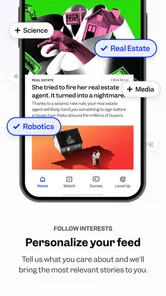
If the first session feels busy, I would begin by choosing a small set of subjects to follow rather than trying to read everything. That gives the feed a clearer purpose and makes it easier to see whether its mix suits your interests. The app is rated for Everyone 10+, and its 3.5 average from around 39,000 ratings suggests experiences vary; I would treat the first few visits as a chance to judge the layout and coverage for myself, not assume it will fit every reader immediately.
Where readers can get stuck
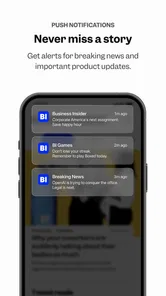
A common point of friction with a broad news app is deciding what deserves attention. Business and technology stories can move quickly, while lifestyle and other coverage may compete for space in the same reading session. I find it helps to open the app with one question in mind—such as what changed in a company or industry—then use related coverage to add context. Notifications can be useful for timely developments, but too many alerts can interrupt the day; I would keep them focused on genuinely important updates if the available controls allow it.
For a practical morning routine, I might scan the feed over breakfast, save the deeper reading for a break, and avoid treating every headline as urgent. That small distinction makes a general news app less distracting. If the feed does not immediately reflect my interests, I would revisit the topics I selected and give the recommendations time to become more relevant rather than repeatedly refreshing without a plan.
Making the reading workflow work
When an article will not load or the experience seems out of date, I start with basic checks: confirm the device has a working connection, close and reopen the app, and see whether the problem affects one story or everything. If only a particular item is affected, returning to it later is a sensible test; if the whole app is struggling, restarting the device can help distinguish a temporary issue from a persistent one. I would also check that the installed app is current. The release history reaches back to Jan 27, 2012, and the current version is 16.3.0, so a device running an older build may not behave like a recently updated one.
More From Our News Desk

Weather by Xiaomi Review: Clear at a Glance, Less Clear Up Close

X Under Pressure: Can It Recover When Posting Goes Wrong?

Clash of Clans Is Won Between the Battles

Android Auto Makes the Case for Quieter Car Software

MobiOffice: Transforming Mobile Productivity with Seamless Integration

EA SPORTS FC™ Mobile Soccer: Redefining Mobile Sports Gaming
For a story I want to understand rather than merely skim, I find it useful to read the main piece first and then compare its framing with another reputable source. Business Insider’s strength is approachable coverage and analysis, but a single publication should not be my only reference for high-stakes financial or political decisions. This habit is especially useful when a headline prompts me to act: I pause, check the details, and separate reported facts from my own interpretation.
When the app may not be the cause
Not every interruption points to a problem with the app itself. A weak connection can affect any news service, and a device that is low on storage or running an older operating system can make several apps feel unreliable. Business Insider lists a minimum operating-system requirement of 8.1, so I would check compatibility before troubleshooting further. If articles open elsewhere but not here, restarting and updating are reasonable first steps; if multiple apps have trouble, I would look at the device or network before blaming this one.
Business Insider has more than a million installs, and its category is crowded with newspaper apps, aggregators, and general-purpose news feeds. Compared with an aggregator that pulls headlines from many publishers, this app keeps the experience centered on one editorial source, which can make its coverage feel more coherent but gives me less range of viewpoints in one place. Someone who wants a broad cross-publication scan may prefer an aggregator; someone who wants business-focused reporting from a familiar outlet may find this a more direct daily read.
Who will get the most from it
I’d recommend trying it if business, markets, technology, or the wider effects of company decisions are regular interests, especially if you want explanations alongside headlines. It can also suit a curious reader who likes moving between professional news and lighter subjects without switching apps. I would be more cautious if you only want local headlines, a neutral feed assembled from many outlets, or a completely uninterrupted free reading experience. In-app purchases range from $9.49 to $99.99 per item, so I would review any purchase prompt carefully and decide whether the available paid option matches how often I read.
For a commuter, a useful approach is to scan a few headlines before leaving, read one longer piece during a quiet stretch, and use audio or video only when those formats genuinely fit the moment. The app’s multimedia presentation can make dense topics easier to approach, but watching or listening is not automatically quicker than reading; on a noisy train, text may be the simpler choice. That kind of small adjustment helps the app support a routine instead of taking it over.
A useful way to judge its coverage
Rather than deciding from one headline, I would try the same subject across a few visits. For example, if I am following a company change, I can see whether the coverage helps me understand the decision and its consequences, rather than just repeating the announcement. Then I can compare the account with another publication when the subject affects money, work, or a significant choice. This is a practical way to benefit from a recognizable editorial voice while avoiding the assumption that one app can supply every perspective.
That approach also helps answer a likely question: is this a replacement for a general news source? For me, not quite. It can be a useful home for business-oriented reading and adjacent topics, but readers who need local reporting, a wide range of publishers, or a consistently comprehensive view should keep another source in their routine. The right choice depends less on how much content appears and more on whether the publication’s focus matches the questions you actually have.
Why Business Insider?
First things first, you might be wondering why you should download Business Insider over other news apps. Well, let me spill the beans. This app is not just about delivering news; it's about delivering insightful analysis that you can actually use. Whether it's understanding the implications of a new government policy or finding out what the latest tech innovation means for your business, Business Insider has got you covered.
Features That Stand Out
The app is designed with a sleek interface that’s super user-friendly. I mean, who doesn’t love an app that's both informative and easy to navigate? One of the features I absolutely love is the personalized news feed. It lets you tailor what kind of content you want to see more of, so you’re always in the loop about topics that matter to you. Plus, the push notifications are like your best friend who never fails to give you a heads-up about critical updates.
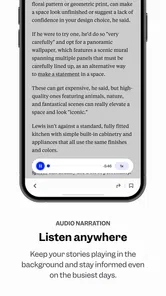
Another cool feature is the multimedia integration. If you're a visual learner like me, you'll appreciate the engaging videos and infographics that break down complex information into digestible chunks. And for those long commutes, the audio articles are a lifesaver! Just pop in your earbuds and let the app do the talking.
Content Quality
Now, let's talk about the content. The articles are well-researched and offer a balanced perspective, which is refreshing in a world full of sensational headlines. The writers at Business Insider seem to have a knack for boiling down complex topics into easy-to-understand articles. I often find myself diving into topics I didn’t even know I was interested in, simply because of how engagingly they're presented.
Moreover, the app covers a wide array of topics from finance and tech to lifestyle and politics. This diversity ensures that there's something for everyone. Whether you're a seasoned investor or someone just curious about the latest celebrity scandal, you’ll find articles that pique your interest.
Choosing the right format for the moment
One small but useful habit is to match the format to the situation instead of assuming multimedia is always an upgrade. I would read when I need to scan details quickly, watch when a visual explanation adds something, and listen when my hands are occupied and the environment is quiet enough. On a crowded commute, audio can be awkward; at a desk, a video may be a distraction. Having different ways to engage is most valuable when I choose intentionally rather than using them by default.
If a story seems especially important, I would also avoid relying on a quick summary alone. A headline or short update can point me toward a topic, but the fuller article is where I can check what is being claimed and what context surrounds it. For financial decisions in particular, I would use the app to stay informed, not as a substitute for my own research or advice suited to my circumstances.
Final Thoughts
In a nutshell, if you're looking for a reliable, insightful, and user-friendly news app, Business Insider should be on your radar. It’s more than just a news app; it’s a tool for enhancing your understanding of the world. And trust me, once you start using it, you’ll wonder how you ever kept up with the news without it.
So, go ahead, give it a whirl, and thank me later!
My practical verdict
I would give it a trial if business and technology stories already shape your interests, or if you want an accessible way to explore how company decisions connect to everyday life. It is less compelling if your priority is an all-publisher feed, local headlines, or avoiding paid prompts altogether. The app is free to start, but the optional purchases make it sensible to pause and read the terms on screen before confirming anything. Its 4,000 reviews and 3.5 average make me cautious about assuming every reader will enjoy the experience equally, so I would judge it by a few focused sessions rather than by its reputation alone.
My recommendation is to set a modest routine, keep alerts selective, and use another publication when a story deserves more than one viewpoint. With those boundaries, Business Insider can be a convenient part of a news habit rather than the whole habit. I would keep it if its reporting consistently answers the questions I bring to it; if I find myself scrolling without learning much, I would switch to a more focused source or a multi-outlet aggregator.
Business Insider: News & more Frequently Asked Questions
Who publishes the Business Insider app?
Business Insider is published by Business Insider, Inc., the company behind the publication. The app is designed as a mobile way to read business news, with a focus on making coverage convenient to access while on the go. If you already follow Business Insider, the app offers a dedicated place to read its news and features on your device.
What does the Business Insider app cover?
The app focuses on business news and analysis, with coverage touching on areas such as finance, technology, media, and strategy. It is suited to readers who want to keep up with developments across the business world rather than use a general-purpose news reader. Its store summary describes it as a fast and convenient way to read business news on the go.
What devices and operating systems can run Business Insider?
Business Insider is a news and magazines app developed by Business Insider, Inc. It is available for Android and iOS, with a minimum operating-system requirement of version 8.1. Before installing, check that your device meets this requirement and has enough available space for the app. The app is free to download, though some content and features may involve in-app purchases.
Is Business Insider suitable for younger readers?
Business Insider has an Everyone 10+ content rating, so it is intended for a broad audience while being rated for users aged ten and older. Its focus is business news and analysis, including subjects such as finance, technology, and media. Parents or guardians can consider that rating alongside a younger reader’s maturity and interests when deciding whether the app is appropriate.
What is Business Insider and what does it offer to users?
Business Insider is a leading source of business news and analysis, offering comprehensive coverage on a wide range of topics including finance, tech, media, and strategy. The app provides up-to-date news articles, insightful commentary, and in-depth reporting, making it an essential tool for anyone looking to stay informed about the business world. Users can access exclusive content, insightful features, and interviews with industry leaders, all delivered through a user-friendly interface.
Pros
- Comprehensive business news coverage.
- High-quality analysis and insights.
- User-friendly interface.
- Regular updates with fresh content.
- Global perspective on business trends.
Cons
- Subscription required for full access.
- Ads can be intrusive at times.
- Limited offline reading options.
- Heavy app size on older devices.
- Occasional loading delays.











