Breaking News: Local & Latest
- 2.00
- 3.9
- Installs
- 100.00K
- Price
- Free

Screenshots
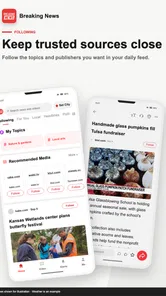
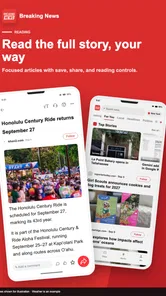
Analysis by Reviewed
Breaking News: Local & Latest is the kind of news app that makes a strong first impression because it focuses on the reason most people open a news feed in the first place: finding out what is happening right now, especially nearby. I spent time using it as a daily news shortcut rather than treating it like a newspaper replacement, and that distinction matters. It is free, aimed at everyone, and developed by LiveTech Limited, so the barrier to trying it is low. The real question is whether it remains useful after the initial curiosity fades.
My short answer is that it can earn a regular place on your phone if you want a simple stream of local, breaking, and personalized updates. It is less convincing for someone who expects deep reporting, a carefully edited daily briefing, or a complete replacement for several trusted publications. The app’s current average is 3.9 from around 259 ratings, while its reach has passed 100K installs. Those figures suggest a modest but real audience rather than a universally established news habit.
From quick discovery to a practical daily routine
I’d use this section to look beyond the initial appeal of a fast headline feed and consider whether it can support a routine that stays useful without demanding constant attention. A simple habit—checking at chosen moments and following up only when a story matters—can make the difference between practical awareness and aimless scrolling.
Why the first week feels useful
The first-week appeal comes from reducing the effort between unlocking the phone and seeing relevant headlines. Traditional news apps often make me choose a publication, browse several sections, or work through a large front page. This app feels more direct: I can use it as a quick check for breaking developments and local stories without committing to a long reading session.
That makes it particularly handy during small gaps in the day. I can look at the feed while waiting for transport, before starting work, or when I want a brief sense of what has changed since breakfast. The value is not that every item deserves a full read. The value is that the app gives me a starting point, helping me decide which stories deserve more attention elsewhere.
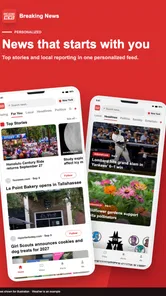
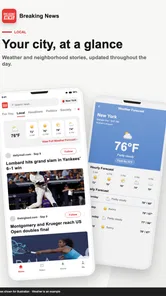
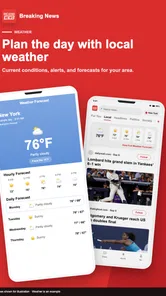
Personalization also changes how I approach the feed. A general national news page may contain important stories, but much of it can feel distant from my routine. Local updates have a different usefulness: transport disruption, weather developments, community events, public notices, and nearby incidents can affect decisions I make that same day. When the local angle is relevant, a short update can be more valuable than a longer national article.
I would not describe the experience as a replacement for thoughtful journalism. In the first week, I still found myself wanting to open a full article from a publication I already trust when a subject was serious or complicated. That is not necessarily a flaw. A breaking-news feed and a detailed news source serve different purposes. The app works best as the fast layer at the front of my news routine.
More From Our News Desk

Weather by Xiaomi Review: Clear at a Glance, Less Clear Up Close

X Under Pressure: Can It Recover When Posting Goes Wrong?

Clash of Clans Is Won Between the Battles

Android Auto Makes the Case for Quieter Car Software

MobiOffice: Transforming Mobile Productivity with Seamless Integration

EA SPORTS FC™ Mobile Soccer: Redefining Mobile Sports Gaming
A realistic morning use case
Imagine checking the app before leaving home. I would scan the latest headlines, look for anything local that might affect the commute, and note one or two national stories worth reading later. If there is a developing event, the app can alert me to the topic quickly, while a more established source can provide context once the facts become clearer.
This workflow is more useful than endlessly scrolling. I recommend treating the feed as a triage tool: identify what matters, save the topic mentally, and then verify important claims through a reputable source. That habit prevents the speed of breaking news from becoming a substitute for accuracy.
Another useful approach is to check it at set moments instead of opening it whenever a notification appears. A quick morning scan and an evening review can provide recurring value without turning the app into a constant interruption. This is one of the differences between a helpful news habit and notification fatigue.
What the app is good at during early use
The strongest early benefit is convenience. I do not need to remember several publication names or visit multiple sections to get an initial overview. The combination of local and latest updates gives the app a clear identity, and the personalization angle makes it more practical than a completely uniform headline list.
It is also approachable for casual readers. Someone who does not want to build a complicated news system can install a free app, open it, and begin browsing. The Everyone age rating reinforces that broad accessibility. Families should still discuss how children interpret alarming headlines, but the app is not positioned as a specialist or restricted product.
At the same time, I noticed an important trade-off: speed and breadth can make a feed feel less deliberate than a publication’s front page. A newspaper app may offer stronger editorial hierarchy, while a broadcaster’s app may provide clearer live coverage for major events. This app’s advantage is the quick overview, not necessarily the deepest presentation.
Does it become more useful after the novelty?
The first few days are naturally more exciting because every headline feels like a discovery. The month-to-month test is harder. I asked myself whether I would still open the app when there was no major event, and whether local coverage would continue to feel relevant rather than repetitive.
For me, its lasting value depends on how closely the feed matches my real interests. If the personalization keeps the balance between nearby stories and broader breaking news, the app can become a dependable first check. If the feed repeatedly shows topics I do not care about, the habit weakens quickly. A news app has to earn attention repeatedly; installation alone does not create loyalty.
The best long-term role is as one layer in a broader information routine. I would use it for discovery, a trusted publication for confirmation, and longer articles or official sources for decisions that carry consequences. That division of labor avoids expecting one lightweight feed to perform every kind of journalism.
What I would do before relying on it
During the first week, I would pay attention to three things rather than simply counting how many headlines appear. First, do local stories genuinely relate to my area? Second, do breaking updates help me understand what changed, or do they only create curiosity? Third, do I find myself opening another source to verify nearly everything?
Those checks reveal whether the app fits a person’s needs. If local relevance is strong and the feed helps me discover worthwhile subjects, it may deserve a permanent spot. If I mainly want detailed analysis, specialist reporting, or a single publication’s editorial voice, a conventional news app will probably serve me better.
Month-to-month value, upkeep, and the fatigue problem
Long-term value depends less on how often I open the app than on whether each visit helps me make a useful choice about what to read next. I’d also weigh the attention it asks for: even a free news app can feel costly if repeated updates disrupt the day, so the next section looks at upkeep and ways to avoid fatigue.
Where recurring value can come from
News changes every day, so an app in this category does not need a large collection of permanent tools to remain useful. Its recurring value comes from reducing the effort of staying informed. I can return after several hours and see what has developed, rather than rebuilding my reading list from scratch.
Local coverage is especially important here. National headlines are easy to find through television, search, social networks, and major publishers. Nearby news is often more fragmented. A dedicated local angle can save time by bringing community-level developments closer to the same place where I check broader updates.
There is also value in using the app during periods when I have less time. When my schedule is busy, I may not read a long article, but a concise headline can tell me whether a subject deserves attention later. This is a realistic strength that a store summary cannot show: the app can function as a filter for limited attention, not merely as a destination for reading.
However, that role requires discipline. I would not use a quick headline as the final basis for a medical, financial, legal, or safety decision. For those subjects, the app should point me toward further reading, not replace it. The faster the news cycle, the more important that distinction becomes.
Maintenance is light, but attention is the real cost
The app itself is not demanding to maintain in the way a productivity system can be. I do not need to organize a large library or create an elaborate workflow. The maintenance burden is mostly behavioral: deciding when to check it, which alerts deserve attention, and when to stop scrolling.
That hidden cost is easy to underestimate. A breaking-news app can become noisy even when it is technically convenient. If every update feels urgent, I may open it reflexively and leave with more anxiety than knowledge. My practical advice is to keep the app’s role narrow. Use it for timely awareness, then close it once I know whether a story matters.
I also prefer reviewing my notification habits after several days rather than accepting every prompt indefinitely. A notification that was useful during a major event may become distracting during an ordinary week. The right setting is personal, but the principle is universal: recurring value should come from relevant information, not from the app demanding attention.
The current release is v1.7.4 and supports devices running Android 7.0 or later. That broad compatibility makes it accessible on older Android phones, which is practical for readers who do not upgrade frequently. Still, compatibility is not the same as a perfect experience on every device. Older hardware, smaller screens, or a slower connection can make rapid feed browsing less comfortable than on a newer phone.
Why some users may tire of it
The first source of fatigue is repetition. Breaking news often develops in stages, and several updates may concern the same event without adding much useful information. If I keep refreshing, I can mistake movement in the feed for meaningful progress. The app cannot solve that problem completely because it is built around timely updates.
The second is emotional intensity. Local incidents and urgent headlines can feel more personal than distant news. That closeness is part of the app’s usefulness, but it can also make the feed harder to browse casually. Someone who already feels overwhelmed by news may prefer a scheduled digest or a slower editorial format.
The third is context. A short update can tell me that something happened without explaining why it happened, what remains uncertain, or what happens next. I found that this matters most with politics, public safety, and developing events. In those cases, I would rather use the app to identify the subject and then move to a source with named reporting, background, and corrections.
A fourth issue is trust management. A personalized feed can feel efficient, but efficiency should not be confused with editorial completeness. If I only read stories that match my existing interests, I may miss important subjects outside my usual habits. I would occasionally step outside the feed and consult a broader source so that convenience does not narrow my view.
How it compares with familiar alternatives
Compared with a major newspaper app, Breaking News: Local & Latest feels more immediate and less tied to one editorial identity. A newspaper is usually better when I want investigations, opinion, analysis, and a consistent publication voice. This app is better when I want a quick cross-section of what is happening and do not want to commit to one outlet.
Compared with social media, it offers a more focused starting point. Social platforms can surface news very quickly, but they also mix reporting with commentary, rumors, personal reactions, and unrelated content. I prefer this app when I want to begin with news rather than with a conversation about news. I would still verify a major claim before sharing it.
Compared with a broadcaster’s live-news app, it may be more convenient for scanning a range of subjects, while the broadcaster may be stronger for live video, established correspondents, and event-specific coverage. Compared with a simple browser search, the app removes some repeated effort, but search remains better when I already know the exact topic or source I want.
This comparison leads to a clear trade-off. The app’s strength is not owning the entire news experience. Its strength is occupying the first few minutes of that experience efficiently. Readers who understand that role are more likely to keep using it than readers expecting a full newsroom in one feed.
Who should keep it installed?
I think it is a good fit for people who want personalized local and breaking-news discovery in a lightweight routine. It suits commuters, busy workers, students, and casual readers who want to know whether something important has changed without opening several separate publications. It can also help people who have moved to a new area and want a simple way to become more aware of nearby developments.
I would be more cautious recommending it to readers who need specialist reporting, strong archival search, detailed explainers, or a publication with a clearly defined editorial standard. It is also not my first choice for anyone trying to reduce exposure to urgent headlines. A weekly magazine, scheduled digest, or carefully selected newspaper may be healthier for that purpose.
Because the app is free, trying it carries little financial risk. The more meaningful test is whether it saves time without consuming too much attention. After several weeks, I would ask whether it helped me discover useful information or merely encouraged repeated checking. If the answer is mostly the latter, uninstalling it would be reasonable.
My long-term verdict
Breaking News: Local & Latest earns lasting space when I treat it as a practical news doorway rather than a complete news home. Its local focus gives it a reason to exist beside larger publications, and its breaking-news orientation makes it useful during short, irregular moments. The free price and broad device support make experimentation easy, while the 3.9 average shows that the overall experience is useful but not flawless.
What keeps me interested is the possibility of a simple habit: open it at a deliberate time, scan for genuinely relevant developments, follow important subjects through stronger sources, and stop. That workflow gives the app recurring value without allowing it to dominate the day.
What limits my enthusiasm is the nature of fast news itself. Repetition, incomplete context, and notification fatigue can gradually reduce the benefit. The app is only as good as the attention rules I use around it. If I want depth, certainty, or a polished daily edition, I would choose a different tool. If I want a convenient first look at local and current events, I would keep this one installed.
My recommendation is therefore measured but positive: try it for a week, judge the local relevance rather than the number of headlines, and build a small verification habit for serious stories. If it consistently helps you decide what deserves further reading, it has earned a place in your routine. If it only makes you refresh more often, the novelty has already ended.
Breaking News: Local & Latest Frequently Asked Questions
What devices can run Breaking News: Local & Latest?
Breaking News: Local & Latest is available for Android and iOS users, and the Android version requires Android 7.0 or later. Before downloading, check that your device meets the relevant system requirements and that the app is available in your region. The app is listed as suitable for everyone, so it may be considered by readers of different ages.
Who develops Breaking News: Local & Latest, and how widely is it used?
The app is developed by LiveTech Limited and is in the News & Magazines category. It has more than 100,000 installs and an average rating of 3.9 from 259 ratings. Those figures offer a quick sense of its reach and user feedback, though individual experiences can differ depending on location, device, and the news coverage a reader wants.
What is Breaking News: Local & Latest?
Breaking News: Local & Latest is a news application designed to help users follow current events, local stories, and major developments from around the world. After exploring the app, its main focus appears to be delivering a convenient stream of updated headlines in one place, allowing readers to browse different topics without switching between multiple news websites or applications.
Can I personalize the news shown in the app?
The application is intended to make news discovery more relevant by allowing users to focus on subjects, locations, or categories that interest them. Depending on the version and device, personalization may include selecting preferred topics, following local coverage, or adjusting notification choices. It is worth reviewing the settings after installation so unnecessary alerts do not interrupt your day.
Does Breaking News: Local & Latest provide local news as well as international stories?
Yes, the app is built around a combination of local and broader breaking-news coverage. This can be useful if you want community updates while also keeping track of national or international events. However, the exact selection of local stories may depend on your location, available publishers, language settings, and the sources supported in your region.
Pros
- Quick access to breaking stories from nearby and global sources.
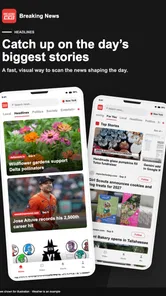
- Clean layout makes headlines easy to scan at a glance.
- Useful alerts help you stay informed about developing events.
- Covers multiple categories
- including politics
- business
- and entertainment.
- Personalized news options can reduce irrelevant updates.
Cons
- Notification frequency may become distracting during busy news cycles.
- Some stories may repeat across different publishers or categories.
- Article quality and writing style can vary between news sources.
- Certain features may depend on location or regional availability.
- The app may use noticeable battery and mobile data for frequent updates.











