

Bouncie
- 674.00
- 4.2
- Installs
- 100.00K
- Price
- Free

Screenshots
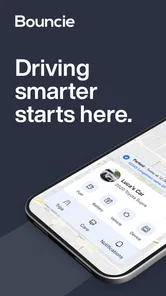
Analysis by Reviewed
If you are looking for a calmer way to keep an eye on a vehicle, Bouncie is the kind of app that makes more sense after you think about the routine around your car, rather than the app itself. I found it most useful as a companion to a connected vehicle setup: something you check when you want a quick understanding of a trip, a vehicle’s recent activity, or an unexpected change in its normal pattern. It sits in the Auto & Vehicles category, is free to download, and is aimed at Everyone, so the basic idea is approachable even if you are not especially comfortable with vehicle technology.
The first thing I would clarify is that this is not simply a driving game, a route planner, or a replacement for a mechanic. Its value comes from connecting driving information with everyday decisions. That can mean checking whether a family member has arrived, reviewing a journey after lending out the car, or building a better sense of how the vehicle is being used. The developer is Tail Light, LLC, and the app has built a solid audience, with an average rating of 4.2 from around 1.8 thousand ratings and more than 100 thousand installs.
What to expect before you begin
Bouncie is best approached as the mobile part of a vehicle-monitoring experience, not as an app that can magically provide useful information without the right connected setup. That distinction matters for a first-time user. If you install it expecting a standard map app that immediately knows where your car is, you may feel confused. If you see it as the place where connected driving information becomes easier to review, the workflow is much clearer.
In my experience, the strongest appeal is convenience. Instead of relying only on memory, text messages, or a paper note in the glove compartment, you have a dedicated place to look at driving activity. That is particularly practical for households sharing a car, parents helping younger drivers build better habits, or owners who want more awareness when a vehicle is being used by someone else.
There is also a useful emotional benefit: the app can reduce the urge to make repeated calls or send repeated messages. A quick check can sometimes answer the question that would otherwise interrupt someone’s drive. That does not mean I would treat the app as a substitute for communication in every situation, but it can make ordinary coordination less tiring.
The app is currently at version 4.25.13 and supports devices running Android 7.0 or later. Those details are worth checking before installation, especially if you are using an older phone. On a compatible device, the free download makes it easy to try the app without committing money at the outset, although the overall connected-vehicle experience should be considered separately from the download itself.
One realistic example is a shared family vehicle. Imagine that another household member takes the car for an appointment and you need to know whether the trip has probably finished before planning the next errand. Rather than guessing from the clock or sending several messages, you can use the app as your first place to check the vehicle’s recent activity. That small change is where Bouncie starts to feel useful: not dramatic, just less friction in a busy day.
More From Our News Desk

 Gmail
GmailGmail in a Busy Inbox: Who Benefits Most?
From first account to crowded workday, Gmail earns its place through dependable search and flexible sorting—but its best fit depends on how much inbox maintenance you can tolerate.

 Prime Video
Switching to Prime Video: What Changes in Your Viewing Routine
Prime Video can make a compelling second home for streaming, but switching means learning a different catalog, rental layer, and route from browsing to playback.

 Universal TV Remote Control
Universal TV Remote Control Works Best as a Reliable Backup
A phone remote earns its place through quick setup and reliable habits. Here is how to get more from Universal TV Remote Control—and where its limits show.

 Weather - By Xiaomi
Weather by Xiaomi Review: Clear at a Glance, Less Clear Up Close
Xiaomi’s weather app makes everyday forecasts quick to scan, but its calm surface can leave useful details and recovery paths harder to find than they should be.

 X
XX Under Pressure: Can It Recover When Posting Goes Wrong?
A resilience-focused review of X, examining setup, mistaken posts, interruptions, weak connections, and the gaps that matter when recovery needs to be dependable.

 Clash of Clans
Clash of Clans Is Won Between the Battles
Its raids are quick; its community is a long-term project of coordination, teaching, rivalry, and shared responsibility—with all the friction that entails.
Latest News



Who will get the most from it
I would recommend trying Bouncie if you regularly share a vehicle, want a clearer record of driving activity, or prefer having one focused app instead of piecing information together from messages and memory. It can also suit people who are responsible for more than one driver and want a simple routine for checking what happened during a trip.
The app is less compelling for someone who only wants turn-by-turn navigation. Google Maps, Apple Maps, or another established navigation tool will usually be the better choice for planning a route and following directions. Bouncie belongs to a different part of the driving experience. It is about connected awareness and review, not about replacing every tool you already use in the car.
I would also hesitate to recommend it to a person who dislikes connected services in principle. Even a well-designed vehicle app requires a willingness to set up the connection, understand what the information means, and accept that digital records can change how you think about privacy and shared-car boundaries. The right fit depends as much on your household’s expectations as on the app’s interface.
Getting through the first setup without guessing
For a smoother start, I would install the app before trying to solve a real driving problem. Open it when you have a few quiet minutes, identify the vehicle or account you intend to use, and read each setup prompt rather than tapping through automatically. The goal is not merely to reach the home screen. The goal is to know which vehicle you are viewing and what kind of information you should expect to see there.
This is one of the most important practical tips: decide who needs access before you begin. In a shared household, people often focus on getting the first phone working and only later discover that everyone has a different idea about who should check trips or receive updates. Agreeing on that routine early avoids turning a useful driving tool into a source of unnecessary arguments.
Keep the vehicle and the phone context in mind during setup. If you are configuring the app while sitting far away from the car, it may be harder to understand whether a later result is connected to the correct vehicle. I prefer doing the initial check near the car, then confirming the vehicle identity before relying on anything for a real trip.
Another helpful habit is to perform one deliberate test rather than waiting for a random event. Start with a short, ordinary drive or a known vehicle movement, then return to the app and look for the corresponding activity. This creates a reference point. You learn what a normal entry looks like, how quickly it becomes useful to you, and where to look the next time you need an answer.
Do not judge the whole experience from the first screen alone. Vehicle apps often make more sense after there is actual activity to review. A blank or unfamiliar view during initial setup does not necessarily tell you how helpful the app will be once your normal driving pattern is represented. I found that the first meaningful test was more informative than simply browsing menus.
The first successful action to aim for
Your first success should be simple: complete a normal trip, open Bouncie afterward, and identify the entry that belongs to that trip. That one action teaches you more than reading a list of features. You learn how the app organizes driving information, how you recognize the right vehicle, and whether the presentation feels clear enough for your household.
For a first test, choose a journey with an obvious beginning and end, such as driving to a shop and returning home. Avoid testing during a complicated day with several drivers and multiple stops. The simpler the trip, the easier it is to understand what you are seeing. Once that makes sense, you can use the app for more involved situations without wondering whether two journeys have been mixed together.
I also recommend checking the app shortly after the trip instead of waiting several days. Fresh context helps you match the displayed activity with what you remember. If you later need to investigate an unfamiliar journey, that early experience gives you a reference for how the app represents ordinary use.
This first check can answer several questions naturally. Is the correct vehicle selected? Can you recognize the trip without effort? Does the information help you make a decision, or does it merely add another screen to inspect? Those are more useful questions than whether the app looks impressive in isolation.
A small but non-obvious advantage of this approach is that it exposes household misunderstandings early. One person may assume the app is mainly for checking arrival, while another may expect it to explain every detail of a vehicle’s condition. Testing one normal trip lets you agree on what the app is actually being used for before an unusual journey creates tension.
How I would build it into a daily routine
I would not keep Bouncie open constantly. That can turn a helpful tool into a source of distraction. Instead, I would give it a few specific jobs: checking a shared car after an expected trip, reviewing activity when the timing seems unusual, or looking back at a journey when planning the next day. A defined purpose makes the app easier to live with.
For families, a useful workflow is to establish a simple check-in rule. For example, the driver can still message when plans change, while the app is used for ordinary confirmation. That keeps the technology from replacing basic courtesy. It also prevents someone from treating an app view as the complete story when traffic, a stop, or a change of plan may explain what happened.
For a person lending out a car, I would check the vehicle before and after the loan period, rather than repeatedly monitoring every moment. That creates a manageable record of the relevant window and avoids turning occasional borrowing into an exhausting supervision task.
If you are using the app because several people depend on one vehicle, make the vehicle name or identity easy for everyone to recognize. Confusion over which car is selected can undermine confidence even when the underlying information is correct. A clear shared naming habit is a small setup decision with a surprisingly large effect on daily usability.
Common confusion and where the experience can be limited
The biggest source of confusion is expecting Bouncie to behave like a universal car dashboard. It is more focused than that. A connected-driving app can help you understand activity, but it does not automatically replace navigation, roadside assistance, maintenance expertise, or direct conversation with the driver. I would keep those roles separate instead of asking one app to do everything.
Another point worth understanding is that an app view should be treated as useful context, not an unquestionable verdict. If a trip looks unusual, I would first consider ordinary explanations: a detour, a stop, a change of plans, or someone else using the vehicle. The best use of the information is to start a sensible conversation or make a practical decision, not to jump immediately to the worst conclusion.
There can also be a learning curve around timing. A first-time user may expect every action to feel immediate and obvious, while connected vehicle information may require a moment before it becomes useful in the app. I found it better to evaluate the overall pattern than to panic over one delayed check. For urgent situations, I would use a more direct method of communication rather than relying only on an app.
Privacy is another genuine consideration. In a shared car, people should understand who can view driving activity and why. Even when everyone has good intentions, unclear expectations can make the app feel intrusive. Before expanding access, I would have an honest conversation about what the information is for, how often it will be checked, and what should happen when a trip changes unexpectedly.
This is also where Bouncie may not be the right choice. If your main need is detailed mechanical diagnosis, take the vehicle to a qualified professional. If you want the fastest route through traffic, use a navigation specialist. If you need immediate reassurance from a driver, call or message them. Bouncie is strongest when it fills the gap between those tools: everyday visibility into connected driving activity.
Compared with relying on text messages, the app can reduce missed updates and make the vehicle’s recent use easier to review. Compared with a navigation app, it offers a different perspective rather than a direct replacement. Compared with a manufacturer’s built-in vehicle system, its appeal is the focused mobile experience for people who want connected driving information in one place. The trade-off is that you must be comfortable with setup and with the boundaries of shared access.
Three practical lessons I would keep in mind
- Test one uncomplicated trip first. A short, clearly remembered journey gives you a baseline and makes later entries easier to interpret.
- Separate confirmation from emergency communication. Use the app for routine awareness, but contact the driver directly when timing or safety truly matters.
- Agree on access before a problem occurs. A shared rule about who checks activity prevents the technology from becoming a source of suspicion.
These habits may sound basic, but they change the experience considerably. The app becomes less about watching a screen and more about creating a repeatable answer to common vehicle questions. That is the difference between installing a connected-car app and actually making it useful.
What the rating and maturity suggest
The public response gives Bouncie a 4.2 average from roughly 1.8K ratings, with 672 written reviews. I would read that as a sign that many people find the concept worthwhile, while still leaving room for different experiences depending on vehicle setup, household expectations, and tolerance for connected services. The app has also passed the 100K-plus install mark, so it is not an obscure experiment with no established user base.
Its release history goes back to June 25, 2017, which gives the product a longer runway than a brand-new utility. That is reassuring if you prefer apps that have had time to develop, although longevity alone does not guarantee that every screen will match your personal workflow. I still recommend testing the exact task you care about instead of choosing it solely because other people use it.
The Everyone content rating makes the app broadly approachable, but a general age label does not settle the more important question of whether your family will use connected driving information respectfully. That decision belongs to the people sharing the vehicle. The app can support a clear agreement, but it cannot create one for you.
My recommendation after using it as a first-time driver companion
I see Bouncie as a practical choice for people who want more awareness around a shared or connected vehicle without turning their phone into a complicated automotive control panel. The free app is easy enough to justify trying, and its value becomes apparent when it answers a recurring question in your day: did the car leave, has the trip finished, or what happened during that journey?
I would start slowly. Install the current version on a compatible device, set up the intended vehicle carefully, complete one ordinary test trip, and decide what the app will and will not be used for. That path gives you a meaningful result quickly while protecting you from the most common mistake: expecting a connected-driving tool to replace navigation, mechanics, or communication.
My honest view is that Bouncie is most successful when it stays in its lane. It is not the app I would open to plan a complex route or diagnose a warning light. It is the app I would choose when the question is about understanding a vehicle’s recent use and making everyday coordination easier. For a household that shares a car, that can be genuinely valuable.
If that specific need sounds familiar, I think Bouncie is worth exploring. If you rarely share your vehicle and already have a reliable system for navigation and trip coordination, its benefits may feel less important. Either way, the best test is not a long feature tour. It is one normal drive followed by one clear question: did the information help me make a better decision with less hassle?
Bouncie Frequently Asked Questions
Is Bouncie free to download, and what costs should I expect?
The Bouncie app is free to download, but using its connected-car tracking service normally requires a compatible device and an active subscription. Before committing, check the current hardware and service costs, along with any activation fees, taxes, or cancellation terms that may apply. The app itself is only one part of the setup, so consider the ongoing service cost when deciding whether Bouncie fits your needs.
What devices can run the Bouncie app?
Bouncie is available for Android and iOS, and the Android version requires Android 7.0 or later. The app is intended to work with Bouncie’s connected-car device, so downloading it alone does not provide vehicle tracking. If your phone meets the operating-system requirement, you can install the app and use it as the companion interface for a properly set up Bouncie service.
What is Bouncie and how does it work?
Bouncie is a connected-car tracking service that uses a small GPS device plugged into a vehicle’s OBD-II port. After installation, the device communicates with the Bouncie mobile app, allowing you to view the vehicle’s location, driving routes, speed, mileage, and trip history. It is designed for families, caregivers, and vehicle owners who want more visibility into how and where a car is being driven.
What information can I see in the Bouncie app?
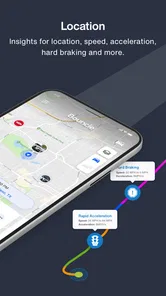
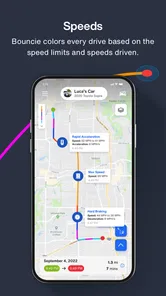
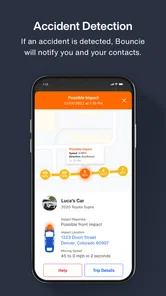
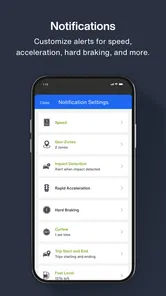
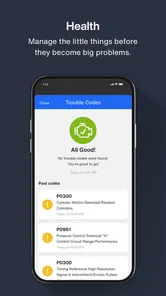
The Bouncie app provides several types of driving information, depending on the selected plan and device setup. You can generally review a vehicle’s current or recent location, trip routes, driving time, distance traveled, speed, hard braking, rapid acceleration, and possible impact events. The app may also provide vehicle health details and alerts, helping you monitor routine use and identify unusual driving behavior.
Does Bouncie require a monthly subscription?
Yes, Bouncie normally requires an active subscription because its device uses cellular connectivity to send vehicle data to the app. The hardware and service costs can vary depending on the offer, plan, or retailer, so it is important to check the current pricing before purchasing. Users should also confirm whether taxes, activation fees, cancellation terms, or other charges apply.
Pros
- Real-time location updates help you check a vehicle’s current position.
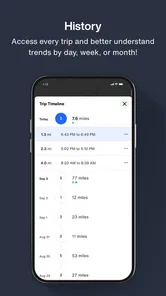
- Trip history makes it easier to review routes
- stops
- and driving activity.
- Crash detection can alert emergency contacts after a serious collision.
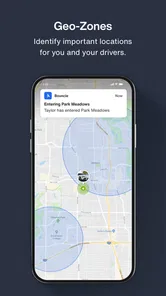
- Geofencing notifications warn you when a vehicle enters or leaves an area.
- Maintenance reminders help track service needs and vehicle health.
Cons
- Requires a compatible Bouncie device and an active subscription.
- Location accuracy may vary in poor cellular coverage or enclosed areas.
- Frequent tracking can affect battery life on the connected vehicle.
- Some alerts may arrive late because they depend on mobile network service.
- The app is mainly useful for cars
- not bicycles
- motorcycles
- or other vehicles.











