Boston.com
- 272.00
- 4.5
- Installs
- 50.00K
- Price
- Free

Screenshots



Analysis by Reviewed
I use Boston.com as a quick way to keep up with local news, weather, sports, and the subjects people around Boston are actually discussing. It is a free News & Magazines app from Boston Globe Media Partners, LLC, and its main value is focus: instead of sorting through a broad national feed, I can open one place built around Boston. That makes it especially useful when I want local context rather than another stream of general headlines.
The app has been available since April 21, 2011, and its current version is v5.12.19. It is suitable for Everyone and works on devices running Android 6.0 or later. With more than fifty thousand installs and an average rating of 4.5 from around eight hundred ratings, it has a meaningful history with readers, although those figures should be read as a general sign of reception rather than a promise that every phone or reading habit will feel identical.
How Boston.com feels during everyday reading
My first impression is that Boston.com makes the most sense when I treat it as a local check-in rather than an endless replacement for every news source. I open it when I want to know what is happening in the city, catch up on a topic I missed, or see which local stories deserve more attention. That narrower purpose helps the app feel less overwhelming than a national news aggregator filled with stories that have no practical connection to my day.
The speed I expect from an app like this depends on two things: how quickly the current content becomes available and how smoothly I can move through it once it is on screen. Boston.com is most useful when I am checking it in short sessions, such as before leaving home, during a lunch break, or while deciding whether traffic, weather, sports, or a local event may affect my plans. I would not judge it by the same standard as a simple calculator or notes app, because news content naturally involves loading articles and changing material.
For that reason, I see the app as a practical companion for frequent brief visits. A local reader can open it, scan the available stories, choose one that matters, and leave without committing to a long browsing session. That workflow is more efficient than opening several unrelated sources whenever I only need a Boston-specific update.
The strongest performance advantage is focus, not raw speed. The app gives me a defined local destination, so I spend less time filtering out irrelevant national coverage. If my goal is Boston news, that reduction in searching can make the whole experience feel faster even when an article itself still takes a moment to load.
What happens when I use it heavily
Light reading is the natural use case, but heavier sessions reveal a different trade-off. If I move from headline to headline, open several articles, and keep returning to the main feed, the app becomes more dependent on the quality of my connection and the behavior of the phone itself. That is normal for a content-led application, but it matters if I expect uninterrupted reading while moving through weak coverage or using an older device.
More From Our News Desk

Weather by Xiaomi Review: Clear at a Glance, Less Clear Up Close

X Under Pressure: Can It Recover When Posting Goes Wrong?

Clash of Clans Is Won Between the Battles

Android Auto Makes the Case for Quieter Car Software

MobiOffice: Transforming Mobile Productivity with Seamless Integration

EA SPORTS FC™ Mobile Soccer: Redefining Mobile Sports Gaming
I would use Boston.com in a busy day by separating quick checks from deeper reading. In the morning, I might scan local headlines to understand the day. Later, I can open one or two stories when I have time to read properly. This avoids turning every visit into a long session and makes it easier to notice whether a story is genuinely useful or simply interesting in the moment.
A realistic example is a weekday commute. Before leaving, I check Boston.com for local developments that could affect my plans. If I see a story relevant to my neighborhood or schedule, I read it before heading out. During the trip, I would avoid depending on the app as though it were a guaranteed offline briefing; I prefer to load important information while I have a reliable connection and keep a second source available for urgent travel decisions.
Another useful workflow is to use the app as a starting point for local context. If a headline catches my attention, I read the article in Boston.com first, then decide whether I need a broader national source for background. This is more efficient than beginning with a general aggregator, where a local story may be buried among thousands of unrelated updates.
Long reading sessions can also expose the limits of a focused news app. Someone who wants politics, international reporting, technology, business, and local coverage in one carefully balanced stream may find Boston.com too narrow. I like that narrowness when I want Boston, but I would not make it my only news habit if my interests extend far beyond the region.
Stability and recovering from interruptions
For a news app, reliability is not only about avoiding crashes. It is also about recovering sensibly when I switch to another app, lose a connection briefly, or return after leaving Boston.com open for a while. My expectation is that a local news reader should let me resume without making me repeat the entire search process. The practical test is simple: can I return to the story or section I was using without unnecessary friction?
I also pay attention to whether the app remains comfortable during repeated short visits. News reading often happens in fragments, not one long sitting. I may open the app for a minute, leave it to answer a message, and come back later. That pattern makes state recovery more important than flashy presentation. A reader who checks local news throughout the day will notice this more than someone who opens the app once each evening.
There is a sensible precaution for important information: do not rely on any single news app as the sole source for urgent alerts or time-sensitive decisions. Boston.com is valuable for local reporting and awareness, but a major emergency, travel disruption, or public safety issue may justify checking an official source as well. That is not a criticism unique to this app; it is simply good news-reading practice.
The app’s long availability is reassuring for readers who prefer an established local destination over a newly launched aggregator. At the same time, an older app history does not guarantee identical behavior on every modern device. Updates, operating-system changes, connection quality, and the amount of content being loaded can all affect the experience. I would keep the app updated and restart it if a temporary loading problem appears, rather than assuming the issue reflects the whole service.
Older phones, storage, and daily device demands
Boston.com supports Android 6.0 and later, which gives it a broad compatibility range. That is helpful if I am using a phone that is not new, but compatibility is only the starting point. A device that can install an app may still feel slower when storage is nearly full, memory is under pressure, or the connection is inconsistent. News applications also handle changing content, so the reading experience can vary more than it would with a static utility.
I would be comfortable trying it on a modest Android phone if my expectations were realistic. For short reading sessions, the main question is whether the device can load pages and move between them without annoying pauses. If my phone is already struggling with several demanding apps, I would close unused applications before blaming Boston.com for every delay. This small habit can make local reading more pleasant without requiring a newer device.
Resource demands matter most to people who keep many apps active, use an older battery, or read for long periods. I do not see a reason to install Boston.com solely for constant background use; its value comes from opening it when I want local information. Treating it as an on-demand reader is a sensible way to limit unnecessary device activity and keep the app’s role clear.
Storage is another practical consideration. I would leave enough free space for the phone to operate comfortably and avoid judging the app while the entire device is crowded. If I need a lightweight, text-first experience above all else, a mobile browser may be preferable in some situations. The browser can reduce the number of installed apps, while the dedicated app is more convenient for a reader who returns to Boston coverage often.
The choice between the app and a browser comes down to habit. I prefer the app when I want a dedicated local-news shortcut and do not want to search for Boston.com each time. I would choose the browser when I am conserving storage, switching between many publications, or using a device where installing another app feels unnecessary.
Who gets the most from this local focus
Boston.com is a strong fit for Boston residents, commuters, students, former residents who still care about the area, and anyone planning a visit who wants a local perspective. It is also useful for people who feel that national news apps give them too much information without enough connection to their immediate surroundings. The app’s purpose is easy to understand: open it when Boston is the part of the world you want to follow.
I especially recommend it to readers who prefer several short check-ins instead of a single long news session. A local app works well in that rhythm because I can use it to orient myself, identify a story worth reading, and return later for another update. It also gives me a clearer starting point than a general feed when I am specifically interested in the city.
On the other hand, someone outside the Boston area may not get enough value from it. A traveler who only needs broad national headlines, a specialist who wants a dedicated business publication, or a reader who expects one app to cover the entire world should look at broader alternatives as well. Boston.com can complement those services, but it does not need to replace them.
The free price makes trying it straightforward, particularly for readers who are unsure whether a local-news app belongs in their routine. I would install it, use it during several different parts of the day, and judge it by whether it helps me find relevant Boston stories faster than my current method. That is a better test than deciding from one brief opening.
How it compares with general news alternatives
Compared with a national news aggregator, Boston.com feels more purposeful. A general feed is better when I want a wide range of sources and subjects in one place. Boston.com is better when local relevance matters more than variety. The trade-off is obvious: I gain a stronger Boston identity but give up some breadth.
Compared with reading Boston.com in a browser, the dedicated app is more convenient for repeated access. The browser remains useful when I are moving between publications or trying to limit installed software. I would choose the app for routine local reading and the browser for occasional visits or broader research.
Compared with social media, the app offers a calmer starting point for finding local stories. Social feeds can surface useful information quickly, but they also mix commentary, repetition, and unrelated material. Boston.com gives me a more direct path to local coverage. I still would not confuse a news app with a complete community conversation; social platforms may provide reactions and eyewitness discussion that a publication app does not replace.
Compared with a newspaper app built around a broader regional or national publication, Boston.com’s appeal is its Boston-centered identity. Readers who want a single publication for many regions may prefer another service. Readers who want the city itself to remain the organizing principle will likely understand this app more quickly and use it more consistently.
Small habits that improve the experience
I get more from Boston.com when I open it with a question in mind. “What matters locally this morning?” is more useful than endlessly refreshing without a purpose. If I am checking a developing situation, I read the full article rather than relying on a headline. If I am browsing casually, I limit the session so the app remains a helpful update rather than another source of information overload.
I also separate discovery from verification. The app is a good place to discover a local story and understand why it matters in Boston. For decisions involving safety, travel, or official instructions, I check the responsible authority too. This habit protects against acting on a partial news picture and makes the app more valuable because I use it for context instead of asking it to do every job.
For older phones, I keep the operating system within the supported range, maintain free storage, and close unusually demanding apps before a long reading session. When a page seems slow, I first consider the connection and the phone’s overall condition. If the app has been left open through several interruptions, restarting it is a reasonable recovery step.
For readers deciding between the app and a browser, I suggest a simple rule: install it if Boston news is part of your regular routine. If you only visit occasionally, the browser may be enough. That distinction prevents the app from becoming unnecessary clutter while still recognizing its convenience for frequent local readers.
My performance verdict
After looking at speed expectations, heavier use, recovery, and device constraints, I see Boston.com as a focused local-news tool rather than an all-purpose media hub. Its performance value comes from making Boston the center of the experience, which reduces the effort involved in finding relevant coverage. It is most convincing during short, repeated sessions on a reasonably maintained device with a dependable connection.
The app is not the right choice for readers who need a worldwide news dashboard, a specialist publication, or a guaranteed substitute for official emergency information. It may also feel unnecessary if I already have a browser routine that gives me the same local access without adding another installation. Those are fair reasons to choose a different option, not flaws that every user must overcome.
For me, the balance is positive. Boston.com earns its place when local relevance matters more than having every subject in one feed. It is free, accessible to a broad range of Android devices, rated 4.5 on average by its users, and clearly aimed at people who want a closer connection to Boston news. I would recommend Boston.com to a friend who wants dependable local reading in a dedicated app, while suggesting that they keep a broader source and official channels nearby for needs the app is not designed to cover.
Boston.com Frequently Asked Questions
Is the Boston.com app available for my phone?
Boston.com is a news and magazines app from Boston Globe Media Partners, LLC. Before downloading, check that your device meets the app’s minimum operating-system requirement: Android 6.0 or later. Keeping your operating system and app updated can also help you get the latest available version and a smoother reading experience.
What is the Boston.com app used for?
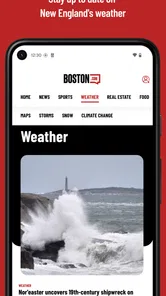
Boston.com is designed to keep readers informed about news and events in the Boston area and across New England. After exploring its content, you can expect local reporting, breaking news, politics, sports coverage, entertainment, lifestyle stories, weather-related updates, and community information. It is especially useful for residents, commuters, students, and anyone who wants a convenient overview of what is happening in and around Boston.
Does Boston.com provide reliable local news and breaking updates?
The app focuses primarily on Boston-area journalism and regularly publishes updates as stories develop. Its coverage includes local government, neighborhoods, transportation, public safety, business, sports, and regional events. As with any news platform, breaking reports can change as more information becomes available, so it is wise to read follow-up updates and compare major or sensitive stories with official statements and other reputable sources.
Is the Boston.com app free to download and use?
Boston.com is free to download, allowing users to browse its articles and features. The app is rated Everyone, making it suitable for a broad audience. Access to individual content may depend on the app’s current terms and any restrictions that apply, so review the app’s details in your device’s app store before downloading.
Can I customize notifications and the type of news I receive?
The app may offer notifications for breaking news, important local developments, sports results, weather, or other selected topics, depending on the platform and version installed. During testing, notification controls were an important part of the overall experience because frequent alerts can become distracting. After installation, review the app’s notification settings and your device permissions so you receive useful updates without unnecessary interruptions.
Pros
- Covers breaking Boston news
- local politics
- sports
- and community stories.
- Strong Red Sox
- Celtics
- Bruins
- and Patriots coverage for local fans.
- Includes restaurant reviews
- event guides
- and useful lifestyle recommendations.
- Provides weather updates and forecasts tailored to the Boston area.
- Offers local reporting that helps residents follow neighborhood developments.
Cons
- Most content is focused on Boston and may feel irrelevant outside New England.
- Some articles and features may require a paid subscription to access fully.
- Frequent notifications can feel excessive unless carefully customized.
- Advertising may make parts of the app feel cluttered during browsing.
- Coverage can be less useful for users seeking national or international news.












