Blink Charging Mobile App
- 1.69K
- 3.8
- Installs
- 100.00K
- Price
- Free

Screenshots
Analysis by Reviewed
Ever been in a situation where your electric vehicle (EV) is running low on juice, and the nearest charging station feels like it's on another planet? Well, worry no more, because the Blink Charging Mobile App is here to save the day! I recently had the chance to take this app for a spin, and let me tell you, it's a game-changer for EV owners.
Finding Your Nearest Charging Station
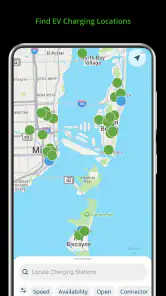
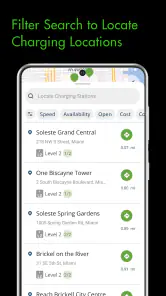
When it comes to locating charging stations, the Blink Charging Mobile App has got you covered. With its user-friendly interface, you can easily search for stations nearby or even plan your route with charging stops along the way. The app provides real-time updates on station availability, so you won’t waste time driving to a station that's already occupied.
Reservation and Payment Made Easy
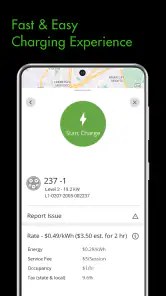
One of the standout features of this app is the ability to reserve a charging spot in advance. Imagine the peace of mind knowing you've secured a spot, especially during peak hours. Plus, the payment process is as smooth as butter. The app supports multiple payment options, making it super convenient to pay for your charging session without any hassle.
Not Just for Blink Users
Even if you aren't a Blink member, this app can still be your best friend on the road. It allows guest users to access many of the features, although signing up does offer additional perks like discounted rates and regular updates on new station openings.
Moreover, the app is designed to be inclusive, supporting a wide range of EV models. So, whether you drive a Tesla, Nissan Leaf, or a Chevy Bolt, you’ll find it incredibly handy. I personally loved how seamless it was to integrate this app into my everyday routine. It’s like having a personal assistant dedicated to keeping my EV charged and ready to go.
Friendly User Interface
The developers have done a stellar job with the interface. It's intuitive, clean, and doesn’t bombard you with unnecessary information. Everything is where you expect it to be, and that’s a big thumbs up in my book. I especially liked the map feature, which not only shows charging stations but also their status – available, in-use, or out of order.
In conclusion, if you're an EV owner, the Blink Charging Mobile App is pretty much a must-have. It's reliable, easy to use, and can save you a ton of time and stress. So, next time you're heading out on a road trip or just commuting to work, make sure this app is downloaded and ready to go. Trust me, you won't regret it!
Blink Charging Mobile App Frequently Asked Questions
What devices and operating systems can run the Blink Charging Mobile App?
The Blink Charging Mobile App is available for Android and iOS devices, making it accessible to users on either mobile platform. On Android, the app requires Android 10 or later. It is a free Auto & Vehicles app developed by Blink Charging, and its Everyone content rating makes it suitable for a general audience.
Who develops the Blink Charging Mobile App, and what should I know about its user feedback?
Blink Charging develops the app, which focuses on making it easier to find EV chargers. It has an average rating of 3.8 from around 5,400 ratings, alongside roughly 1,700 written reviews. Those figures offer a broad sense of user feedback, though individual experiences may differ depending on a person's device, needs, and use of Blink charging stations.
What is the Blink Charging Mobile App and how does it work?
The Blink Charging Mobile App is designed to facilitate electric vehicle (EV) charging by allowing users to locate Blink charging stations, check availability in real-time, and initiate charging sessions remotely. Additionally, users can view charging history, manage accounts, and receive notifications about charging status. The app is available for both Android and iOS devices.
Is the Blink Charging Mobile App free to download and use?
Yes, the Blink Charging Mobile App is free to download from both the Google Play Store and Apple's App Store. While the app itself is free, users will incur costs associated with the actual charging of their vehicles at Blink charging stations. Pricing may vary depending on the location and type of membership.
What are the key features of the Blink Charging Mobile App?
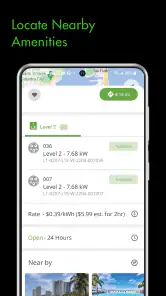
The Blink Charging Mobile App offers a variety of features including locating nearby charging stations, real-time availability updates, remote start of charging sessions, and account management. Users can also monitor their charging history, track energy consumption, and receive notifications about charging status. The app aims to provide a seamless and efficient experience for EV owners.
Pros
- Real-time charging station availability
- User-friendly interface
- Multiple payment options
- Detailed charging history
- Wide network coverage
Cons
- Limited customer support
- Occasional app crashes
- Requires account registration
- Limited offline features
- Inconsistent charging rates

- Category
- Auto & Vehicles
- Version
- 3.1.30











