BlazeTV
- 3.84K
- 3.7
- Installs
- 500.00K
- Price
- Free

Screenshots
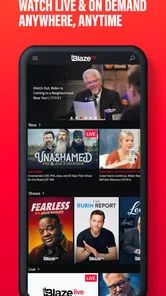
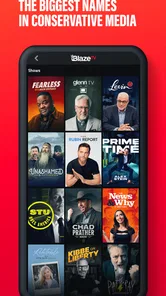
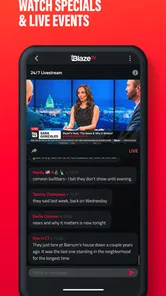
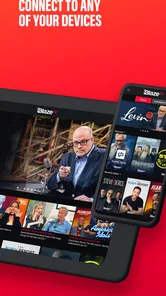

Analysis by Reviewed
I approach BlazeTV as a focused place to watch political and cultural commentary from a conservative perspective, not as a one-stop source for every kind of news. That distinction matters from the first session: if you want hosts making arguments and discussing issues, the app has a clear purpose; if you want a neutral scan of headlines, you may be happier elsewhere. I find it most useful when I treat it as one voice in a wider news routine.
Where viewers can get stuck
The main hurdle is less about finding something to watch and more about knowing what kind of experience you want. BlazeTV centers its appeal on a clear point of view, which can be a strength if you seek that perspective and a limitation if you expect a neutral, all-sides news digest. I would go in looking for commentary and conversation, then use other reporting when I need a broader account of a developing story.
It also helps to separate the app’s content from the practical question of access. The app is free to download, but it includes in-app purchases listed from $14.99 to $120 per item. Before committing to anything paid, I’d check the purchase details shown in the app and make sure they match what I intend to access. That small pause is especially useful if I’m only trying it out or setting it up for someone else.
Setup checks before a viewing session
If a show will not play or the app feels slow, I’d start with basic checks rather than assume the content itself is unavailable: confirm the device has a working connection, close and reopen the app, and check that the installed version is current. Version 9.58.0 is the current release listed, and the minimum operating-system requirement is 7.1. Those details matter when an older phone or tablet is involved; an operating system below the requirement can be a more likely obstacle than a navigation mistake.
For a smoother routine, I’d open the app before a planned viewing session and find the episode or live stream I want while I have time to troubleshoot. If I’m using it during a commute or between errands, I wouldn’t count on a live program being convenient at the exact moment I’m free; the option to catch up on episodes is more practical when schedules do not line up.
How BlazeTV fits into a daily news routine
For example, I might check in after work, choose a discussion that speaks to a topic I’ve been following, and then compare its claims with reporting from a general news source. That gives me the value of a distinct editorial lens without treating commentary as a complete news briefing. The app is a better match for viewers who enjoy hosts and debate than for someone who wants a quick, largely factual headline scan.
Recovering a disrupted workflow
If playback or navigation interrupts a session, I’d keep the fix simple: return to the program list, reopen the item, and restart the app if the screen remains unresponsive. If the problem continues, checking the connection and device compatibility is a sensible next step. I would avoid repeatedly tapping purchase or playback controls while the app is stalled; first make sure the screen has recovered so an accidental selection does not complicate the session.
More From Our News Desk

Weather by Xiaomi Review: Clear at a Glance, Less Clear Up Close

X Under Pressure: Can It Recover When Posting Goes Wrong?

Clash of Clans Is Won Between the Battles

Android Auto Makes the Case for Quieter Car Software

MobiOffice: Transforming Mobile Productivity with Seamless Integration

EA SPORTS FC™ Mobile Soccer: Redefining Mobile Sports Gaming
There is also a useful habit for anyone who watches to understand an argument rather than simply pass time: note the specific claim that interests you, then look for independent context afterward. That makes the app more valuable as a starting point for discussion, while guarding against the common mistake of letting a single commentator stand in for the whole news picture.
When another option is a better fit
BlazeTV makes the most sense when you want a recurring slate of shows and a recognizable conservative voice. A broad news app is the more practical choice if your priority is scanning headlines across many subjects and viewpoints in one place. Someone who rarely watches long-form commentary may also find that a general news source suits their habits better. The best comparison is not which app is universally superior, but whether you want a perspective-led program experience or a wider, more neutral starting point.
Choosing it for the right kind of viewing
I’d recommend it most readily to someone who already knows they enjoy opinion-led programs and wants to make those shows part of a regular routine. It can also suit a viewer who wants to hear arguments they do not encounter in their usual news feed, provided they are willing to check important claims against other reporting. The key trade-off is simple: a consistent editorial identity makes it easier to find a familiar perspective, but it does not replace the range of subjects and viewpoints a general news service aims to provide.
For a household deciding whether to install it, I’d think about who will actually watch and what they expect from it. A person who follows political discussion and prefers watching a host unpack an issue may get more from it than someone who only wants breaking headlines. If you are setting it up for a relative, I would explain both the perspective and the purchase prompts before handing over the device, so they can distinguish free installation from any paid choices.
A practical way to fit it into the day
One realistic use is to open the app after dinner, choose a program connected to a story that came up during the day, and watch with a specific question in mind. Instead of letting a long session turn into background noise, I’d pause afterward to identify what was fact, what was interpretation, and what would benefit from another source. That small routine makes commentary easier to assess and gives the viewing a purpose beyond filling spare time.
If time is short, I would not open it expecting the same quick utility as a headline reader. The format is more rewarding when I can give a discussion some attention, and less convenient when I have only a minute to check what happened. For a busy day, I’d use a general news app for the fast overview and return to BlazeTV when I want to spend longer with a particular argument or topic.
Making a fair comparison with other news apps
Compared with a conventional news aggregator, BlazeTV puts the emphasis on programs and a defined editorial outlook rather than presenting itself as a broad collection of competing reports. That can reduce the effort of finding commentary from the perspective you came for. The reverse is also true: if your goal is to compare several accounts of the same event in one place, a multi-outlet news app is likely the more efficient tool.
I would not judge the app by whether it behaves like a newspaper reader, because that sets the wrong expectation. Its value is in watching voices develop an argument and following the subjects they choose to discuss. A useful pairing is to use it for that perspective, then consult a source with a different editorial approach for background, dates, and corroboration. That is a more balanced workflow than asking either one app to do every job.
What Sets BlazeTV Apart?
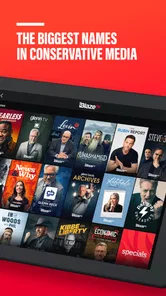
Imagine having a network that brings you unfiltered, bold, and, at times, controversial content. That's exactly what BlazeTV offers. The platform hosts a myriad of shows that you won't find on mainstream media, each with a unique perspective that challenges the status quo. Whether you're tuning in for the latest on American politics, cultural debates, or just some good old-fashioned commentary, BlazeTV has got something for everyone.
Content That Sparks Conversations
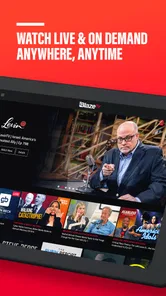
The app's interface is sleek and user-friendly, making navigation a breeze. Once you dive in, you'll find a treasure trove of shows hosted by personalities who aren't afraid to speak their minds. From Glenn Beck's deep dives into political issues to Steven Crowder's comedic yet thought-provoking takes, there's no shortage of content that will keep you glued to your screen.
One of the features I appreciate the most is the ability to watch live streams and catch up on episodes you might have missed. This flexibility means you can stay informed on your own schedule. Plus, the app offers exclusive content that's not available anywhere else, giving you that little extra incentive to keep coming back for more.
The Community and User Experience
BlazeTV isn't just about watching shows; it's about being part of a community. The app allows for interaction with fellow viewers, providing a platform for discussions and debates around the topics that matter most to you. The comment sections are lively, and it's refreshing to see a space where different viewpoints can be shared openly.
As for the user experience, I found the app to be quite stable with minimal glitches. It's compatible with both Android and iOS devices, ensuring that you can access your favorite content no matter what device you're using.
Ratings, cost, and expectations
As a free News & Magazines app from BLAZE MEDIA LLC, it has reached over 500,000 installs and holds an average rating of 3.8 from around 7,200 ratings. I read that as evidence of an established audience, not a guarantee that its viewpoint or viewing style will suit everyone. The Teen age rating is another practical point for families to keep in mind when deciding whether the content fits their household.
The app is currently at version 9.58.0, and it requires an operating system of at least 7.1. Those are useful checks before troubleshooting: if the device is below that minimum, reinstalling or repeatedly reopening the app is unlikely to solve the underlying compatibility issue. On a supported device, I’d still begin with the connection and a fresh app launch before assuming the program itself is the problem.
When the app may not be the cause
A failed session does not always point to a defect in the app. If other online services are also struggling, the connection is a sensible first place to look. If only one item fails, I’d leave it, return to the program list, and try again later rather than repeatedly tapping the same control. If the whole interface stops responding, closing and reopening the app is a more measured first step than changing several device settings at once.
I also find it helpful to separate access questions from editorial expectations. A program that presents a strong interpretation may not answer every factual question I have, but that is different from a playback problem. Decide whether the issue is technical or whether you wanted a wider range of coverage; the first calls for basic troubleshooting, while the second may call for pairing this app with a different kind of news source.
Final Thoughts
To sum it up, BlazeTV is more than just an app—it's a movement. It brings together a community of individuals who are passionate about staying informed and engaging in meaningful conversations. If you're someone who values diverse opinions and enjoys content that challenges the norm, then BlazeTV is definitely worth checking out. Just remember to keep an open mind and enjoy the ride!
Happy watching!
BlazeTV Frequently Asked Questions
Is BlazeTV suitable for viewers who want news and entertainment in one app?
BlazeTV is a News & Magazines app with the tagline “News & Entertainment for people who love America.” It brings news and entertainment together for viewers interested in that focus. If you are deciding whether it fits your interests, consider the kind of commentary and programming you typically watch and whether BlazeTV’s stated focus appeals to you.
Is BlazeTV free to download, and what might I pay for inside the app?
BlazeTV is free to download, so you can install the app without paying an upfront download price. It also offers in-app purchases, with listed items ranging from $14.99 to $120.00 each. Those purchases are separate from downloading the app, so review the purchase options shown in the app before committing to anything.
What is BlazeTV and what kind of content does it offer?
BlazeTV is a streaming service that offers a variety of content aimed at conservative audiences. It features a mix of political commentary, news, documentaries, and entertainment programming. Users can access shows from well-known conservative personalities and enjoy a platform that prioritizes free speech and diverse opinions within the conservative space.
How can I access BlazeTV on my devices?
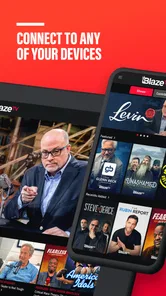
BlazeTV is accessible on multiple platforms, including iOS and Android devices, as well as through web browsers on laptops and desktops. Additionally, you can watch BlazeTV on smart TVs and streaming devices such as Roku, Apple TV, and Amazon Fire TV. Simply download the app from your device's app store or visit the BlazeTV website to start streaming.
Do I need a subscription to watch BlazeTV, and are there any free trials?
Yes, a subscription is required to access BlazeTV content. The service offers several subscription plans, including monthly and annual options. New users can take advantage of a free trial period, usually lasting about 7 days, to explore the content and features before committing to a paid plan. Be sure to check the website for the latest offers.
Pros
- High-quality streaming content
- Wide variety of shows
- User-friendly interface
- Offline viewing available
- Personalized recommendations
Cons
- Subscription required
- Limited content in some regions
- Occasional streaming lags
- Lacks social sharing features
- Ads in lower subscription tiers











