Beauty Camera -AI Photo Editor
- 52.00
- 4.3
- Installs
- 1.00M
- Price
- Free

Screenshots



Analysis by Reviewed
I find Beauty Camera - AI Photo Editor most useful when I want a finished-looking portrait without opening a complicated desktop editor. It is a beauty app from Kamrej Apps, aimed at quick photo touch-ups, makeup effects and filters rather than detailed image work. That focus is convenient, but it also shapes the experience: the appeal is speed and approachable controls, not fine-grained control over every pixel.
When the network becomes part of the workflow
AI-assisted effects and filters are the kind of tools people often want to try while browsing, sharing or choosing a picture, so a steady connection can matter during parts of the experience. I would plan edits that rely on network access when I have a reliable signal, rather than assuming every option will behave the same way in a basement, on a train or in a crowded venue. That is a practical habit, not a claim that the app requires a connection for every task.
For a casual user, the useful question is less “Can I edit every photo anywhere?” and more “Can I finish the picture I need before I share it?” I would choose the image first, make a restrained edit, and check that the result is saved before leaving a dependable connection. If you are preparing several portraits for a post or an event, doing the selection and editing in one sitting can also make it easier to keep the look consistent.
Getting Started with the Magic
Downloading the Beauty Camera - AI Photo Editor is as easy as pie. Once it's on your device, you'll find an interface that's both intuitive and sleek. I mean, I’m not a tech wizard, but navigating through the app felt like a breeze. The app opens up with a camera interface that is ready to snap your photo, or, if you're feeling nostalgic, you can upload one from your gallery.
Choosing the right photo on a phone
Having both a camera starting point and a gallery option suits two different mobile moments: taking a quick selfie while getting ready, or revisiting a portrait you already took in better light. I would favor the gallery route when the moment is not urgent. It lets me compare a couple of shots before editing, which often matters more than applying another effect; a well-lit, focused original usually gives a more natural result than trying to rescue a blurry picture.
A realistic use is getting a profile photo ready during a short break. I would pick a clear image, make one small adjustment at a time, and pause between changes to check whether the face still looks like me. On a phone screen, strong filters can seem appealing in the moment and look much heavier later on a larger display. A quick final check at normal brightness helps avoid that surprise.
The Features that Make You Go Wow
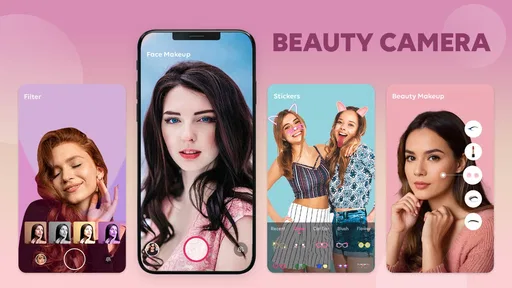
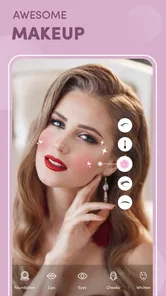
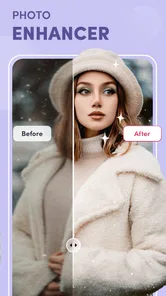
Okay, let’s talk about the features because that's where the real fun begins. The app offers a multitude of editing tools that enhance your photos using AI technology. From smoothing out your skin to adding a little blush, it’s like having a digital makeup artist at your beck and call. The AI is smart, like scary smart, and knows just how to enhance your features without making you look too "edited."
More From Our News Desk

 Instagram
’s Power Comes From Its Place in Your Phone
A close look at how Instagram turns Meta’s reach, recommendation systems and everyday camera habits into durable platform power—and what that costs users.

 Gmail
Gmail in a Busy Inbox: Who Benefits Most?
From first account to crowded workday, Gmail earns its place through dependable search and flexible sorting—but its best fit depends on how much inbox maintenance you can tolerate.

 Prime Video
Switching to Prime Video: What Changes in Your Viewing Routine
Prime Video can make a compelling second home for streaming, but switching means learning a different catalog, rental layer, and route from browsing to playback.
 Universal TV Remote Control
 Works Best as a Reliable Backup
A phone remote earns its place through quick setup and reliable habits. Here is how to get more from Universal TV Remote Control—and where its limits show.

 Weather - By Xiaomi
Weather by Xiaomi Review: Clear at a Glance, Less Clear Up Close
Xiaomi’s weather app makes everyday forecasts quick to scan, but its calm surface can leave useful details and recovery paths harder to find than they should be.

 X
X Under Pressure: Can It Recover When Posting Goes Wrong?
A resilience-focused review of X, examining setup, mistaken posts, interruptions, weak connections, and the gaps that matter when recovery needs to be dependable.
Latest News



Among the many features, what really caught my eye was the ability to adjust lighting and contrast with just a swipe. It’s like having a tiny but mighty photo editor right in your hands. And for those who love a little drama, the app provides a range of filters that can set the mood just right. Whether you're going for that sunny day glow or the moody evening look, this app has got you covered.
Keeping edits natural and recoverable
My best tip is to treat each tool as a small correction, not a reason to redo the whole face. I would begin with lighting and contrast, then try makeup or smoothing only if the portrait needs it. That order makes it easier to spot when an effect is doing too much. Compare the edited image with the original before settling on a look, especially if you are changing several things in one pass.
If a filter feels wrong, stepping back and trying a lighter touch is usually better than stacking more effects to compensate. I would also keep an untouched copy of a favorite photo in the gallery before experimenting. That simple precaution gives you a clean original to return to, whether you are changing your mind or making a different version for a work profile and a more playful social post.
Who benefits, and what alternatives do better
This is a sensible fit for people who want approachable portrait editing and quick makeup-style changes without learning a full editing suite. It can also be useful for someone who wants to test a few looks before choosing a profile picture. If your priority is precise retouching, layered adjustments or careful control over a whole scene, a general-purpose photo editor is likely a better match. Those tools take more effort, but they usually suit edits where preserving texture and controlling each detail matter more than speed.
Compared with a basic phone gallery editor, the attraction here is the beauty-focused mix of portrait effects and filters. Compared with a professional editor, the trade-off is the opposite: less emphasis on detailed manual work in exchange for a more direct, playful workflow. I would not choose it to correct a complicated group photo or to make a subtle commercial image; its strongest use is a single portrait where a quick, visible improvement is the goal.
Limits, cost and fit
The app is free to install, with optional in-app purchases listed at $7.99 per item. That makes it easy to try the basic experience before deciding whether any paid item is worth it to you. Beauty Camera has an average rating of 4.3 from around 2.9 thousand ratings, and it has passed over one million installs. It is rated for everyone, runs on Android 8.0 or later, and its current version is 1.44.
Those details make it accessible to many Android users, but the best choice still depends on your editing habits. If you want to adjust a selfie in a few minutes, the approachable controls are a genuine advantage. If you dislike beauty effects, want a strictly manual workflow, or need dependable editing in places with unreliable connectivity, I would look at a more conventional editor instead. Kamrej Apps has made a focused tool, and that focus is both its convenience and its boundary.
Why You’ll Love It
Let me tell you why I’m gushing over this app. First off, it’s incredibly user-friendly. You don’t have to be a professional photographer to make your photos look professional. The AI does most of the heavy lifting, which is great for those of us who just want to look good without spending hours editing.
Another thing? It's incredibly versatile. Whether you need a quick touch-up before posting on social media or you’re just playing around with your photos, there’s something for everyone. The app makes even the simplest selfies look like they’ve been taken by a pro, and who doesn’t want that kind of magic?
The Final Say
In a world where our digital presence matters more than ever, Beauty Camera - AI Photo Editor is a must-have tool for anyone looking to enhance their photos effortlessly. It combines simplicity with stunning features that can make any photo pop. So, if you haven't already, give it a try and unleash your inner photographer. Trust me, you won't regret it!
Beauty Camera -AI Photo Editor Frequently Asked Questions
Is Beauty Camera - AI Photo Editor suitable for both Android and iOS devices?
Beauty Camera - AI Photo Editor is a beauty-focused photo editing app, and checking your device’s store page before downloading is a good way to confirm compatibility. For Android, the app requires Android 8.0 or later. If you use an iPhone or iPad, review the requirements shown in the relevant app store so you can make sure the version offered there works with your device.
Who develops Beauty Camera - AI Photo Editor, and what is its general reputation?
Beauty Camera - AI Photo Editor is developed by Kamrej Apps. It has a 4.3 average rating from around 2.9 thousand ratings, giving prospective users a useful snapshot of how it has been received. Ratings reflect individual experiences, so it is sensible to consider whether its beauty tools and editing style suit what you want from a photo editor.
What features does Beauty Camera - AI Photo Editor offer to enhance my photos?
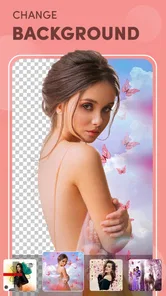
Beauty Camera - AI Photo Editor provides a range of features designed to enhance your photos effortlessly. It includes AI-powered tools like automatic beautification, filters, and effects to improve skin tone, remove blemishes, and add makeup virtually. You can also enjoy advanced editing options such as background changes, lighting adjustments, and image cropping to create stunning visuals with just a few taps.
Is Beauty Camera - AI Photo Editor free to use, or does it require a subscription?
Beauty Camera - AI Photo Editor is free to download, so you can try its basic features without paying upfront. It also offers in-app purchases, with items priced at $7.99 each. Check the purchase details in the app before buying anything, and consider whether the available free tools meet your needs before spending money.
How user-friendly is Beauty Camera - AI Photo Editor for beginners?
Beauty Camera - AI Photo Editor is designed with user-friendliness in mind, making it suitable for beginners and experienced photo editors alike. It features an intuitive interface with easy navigation and one-tap editing options. Whether you're new to photo editing or a seasoned pro, the app's streamlined design aims to make it straightforward to create and adjust images.
Pros
- User-friendly interface for easy navigation.
- Wide range of editing tools available.
- AI enhancements improve photo quality.
- Quick processing and exporting of images.
- Frequent updates with new features.
Cons
- In-app purchases can be expensive.
- Occasional bugs in certain features.
- Limited free version capabilities.
- Advertisements can be intrusive.
- Requires internet for full functionality.