

Banks Power
- 42.00
- 4.3
- Installs
- 10.00K
- Price
- Free

Screenshots
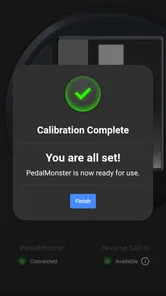
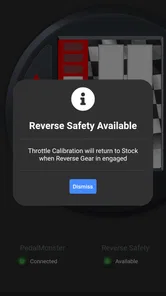
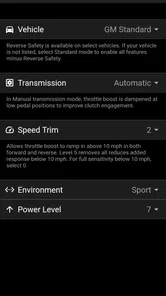
Analysis by Reviewed
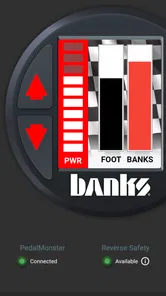
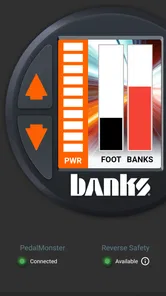
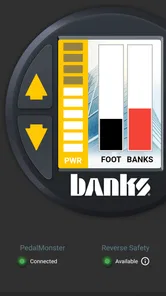
I spent time with Banks Power as an automotive companion rather than treating it like a general vehicle app. Its purpose is quite focused: it gives drivers a way to work with compatible Banks hardware, especially the iDash Pro and PedalMonster. That narrow focus is important. If your vehicle does not use those products, this is not an app you install simply to browse tools or learn about diesel performance. If you do use them, the app can become the practical control point you reach for when driving settings, checking information, or coordinating changes between people who share the vehicle.
That makes the app unusual in the Auto & Vehicles category. Many alternatives in this space are built around navigation, fuel prices, maintenance reminders, insurance, or generic diagnostics. Banks Power is much more equipment-specific. I found that its value depends less on how many things it does and more on whether it sits directly beside the hardware already installed in your truck. For the right owner, that specialization is a strength. For everyone else, it is a clear reason to skip it.
How the app fits into a shared vehicle
The most realistic use case is a household with one modified truck and several drivers. Imagine one person using the vehicle for towing during the week, another taking it to work, and a third occasionally borrowing it for errands. Without a shared control point, every driver may have a different idea of how the truck should respond. One person may prefer a conservative pedal feel, while another may want a sharper response. The app gives the owner a practical place to manage the connected Banks equipment instead of relying on separate habits or trying to remember which physical controls were changed last.
I would not describe this as a family-management app, because it is not designed around profiles, parental controls, or household permissions. Its role is mechanical and operational. The household benefit comes from having one recognizable tool for the vehicle, not from special family features. That distinction matters when deciding whether it belongs on several phones or only on the phone of the person who normally manages the truck.
For a shared device, I would keep expectations simple. The app is useful when the people using it understand the vehicle and the connected Banks products. It is not a substitute for explaining safe driving behavior to a new driver, and it should not be treated as a remote permission system. If a teenager, visiting relative, or occasional borrower uses the truck, I would agree on settings before handing over the keys rather than expecting the app to enforce boundaries.
The app is free to install, which removes one barrier for a household that wants to try it. The more meaningful question is whether the truck already has compatible Banks equipment. The software alone does not turn a standard vehicle into a Banks-controlled vehicle, so downloading it before checking hardware compatibility may lead to disappointment. I see it as an accessory to an existing setup, not as a standalone automotive utility.
What I would decide before installing it
My first step would be to identify exactly which Banks product is installed and who is responsible for changing its settings. The store summary points directly to control of the iDash Pro and PedalMonster, so I would begin there rather than assuming every Banks product appears in the same way. This simple check prevents a common mistake: expecting a broad dashboard app when the experience is really centered on particular equipment.
More From Our News Desk

 Gmail
GmailGmail in a Busy Inbox: Who Benefits Most?
From first account to crowded workday, Gmail earns its place through dependable search and flexible sorting—but its best fit depends on how much inbox maintenance you can tolerate.

 Prime Video
Switching to Prime Video: What Changes in Your Viewing Routine
Prime Video can make a compelling second home for streaming, but switching means learning a different catalog, rental layer, and route from browsing to playback.

 Universal TV Remote Control
Universal TV Remote Control Works Best as a Reliable Backup
A phone remote earns its place through quick setup and reliable habits. Here is how to get more from Universal TV Remote Control—and where its limits show.

 Weather - By Xiaomi
Weather by Xiaomi Review: Clear at a Glance, Less Clear Up Close
Xiaomi’s weather app makes everyday forecasts quick to scan, but its calm surface can leave useful details and recovery paths harder to find than they should be.

 X
XX Under Pressure: Can It Recover When Posting Goes Wrong?
A resilience-focused review of X, examining setup, mistaken posts, interruptions, weak connections, and the gaps that matter when recovery needs to be dependable.

 Clash of Clans
Clash of Clans Is Won Between the Battles
Its raids are quick; its community is a long-term project of coordination, teaching, rivalry, and shared responsibility—with all the friction that entails.
Latest News



I would also decide whether the app is needed by every driver. If one owner handles configuration and everyone else only drives, installing it on every phone may add confusion without adding much value. If two adults regularly adjust the vehicle for different jobs, shared access can be more practical. The important boundary is not age or family role by itself; it is whether the person understands what a setting change can mean while the vehicle is being driven.
Because the application is free and rated for Everyone, it is easy to view it as harmless general-purpose software. In practice, the content rating describes the app’s audience, not the skill level required to operate connected vehicle hardware responsibly. I would be comfortable with a family member seeing the app, but I would still reserve configuration decisions for someone who knows the truck, the attached products, and the reason for each adjustment.
That is where the app differs from a typical fuel or parking application. A household can let almost anyone use those tools without affecting the vehicle’s behavior. Banks Power belongs closer to an equipment control panel. The interface may be approachable, but the consequences of careless changes come from the hardware and the vehicle, not from the age label in the app store.
Setup is more about preparation than tapping through screens
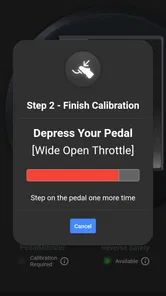
My advice is to approach setup with the truck parked and the relevant hardware close at hand. This is not an app I would explore while stopped briefly at a fuel station or while another person is waiting to leave. A calm setup session makes it easier to identify the connected equipment, understand what the app is showing, and agree on a baseline before anyone experiments.
I would also keep the first session deliberately conservative. Rather than changing several things at once, I would note the starting behavior, make one adjustment, and observe the result under suitable conditions. That workflow is more useful than chasing an impressive-feeling change immediately, because it gives the household a shared reference point. If the truck later feels different, you have a better chance of knowing which change caused it.
One of the less obvious strengths of a dedicated app is that it can reduce guesswork between the phone and the hardware. Instead of treating the PedalMonster or iDash Pro as an isolated accessory, the driver can approach the whole setup as one system. The trade-off is that the app becomes less forgiving of vague expectations. You need to know what you are trying to accomplish: smoother response for daily use, a different feel for towing, or clearer information from the display. Without that goal, the controls can become interesting but not especially useful.
I would not make a habit of adjusting settings while moving. Even if the app makes a change technically convenient, a driver’s attention belongs on the road. In a shared household, this is worth saying out loud because convenience can encourage experimentation at the wrong moment. Set the vehicle up before departure, then drive. If a change is needed, pull over safely and handle it there.
Another practical boundary is phone ownership. If the app is installed on a shared tablet or a family phone, everyone may assume the visible configuration is the approved one. That can work only when the household communicates clearly. I prefer one primary phone for management, with other drivers knowing who to contact when the truck needs a different setup. This is not a feature of the application; it is a sensible operating routine around it.
Coordinating different drivers without creating confusion
A shared truck often has different jobs during the same week. The person towing a trailer may want a different response from the person commuting in traffic. Someone carrying tools or equipment may care more about predictable pedal behavior than quick response. The useful role of Banks Power is that it gives the household a common place to discuss those needs, rather than turning every change into a vague complaint that the truck “feels off.”
I would create a small spoken agreement: who can change settings, when changes are allowed, and what the default should be when the vehicle is passed to someone else. If the vehicle is normally used by several people, returning it to the agreed baseline after a special trip is considerate. That is especially important when one driver has adjusted the setup for towing and another expects the familiar daily-driving feel.
A concrete example is a weekend trip. Before leaving, the owner can prepare the vehicle for the load and explain to the other driver what was changed and why. After the trip, the owner can review the setup again before the truck returns to ordinary errands. The app does not need to provide a family dashboard for this workflow to be useful; it simply gives the responsible driver a direct way to work with the Banks equipment.
This kind of coordination also helps when something feels wrong. If drivers make random changes independently, troubleshooting becomes difficult. If they agree to change one setting at a time and mention what they changed, the owner has a much clearer starting point. That is a small discipline, but it is one of the most valuable habits I would recommend with a control-oriented automotive app.
The limitation is that the app cannot replace mechanical judgment. A setting change will not resolve every drivability concern, and an unusual vehicle behavior should not automatically be blamed on the app. If the truck develops a problem, the right response is inspection and qualified service, not repeated adjustments from a phone. I appreciate the convenience of mobile control, but I would never confuse convenience with diagnosis.
Age, trust, and the difference between access and responsibility
The Everyone rating makes the app broadly accessible from an age-classification standpoint, but shared-device use still needs adult judgment. I would not hand a young or inexperienced driver unrestricted control simply because the app itself is not age-restricted. The relevant question is whether that person understands the connected hardware and can make changes without being distracted or treating the vehicle like a game.
For a family, trust should be based on behavior and knowledge. A careful older teenager who has been shown the vehicle may be more prepared than an adult who has never used the system. At the same time, I would keep the first few sessions supervised. The goal is not to make the app feel forbidden; it is to prevent casual experimentation from becoming part of normal driving.
I also like the idea of separating viewing from changing, even if the household has to manage that boundary informally. A passenger may be interested in what the iDash Pro is showing, while the driver should not be encouraged to browse controls in traffic. A family can agree that questions and adjustments happen when parked. That simple rule protects attention better than relying on the phone’s presence or the app’s approachable appearance.
Privacy and account expectations deserve a similar practical approach. I would not assume that installing the app on a shared device creates separate household identities or individualized histories. If several people use the same phone, they should treat the visible configuration as shared information. If that feels too open, keeping the application on the owner’s personal device is the cleaner arrangement.
What version and platform support mean in daily use
The current release is version 3.4.5, and the app supports Android devices running version 7.0 or later. That gives it a reasonably broad Android reach, including older phones that a household may still keep in the truck. Still, an older compatible operating system does not guarantee that every phone will be equally comfortable for control work. Screen size, battery condition, and the phone’s general reliability matter when the device is being used around a vehicle.
I would choose the most dependable phone available rather than the oldest supported one. A spare phone can be convenient, but if it is slow, constantly losing charge, or difficult to read in daylight, it may turn a straightforward adjustment into a frustrating task. For a shared vehicle, reliability is more important than having the app installed on every available device.
The developer is Banks Power, which makes the app’s focused relationship with the iDash Pro and PedalMonster feel coherent rather than accidental. I would still keep the app updated when practical, especially when the connected equipment is important to daily driving. Updates can change how an app behaves with a phone’s operating system, so after updating I would briefly check the setup while parked before relying on it during a trip.
The app has passed ten thousand installs and holds a 4.3 average from roughly eighty-five ratings, with about forty-two written reviews. Those figures suggest that it has found a real audience, but they do not make it a universal recommendation. A specialized tool can serve a smaller group very well. I would interpret the response as a sign of relevance to Banks hardware owners, not as evidence that it belongs on every driver’s phone.
Where it beats ordinary automotive alternatives
Compared with a generic vehicle app, Banks Power has a more direct relationship with the truck’s installed equipment. A fuel tracker can tell you where you spent money, a maintenance app can remind you about service, and a generic scanner can expose diagnostic information. Those tools may be better choices for general ownership. They do not replace a purpose-built control layer for the iDash Pro and PedalMonster.
The advantage is focus. When the app matches the hardware, the driver does not have to force a general-purpose tool to understand a specialized setup. That is particularly useful for an owner who changes between everyday driving and more demanding vehicle use. The app can be part of a repeatable routine rather than another unrelated dashboard on the phone.
The disadvantage is equally clear: its usefulness drops sharply outside that Banks ecosystem. If you want trip logging, maintenance schedules, route planning, or broad compatibility with different vehicle brands, another app will probably serve you better. Even within performance-oriented software, a broader diagnostic platform may be the better choice for someone who wants information from many systems rather than control of these particular products.
I would also avoid choosing it solely because it is free. Free access is welcome, but the real investment is the compatible hardware and the time spent learning a responsible workflow. For an owner who already has that setup, the app can be a sensible addition. For someone shopping for a first automotive app, there are more versatile options unless Banks equipment is already part of the plan.
Small habits that make the experience better
My first practical tip is to establish a default before making changes. Take note of how the vehicle behaves in ordinary use, then alter only one thing at a time. This turns the app from a menu of possibilities into a controlled adjustment tool. It also makes household conversations clearer because you can describe the change instead of arguing about an overall feeling.
Second, keep special-use settings tied to a specific reason. A towing setup, a commuting setup, and an occasional preference should not blur together. When the reason disappears, return to the agreed everyday configuration. This is especially helpful when several people share the vehicle and only one of them regularly works with the app.
Third, use a parked check-in as part of the handoff routine. If one driver has used the controls, they should tell the next driver whether the vehicle is back at the normal baseline. That two-minute conversation can prevent surprise behavior and is more dependable than assuming everyone will open the app before driving.
Finally, treat unusual behavior as a reason to pause, not as an invitation to keep adjusting. If the vehicle responds unexpectedly, stop experimenting and separate the software question from the mechanical question. The app is valuable because it gives control, but control also requires restraint. That is the trade-off I noticed most clearly during use.
My household verdict
Banks Power is a good fit when the app, the hardware, and the household routine all line up. I would recommend it to owners who use an iDash Pro or PedalMonster and want a focused way to manage that equipment from an Android phone. It is also useful in a shared-vehicle home when one informed person coordinates settings for different driving situations and communicates the baseline to everyone else.
I would skip it if you are looking for a general car companion, broad diagnostics, maintenance reminders, navigation, or a family-control system. Its age rating does not turn it into a safe default for unsupervised vehicle adjustments, and its free price does not make it useful without the compatible Banks setup. Those are not flaws so much as clear boundaries around what the app is for.
With version 3.4.5 and support for Android 7.0 or later, it remains approachable for households using a range of Android phones. My final impression is positive but deliberately specific: this is not an app I would install on every family device just to see what it does. I would install it on the phone of the person who understands the truck, use it while parked, agree on shared settings, and let its specialized control role do the work it was built to do.
Banks Power Frequently Asked Questions
Is Banks Power suitable for someone who has not used a vehicle monitoring app before?
Banks Power is a companion app for Banks equipment, so its usefulness depends on having a compatible product and understanding the vehicle setup it connects to. Users new to vehicle monitoring should become familiar with the connected device’s instructions before changing settings or relying on readings. The app is intended for vehicle-related use, and its features are tied to the Banks hardware in the installation.
What operating system does Banks Power support, and who publishes it?
Banks Power is published by Banks Power and is an Auto & Vehicles app. It requires Android 7.0 or later, so check your device’s operating system before downloading. The app is free and is rated for Everyone. Keeping your phone’s software current can also help ensure a smoother installation and connection experience with compatible Banks equipment.
What is Banks Power, and what does the app do?
Banks Power is a companion app for users of Banks Power performance products, such as tuners, monitors, and related vehicle upgrades. Depending on the supported device and vehicle, it can help display engine data, monitor performance parameters, manage product settings, and access information about Banks equipment. Its exact features may vary by product, vehicle model, and connected hardware, so it is important to check compatibility before downloading.
Which vehicles and Banks Power products are compatible with the app?
Compatibility depends on the specific Banks Power product, vehicle year, engine, and sometimes the installed firmware version. The app is not designed to work universally with every car or truck. Before installation, users should review the official compatibility list and confirm that their Banks device supports mobile connectivity. Using unsupported hardware may prevent the app from connecting or limit the available monitoring and configuration features.
Does Banks Power require additional hardware to work?
In most cases, Banks Power’s mobile functionality is intended to work with compatible Banks hardware installed in the vehicle. Downloading the app alone may not provide access to live engine readings, tuning controls, or product-specific tools. Depending on the setup, users may need a compatible tuner, display, adapter, or communication connection. Always follow the product manual and installation instructions to avoid incorrect configurations or connection problems.
Pros
- Real-time engine data helps monitor performance while driving.
- Customizable gauges make key vehicle parameters easy to view.
- Supports tuning adjustments for compatible diesel applications.
- Trip data can help track fuel use and driving performance.
- Useful companion for users already running Banks hardware.
Cons
- Many features require compatible Banks equipment to work properly.
- Vehicle coverage may be limited compared with general OBD apps.
- Advanced tuning options can be confusing for inexperienced users.
- Live monitoring may increase battery use during extended drives.
- Incorrect settings could affect engine performance or reliability.











